Muslim Pro: Quran Athan Prayer
- 34.51K
- 4.0
- Installs
- 100.00M
- Price
- Free

Screenshots





Analysis by Reviewed
I find that prayer apps are most useful when they reduce small daily uncertainties rather than add another routine to manage. Muslim Pro brings prayer reminders, a Qibla direction tool, Quran content and other faith-related material together in one lifestyle app. Bitsmedia has been developing it since its release on April 12, 2011, and its broad reach is reflected in more than 100 million installs. It is free to start, with optional in-app purchases, so I’d treat it as a flexible toolkit rather than assume every part is included at no cost.
Where people can get stuck
The first hurdle is often not finding a feature but getting its context right. Prayer reminders rely on location and timing settings, so a notification that seems early or late may reflect an unsuitable location or calculation choice rather than a broken reminder. I would check those details before relying on the alerts for a tightly planned day, especially after travelling or changing phones.
The Qibla tool has a different kind of setup friction: it depends on the phone’s compass behaving sensibly. If the direction seems inconsistent, move away from magnetic objects and follow any calibration guidance shown on the device. I would use the indicator as a practical aid, then recheck it in a clear space instead of assuming one reading is definitive.
There is also a choice to make about how much of the app you want to use. Someone who only needs prayer times may find the Quran, reading material and community-oriented areas more than they need, while a person seeking one place for several routines may appreciate the breadth. The key is to begin with the tools that solve an actual daily problem, rather than enabling every option at once.
Setup checks that make reminders more useful
When I set up a prayer app, I first confirm the location and review the displayed schedule against a trusted local reference. That quick comparison helps catch a mismatch before I build habits around notifications. If I have moved to a new city, I repeat the check; a schedule that was useful at home should not be assumed to remain suitable elsewhere.
Next, I make sure the phone itself is not silencing alerts. Notification settings, quiet modes and battery restrictions can all affect whether a reminder appears promptly, and these are device-level checks rather than reasons to change prayer settings blindly. I prefer to test one reminder and adjust the phone’s alert behavior before adding more sounds or notifications.
For the Qibla direction, I take a moment to let the compass settle and avoid checking beside a car, speaker or other magnetic source. This is a simple but easily missed habit: when the reading looks odd, changing the app’s location will not fix a disturbed compass. A calm second check in another spot is more useful than repeated tapping.
More From Our News Desk

Weather by Xiaomi Review: Clear at a Glance, Less Clear Up Close

X Under Pressure: Can It Recover When Posting Goes Wrong?

Clash of Clans Is Won Between the Battles

Android Auto Makes the Case for Quieter Car Software

MobiOffice: Transforming Mobile Productivity with Seamless Integration

EA SPORTS FC™ Mobile Soccer: Redefining Mobile Sports Gaming
Recovering a routine when something goes wrong
If an alert is missed, I would work through the problem in a sensible order: check whether the app’s schedule still matches the current location, inspect the phone’s notification and sound settings, then reopen the app and see whether the information refreshes. This separates a timing issue from a delivery issue and avoids changing several settings without knowing what helped.
When travelling, I would verify the schedule again after arrival and keep a local timetable in mind until the app’s displayed times make sense for the new place. The same careful approach applies to the Qibla tool: confirm the phone’s compass is behaving before relying on a direction reading. These checks are useful whether a user is on a short trip or settling into a new routine.
For Quran listening or reading, I would choose a small, repeatable moment—such as a quiet commute or a break at home—instead of expecting a large block of free time. If audio does not suit the setting, the Arabic text and translations offer a different way to use the app. That flexibility is valuable, although anyone who wants only a dedicated Quran reader may prefer a simpler app focused on that task.
My everyday scenario is a workday that starts away from home: I check the prayer schedule before leaving, use reminders as prompts rather than as my only source of timing, and consult the Qibla tool when I arrive somewhere unfamiliar. Later, I might read or listen to a passage during a quiet break. Keeping those actions separate makes the app feel helpful without turning every feature into another obligation.
A routine that fits around real life
For a more settled routine, I would treat the app as a quick reference point rather than a planner that needs constant attention. In the morning, checking the day’s prayer schedule can help me anticipate breaks and travel time. If work or family plans change, the displayed times remain a useful prompt, while a mosque timetable or guidance I already trust can provide the context I need. This division of roles matters: the app can make information convenient without deciding how I organize worship.
It can also help when the day is divided across places. I might check the Qibla direction in a quiet room at work, then return to the Quran later at home instead of trying to make every tool part of one session. That separation reduces screen time and makes the app easier to keep using. I would especially recommend this approach to someone who tends to install useful apps and then abandon them because their notifications and extra content become too demanding.
For a new user, I would start with one clear purpose: perhaps checking prayer times, or keeping a Quran passage close at hand. After a few days, I would add another tool only if I missed it. This staged setup is more revealing than switching everything on at once, because it shows whether a feature genuinely helps and makes it easier to notice which setting needs attention.
First Impressions
When I first downloaded Muslim Pro: Quran Athan Prayer, I was immediately struck by its sleek and user-friendly interface. The design is clean, which makes navigation a breeze. Even if you're not super tech-savvy, you'll find your way around easily. The app is available for both Android and iOS, so no one misses out!
Features Galore
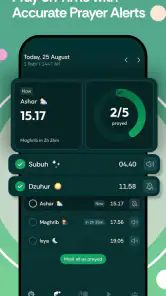
One of the standout features of Muslim Pro is its comprehensive prayer time notifications. These are based on your location, ensuring you’re always aware of the exact prayer times. It's nice to have this kind of precision, especially when traveling or in unfamiliar places.
The app also includes an accurate Qibla locator, which is so handy if you’re in a new city and need to find the direction for prayers. This feature alone has been a lifesaver for me on numerous occasions!
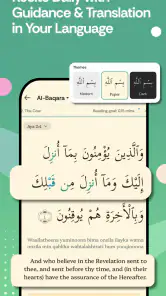
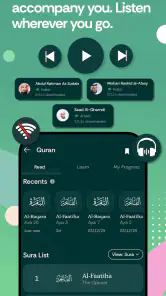
Another great aspect is the full Quran with Arabic scripts, translations, and audio recitations. The selection of reciters is impressive, and the audio quality is top-notch. If you're like me and love listening to different recitations, this feature will definitely win you over.
Community and Connectivity
Beyond the practical features, Muslim Pro fosters a sense of community. There's a section where you can connect with other users, share prayers, and even create a digital prayer group. It's a wonderful way to stay connected with fellow Muslims around the globe.
For those who enjoy reading, the app offers Islamic articles and stories that are both enlightening and enjoyable. It's a nice touch that adds depth to the app beyond its primary functionalities.
Personalization Options
Customization is key in any app, and Muslim Pro doesn’t disappoint. You can personalize your experience by choosing different Athan sounds, themes, and languages. It’s these small touches that make the app feel truly yours.
Additionally, the app offers a fasting timer during Ramadan, which is super helpful. It lets you know the exact time for Suhoor and Iftar, making it easier to manage your fasting schedule.
Room for Improvement?
No app is perfect, and while Muslim Pro has a lot going for it, there are a few areas where it could improve. For instance, while the free version offers a lot, some of the premium features require a subscription. This isn’t a deal-breaker for me, but it might be something to keep in mind if you're on a tight budget.
Additionally, while the app works smoothly most of the time, I’ve noticed occasional lag during peak usage times, like during Ramadan. Hopefully, future updates will address this.
Choosing it over simpler alternatives
Compared with the usual alternatives, the main distinction is breadth. A basic prayer-time utility is often the better choice for someone who wants a quiet schedule and nothing else to browse. A standalone Quran reader makes more sense if reading is the only goal and the user would rather keep that activity separate. Muslim Pro is more useful when switching between timings, direction, recitation and related reading in one place is a real convenience, not merely an appealing list of options.
That all-in-one approach has a trade-off. More sections can make it harder to keep attention on one task, and a person who likes a minimal home screen may prefer a focused tool. I would not choose this app simply because it has many features; I would choose it if at least two or three of its tools fit into my week. For example, someone who checks prayer times daily and also reads Quran regularly has a stronger reason to keep it than someone who only needs an occasional direction check.
The same distinction applies to households and shared routines. A person whose timing conventions differ from those used by another family member should compare the schedule settings and agree on a trusted reference rather than assuming one display settles every difference. The app can make a routine easier to consult, but personal practice and local guidance still matter.
Who will get the most from it?
I’d recommend it most to someone who wants prayer timing, direction, Quran access and related reading in one place, and who is happy to spend a little time making the setup suit their routine. Its 4.0 average rating across around 1.9 million ratings suggests many people find value in the app, though a large audience does not guarantee that every feature will fit every person.
If you already rely on a mosque timetable and want nothing beyond a straightforward clock or notification, a narrower prayer-time app may feel quicker and less busy. Likewise, a dedicated Quran app can be a better fit if reading or listening is your only priority. I see the broader collection as the main advantage here, but also the reason it may feel like more than some users need.
The app is rated for Everyone, but that describes its audience suitability rather than whether every function will be useful to every age or household. It has been around for years, and its scale—about 35,000 written reviews—makes it a familiar option, not a substitute for checking that its schedules align with the guidance you follow.
I also think it is a reasonable option for someone who is new to using a faith-focused app and would like a few kinds of content under one roof. The important caveat is to take the setup slowly. A newcomer can start with the schedule and direction, learn where the Quran content sits, and ignore the rest until there is a reason to return. People who prefer to keep religious practice entirely offline, or who do not want reminders on their phone, may be happier with a printed timetable and a separate compass or book.
Cost, choice and a practical limit
Because the app is free to download and includes in-app purchases ranging from about fifty cents to around $215 per item, I would explore the free experience before paying for anything. Prices can vary by item, and a purchase only makes sense if it unlocks something you will actually use. For basic prayer reminders and direction, first see whether the available tools already meet your needs.
One trade-off with an all-in-one app is attention: extra content can be useful, but it can also distract from a simple task. I would keep the home screen and alerts focused on the essentials, then visit reading or community areas intentionally. That way, the app supports a routine instead of filling every spare moment with prompts.
There are situations when the app is not the cause of a problem. A phone that suppresses notifications, a compass affected by its surroundings, an outdated location, or a local timetable that uses different conventions can all explain a mismatch. I find it more reliable to identify which part is at issue than to assume every discrepancy is an app error.
Before buying an optional item, I would ask what specific inconvenience it solves for me and whether I expect to use that benefit regularly. If the answer is vague, waiting is sensible; the free version gives a chance to understand the basic workflow before spending anything. This is a practical way to avoid paying for an addition that looks attractive in the moment but does not become part of daily use.
Practical verdict
At the end of the day, Muslim Pro: Quran Athan Prayer is a must-have app for anyone looking to integrate faith seamlessly into their daily lives. The combination of practical tools and community features makes it stand out in the sea of apps available today.
Whether you need accurate prayer times, beautiful Quran recitations, or just want to stay connected with the Muslim community, this app has got you covered. So, if you haven’t already, give it a try and see for yourself how it can enhance your spiritual journey.
Download it from the Google Play Store or the Apple App Store and let me know what you think!
Muslim Pro: Quran Athan Prayer Frequently Asked Questions
Does Muslim Pro help me find the Qibla direction?
Yes. Muslim Pro includes a Qibla direction feature to help you orient yourself for prayer. The app is intended to bring this tool together with prayer reminders and Quran-related content, making it a convenient option if you want worship-focused features in one place. Check the app’s setup choices so the direction tool can suit the way you use it.
Can I set reminders for prayer times in Muslim Pro?
Muslim Pro highlights Azan reminders as a way to help you remember daily prayers. You can explore the reminder options during setup and decide how they fit your routine. Having prayer prompts alongside Qibla direction and Quran content can make the app useful as an everyday worship companion, especially if you prefer keeping these tools together rather than using separate apps.
Is Muslim Pro available for both Android and iOS?
Muslim Pro is an app for mobile users looking for prayer and Quran tools. Before downloading, check the app store on your device for its current availability and compatibility. Once installed, its core purpose is to support everyday worship with features such as Azan reminders and Qibla direction, alongside Quran-related content.
Can I use Muslim Pro without creating an account?
Muslim Pro is designed as a practical companion for everyday worship, with features such as prayer-time reminders and Qibla direction at its core. Whether you prefer to keep app use simple or explore more of its content, consider the permissions and setup choices shown when you install it. Its basic purpose is to help you stay connected with daily prayer routines.
What is Muslim Pro, and who makes it?
Muslim Pro is a Lifestyle app developed by Bitsmedia. It is built around everyday Muslim worship, with Azan reminders and Qibla direction highlighted as ways to support prayer. The app also brings together prayer-related tools and Quran content, making it useful for people who want several faith-oriented features in one place rather than relying on separate apps.
Pros
- Comprehensive Quran with audio recitations.
- Accurate prayer times and Qibla direction.
- Extensive library of duas and supplications.
- Community features for connecting with others.
- User-friendly interface with customization options.
Cons
- Ads can be intrusive in the free version.
- Some features require premium subscription.
- Occasional inaccuracies in location-based services.
- Large app size may affect storage space.
- Limited offline functionality for certain features.
- Category
- Lifestyle
- Version
- Varies with device