My Lightning Tracker & Alerts
- 1.43K
- 4.7
- Installs
- 1.00M
- Price
- Free

Screenshots
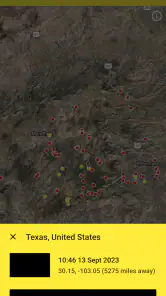
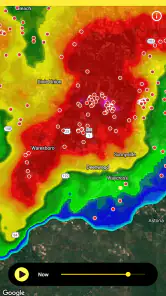
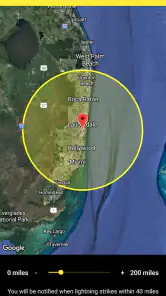
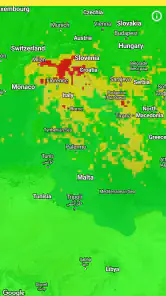
Analysis by Reviewed
I would treat My Lightning Tracker & Alerts as a focused companion for answering one practical question: is lightning activity close enough to change what I’m doing? It is a weather app from JRustonApps B.V., and its emphasis is narrower than a full forecast service. That focus is useful when storms are the concern, but it also means I wouldn’t rely on it alone for temperature, rain timing, or a complete picture of the day.
What to expect from a lightning-focused app
The main idea is to watch lightning activity on a map and use alerts to stay aware as storms develop. The free app is rated for Everyone, and its current version is 25.3.1. It has a 4.7 average from around 46,000 ratings, with more than a million installs, so it has clearly found an audience among people who want storm information close at hand.
That audience might include someone who runs outdoors, works in a yard, camps, or simply wants a better reason to pause before heading out. It is less suited to anyone expecting a traditional weather app to cover every forecast detail. I’d keep a general forecast app for planning the whole day and use this one when lightning itself is the decision-making factor.
Articles Related to My Lightning Tracker & Alerts
For a first-time user, the key expectation is focus rather than complexity: this is a tool for checking lightning activity, not a replacement for every source of weather information. I’d install it when I have a practical reason to monitor storms, then give myself a minute to learn what the map and alert settings are meant to tell me. That small orientation makes the app easier to use calmly when weather is already changing.
Getting Started with My Lightning Tracker
Jumping into My Lightning Tracker & Alerts is a breeze. As soon as you open it, you're greeted by a clean, user-friendly interface that makes navigation a cinch. The app doesn't bombard you with unnecessary bells and whistles, which is something I truly appreciate. Right off the bat, it pinpoints your location and provides real-time updates on lightning strikes in your vicinity. It’s like having your personal weather alert system right in your pocket.
Make the first alert useful
For a first-time user, I’d start by checking the map around home rather than immediately setting alerts for every possible situation. Seeing the activity in context helps you understand what the app is showing and decide which notifications would actually change your plans. Then choose an alert style you’ll notice without finding disruptive: a sound may be useful when the phone is in a pocket, while a visual notification may be enough if you check your screen often.
A realistic first success is simple: before taking a dog for a walk or setting off on a bike ride, open the map, check nearby lightning activity, and decide whether to wait or choose a shorter route. The app can inform that choice, but I wouldn’t treat a quiet map or a single alert as a guarantee of safety. Conditions can change, and outdoor decisions still call for caution.
You May Like

How Microsoft OneDrive Became a Mobile Productivity Giant

How Google Translate Breaks Language Barriers Effortlessly

Why Google Sheets Is the Ultimate Mobile Productivity Tool

Unveiling the Dynamic World of My Talking Tom Friends

Free Fire MAX: Dominating the Battle Royale Arena

Free Fire: Winterlands – The Ultimate Winter Gaming Adventure
One useful habit is to check the map before you leave and again if your plans keep you outside for a while. That turns the app from a last-second alarm into one part of a decision routine. If the map gives you reason to delay, use the time to check your broader forecast too; if you go ahead, keep a way to receive alerts available rather than assuming the first glance settles the question for the whole outing.
Features That Stand Out
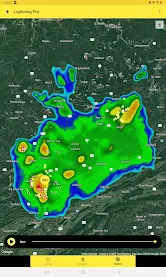
One of the features that blew me away was the detailed map view. It displays lightning strikes as they happen, with a precision that’s pretty impressive. You can see the exact distance of the nearest strike and even get notifications for strikes happening within your predefined safe radius. Now, isn’t that nifty?
On top of that, the app allows you to track lightning strikes worldwide. So, if you’re a weather enthusiast or just someone who likes to keep an eye on global storm patterns, this app has got you covered. Another standout feature is the historical data availability. You can look back at previous storms and see where strikes occurred. It’s both educational and fascinating.
The worldwide view and past activity are most useful when treated as context rather than a forecast. For instance, if I’m comparing how a storm moved across an area, the map can make the pattern easier to follow than a brief text alert. Historical strikes can also satisfy curiosity after a storm, but they shouldn’t be mistaken for a prediction of where the next strike will land.
That historical view is also a good way to learn what the map represents when there is no immediate decision to make. I’d explore it on a calm day, then return to the live map when storms are relevant. Doing that beforehand can make symbols and movement less distracting later. The trade-off is that looking back is informative, but it does not tell you what will happen next; I’d avoid treating a past pattern as a safe route or a timetable.
Understanding alerts and the map
A common point of confusion is the difference between seeing activity on the map and receiving a notification. The map is something you can check when you want a snapshot; an alert is meant to get your attention when activity meets the setting you chose. I’d review the radius and notification style before relying on it, especially if you tend to silence your phone or keep it out of reach. A notification is useful only if you notice it in time to act.
Another trade-off is that a lightning tracker is inherently more specific than a general weather app. That specificity is its strength during storms, but it doesn’t replace checking a broader forecast before a long drive, outdoor event, or full day away from home. If your main concern is rain chances or changing temperatures, a conventional forecast app is the better first stop; if lightning is the key concern, this one gives that concern more attention.
I’d also think about the setting in which I expect to receive an alert. A phone left indoors while I work in the garden, or tucked away with notifications muted, can undermine even a useful warning. Before an outdoor activity, I’d make sure the phone is somewhere I can notice it and that the selected alert style suits the surroundings. In a quiet home a visual notice may do; outside or while moving, a sound could be easier to catch.
For a family outing or a group plan, the app is best treated as one person’s useful check rather than a shared guarantee. I’d check activity before setting off, explain that plans may change, and keep the group ready to pause or head indoors if conditions warrant it. The practical value is helping me notice a concern and act earlier, not deciding on behalf of everyone that a location is safe.
The User Experience
Using the app feels intuitive. The developers clearly put a lot of thought into the user experience. Setting up alerts and notifications is straightforward, and you can customize the type of alerts you receive. Whether you want sound alerts, vibration, or a simple notification pop-up, it’s all up to you. Plus, it’s compatible with both Android and iOS, so no one’s left out.
Moreover, the app runs smoothly without draining your phone’s battery, which is a massive plus. I’ve used a few weather apps in the past that turned my phone into a mini heater, but that’s never the case here.
If you’re deciding whether to keep it installed, think about how often lightning changes your plans. For someone who spends time outdoors or lives with seasonal storms, quick access to a local map and a chosen alert style can make checking conditions part of a sensible routine. If you rarely need storm-specific information and already get enough warning from another source, a dedicated tracker may feel like one more app to manage.
Compared with the usual alternative—opening a broad weather app to read a general forecast—this tracker gives lightning a more direct place in the decision. That is a real advantage when a nearby storm is the question, but the broader app remains more useful for deciding what to wear, whether rain is expected later, or how the whole day may unfold. I’d keep both only if those are genuinely different needs for me; otherwise, the extra app may not earn its place.
It is particularly suitable for people whose plans are flexible: walkers who can wait, gardeners who can stop, or campers who can reconsider an outing. Someone who needs a complete forecast in one screen, or who cannot check a phone during work, may be better served by a broader weather service and an established local warning source. The tracker is most helpful when its information can lead to a practical choice, not simply when it adds another screen to watch.
Using it in an everyday routine
Imagine I’m about to take a bike ride after work and clouds are building. I can check the local map before leaving, choose whether to wait, and keep an alert style active if I decide to go. If activity appears while I’m out, I can reassess rather than continuing automatically. I’d also have a broader forecast in mind for rain and other conditions, because lightning information alone cannot answer every question a ride raises.
For a gardener, the same approach can be even simpler: check before starting a task that can be paused, keep the phone close enough to notice, and be prepared to stop rather than trying to finish one last job. For a camper, the app can be a useful check while planning, but I would not use a map of strikes as a substitute for sensible shelter decisions or local guidance. The right workflow depends on whether I can act when the information changes.
If alerts feel too frequent or not useful, I’d revisit the distance setting instead of turning every notification off immediately. A setting that is too broad may interrupt me without changing what I do, while one that is too narrow may not give me the awareness I wanted. The best choice is personal: it depends on where I am, how quickly I can change plans, and whether I will notice the alert. I’d adjust it after a few ordinary checks rather than trying to find a perfect setting on the first day.
Final Thoughts
All in all, My Lightning Tracker & Alerts is a must-have for anyone who wants to stay ahead of the storm. It’s reliable, user-friendly, and packed with just the right amount of features. Whether you're a storm chaser or just someone who wants to know if it’s safe to go for that afternoon jog, this app is worth every megabyte. Trust me, once you start using it, you’ll wonder how you ever lived without it.
My more measured recommendation is to use it as one part of a weather routine: check the local map when lightning is relevant, set alerts you’ll actually notice, and keep a broader forecast for the rest. Released on November 29, 2016, it has continued to receive updates, with version 25.3.1 offering the current experience. I’d recommend giving it a try if storm awareness is a regular need; if you want an all-in-one forecast, pair it with a broader weather option rather than expecting this focused tool to do everything.
Because the app is free, trying that routine does not require a purchase, and its Everyone age rating makes it approachable for a broad range of users. I’d still set it up with the person who will rely on the alerts, especially if a child or another family member is using the phone: make sure they understand that a notification is a prompt to pay attention, not a promise that every outdoor situation is safe. The useful outcome is a clearer reason to pause, check conditions, and make a cautious choice.
My bottom line is straightforward: install it if lightning is a recurring part of your outdoor decisions, spend a little time learning the map and alert behavior before you need them, and keep a general forecast for everything else. If storms rarely affect your routine, you may not need a dedicated tracker. But when lightning is the specific uncertainty you want to watch, this focused app can make the first check—and the next decision—feel more informed.
My Lightning Tracker & Alerts Frequently Asked Questions
Does My Lightning Tracker & Alerts need an internet connection to show storm activity?
My Lightning Tracker & Alerts is built around a thunderstorms map, radar and lightning alerts, so an internet connection is needed to receive current information and notifications. If you are planning to use it while travelling, check that your phone can access the internet in the places where you want to follow storms. The app can help you monitor activity, but it should not replace local safety guidance.
Can I use My Lightning Tracker & Alerts to monitor storms somewhere other than my current location?
Yes. My Lightning Tracker & Alerts is designed for users who want to follow lightning activity in their own area or monitor other places of interest. Its thunderstorms map and radar make it possible to keep an eye on storm activity beyond your immediate surroundings, which can be useful when planning travel or checking conditions for family members elsewhere.
Is My Lightning Tracker & Alerts free to download, and what is it designed to do?
My Lightning Tracker & Alerts is a free weather app for tracking lightning strikes. Its thunderstorms map, radar and lightning alarm help users follow storm activity and receive alerts. The app is developed by JRustonApps B.V. and is intended for anyone who wants lightning information while keeping an eye on thunderstorms.
Who can use My Lightning Tracker & Alerts, and is it suitable for children?
The app has an Everyone content rating, so its listed age classification is broad. Its focus is weather information: users can track lightning strikes and use the map, radar and lightning alarm to follow thunderstorms. As with any weather tool, it can support awareness of storm activity, but users should still make sensible safety decisions when severe weather is nearby.
What features does My Lightning Tracker & Alerts offer?
My Lightning Tracker & Alerts provides real-time lightning strike information and alert notifications. Users can view lightning strikes on an interactive map, receive alerts for their chosen locations, and access historical data. The app is designed to help users stay safe during storms by offering precise and timely lightning information.
Pros
- Real-time lightning alerts
- Comprehensive storm tracking
- User-friendly interface
- Customizable notification settings
- Worldwide coverage
Cons
- Frequent ad interruptions
- Limited free features
- Battery consumption concerns
- Occasional map loading issues
- Premium version is costly

- Category
- Weather
- Version
- 25.3.1