My Aurora Forecast & Alerts
- 838.00
- 4.6
- Installs
- 5.00M
- Price
- Free
Screenshots
Analysis by Reviewed
Aurora chasing is one of those hobbies where the hardest part is often deciding whether tonight is worth the effort. My Aurora Forecast & Alerts is built for that decision: it puts aurora information in a phone app so I can check conditions before heading out, rather than relying only on a general weather forecast or a lucky glance at the sky. I find it most useful as a planning aid, not as a promise that the lights will appear on demand.
Where expectations can trip you up
An alert can tell you that activity looks promising, but it cannot guarantee a visible display from your exact location. Clouds, local light pollution, distance from a darker viewing spot, and changing conditions all affect what you will actually see. I treat an alert as a reason to look outside or check the map, not as proof that I should immediately get in the car.
That distinction matters especially for newcomers. A forecast is a guide to likelihood, not a substitute for clear skies or patience. Before making a long trip, I check the ordinary local forecast separately and think about whether I have a safe, accessible place to wait. The app helps me judge the aurora side of the decision; it cannot make the whole outing a sure thing.
A User-Friendly Guide to the Northern Lights
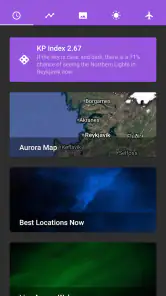
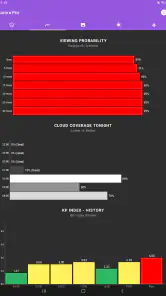
When I first opened My Aurora Forecast & Alerts, I was immediately impressed by its clean and intuitive interface. It's super easy to navigate, which is a big win in my book. The main screen gives you all the essential information at a glance - from the current aurora activity to the weather conditions in your area. It's like having a personal guide right in your pocket.
Features That Shine
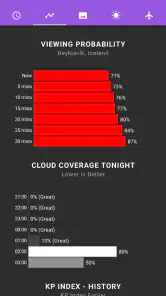
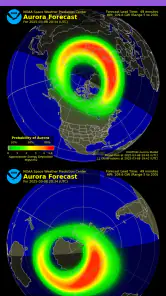
One of the standout features of the app is its real-time aurora forecast. The app uses data from multiple sources, including the NOAA, to provide accurate predictions. This means I can plan my nights out with a much higher chance of actually seeing the aurora. The app also sends out alerts, so if the lights are active, you'll know right away. No more missing out on those magical moments!
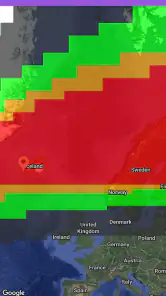
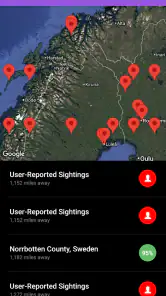
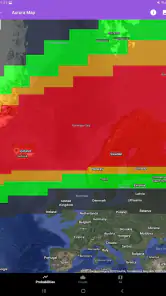
Another feature I love is the map. It shows you where the aurora is visible in real-time, and you can even see the probability of seeing the lights in different areas. It's perfect for checking whether it's worth the drive to a darker spot or not.
Making the forecast useful in real life
My practical routine is to check the forecast earlier in the evening, then use the map to compare the outlook around me before choosing a viewing location. That second look helps me avoid treating a broad regional forecast as though every nearby field has the same conditions. If the map suggests a better chance elsewhere, I still weigh the extra travel against cloud cover, road conditions, and how long I am willing to stay out.
More From Our News Desk

Weather by Xiaomi Review: Clear at a Glance, Less Clear Up Close

X Under Pressure: Can It Recover When Posting Goes Wrong?

Clash of Clans Is Won Between the Battles

Android Auto Makes the Case for Quieter Car Software

MobiOffice: Transforming Mobile Productivity with Seamless Integration

EA SPORTS FC™ Mobile Soccer: Redefining Mobile Sports Gaming
For a realistic example, imagine I am home on a weeknight and an alert arrives while I am deciding whether to go to bed. I would first check whether the sky is clear where I am, then look at the map and decide whether a nearby dark area is practical. If clouds cover the route or the drive feels unreasonable, I can skip the outing without blaming the forecast. The app narrows the decision; it does not remove the ordinary trade-offs.
Setup checks and recovery when things feel quiet
If alerts are not appearing, I would start with simple checks: make sure notifications for the app are enabled in the phone’s settings, confirm the app can send alerts, and check that the phone has a working internet connection. I would also open the app directly rather than relying on a notification to tell me what is happening. These are sensible first steps for any alert-based app, not a guarantee that every delay has the same cause.
If the information seems stale or the map does not behave as expected, I would refresh the view, check connectivity, and reopen the app. A forecast can change while I am looking at it, so I avoid making a plan from one glance hours earlier. If the phone itself is restricting background activity, checking its notification and battery settings may help; the exact controls vary by device, so I would avoid assuming one menu path works for everyone.
Who will get the most from it
This is a better fit for people who live in or travel to places where aurora viewing is plausible, and who enjoy checking conditions before committing to a late outing. Beginners can use the explanatory material and map to build a basic routine, while experienced watchers may appreciate having forecast and solar-wind context close at hand. I would not choose it as my main weather app, though: a conventional weather service is the more direct tool for detailed day-to-day planning, and this app’s appeal is the aurora-specific view.
There is also a useful trade-off in how much attention you give alerts. Keeping them on can save repeated manual checks, but frequent notifications may become noise if you are far from a viewing area or cannot go out at short notice. I would tune my notification choices to how often I can realistically act, then use the app when I am planning rather than treating every alert as an instruction.
Perfect for All Levels of Enthusiasts
Whether you're a seasoned aurora chaser or a newbie just starting out, this app caters to all levels. For beginners, there's a handy section explaining what the aurora borealis is and how to best photograph it. It's like having a crash course in aurora hunting!
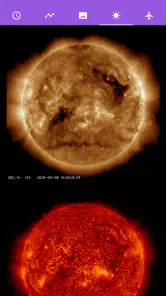
For those who are more experienced, the detailed forecast and solar wind data help in making informed decisions about when and where to head out. Plus, the community feature lets you share your experiences and photos with fellow aurora enthusiasts, which is a great way to connect and learn from others.
That community angle is a bonus rather than a reason to install it on its own. I would use other people’s reports as context, not as a substitute for checking my own sky: someone elsewhere can have a very different view. The photography guidance is a helpful starting point, but a successful photo still depends on your camera, location, and willingness to experiment, so I would not expect an app lesson to replace practice.
Who should look elsewhere
If I wanted an all-purpose forecast for rain, temperature, and planning an ordinary commute, I would reach for a general weather app first. If I live somewhere auroras are rarely visible and have no plans to travel, the specialized forecasts and alerts may not earn a regular place on my home screen. Likewise, anyone expecting an alert to guarantee a dramatic show is likely to be disappointed; the app can inform a choice, but the sky remains outside its control.
My Aurora Forecast is free, rated for Everyone, and developed by JRustonApps B.V. It has a 4.6 average from around 49,000 ratings and has been installed over 5 million times. It was released on February 18, 2016, and version 25.2.3 supports Android 7.0 and later. Those details make it easy to judge basic fit, but the real value for me is whether its focused information helps turn a vague hope into a sensible plan.
Choosing how to use alerts and maps
I would set up a simple habit rather than checking the app constantly: take a look when I have a realistic chance to go out, then use the map to make a local decision. This is especially useful when I am travelling. I can check the outlook before choosing an evening activity, but I would keep the rest of the trip flexible instead of building a fixed itinerary around a forecast. That keeps the app helpful without letting a changing sky dictate the whole night.
The map is also most useful as a comparison tool, not a navigation instruction. A stronger-looking area can be a poor choice if reaching it means driving tired, taking an unfamiliar road late at night, or losing access to a safe place to wait. I would decide on a couple of sensible viewing options in advance and use the forecast to choose between them. That small bit of preparation matters more than chasing every apparent improvement on the map.
What it can and cannot replace
Compared with the usual alternative of checking a general weather app and occasionally searching for aurora news, this app brings the aurora-focused view into one place. That is convenient when I want to decide whether to pay attention tonight. A regular weather app is still better for a detailed picture of rain, temperature, and everyday conditions, while broader aurora discussions can offer human reports and context. I see this as a specialist companion rather than a replacement for either.
One practical limitation is that combining forecast information in one screen can make it tempting to treat every indicator as equally decisive. I would avoid that. The aurora outlook, local cloud cover, visibility from my exact spot, and the time I can realistically spend outside are separate parts of the decision. If one of those makes the outing impractical, a promising forecast does not turn it into a good plan.
It is also worth thinking through the alert question before a night out. If I am asleep, driving, or busy, a notification may not reach me at a useful moment. I would not rely on alerts as an emergency-style signal; checking manually when I am available is a more dependable routine for deciding whether to go. If notifications seem silent, the phone’s settings and connection are sensible places to start, but no alert can make conditions visible through clouds.
A specialist tool with a sensible role
JRustonApps B.V. has made an app for a particular kind of curiosity: watching for a natural event that is both exciting and uncertain. That focus is the point. At no cost, it is easy for an interested beginner to try, and the Everyone content rating makes its audience broad. The 4.6 average from around 49,000 ratings and more than 5 million installs suggest that many people have found a reason to keep it around, though popularity does not change the basic limits of forecasting.
Android users should also check the device requirement before installing: the current version is 25.2.3 and requires Android 7.0 or later. For someone on a compatible phone, the main question is less about technical complexity than whether aurora watching is a regular enough interest to justify a dedicated app. If it is, keeping a focused forecast close by can be more convenient than piecing together the same kind of information each time.
The Final Verdict
In conclusion, My Aurora Forecast & Alerts is an indispensable tool for anyone interested in witnessing the Northern Lights. Its user-friendly interface, accurate forecasts, and community features make it a must-have on your phone. So, if you're dreaming of catching those elusive dancing lights, don't leave home without this app. Happy aurora hunting!
My own recommendation is more measured: I would keep it installed if I actively follow aurora conditions or travel with a chance of seeing them, while remembering to verify the sky and practical travel conditions independently. It is less compelling if I only want routine weather information or expect certainty from a forecast. Used as one part of a careful plan, it gives aurora watchers a focused way to decide when to pay attention and when to stay in.
My Aurora Forecast & Alerts Frequently Asked Questions
Do I need to create an account to use My Aurora Forecast & Alerts?
My Aurora Forecast & Alerts is focused on aurora forecasts, alerts, and maps, so it is useful for checking Northern Lights activity rather than setting up a broad weather profile. If you prefer to keep your app use simple, you can explore its purpose and decide whether it suits your needs. The key reason to download it is to follow potential aurora activity.
Will My Aurora Forecast & Alerts help me choose when and where to look for the Northern Lights?
Yes, the app is intended to help users follow aurora activity and identify promising times and places to view it. Forecasts, alerts, and maps can give you useful guidance when planning a viewing attempt, whether you are an enthusiast or a photographer. Conditions can still change, so use the information to guide your plans rather than treating it as a guarantee.
What devices and operating systems can I use with My Aurora Forecast & Alerts?
My Aurora Forecast & Alerts is available for Android and iOS users interested in checking aurora activity on a mobile device. The Android version requires Android 7.0 or later, so it is worth checking your device’s software before downloading. The app is free and is rated for Everyone, making it accessible to a broad audience.
Who develops My Aurora Forecast & Alerts, and what kind of app is it?
My Aurora Forecast & Alerts is a weather app developed by JRustonApps B.V. Its focus is narrower than a general forecast app: it helps people follow Northern Lights and Aurora Borealis activity through forecasts and alerts. That makes it most relevant to aurora watchers, travelers, and photographers who want aurora-related information rather than a broad set of everyday weather tools.
What is My Aurora Forecast & Alerts app used for?
The My Aurora Forecast & Alerts app is designed to help users track and predict aurora borealis (northern lights) activity. It provides real-time alerts, forecasts, and maps to help enthusiasts and photographers find the best locations and times to view the aurora. Its user-friendly interface and accurate predictions make it a valuable tool for anyone interested in witnessing this natural phenomenon.
Pros
- Accurate aurora predictions
- User-friendly interface
- Push notifications for alerts
- Detailed weather data included
- Works offline
Cons
- Ads can be intrusive
- Limited free features
- Requires location access
- No social sharing options
- In-app purchases needed
- Category
- Weather
- Version
- 25.2.3













