

My Tide Times - Tables & Chart
- 1.34K
- 4.8
- Installs
- 1.00M
- Price
- Free

Screenshots
Analysis by Reviewed
I judge a tide app by whether it helps me make a better decision before I leave home, rather than by how much information it can squeeze onto a screen. My Tide Times - Tables & Chart is built for that particular job: checking how the tide is expected to change at a coastal location and using that timing to shape a visit. It is most useful when the state of the shore affects what I plan to do, from walking across exposed sand to choosing when to fish.
A tide chart is a planning tool, not just a lookup
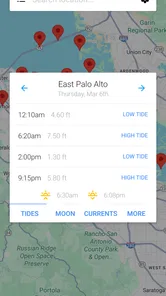
The main benefit is having tide times and a chart together, so I can consider both the expected turning points and the pattern between them. A single time is easy to remember but can be misleading if I forget whether the water is rising or falling. Looking at the chart helps me think in terms of a window: when the shore may be more exposed, when the water is likely to return, and whether my outing fits comfortably between those changes.
That small shift in how I use the information matters. Rather than asking only, “When is low tide?”, I can ask, “How much time do I have for the walk I’m considering, and when should I turn back?” A prediction gives me a useful framework for planning, but it is not a route assessment or a guarantee about conditions at a particular stretch of coast.
How I use it before and during a visit
For an unfamiliar destination, I would first identify the relevant coastal location and check the forecast before travelling. Then I would use the chart to decide whether the plan suits the tide pattern, instead of picking an arrival time based only on convenience. If I intend to walk across a broad stretch of shore, for example, I would think about the return journey as well as the outward one. The time at which the water begins to change can matter just as much as the low point itself.
Once I am out, I would treat the displayed timing as a reference to check alongside what I can see, local signs, and any advice for that area. Tide information is especially helpful for deciding when to start or when to wrap up, but it does not tell me whether a route is passable or safe. That distinction is important for anyone exploring a new beach, a tidal path, or rock pools.
First Impressions
When I first launched the My Tide Times - Tables & Chart app, I was greeted by a clean and intuitive interface. It's straightforward and user-friendly, which is something I always appreciate. No one wants to fiddle around trying to find tide information when they're itching to hit the beach!
Features that Stand Out
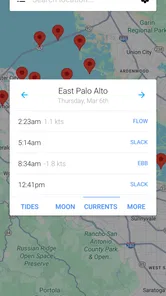
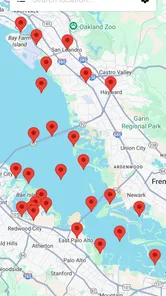
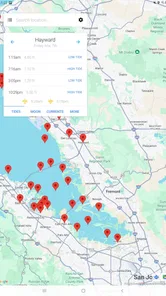
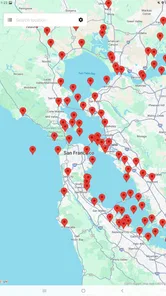
This app is packed with features that are incredibly useful. You can easily search for the tide times of over 9,000 locations worldwide. Whether you're in California or Cornwall, this app has got you covered. I was impressed with the accuracy of the information it provides, which is essential when planning any coastal activity.
More From Our News Desk

 Gmail
GmailGmail in a Busy Inbox: Who Benefits Most?
From first account to crowded workday, Gmail earns its place through dependable search and flexible sorting—but its best fit depends on how much inbox maintenance you can tolerate.

 Prime Video
Switching to Prime Video: What Changes in Your Viewing Routine
Prime Video can make a compelling second home for streaming, but switching means learning a different catalog, rental layer, and route from browsing to playback.

 Universal TV Remote Control
Universal TV Remote Control Works Best as a Reliable Backup
A phone remote earns its place through quick setup and reliable habits. Here is how to get more from Universal TV Remote Control—and where its limits show.

 Weather - By Xiaomi
Weather by Xiaomi Review: Clear at a Glance, Less Clear Up Close
Xiaomi’s weather app makes everyday forecasts quick to scan, but its calm surface can leave useful details and recovery paths harder to find than they should be.

 X
XX Under Pressure: Can It Recover When Posting Goes Wrong?
A resilience-focused review of X, examining setup, mistaken posts, interruptions, weak connections, and the gaps that matter when recovery needs to be dependable.

 Clash of Clans
Clash of Clans Is Won Between the Battles
Its raids are quick; its community is a long-term project of coordination, teaching, rivalry, and shared responsibility—with all the friction that entails.
Latest News



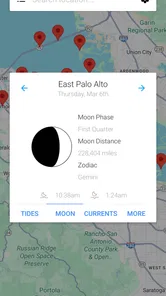
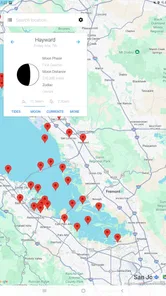
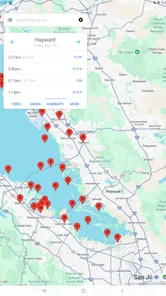
One feature I particularly love is the ability to view the sun and moon data alongside the tide times. This is perfect if you’re planning to catch a sunrise or need to know when the moon will be out for some night-time fishing. Plus, the app offers tide charts that are easy to read and interpret. It's like having a personal tide expert right in your pocket!
Making the information useful on an ordinary day
A realistic use for me is a weekend walk with a friend. Before leaving, I can check the tide for the coast we have in mind and pick a time that suits the sort of visit we want: a longer stretch of open shore, or a later arrival that fits around other plans. The chart is especially helpful when I want to understand the direction of change rather than remember a single time from a list. I would still treat it as planning guidance, not a guarantee that every patch of beach will be safe to cross.
A small but worthwhile habit is to look at the information before travelling, then check it again when deciding how long to stay. That is more useful than opening the app only at the water’s edge, when the best time to change plans may already have passed. If I’m visiting an unfamiliar coast, I would also check local signs and advice: a tide prediction cannot account for every hazard, access restriction, or sudden change in conditions.
Turning a tide check into a practical routine
I would make the app part of the decision process, not an isolated ritual. First, I’d choose the activity and the place; next, I’d look at the tide pattern and decide whether the timing is workable; finally, I’d check the broader weather and any local guidance. That order prevents a common mistake: seeing a convenient low tide and assuming the whole outing automatically makes sense. A strong wind, poor visibility, or an unsuitable access point can still change the plan.
For a family visit, this approach can help avoid arriving just as the part of the beach everyone hoped to explore is becoming covered. For fishing, the tide times and the accompanying sun and moon information offer useful context for choosing when to go, though they do not promise a catch. For photography, the chart can help me plan around a particular shoreline appearance, while the sun information may help me think about the timing of a sunrise. These are planning cues, not guarantees about what the scene or conditions will be.
One practical tip is to check the location carefully before relying on a prediction. Coastal place names can be similar, and a tide point that is convenient in a search may not represent the exact inlet, beach, or harbor I have in mind. I would use the chart as a nearby reference and verify local conditions when precision matters. That extra moment of care is more useful than treating any one reading as a universal answer for an entire coastline.
Why You’ll Love It
What sets this app apart from the rest is its reliability and ease of use. As someone who frequently checks tide times, I find the notifications feature particularly useful. You can set alerts for high and low tides, so you never miss the perfect wave or the ideal time to explore tide pools.
Another aspect worth mentioning is the offline access. You can download the tide times for your favorite locations and access them even when you’re off the grid. This is a lifesaver for those remote beaches with spotty reception.
Getting more value from alerts and offline access
Alerts are most helpful when I give them a specific job. If I am arranging a short visit around a tide change, a reminder can prompt me to leave or reconsider my timing; it is less useful if I set alerts for every high and low tide and then begin ignoring them. I’d choose the events that matter to the outing rather than treating notifications as a constant stream of instructions. They can support a plan, but they cannot decide whether it is sensible to continue.
Offline access is a good reason to prepare before leaving a connected area. I would make sure the location I need is saved or downloaded in advance, then avoid assuming that anything not prepared will appear once I have no reception. For a familiar beach, this can make a quick check more convenient. For a new destination, I would still look up access details and local safety information while I have a connection, since a tide chart alone is not a substitute for those resources.
Compared with a general weather app, this tool has a narrower purpose and gives tide planning more attention. A weather app remains the more useful choice if my main question is whether it will rain or feel windy; the tide-focused approach is better when shoreline changes determine the timing of my visit. I would keep both kinds of information in mind rather than expecting one app to answer every coastal question.
Where it fits—and where it doesn’t
Alerts and saved information can make a difference when I am busy getting ready: I can set a reminder around a tide change instead of relying on memory or repeatedly opening a forecast. Offline access is another practical advantage for a remote shore, but it is sensible to prepare while connected and make sure the location I need is available before leaving. That kind of preparation is more dependable than assuming a phone will have a signal at the beach.
JRustonApps B.V. makes this free weather app, and its focus is much narrower than a broad forecast service. That is a strength if tide timing is the detail I need; a standard weather app is still the better first stop for deciding whether the day’s wind or rain makes an outing pleasant. The app has a 4.7 average from around 26,000 ratings, and more than a million installs, which suggests it has found a substantial audience among people looking for tide information.
I would recommend it most to beach walkers, anglers, surfers, and anyone who regularly plans around the shore. It is less compelling for someone who only wants a quick temperature check, or for a visitor who expects an app to replace local safety judgement. The age rating is Everyone, and the current version is 25.1.3; it runs on operating systems from version 7.0 onward. The key question is whether tide timing is something I actually use: if it is, a dedicated tool is more convenient than trying to infer shoreline conditions from a general weather forecast.
Who benefits most from a dedicated tide tool
I see the strongest fit for people who return to the coast often enough that timing becomes part of their routine. A regular shore walker can compare the day’s tide pattern with the kind of route they want to take. Someone who fishes can use tide times as one factor when deciding when to head out. A surfer may find the information useful as part of planning, while still needing to rely on conditions and local knowledge relevant to the break. The shared advantage is having tide details ready without searching through a broad forecast screen.
It is a weaker fit for a person who visits the seaside once in a while and mainly wants temperature, rain, or wind. In that case, a normal weather app may be enough, and the extra tide-specific focus may not justify another tool. It is also not the right choice for someone who expects a tide chart to map safe crossings, replace local warnings, or tell them exactly what the water will do at every point. I would use it to refine a plan, not to make a risky one seem safe.
For someone deciding whether to try it, the practical question is simple: will the timing of the water change what you do? If the answer is yes, the combination of tide tables, a chart, sun and moon details, alerts, and offline access can make pre-trip planning more convenient. If the answer is no, a general weather forecast may serve everyday needs better.
The Verdict
In conclusion, My Tide Times - Tables & Chart is an indispensable tool for anyone who enjoys spending time by the sea. Its accuracy, user-friendly design, and useful features make it a top choice for tide enthusiasts. Whether you're a surfer, a sailor, or someone who just loves the ocean, this app will surely enhance your coastal adventures. So go ahead, give it a try and see how it transforms your seaside escapades!
My own recommendation comes with a simple qualification: use it to make better plans, not to make safety decisions in isolation. Its tide-focused approach is most useful when I already know where I want to go and need help choosing when. The app is free, was released on January 22, 2014, and has around 1,300 written reviews. If the coast is part of your routine, I think it earns a place among the tools you check before heading out.
My Tide Times - Tables & Chart Frequently Asked Questions
Can My Tide Times help me decide when to plan a coastal outing?
My Tide Times is designed around tide tables and forecasts, making it useful when tide timing is part of planning time by the coast or around water. You can consult the app for tide information rather than relying on a general-purpose weather app for that specific need. As with any forecast, use the information thoughtfully when making plans.
Is My Tide Times intended for specialist tide users or casual checking?
The app’s focus on tide tables and forecasts makes it relevant both to people who regularly consult tides and to those who simply want to check tide information before spending time near the water. It is presented as a focused tide tool, rather than a general weather app, so its appeal depends on whether tide information is useful to your plans.
What is My Tide Times - Tables & Chart used for?
My Tide Times is a weather app focused on tide tables and forecasts. It is designed for people who want tide information in one place when planning time by the coast or around water. The app’s central purpose is reflected in its description as a tide tables and forecasts application, so it is aimed at practical tide checking rather than general-purpose weather browsing.
Who develops My Tide Times, and is it suitable for all ages?
My Tide Times is developed by JRustonApps B.V. Its content rating is Everyone, making it suitable for a broad audience, including people looking for a straightforward way to check tide information. Whether you are new to tide tables or already use them regularly, the app is presented as a focused tool for viewing tide times and forecasts.
What platforms is My Tide Times available on?
My Tide Times - Tables & Chart is available for both Android and iOS devices. Users can download the app from Google Play Store for Android devices or the Apple App Store for iOS devices. The app provides seamless functionality across both platforms, ensuring that users have access to tide times and charts wherever they go.
Pros
- Accurate tide predictions worldwide.
- User-friendly interface for easy navigation.
- Customizable alerts for tide changes.
- Includes moon and sun data.
- Works offline after initial data download.
Cons
- Ads can be intrusive at times.
- Limited features in free version.
- Some locations may have outdated data.
- No widget support for quick access.
- Occasional slow loading of data.













