Screen Recorder Video Recorder
- 34.89K
- 4.4
- Installs
- 100.00M
- Price
- Free

Screenshots
Analysis by Reviewed
I reach for Screen Recorder Video Recorder when I need to turn something happening on my phone into a clip I can explain, edit, and pass along. It makes the most sense as a practical capture-and-finish tool: record the screen, make a few focused changes, then share the result. I wouldn’t choose it for every video project, but for short tutorials, gameplay moments, and quick demonstrations, keeping those steps together is genuinely convenient.
Choosing a recording that has a purpose
I find a screen recorder most useful when I decide what the finished clip needs to do before I press record. A short demonstration, a game moment, and a narrated walkthrough all call for different pacing. With this app, I’d plan the order of taps or actions first, then capture only the section that helps the viewer understand the point. That small bit of preparation can save more time than trying to rescue a wandering recording in the editor.
For a practical example, imagine showing a family member how to change a setting on their phone. I’d close anything unrelated, make the steps slowly, and use microphone narration only if it genuinely clarifies what’s happening. Then I’d trim the start and finish so the clip begins with the useful action, not the moment I was getting ready. That is a simple workflow, but it turns a raw capture into something easier to follow and share.
Getting Started with Screen Recorder Video Recorder
First things first, downloading the app was a breeze. It's available on both Android and iOS, so no worries about compatibility. Once installed, you're greeted with a clean and intuitive interface. I love apps that don’t require a degree in rocket science to use, and this one fits the bill perfectly.
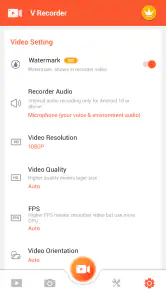
Setting it up was straightforward. You can tweak the recording settings to fit your needs. Want to capture in HD? Go for it. Need to adjust the frame rate? Easy peasy. The app gives you full control without overwhelming you with options.
Features That Stand Out
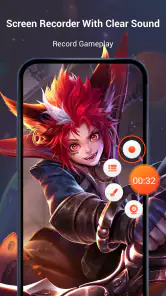
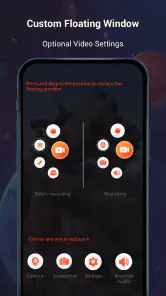
One of the coolest features is the one-tap recording. You can start recording with just a tap, and it’s seamless. No lag, no fuss. The app also offers a floating widget, which is super convenient if you need to pause or stop the recording without having to exit your current screen. It’s all about making life easier, right?
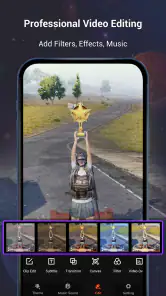
Another standout feature is the ability to edit your recordings right in the app. You can trim, cut, and even add music or text to your recordings. This is perfect for those quick edits you need to make before sharing your masterpiece with the world.
More From Our News Desk

Weather by Xiaomi Review: Clear at a Glance, Less Clear Up Close

X Under Pressure: Can It Recover When Posting Goes Wrong?

Clash of Clans Is Won Between the Battles

Android Auto Makes the Case for Quieter Car Software

MobiOffice: Transforming Mobile Productivity with Seamless Integration

EA SPORTS FC™ Mobile Soccer: Redefining Mobile Sports Gaming
Making a clean clip without overworking it
For a tutorial or a quick social post, I’d keep the edit focused: remove dead time, add a short text cue only where it prevents confusion, and use music sparingly if spoken instructions matter. The convenience of editing in the same app is useful, but I wouldn’t treat a phone editor as a replacement for a full desktop timeline when a project needs several layers, detailed audio mixing, or precise control over many scenes.
One trade-off worth thinking about is sound. A voice explanation can make a screen capture much clearer, yet it also makes background noise more noticeable. I’d record in a quiet spot and do a brief test before a long take, especially if the clip is meant to teach rather than simply document. If the sound is not essential, a clean capture with a short text label may be easier to watch than narration recorded in a noisy room.
Planning a capture around the final destination
Before recording, I’d also decide whether the clip is for a private message, a class or work explanation, or a public post. That choice changes how much context the viewer needs. A friend may know which screen I mean; a stranger probably won’t. For a public tutorial, I’d begin with the relevant screen already open and make each tap deliberate, rather than asking the viewer to sit through navigation that adds no instruction.
A useful habit is to leave a short pause before and after the action I want to show. It gives me room to trim without cutting into a tap or making the demonstration feel rushed. For a game highlight, the opposite may be true: I’d capture a little lead-in so the payoff makes sense, then remove the dead time afterward. The app’s recording and trimming workflow supports both approaches, but planning the capture is what keeps the edit manageable.
Why You'll Love It
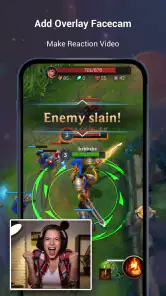
Now, onto why I personally love Screen Recorder Video Recorder. As someone who’s not exactly tech-savvy, I appreciate how user-friendly it is. The app doesn’t bombard you with ads, which is a huge plus in my book. And the fact that you can record with audio from your mic is a bonus. This is great for recording reactions or commentary while you capture your screen.
Oh, and did I mention the app allows you to record live streaming? Yep, you can capture those epic gaming moments or important live sessions without missing a beat. It’s like having your own little production studio right in your pocket.
Managing a longer recording before it becomes a chore
Long captures can be useful when a sequence unfolds unpredictably, but they are harder to review and trim than a short, planned take. For a game session, I’d start with a clear idea of what I’m hoping to preserve and check the result soon afterward, while I still remember where the key moment happened. For a walkthrough, I’d split the explanation into separate short recordings when the subject naturally changes. That makes it easier to discard a weak take without rebuilding the entire video.
I’d also think about whether microphone commentary is worth keeping throughout a clip. Live reactions can add personality to gameplay, but they may distract from an instructional recording where the screen itself is the main point. If the narration is only needed for one step, a brief spoken explanation or a text cue can keep the rest of the clip uncluttered. The better choice depends on whether the viewer needs my voice, the game audio, or simply a clear view of the actions.
Where it fits among screen-recording options
On Android, the built-in screen recorder is often enough for a one-off capture when you just need the file and no edits. I’d choose this app when I want to move from recording to trimming, adding text, or putting music behind a clip without switching tools. Compared with a dedicated video editor, it favors a quick capture-and-finish routine over elaborate post-production, which is a sensible compromise for short explainers and gameplay highlights.
I’d also be cautious about recording private conversations, account details, or other people’s content without permission. Before sharing a screen recording, I’d watch it through once to catch notifications or personal information that appeared unexpectedly. That review step is easy to skip when you’re excited to publish, but it can prevent an avoidable privacy mistake.
From first take to a shareable handoff
My preferred workflow is to capture, review, trim, and then watch the complete edited clip once before I send it anywhere. That final playback is not busywork: it helps catch an abrupt start, a cut that removes a necessary tap, or a text cue that appears too briefly to read. If I’ve added music, I’d listen with the narration in mind as well. A soundtrack that feels pleasant on its own can compete with spoken instructions once the two are together.
For a simple family how-to, I’d keep the handoff lightweight: one clear recording, only the edits needed to make the steps understandable, and a short message explaining what the clip shows. For a creator preparing a sequence of polished posts, I’d be more cautious. A quick mobile edit may be enough for a single highlight, but a repeatable series often benefits from a dedicated editor where I can manage scenes, audio, and revisions with finer control. The point is to match the tool to the delivery, rather than keep adding effects just because they are available.
Some Handy Tips
Here are a few tips to get the most out of the app:
- Explore the settings: Spend a few minutes tweaking the settings to match your recording needs. It can make a big difference in the final output.
- Use the floating widget: It’s a lifesaver when you need to make quick adjustments without interrupting your workflow.
- Keep an eye on storage: High-quality recordings can take up space, so make sure you’ve got enough room on your device.
Everyday use, device fit, and purchase choices
In everyday use, I’d pick this for the person who wants to explain a phone setting to a relative, show a colleague a repeatable sequence, or save a short gameplay moment with enough editing to make it presentable. It is less appealing if all you need is an occasional untouched capture, since the built-in recorder may already do that job, or if your normal output needs a carefully assembled, multi-scene edit. The app is in the video-player and editing space, so its value is in joining screen capture with quick finishing rather than replacing a full production setup.
The app is free to install and is rated for Everyone; its current version is 8.3.0.0, and it is built for Android 5.0 or later. The developer is VIDEOSHOW Video Editor & Maker & AI Chat Generator. It has a 4.4 average from around 1.7 million ratings, with over 100 million installs, which shows how widely it is used without telling me whether it suits every workflow.
There are also in-app purchases, with items ranging from $0.99 to $179.99, so I’d check the purchase details before committing to anything beyond the free experience. I would not assume that paying is necessary for a basic capture-and-trim task; I’d first try the workflow I actually need and consider a purchase only if a clearly useful option is part of it. If you only record occasionally, the built-in recorder may be simpler. If your work depends on polished multi-track editing, consistent production controls, or a carefully managed publishing pipeline, I’d reach for a more specialized editor instead. This is best viewed as a convenient mobile tool, not a substitute for every stage of a creator’s setup.
Who I’d recommend it to—and who should pass
I’d recommend it to someone who makes screen-based explanations often enough to appreciate having capture and basic editing close together, but who doesn’t want to learn a complicated production workflow just to share a clear clip. It also suits casual gaming creators who want to preserve a moment and shape it into a short highlight. The best fit is someone who values speed and practicality over detailed control.
I’d steer away from it if your priority is a precise, polished video assembled from many sources, or if you routinely need to revise a project with complex layers. A dedicated editor is the better choice for that kind of work. I’d also choose a basic built-in recorder when I only need an unedited clip and want to avoid an extra step. The key question is whether the convenience of recording and making simple edits in one place will save you time often enough to matter.
Wrapping It Up
Overall, Screen Recorder Video Recorder is an absolute must-have for anyone needing a reliable and easy-to-use screen recording app. It’s packed with features that cater to both beginners and pros, making it versatile enough for all your recording needs. Whether you’re capturing gameplay, tutorials, or anything in between, this app is up to the task.
So, if you're on the lookout for a screen recording app that’s both powerful and user-friendly, give this one a shot. You won’t be disappointed!
Screen Recorder Video Recorder Frequently Asked Questions
Can I choose which audio source to record?
The app is presented as a way to record games with sound, and it can capture audio from the device or use the microphone. That gives you options for gameplay, demonstrations, and spoken commentary. Before you begin, review the audio controls and permission prompts so you select the source that fits your recording and avoid capturing sound you did not intend to include.
Can I edit a recording before sharing it?
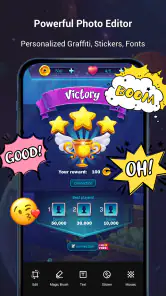
Yes. Screen Recorder Video Recorder includes editing tools for trimming clips, adding music, and inserting text, so you can make basic changes after recording. Its store summary also highlights editing screenshots with music. These tools can help shape a capture for sharing, though it is worth checking the finished file before posting to make sure the edits and audio suit your intended audience.
How much storage space should I have available before recording?
Screen recordings are video files, so it is sensible to make sure your device has room for the clips you plan to create. The amount of space a recording uses can vary with its length and settings, such as resolution and frame rate. If you are preparing to capture a long session, checking available storage beforehand can help prevent interruptions and leave room for other files.
Can I use the app to record gameplay and make content for others?
Gameplay recording is one of the app’s stated uses, and the store summary specifically mentions recording games with sound. You can also use its editing tools to trim footage, add music, or insert text. If you plan to share a recording, consider whether it includes private information, other people’s voices, or material you do not have permission to publish.
Does the app include optional paid features?
Screen Recorder Video Recorder is free to download, but it includes in-app purchases. Individual items are listed from $0.99 to $179.99, so review the purchase details shown in the app before confirming anything. The presence of purchases does not mean you must buy an item before trying the app; consider your needs and any purchase settings on your device.
Pros
- User-friendly interface with intuitive controls.
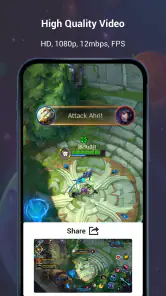
- High-quality video recording options available.
- Supports multiple video formats for export.
- Allows real-time screen drawing and annotations.
- Offers seamless integration with cloud storage.
Cons
- Contains ads that can interrupt recording.
- Limited editing tools in the free version.
- Occasional lag during high-resolution recording.
- Requires in-app purchases for advanced features.
- May consume significant battery during use.
- Category
- Video Players & Editors
- Version
- 8.3.0.0