MP3 Cutter and Ringtone Maker
- 6.95K
- 4.6
- Installs
- 50.00M
- Price
- Free

Screenshots
Analysis by Reviewed
I like ringtone tools best when they solve one small problem without turning it into a full audio-production project. That is the appeal of MP3 Cutter and Ringtone Maker: I can take a moment from a song I already have and shape it into a sound that feels personal, rather than settling for the phone’s default tones. It is a free music and audio app from InShot Inc., rated for Everyone, and its focus is deliberately narrow: making short audio edits for everyday phone use.
When a small sound is the whole project
This kind of editing is useful beyond personalizing a ringtone. A short, distinct notification can help separate messages from other alerts, while an alarm can use a familiar tune instead of a generic sound. I would keep each choice suited to its job: a brief notification should be identifiable without demanding attention, whereas an alarm needs to remain tolerable after repeated mornings. The same excerpt may not work equally well for both.
It is also a practical option for people who enjoy music but do not want to learn a full editing program just to make a phone sound. If you already have audio available on your device and a specific moment in mind, a focused cutter can feel much less intimidating than a timeline filled with production controls. If you do not have a source track ready, though, this is not a music-discovery app; the editing task begins with audio you can select.
I would skip it if the goal is to compose a song, record several instruments, or prepare a polished release. Those jobs call for tools built around recording, tracks, effects, and detailed control. This app’s appeal is the opposite: reducing a small, everyday task to a few decisions about where a clip begins and ends, and what you want to use it for.
A practical starting point for a personal sound
The app makes the most sense when you already know the sound you want: a chorus to wake up to, a distinctive opening for a call, or a brief alert that is easier to recognize than a standard chime. Instead of learning a broad audio editor, you can begin with a track in your library and concentrate on choosing a useful excerpt. That focused approach is a real advantage for someone who wants a result quickly, though it is less suited to a creator building a layered music project from scratch.
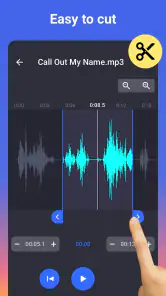
In an ordinary day, I might hear a song on my commute, remember that its opening would make a recognizable ringtone, and save the idea for later. When I have the audio available on my phone, I can use the waveform to locate the moment, trim away the lead-in, and listen back before deciding whether it works as a call sound. That final listen matters: a section that feels natural in a full song can start abruptly or sound repetitive when it plays on its own.
The app sits among simple audio cutters rather than desktop-style digital audio workstations. Compared with a general editor, it keeps the task approachable and tailored to phone sounds; compared with choosing a built-in ringtone, it gives me more control over the source and the exact excerpt. The trade-off is that this simplicity is not a substitute for detailed mixing, recording, or mastering tools. If those are your goals, a fuller audio editor is a better fit.
More From Our News Desk

Weather by Xiaomi Review: Clear at a Glance, Less Clear Up Close

X Under Pressure: Can It Recover When Posting Goes Wrong?

Clash of Clans Is Won Between the Battles

Android Auto Makes the Case for Quieter Car Software

MobiOffice: Transforming Mobile Productivity with Seamless Integration

EA SPORTS FC™ Mobile Soccer: Redefining Mobile Sports Gaming
From a source track to a usable phone sound
Before I start trimming, I try to decide what I need the sound to do. For a caller-specific ringtone, a recognizable musical phrase can be more useful than a dramatic but generic burst. For an alarm, I listen for a passage that stays pleasant after several repeats. For a notification, I would favor a short, clear cue that does not feel like a miniature song every time it plays. Thinking about the listening context first makes the editing choices easier and avoids polishing a clip that is wrong for its purpose.
One small but helpful habit is to audition the same candidate at the point where it will actually be heard: by itself, without the rest of the track leading into it. A chorus may depend on the verse for its lift, and a beat can feel oddly exposed when cut free. If the excerpt only makes sense in context, I would look for a self-contained phrase instead. That can produce a more natural result than simply choosing the loudest section.
Getting Started with Ease
Jumping into the app, the first thing that strikes you is its simplicity. No frills, no overcomplicated options, just a straightforward interface that gets the job done. Whether you're a tech novice or a seasoned app user, you'll find getting started a breeze. Simply select a song from your music library, and you're halfway there. The app supports a wide variety of audio formats, which means you're not limited to MP3s alone.
Features that Make the Cut
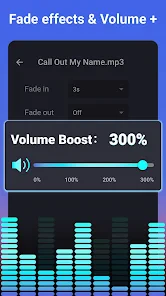
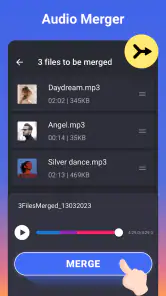
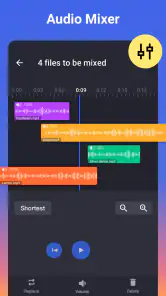
What really sets MP3 Cutter and Ringtone Maker apart is its feature set. You can zoom in and out on the waveform to cut with precision, ensuring you get exactly the piece of the song you want. Feeling creative? You can even merge multiple tracks together to create a custom mashup. The fade in and fade out effects are a nice touch, giving your ringtone a professional feel.
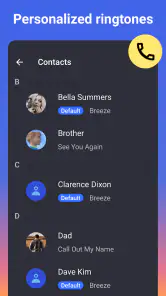
Another highlight is the ability to assign different ringtones to different contacts directly from the app. It’s a fun way to personalize your phone and know who’s calling without even glancing at the screen.
Making a cleaner edit through careful listening
Waveform editing is most useful when I treat it as a guide rather than a guarantee. A visible change in the shape can help me find a beat or phrase, but the ear makes the final call: I play the cut, notice whether the first sound feels clipped, then adjust the start or end and listen again. This back-and-forth is a better way to refine a short excerpt than trying to make a perfect selection in one pass.
For a simple ringtone, I would make one version with a direct start and another with a gentler entrance if the opening feels harsh. Comparing them at ordinary listening volume can reveal a problem that is easy to miss while focusing closely on the waveform. If I am preparing an alarm, I would also check that the ending does not make the clip feel unfinished when it loops or repeats. The goal is not studio polish; it is a sound that behaves well in daily use.
A useful trade-off with fades is that smoothness can come at the cost of immediacy. A fade may soften an abrupt musical entrance, but it can also make a short notification slower to recognize. I would reserve that treatment for clips that benefit from it instead of applying it automatically. Likewise, merging tracks is better for a deliberately playful personal sound than for a practical alert, where a single clear idea is usually easier to identify.
Small editing choices that improve the result
I find that zooming in is especially useful when the sound begins with a quiet beat or a breath before the main phrase. It helps avoid keeping an awkward sliver of silence, which can make a ringtone seem slow to respond. I also treat fades as a listening choice, not an automatic polish: a short alert may need a clean, immediate start, while a longer ringtone can benefit from a gentler entrance or ending.
Merging tracks can be handy for a playful personal tone, but it also makes timing more important. I would preview the join carefully and keep the finished idea simple; two recognizable snippets can become hard to identify if they compete. For an alarm, I would choose a section that still sounds clear when heard repeatedly, rather than picking only the loudest or most dramatic moment. These small checks help the edit work as a phone sound, not just as a slice of music.
Performance and User Experience
The app runs smoothly with minimal hiccups. It's lightweight, so it doesn't hog your device's resources, and it processes edits quickly, so you won't be left waiting around. The user experience is intuitive, with helpful tooltips guiding you through the process if you get stuck.
However, it’s worth noting that the app is ad-supported. While the ads aren't overly intrusive, they can be a bit of a distraction when you're in the zone crafting your perfect ringtone. If you're someone who values an ad-free experience, consider this before diving in.
Saving, assigning, and choosing another tool
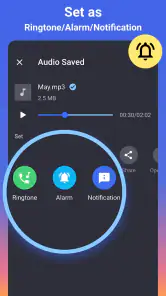
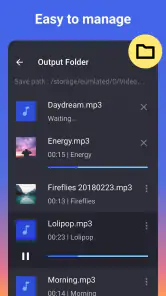
Once a clip is ready, I would give it a clear, recognizable name so it is easy to identify later, especially if I make separate versions for calls and alarms. Before assigning a sound to a contact, it is worth checking that the result starts where intended and is distinctive at the volume I normally use. The app is aimed at personal phone audio, so I would not treat it as a publishing workflow for finished tracks or as a replacement for a dedicated library manager.
For a low-friction workflow, I would make one clip, save it with a name that describes its purpose, and test it in the setting where I plan to use it. That simple naming step matters if I create several variants: labels such as “call,” “alarm,” or a contact’s name are easier to scan than a string of nearly identical filenames. I would also keep the original track untouched and treat the short edit as a separate personal sound, so there is no confusion between a ringtone and the full song.
Direct contact assignment is convenient when I already know whose calls I want to recognize. It is less compelling if I only want to browse and organize a large sound collection; in that case, a dedicated file or ringtone manager may offer a better way to handle a library. Similarly, people who need to share a finished audio asset with collaborators should choose an editor designed for that handoff, rather than expecting a phone-tone tool to manage a broader creative project.
The practical questions are straightforward: can I use it for more than a ringtone? Yes—the app is intended for ringtone, alarm, and notification sounds. Does it cost anything to start? It is free to download, with optional in-app purchases listed from $3.99 to $15.49 per item. Is it a good choice for precise musical production? Not if you need extensive control over layers or a full mixing environment; its strength is making a short, useful phone sound without that extra complexity.
Another decision is whether a custom excerpt is worth the setup at all. If you only want a different sound occasionally, the phone’s built-in choices may be quicker and require no editing. If you want a particular musical cue, a short section from audio you already have, or distinct sounds for different callers, the extra control becomes more valuable. I see this as a small personalization tool, not something every phone owner needs to keep opening.
It has an average rating of 4.6 from around 685,000 ratings, with about 7,000 written reviews and over 50 million installs. Those figures suggest it has found a broad audience, but the best reason to try it is still the specific job it handles: turning audio you like into a sound you can recognize on your phone. The current version is 2.3.2 and it requires Android 5.0 or later, details worth checking against your device before installing.
Final Thoughts
All in all, the MP3 Cutter and Ringtone Maker app is an excellent choice for anyone looking to add a personal touch to their smartphone. It's easy to use, packed with useful features, and delivers exactly what it promises. Whether you're crafting a custom ringtone for yourself or making unique tones for friends, this app is a cut above the rest. So, if you're ready to take your ringtone game to the next level, give it a whirl. You might just find yourself having a little too much fun with it!
My recommendation is clearest for someone with a specific clip in mind who wants to turn it into a call, alarm, or notification sound without learning a larger editor. I would choose a general audio workstation for production, a library manager for organizing lots of files, and the phone’s built-in tones for a no-effort change. For the narrower job it sets out to do, this app offers a practical balance: enough editing freedom to make the result feel personal, without asking the user to become an audio engineer.
MP3 Cutter and Ringtone Maker Frequently Asked Questions
Can I create a ringtone from a song already on my phone?
Yes. MP3 Cutter and Ringtone Maker is made for editing audio and turning a selected section into a custom ringtone, notification sound, or alarm. Its purpose is to help you work with audio files you want to personalize, so you can choose a suitable clip rather than use an entire track. The app is free to download, though in-app purchases are also available.
Can I use MP3 Cutter and Ringtone Maker on an iPhone?
MP3 Cutter and Ringtone Maker is an app for creating and editing audio, but its availability depends on the store and device you use. Before downloading, check that the app is offered for your platform and that your device meets its requirements. The app is listed for Android devices running version 5.0 or later.
Does MP3 Cutter and Ringtone Maker work on my Android phone?
The app is compatible with Android devices running Android 5.0 or later. If your phone uses an older operating system, it may not meet the app’s minimum requirement. Checking your Android version before downloading is a simple way to avoid a compatibility surprise, especially if you plan to use the app to edit audio and create a ringtone, notification sound, or alarm.
What is MP3 Cutter and Ringtone Maker used for?
MP3 Cutter and Ringtone Maker is an app designed to help users easily edit audio files by trimming or merging them to create custom ringtones, notifications, or alarm sounds. It supports various audio formats, ensuring compatibility with most devices, and provides a user-friendly interface for seamless editing.
Is it easy to choose the exact part of a track I want to use?
The app is built around making audio edits for custom device sounds, with simple tools intended to help users cut a clip and prepare it as a ringtone, notification, or alarm. Its interface is designed to be approachable, including for people with little audio-editing experience. If you have a particular moment in mind, you can use the editing tools to shape a shorter sound from your audio.
Pros
- Easy to use interface.
- Supports multiple audio formats.
- Quick processing speed.
- Ability to set start and end times precisely.
- Allows easy sharing of created ringtones.
Cons
- Contains ads in the free version.
- Limited features without purchase.
- Some formats require conversion.
- Occasional app crashes.
- Limited editing tools.
- Category
- Music & Audio
- Version
- 2.3.2













