AI Photo Editor - Polish
- 78.18K
- 4.8
- Installs
- 100.00M
- Price
- Free
Screenshots
Analysis by Reviewed
I usually reach for a phone editor when a photo is nearly right, not when I want to rebuild it from scratch. A dim café shot, a portrait with visual clutter behind it, or a picture that looks flatter on screen than it did in person are familiar cases. In that kind of moment, AI Photo Editor - Polish looks like a practical place to start: it is a free photography app from InShot Inc. with an average rating of 4.8 from around 4.6 million ratings and over 100 million installs. It is intended for an Everyone audience, and its appeal is easy to understand: make common edits approachable without turning them into a technical project.
From Camera Roll to Shareable Photo
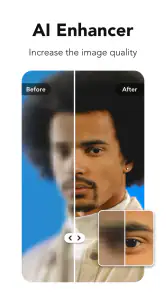
When I begin with an ordinary image, I first decide what actually needs fixing rather than tapping every effect in sight. Polish’s automatic enhancement is useful when the photo is close but its lighting or color feels off. I’d try it as a starting point, compare the result with the original, and keep it only if it improves the picture without changing its character. That quick before-and-after check matters: automatic edits can make a dull image livelier, but a stronger look is not always a more faithful one.
Features That Stand Out
One of the standout features of this app is its ability to automatically enhance your photos. The AI technology analyzes your images and suggests edits that can dramatically improve them. I tested this feature on a few of my less-than-perfect shots, and the results were impressive. Colors popped, lighting was balanced, and details were sharpened, all without losing the essence of the original photo.
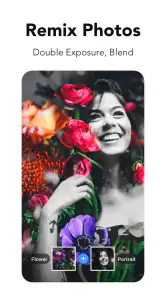
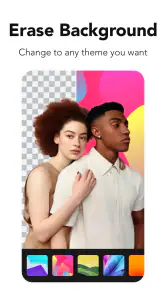
Moreover, you can dive deeper into manual adjustments if you prefer a hands-on approach. From tweaking brightness and contrast to applying filters and effects, the possibilities are endless. The app also includes advanced tools like background removal and portrait enhancements. I had a blast playing around with these features, and the best part? It didn’t require any technical know-how.
For a practical workflow, I’d make one correction at a time: use enhancement for the broad cleanup, then adjust brightness or contrast if the subject still feels too dark or flat. I’d apply a filter last, since a filter can shift colors that I have just carefully corrected. With portraits, I’d check the background-removal edge around hair and shoulders before sharing; this kind of cutout can be handy for a profile image or a simple graphic, but it may need a little scrutiny where the outline is complex.
Everyday Edits That Benefit from a Light Touch
For a family snapshot, marketplace listing, or quick photo sent to a friend, I’d use Polish to solve one visible problem and then stop. A modest lift to a shadowed face can make the subject easier to see; a crop can give the image clearer emphasis; a restrained effect can help a casual post feel finished. The useful habit is to decide on the intended destination first. A photo for a small chat preview does not need the same treatment as one I plan to print or reuse in a carefully designed project.
One less obvious workflow is to make a copy before trying a more dramatic treatment. I can experiment with a creative effect or an AI-generated look while keeping a natural version for later. This matters when the image has practical value as well as visual appeal: for example, a clear picture of an item I am selling should remain trustworthy, even if I also want a more stylized version for a post. Keeping those purposes separate prevents a playful edit from becoming the only version I have.
More From Our News Desk

Weather by Xiaomi Review: Clear at a Glance, Less Clear Up Close

X Under Pressure: Can It Recover When Posting Goes Wrong?

Clash of Clans Is Won Between the Battles

Android Auto Makes the Case for Quieter Car Software

MobiOffice: Transforming Mobile Productivity with Seamless Integration

EA SPORTS FC™ Mobile Soccer: Redefining Mobile Sports Gaming
User-Friendly Experience
Navigation through the app is a breeze. Everything is neatly organized, and the tools are clearly labeled. I never felt overwhelmed or lost, which is sometimes the case with other photo editing apps. The developers certainly prioritized the user experience, and it shows.
Another aspect I appreciated was the speed of the app. Edits are applied almost instantaneously, meaning you can spend more time being creative and less time waiting for the app to catch up. Whether you’re editing a single photo or a batch of images, the performance remains smooth and efficient.
In a typical day, I might take a slightly underexposed lunch photo, brighten it, add a restrained filter, and send it to a friend. Polish suits that quick, phone-first handoff better than opening a more complex desktop editor, where the extra controls can be unnecessary. If I’m preparing a carefully consistent set of images, though, I’d be more deliberate: edit one representative photo first, settle on a look, and then apply the same judgment to the rest rather than assuming every shot needs identical treatment.
Moving an Edit from the App to Its Destination
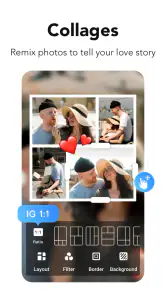
The last part of a phone edit is not a tool; it is deciding whether the result is ready to leave the editor. I’d check the image in the context where it will be seen, because a dramatic effect that looks appealing while I am focused on the editing screen may feel too strong when it appears among ordinary photos. For a profile picture, I’d inspect the outline and make sure the subject still feels natural. For a collage, I’d look at the whole arrangement rather than judging each image separately.
If I am sending a picture to someone who needs an accurate record, I would favor clarity over decoration and keep an unedited copy available. If I am making a casual post, there is more room to experiment with filters or an imaginative treatment. That distinction is especially useful with AI-assisted tools: they can make it easy to move from correction into transformation, so I try to choose deliberately rather than treating every available effect as part of a standard recipe.
Where Polish Fits Among Editors
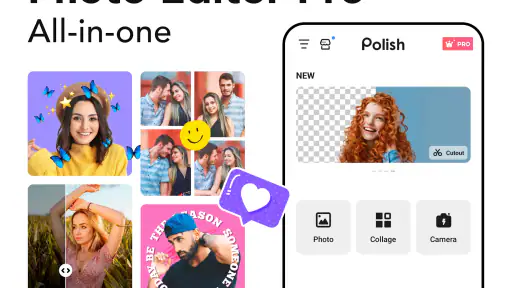
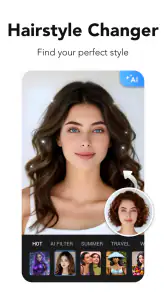
Compared with a basic gallery editor, Polish gives me more room to experiment with AI enhancement, effects, portrait adjustments, and creative treatments in one place. Compared with a specialist editor built around precise color work or layered retouching, its strength is convenience, not the deepest possible control. That distinction helps set expectations: I’d use it for social posts, casual portraits, collages, or an image that needs a fast lift, but choose a more advanced tool when exact masking, repeatable color grading, or a detailed professional retouch is central to the job.
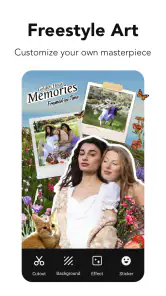
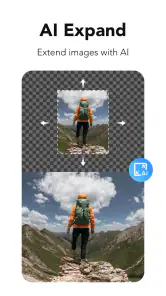
The app’s store summary also points to collage-making and AI art generation, which make it broader than a simple brightness-and-crop editor. Those options are best treated as creative detours rather than necessary steps in every edit. If the aim is a natural-looking photograph, I’d keep the original nearby and judge whether each effect still looks like the scene I meant to capture. If the aim is a playful post, experimenting makes more sense.
That range makes Polish a better fit for someone who likes having correction and creative options close together than for someone who wants a minimalist editor with only a few precise controls. A built-in gallery editor is quicker when I only need a straightforward crop or exposure adjustment. A more specialized photo editor is the better choice when I need fine, repeatable control over a set of images. Polish sits between those approaches: it can take a casual picture further without requiring a full desktop-style workflow, but its convenience should not be mistaken for a substitute for meticulous retouching.
Good Fit, With a Few Trade-Offs
Polish is a strong fit for someone who wants approachable tools and quick results without learning a complicated editing workflow. It is less suited to a photographer who needs meticulous control over every detail or a dependable, identical treatment across a large project. The app is free to download, while in-app purchases range from $0.99 to $129.99 per item, so I’d check the purchase prompt carefully before committing to anything; the free starting point does not mean every option is included at no cost.
The current version is 1.694.240, and the minimum operating-system requirement is version 9. Those details are useful to check before installing, especially on an older phone. For an everyday user, the bigger decision is less about having every possible tool and more about whether quick AI assistance and playful extras match the way they edit. If all I want is a crop and a small exposure correction, the phone’s built-in editor may be enough. If I want a one-stop creative toolkit, Polish offers more to explore.
Before choosing an effect that may be part of a paid offering, I’d read the purchase screen rather than assuming that every tool is included with the free download. That small pause is worthwhile if I am only installing the app for one specific feature. It also helps me decide whether a quick creative experiment is worth paying for, or whether a basic edit in the phone’s own gallery will do the job just as well.
Where the Workflow Can Break
The main risk is not that the app is hard to use; it is that easy editing can encourage too much editing. Automatic enhancement may improve a dim or flat image, but it can also move the picture away from the mood I wanted. Background removal can be useful for a simple cutout, yet detailed outlines such as loose hair deserve a careful look. I would not rely on a quick automatic result for a high-stakes portrait or a polished commercial image without checking it closely.
There is also a difference between making one image look good and making a whole collection feel consistent. If I am preparing photos for a shop page, event album, or a series of posts, I would compare them side by side and adjust each with its own lighting and color in mind. Applying the same strong filter everywhere can make the collection less coherent, not more. For dependable batch consistency, I would favor a workflow with more precise controls than a quick, effect-led edit.
My useful stopping point is simple: if the image communicates what I want and still looks believable for its purpose, I save it and move on. If I find myself stacking effects to rescue a photo that is badly blurred, poorly framed, or missing important detail, another filter is unlikely to solve the underlying problem. In that case, choosing a different shot is often a better use of time than asking an editor to do more than the original picture can support.
A Useful Last Check Before Sharing
My best advice is to save the original untouched and judge the edited image at normal viewing size, not only while zoomed in on the editing screen. That catches over-sharpening, heavy filters, and awkward cutout edges before the picture reaches a group chat or social feed. I’d also avoid stacking several strong effects just because they are available; one clear improvement usually looks more convincing than a chain of edits.
For an everyday user deciding whether to try it, I’d ask one practical question: do you often want more than the phone’s basic editor, but not the learning curve of a specialist tool? If the answer is yes, Polish is a sensible option to explore. If you mainly need exact retouching, careful color matching, or a repeatable production workflow, I would look elsewhere and keep this app for quick, casual edits.
In conclusion, AI Photo Editor - Polish is a convenient choice when I want to improve a phone photo or give it a more playful direction without turning editing into a separate project. Its automatic help and hands-on adjustments make it approachable, while the collage and AI art options offer room to experiment. I would recommend it to casual editors who value speed and variety, with one qualification: check the result, keep the original, and choose a more precise tool when consistency matters more than convenience.
AI Photo Editor - Polish Frequently Asked Questions
Can I use AI Photo Editor - Polish to make a quick edit without learning complicated tools?
The app is presented as an approachable photo editor, with AI filters, photo enhancement, retouching, collage making, and AI art generation in one place. That range gives you options for simple improvements as well as more creative edits. If you are new to photo editing, you can begin with a filter or enhancement and explore other tools as needed.
Does AI Photo Editor - Polish include tools for making photo collages?
Yes. Collage making is part of the app’s creative toolkit, alongside photo editing, AI filters, enhancement, and AI art generation. It may be useful when you want to bring several pictures together rather than edit only one image. The app is free to download, so you can explore its available options and check any in-app purchase details before confirming a paid item.
Can I use AI Photo Editor - Polish to apply filters and enhance a picture?
Yes. The app’s features include AI filters and photo enhancement, making it suitable for trying a different visual style or improving an image. It also includes retouching, collage making, and AI-generated art, so there are creative options beyond basic adjustments. You can start with the tools that fit your photo and explore the broader editing experience at your own pace.
Is AI Photo Editor - Polish appropriate for children or family use?
AI Photo Editor - Polish has an Everyone content rating, so its stated age rating is broad. It is a photography app focused on editing and creating images, with features such as filters, photo enhancement, collage making, and AI art generation. Parents may still want to review the app with younger users and discuss in-app purchases before allowing them to make purchases.
Can I try the editing tools before paying for anything?
Yes. AI Photo Editor - Polish is free to download, so you can explore its editing experience before choosing whether to make a purchase. It also offers in-app purchases, with individual items priced from $0.99 to $129.99. Review the purchase details shown in the app before confirming anything, particularly if you want to understand which options are free and which require payment.
Pros
- User-friendly interface
- Advanced editing tools
- Supports various image formats
- High-quality output
- Fast processing speed
Cons
- In-app purchases required
- Occasional ads appear
- Limited free features
- Requires internet connection
- High battery consumption
- Category
- Photography
- Version
- 1.694.240












