Music Player & MP3 Player
- 52.12K
- 4.8
- Installs
- 100.00M
- Price
- Free

Screenshots
Analysis by Reviewed
If your music lives on your phone and you want more control over how it sounds, Music Player & MP3 Player is worth a look. I see its main appeal as a practical local-music player rather than a replacement for a streaming service: it gives you tools for listening to files you already have, including an equalizer, lyrics, themes and tag editing. That focus makes it useful for a personal library, though it also means it may not suit someone who expects a large online catalog or streaming recommendations.
A player built around your own library
Made by InShot Inc., this free music and audio app has been available since June 9, 2017. Its current version is 3.9.0.178, and it runs on Android 6.0 or later. It has an average rating of 4.8 from around 4.2 million ratings, with over 100 million installs. The app is rated for Everyone, while optional in-app purchases range from $0.99 to $6.99 per item. Those figures suggest a widely used option, but the useful question is whether its local-first approach matches your listening habits.
For example, if you keep albums, downloaded recordings or workout mixes as files on your phone, a dedicated player can make that collection easier to browse than opening individual files through a general-purpose file manager. The tag editor is especially handy when a track appears with a misspelled title or is filed under the wrong artist: correcting the information can make the library easier to navigate later. I would tidy a few tags before building playlists, since better labels make browsing and sorting more useful.
Why Choose This App?
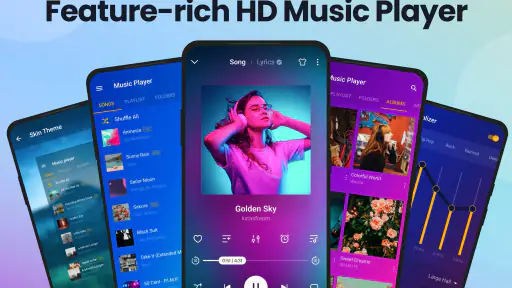
First off, the Music Player & MP3 Player is more than just your average music app. What caught my attention was its super sleek user interface. Navigating through my playlists has never been this intuitive. The app seems to understand that nobody has time to fiddle around with complicated menus when all you want to do is jam out to your favorite tunes.
Features That Stood Out
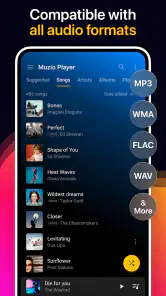
Let's talk about features because, let’s be honest, that’s what we’re all here for. The app supports a wide range of audio formats, which means you can throw just about any song at it, and it’ll play it without a hitch. It’s like having a universal translator for music!
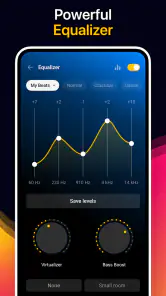
Another feature I absolutely loved is the built-in equalizer. It’s got a ton of presets, from classical to heavy metal, and if you’re picky like me, you can customize your own. It's like having a DJ in your pocket. Plus, the bass boost? Chef’s kiss! Perfect for those tracks that need a little extra oomph.
Getting more from everyday listening
The equalizer is most useful when you treat it as a small adjustment rather than a magic sound upgrade. I’d start with a preset for a quick change, then compare it with the unaltered sound at a comfortable volume; a strong bass boost can make some songs feel fuller but may blur vocals or make already bass-heavy tracks tiring. A custom setting is worth saving for a particular pair of headphones or a genre you play often, rather than constantly changing controls between songs.
More From Our News Desk

Weather by Xiaomi Review: Clear at a Glance, Less Clear Up Close

X Under Pressure: Can It Recover When Posting Goes Wrong?

Clash of Clans Is Won Between the Battles

Android Auto Makes the Case for Quieter Car Software

MobiOffice: Transforming Mobile Productivity with Seamless Integration

EA SPORTS FC™ Mobile Soccer: Redefining Mobile Sports Gaming
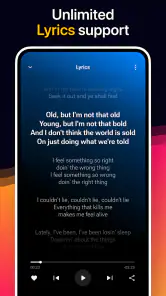
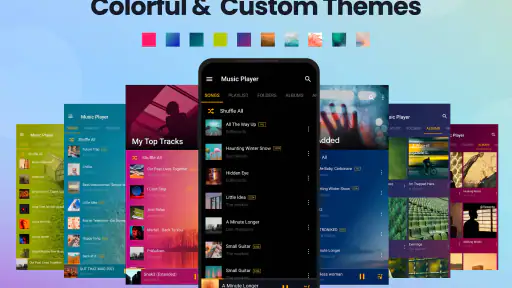
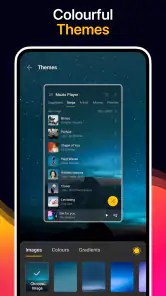
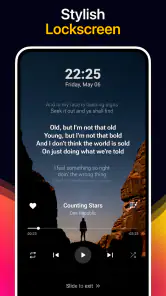
Lyrics and themes add convenience, but they serve different needs. Lyrics are a welcome companion when you want to follow a song, while themes let you make the player feel more personal during regular use. I’d consider them extras around the core job of playing a library, not reasons on their own to switch. If a lyric view does not have what you need for a particular track, the song can still be enjoyed as audio; the app’s strongest case remains having your own files ready to play.
Usability and Experience
Using the app is a breeze. The developers clearly understood the assignment of making a music app that doesn’t get in the way of the music. It’s lightweight, fast, and doesn’t hog your phone’s resources. Whether you’re using it on a high-end device or a more modest one, it performs like a champ.
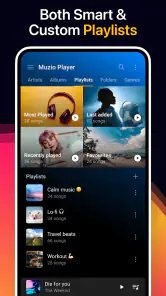
One of my favorite aspects is the playlist creation. It’s straightforward, and organizing your music library is as satisfying as popping bubble wrap. Plus, it integrates seamlessly with your existing music files, so there’s no need for complicated imports.
Making a library work for real routines
I’d use the app differently depending on how my music is organized. For a collection made up of full albums, I’d first correct any missing or confusing artist and title information, then keep album listening intact rather than splitting every record into mood playlists. For workout mixes or recordings grouped by purpose, a few short playlists can make daily selection quicker. This is a useful distinction: the player’s organizational tools help most when they support the way you already listen, not when they tempt you to spend an evening categorizing every file.
A realistic weekday routine might be to choose a commute playlist before leaving home, use the equalizer with the headphones I normally wear, and keep the phone ready to play the tracks I have collected. Later, I might switch to a calmer playlist for focused work without relying on suggestions or an online catalog. The benefit is control over the queue; the trade-off is that I need to have chosen and kept those tracks myself. If I want the app to surprise me with unfamiliar artists, this is not the tool I would reach for.
Where the local-player approach fits
A realistic use is setting up a playlist before leaving home, then using it for a commute or a run without depending on a streaming catalog. That can be a better fit than a subscription-based music app if your collection is already on your device and you prefer choosing every track yourself. On the other hand, if you mainly discover music through curated playlists, want new releases on demand, or expect listening to work through an online catalog, a streaming service is the more natural choice. This player is best when your files—not a service’s catalog—are the center of your routine.
Compared with a basic audio player that simply opens a file, this app makes more sense when you want a browsable library, playlist-making, sound adjustments and tag editing together. Compared with a streaming app, the key difference is not which interface looks better; it is who supplies the music. Here, your own collection is the starting point. That makes it a sensible companion for people who have recordings they want to keep organized, but a poor substitute for someone who expects a vast catalog and hands-off discovery.
One practical trade-off is that the app’s usefulness depends on having music files available to play. A local player cannot fill gaps in a collection with streaming tracks, and a library with inconsistent names or artist tags can take some housekeeping before it feels orderly. I’d use the tag editor to fix the most noticeable errors first, rather than trying to reorganize everything at once; then make a few playlists around actual routines, such as a commute or a focus session. That small setup makes the player more helpful without turning music management into a project.
Questions worth considering before you settle in
If you are wondering whether it is suitable for listening away from a reliable connection, the central point is that it is designed to play music files kept on your device, so your routine depends on having those files available. It is not a way to download a streaming catalog for later. If your music is already stored locally, you can prepare a playlist around your day; if it is not, you will need another way to build a collection before this app can do much for you.
You may also be deciding whether lyrics, themes or the equalizer are essential. I would treat them as supporting tools: the equalizer can help you make a modest adjustment for a particular listening setup, and themes offer a personal touch, while lyrics are useful when available for a song you want to follow. None changes the basic local-library focus. I would try the player with a few familiar tracks first and see whether its browsing and sound controls fit your habits before making it the home for a large collection.
One more practical question is whether you need to pay to use it. It is free to install, with optional in-app purchases; I would begin with the regular listening features and consider a purchase only if a specific offered extra is worth it to me. This is also a good way to judge whether the app suits your device and library in ordinary use rather than deciding from feature names alone.
Final Thoughts
All in all, the Music Player & MP3 Player is a stellar choice for anyone looking to upgrade their music listening experience. It’s packed with features that make it more than just a music player—it’s your personal DJ, concert hall, and music library all rolled into one. If you’re on the hunt for a reliable and feature-rich music app, give this one a shot. Trust me, your ears will thank you!
My recommendation is strongest for listeners who already keep a collection on their phone and want straightforward playlists, sound adjustments and a few library tools in one place. I would skip it if the main thing you want is streaming discovery or a service that supplies the music for you. For a local collection, though, the balance of easy playback and useful extras makes it a sensible free option to try. Optional purchases are available, so I’d explore the everyday listening experience first and only consider paying if an offered extra genuinely matters to your routine.
Music Player & MP3 Player Frequently Asked Questions
Can Music Player & MP3 Player play music without an internet connection?
Yes. Music Player & MP3 Player is an offline music player, so it can play audio files stored on your device without requiring an internet connection. That makes it useful when traveling, saving mobile data, or listening somewhere with limited connectivity. Make sure the tracks you want to hear are available on your device, then use the app to play your local music library.
Who develops Music Player & MP3 Player, and how popular is it?
Music Player & MP3 Player is developed by InShot Inc. It has an average rating of 4.8 from around 4.2 million ratings, with roughly 52,000 written reviews and more than 100 million installs. Those figures indicate that it has reached a large audience, though your experience will still depend on the features and listening tools you personally want from a music player.
Can I edit song information or view lyrics in Music Player & MP3 Player?
The app’s feature set includes lyrics and a tag editor, which can make it easier to follow songs and manage details associated with music files. It is designed for listening to music stored on your device, with tools that help personalize playback and organize a library. If these features matter most to you, check that your music files are available on the device for the player to use.
What features does the Music Player & MP3 Player app offer?
The Music Player & MP3 Player app provides a range of features designed to enhance your listening experience. It supports a wide variety of audio formats, offers customizable playlists, and includes an equalizer with presets for different music genres. Additionally, it features a sleek, user-friendly interface, offline playback capability, and options for managing your music library efficiently. Its store summary also highlights lyrics, themes, and a tag editor, giving listeners more ways to personalize the experience and keep track of their collection.
Is the Music Player & MP3 Player app available for both Android and iOS devices?
Yes, the Music Player & MP3 Player app is available for download on both Android and iOS platforms. Users can find it on the Google Play Store for Android devices and the Apple App Store for iOS devices. The app is optimized for performance on both operating systems, ensuring a seamless music listening experience regardless of your device.
Pros
- Intuitive user interface design.
- Supports various audio formats.
- Offline playback available.
- Customizable themes and skins.
- Equalizer with sound presets.
Cons
- Contains ads in free version.
- Limited features without premium.
- Occasional app crashes.
- No lyrics integration.
- Requires regular updates.
- Category
- Music & Audio
- Version
- 3.9.0.178













