Google Docs
- 75.81K
- 4.7
- Installs
- 1.00B
- Price
- Free
Screenshots
Analysis by Reviewed
My most useful change with a writing app was not learning another formatting trick; it was deciding where a piece of work should live and how I would return to it. Google Docs works best for me as the shared, editable home for drafts and working notes, rather than as a place to scatter every task. That small distinction makes it easier to find what I need and less likely that a quick note turns into an unmanageable pile of documents.
Decide what belongs in a document
Before opening a blank page, I try to name the job: a meeting record, a draft someone else must review, or a note I may need to expand later. That choice gives the document a purpose and makes its title easier to search for. For short-lived reminders or tightly structured task tracking, a notes or list app may be quicker; Docs earns its place when the words need context, revision, or another person’s input.
A practical routine is to keep one document per ongoing piece of work, use a clear title, and put the next action near the top when a draft is unfinished. For example, after a planning call, I can record decisions and open questions in the same document, then share it with the people involved instead of sending around several versions as attachments. The important habit is not creating more documents, but making the useful one easy to recognize and continue.
The Latest on Google Docs
Use collaboration without losing clarity
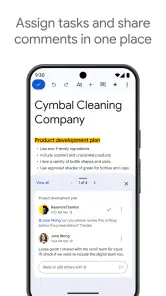
Shared editing is most helpful when people agree on how to use it. I find comments useful for questions that need a response, while suggested edits suit changes that the document owner should review before accepting. If everyone types freely into the same paragraph, real-time collaboration can become confusing rather than faster. A brief note about who is revising which section can prevent that problem without adding another tool to the process.
For a repeatable weekly workflow, I would use a working document for the current plan and a separate document for material that must remain stable. That way, routine updates do not bury reference information. I also avoid treating a shared draft as a final record until someone has checked the wording and resolved open comments; convenience does not replace review.
Seamless Collaboration at Its Best
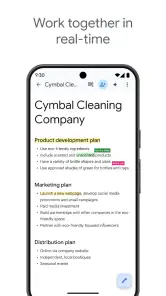
One of the standout features of Google Docs is its seamless collaboration capability. You can share documents with friends, family, or colleagues with just a few clicks. Everyone can edit, comment, and even suggest changes in real-time. It’s like having a virtual meeting room where everyone can pitch in their ideas without stepping on each other's toes. And the best part? Changes are automatically saved, so you never have to worry about losing your work.
Easy Accessibility
Gone are the days when you had to email yourself documents to work on them from different devices. With Google Docs, you can access your documents from any device with an internet connection. Whether you’re on your phone, tablet, or laptop, your documents are just a click away. This app truly embodies the essence of convenience.
More From Our News Desk

Weather by Xiaomi Review: Clear at a Glance, Less Clear Up Close

X Under Pressure: Can It Recover When Posting Goes Wrong?

Clash of Clans Is Won Between the Battles

Android Auto Makes the Case for Quieter Car Software

MobiOffice: Transforming Mobile Productivity with Seamless Integration

EA SPORTS FC™ Mobile Soccer: Redefining Mobile Sports Gaming
User-Friendly Interface
Google Docs sports a clean and intuitive interface. Even if you're not tech-savvy, you’ll find navigating through its features a breeze. Everything is clearly labeled, and the tools are where you’d expect them to be. Need to insert a table or a chart? No problem. The options are right at your fingertips and easy to use.
Rich Features and Tools
While being straightforward, Google Docs doesn’t skimp on features. From voice typing for those moments when typing seems like a chore, to an expansive library of add-ons that enhance functionality, it’s packed with tools to boost your productivity. And if you’re keen on formatting, the variety of fonts, styles, and templates has got you covered.
Integration with Other Google Services
If you’re already in the Google ecosystem, Docs integrates smoothly with other services like Google Drive, Sheets, and Slides. This means you can import data from Sheets or create a presentation with Slides, all within the same ecosystem. It’s a cohesive experience that saves time and boosts efficiency.
Where the workflow can snag
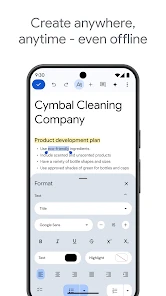
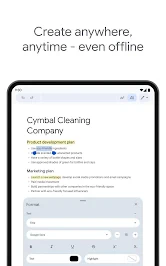
Cloud access is convenient, but relying on an internet connection can be a real friction point when you need to open or continue a document somewhere with unreliable service. I would prepare important material before traveling rather than assume every part of my routine will work exactly the same offline. On a phone, long edits and detailed layout work can also feel cramped; I use mobile for quick changes and leave complex formatting for a larger screen.
Docs is a strong fit for essays, shared plans, meeting notes, and drafts that move between devices. It is less compelling if your work depends on advanced page design, precise print production, or a specialized writing environment. Traditional desktop word processors can offer more control for those jobs, while lightweight note apps are often faster for fleeting thoughts. The useful question is whether collaboration and easy access matter more than deep layout control.
A working day that suits shared documents
Imagine I have a planning call in the morning, a draft to revise after lunch, and a teammate who needs to check one section before the end of the day. I can keep the decisions and unanswered questions in the meeting document, then move into the draft without copying notes across several message threads. When my teammate has time, they can comment on the section that needs attention instead of sending me a separate file that I must reconcile by hand.
The benefit is not simply that both people can type at once. It is that the document remains the place where the current wording, discussion, and next step meet. I still need to distinguish a decision from an open question, and I would not treat every comment as approval. Before sharing a final version, I review the comments and make sure the text says what the group agreed. That modest pause is useful protection against mistaking activity for completion.
Keep capture from becoming clutter
When I am taking notes quickly, I do not try to perfect the formatting in the moment. I write a clear heading, capture the useful details, and add a short status or next action while the context is fresh. Later, I can decide whether that material belongs in an ongoing project document or should remain a standalone record. This makes Docs more useful as a workspace without turning it into a dumping ground for every passing thought.
Searchability starts with naming habits. A title that identifies the subject and purpose is more helpful than a vague label, especially when several people share files. I also try to keep one source document for a continuing piece of work instead of making a new copy after every small revision. Copies can be appropriate when I need a distinct version for a separate audience, but casual duplication makes it harder to tell which one is current.
For recurring work, a simple structure can save time without requiring a complicated template: keep the current status near the top, separate decisions from questions, and give longer sections descriptive headings. If a document grows beyond what is comfortable to scan, I split out stable reference material rather than repeatedly scrolling past it. That judgment matters more than elaborate formatting; a document should make the next useful action obvious.
Questions worth settling before you rely on it
Can I use it for group work without losing control of a draft? Yes, provided I set expectations. I use comments when I want discussion and suggested changes when edits should be reviewed, then check unresolved points before calling the work finished. If several collaborators make changes without coordinating, the shared page can become noisy, so collaboration still needs a clear owner and a basic agreement about who is handling what.
Is it suitable for work across a phone and a computer? It is practical for opening a document, checking information, and making a short correction on a phone. I would not choose a small screen for extensive restructuring or careful page layout when a larger display is available. The convenience of moving between devices is real, but the best device depends on the task rather than on the app alone.
What should I do when I expect unreliable internet? I plan ahead instead of assuming that every document and workflow will be equally convenient offline. Before leaving a dependable connection, I make sure important work is ready to access and avoid leaving a critical edit until the moment I need it. For people whose normal work takes place in places without reliable connectivity, an offline-first tool may be a better primary writing environment.
Does it replace a dedicated notes app or a desktop word processor? Not for every job. A notes app is usually a faster home for a fleeting reminder or a short checklist, while a desktop word processor may suit elaborate formatting and print-focused documents better. Docs sits between those uses: it is most persuasive when a piece of writing benefits from a straightforward document format, easy access, and other people’s input.
Who will get the most from it?
Google LLC makes this free productivity app, and its broad reach is reflected in over a billion installs and a 4.7 average from around 2.5 million ratings. It is rated for Everyone, so it can suit students, households, and teams who want to work on ordinary documents together. Google Docs was released on April 30, 2014, and remains a familiar option for people who already use Google services. I would skip it if you need a highly specialized publishing tool or prefer to keep all writing in a local, offline-first workflow.
One useful habit is to make a document easier to resume: give it a specific title, put the current status near the beginning, and use comments for questions rather than burying them in the main text. That is especially helpful when someone else will pick up the work later. The trade-off is that a shared document needs a little housekeeping; unclear titles and unresolved discussion can make a simple draft harder to navigate.
In conclusion, if you’re looking for a reliable, feature-rich app that simplifies document creation and collaboration, Google Docs is definitely worth a try. It has transformed the way I handle documents, and I’m sure it’ll do the same for you. Give it a whirl and see how it fits into your workflow!
Google Docs Frequently Asked Questions
Can I install Google Docs on an Android phone or iPhone?
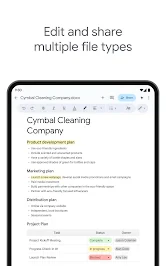
Yes. Google Docs is available as a mobile app for Android and iOS, and you can also use it through a web browser. The app lets you create, edit, and collaborate on documents online, making it useful when you want to work from a phone or tablet as well as a computer.
What do I need to get started with Google Docs?
To use Google Docs, you need access to the app or its web version and a Google account for the account-based features described here. Once signed in, you can create and edit documents and use Google Drive to access your work. The app is part of Google Workspace and is designed for online document creation and collaboration.
Is Google Docs suitable for students and everyday writing?
Google Docs is a productivity app for creating and editing documents, so it can suit schoolwork, personal notes, and other writing tasks. Its online collaboration tools are useful when several people need to work on the same document. It is part of Google Workspace, and the app is available for Android and iOS as well as through a web browser.
Does Google Docs save my work automatically?
Google Docs is designed for online document creation and editing, with documents associated with Google Drive. When you work online, changes are saved to the cloud, making it convenient to return to a document from another supported device. If you plan to edit without an internet connection, enable offline access while connected first; offline changes sync after you reconnect.
What is Google Docs and how can I use it?
Google Docs is a cloud-based word processing application that allows users to create, edit, and share documents online. It is accessible via any web browser or through mobile apps on Android and iOS devices. Google Docs is part of the Google Workspace suite, providing users with collaboration tools, real-time editing, and integration with other Google services like Google Drive, Sheets, and Slides.
Pros
- Real-time collaboration with others
- Auto-save feature prevents data loss
- Accessible from any device
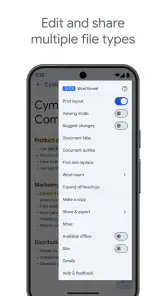
- Supports multiple file formats
- Integration with other Google services
Cons
- Limited offline functionality
- Requires a Google account
- Formatting can be inconsistent
- Less powerful than desktop apps
- Privacy concerns with data storage
- Category
- Productivity
- Version
- Varies with device













