Meta AI
- 4.81K
- 4.7
- Installs
- 10.00M
- Price
- Free

Screenshots
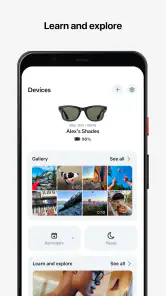
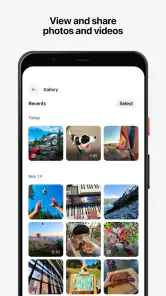


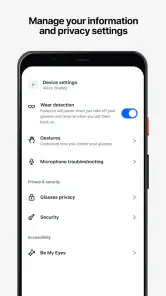
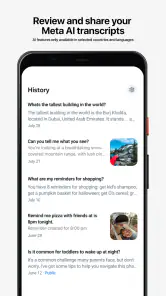
Analysis by Reviewed
Before choosing an AI assistant, I’d ask what I actually need it to do: answer questions, help shape a piece of writing, or make something visual. Meta AI is most appealing when those jobs overlap and I want to try them from one app, rather than switch between a chatbot and a separate creative tool. It is a free productivity app from Meta Platforms, Inc., rated for Everyone. That makes it easy to explore, though “free” doesn’t by itself tell me whether its answers or creative results will suit my needs.
Start with the task, not the novelty
For everyday use, I would treat the assistant as a starting point: ask a question, request a different explanation, or use an answer to get unstuck on a draft. The useful test is whether it saves me a step without asking me to trust it blindly. For example, if I’m planning a weekend meal, I might ask for a few ideas based on ingredients I already have, then check the suggestions against my own preferences and what’s in the kitchen. That is a better fit than expecting a single answer to settle a high-stakes decision.
The video-creation angle gives the app a more distinctive role than a text-only assistant. It may be handy when I want to experiment with a short visual idea instead of opening a separate editing workflow. I’d approach generated material as a rough creative prompt, not a finished piece: decide what I want to communicate first, inspect the result, and be ready to revise or use another tool if the output needs precise timing, editing, or a consistent house style. That distinction matters for anyone making content for work rather than simply playing with an idea.
A useful way to test it in a busy day
I’d try it at the point where a small question is slowing me down, rather than building a whole routine around it. Imagine I have a few minutes before leaving home and need a clearer way to explain an idea in a message. I can ask for a concise version, compare it with my original, and keep only the wording that sounds like me. That workflow is less about accepting a finished answer than using the assistant as a quick second pair of eyes.
For creative work, I’d separate idea generation from approval. If I’m sketching a visual concept for a personal project, I can use a generated result to see whether the direction feels promising, then decide whether it is worth developing elsewhere. This is especially useful when I’m stuck at the blank-page stage. It is less useful when the task already has strict brand rules, exact scene requirements, or a deadline that leaves no room to inspect and refine what comes back.
Where Meta AI fits—and where it doesn’t
The app has a substantial audience: it has over ten million installs and a 4.7 average from around seven hundred thousand ratings. Those figures suggest that many people find it worth trying, but they do not tell me whether a particular answer is accurate or whether a generated video will match my taste. I’d judge it on a few real tasks I repeat, rather than on popularity alone.
When another kind of tool is the better choice
If I mainly need polished video, a dedicated editor is a more sensible place to spend my time because its workflow is built around shaping and finishing footage. If my priority is long-form research, I’d compare answers with trusted sources instead of treating a conversational reply as a citation. And if I only want to organize tasks or keep notes, a conventional planner or notes app may be simpler than opening an AI assistant. Meta AI makes the most sense when I value the combination of asking and creating, not when I need a specialist tool to do one job with exact control.
You May Like

Clash of Clans Is Won Between the Battles

Android Auto Makes the Case for Quieter Car Software

MobiOffice: Transforming Mobile Productivity with Seamless Integration

EA SPORTS FC™ Mobile Soccer: Redefining Mobile Sports Gaming

How Microsoft OneDrive Became a Mobile Productivity Giant

How Google Translate Breaks Language Barriers Effortlessly
That comparison is about the job, not a claim that one type of app is always better. A general assistant can be convenient for moving from a question to an idea, while a search or reference workflow is better when I need to trace a claim back to reliable material. A dedicated video editor is the more natural choice when I need to arrange clips, fine-tune pacing, or make a finished piece consistent. I’d use the assistant to explore possibilities, then move to those specialist tools when the task becomes exacting.
One practical tip is to give a request useful boundaries: name the audience, purpose, and tone, then ask for a version that is shorter or clearer if the first attempt misses. For video ideas, I’d start with a single, concrete concept rather than a vague request, and review the result before sharing it. This makes the app easier to evaluate and keeps its output in the role of a draft. I would also avoid putting private or sensitive details into prompts unless I’m comfortable sharing them with an online service.
Small habits that make the results more useful
When an answer is close but not quite right, I’d identify the specific gap instead of repeating the same broad request. Asking for a simpler explanation, a different tone, or a shorter draft gives me something concrete to assess. I also find it helpful to keep my own purpose in view: an answer intended to help me think is not automatically suitable to send, publish, or rely on without review.
For video prompts, a narrow idea gives me a better basis for judging the result than asking for something generally impressive. I’d name the central subject and the feeling I want the piece to convey, then check whether the output actually supports that intention. The trade-off is straightforward: experimentation can help me move past a creative block, but it does not replace the decisions involved in selecting, editing, and approving a final piece.
Trying it without rebuilding your routine
Switching does not have to mean replacing the tools I already rely on. I’d keep my notes, calendar, and editing app in place, then use Meta AI for the moments when a quick answer or visual experiment might help. A small trial is enough to reveal whether I like the interaction and whether the results save effort. If I find myself copying everything elsewhere for substantial editing, that is a useful sign that a specialist alternative fits my workflow better.
There is little reason to migrate important material just to test an assistant. I’d start with one low-stakes question and one small creative task, then notice whether the answers are easy to assess and whether I naturally return to the app. If the useful parts are only the initial ideas, that can still be a good role for it; I simply wouldn’t mistake occasional help for a reason to abandon tools that already handle my work well.
The app is currently at version 247.0.0.54.165 and requires Android 10 or later. It was released on September 8, 2021, and has around 4,800 written reviews alongside its much larger rating count. I would check that my device meets the minimum requirement before installing, then try a low-stakes question and a simple creative request. The age rating is Everyone, but I’d still guide children through AI-generated answers and media rather than assume every result is automatically suitable or correct.
Someone deciding whether to keep using it should also ask what “useful” means for their own routine. If I get a fresh starting point for a draft or a visual concept, that may be enough; I don’t need every response to become a finished deliverable. If I repeatedly have to verify, rewrite, or transfer results before they save any time, I’d treat that as a reason to narrow how I use it, or choose a more direct tool for that task.
My recommendation
Meta AI is worth a look if I want a free, approachable way to ask questions and explore AI-made videos without committing to a specialist creative workflow. Its strongest case is convenience across those two activities; its weakest is that convenience should not be confused with expert accuracy or fine-grained production control. I’d recommend trying it for brainstorming, everyday explanations, and playful visual drafts, while keeping a dedicated editor, trusted reference sources, or a straightforward organizer for tasks that demand more precision. If those boundaries match how you work, it can be a useful addition rather than another app you feel obliged to use.
Picture this: you're at home, sipping on your favorite coffee, and you decide to dive into a world of endless possibilities right from your smartphone. That's exactly what the Meta View app promises to deliver. With a unique blend of augmented reality (AR) and virtual reality (VR), it’s like having a futuristic portal in your pocket. Let's get into the nitty-gritty of what makes this app a must-try.
Unveiling the World of Augmented Reality
The first thing that hits you about Meta View is its seamless integration of AR technology. Imagine pointing your phone at a painting and suddenly seeing it come to life with animations and sound effects. This app makes it all possible. The AR experiences are not just limited to art; they extend to educational content, games, and even your daily workout routines. It’s like Pokémon Go on steroids, offering more interactive and immersive content.
The VR Experience
If AR wasn’t enough, Meta View takes it a notch higher with its VR capabilities. Strap on your VR headset, and you're instantly transported to different worlds. Whether it’s exploring ancient civilizations or walking through the bustling streets of Tokyo, the app provides a 360-degree experience that's both thrilling and educational. The graphics are top-notch, making the virtual experience feel incredibly real.
User Experience and Interface
Let’s talk about user experience. Navigating through Meta View is as smooth as butter. The interface is intuitive and user-friendly, even for tech newbies. I was pleasantly surprised by the minimalistic design that doesn’t compromise on functionality. Everything is just a tap away, and the app runs without any noticeable lags, which is a big plus.
Content Variety
One of the strongest points of Meta View is its rich content library. From educational modules to interactive games, there’s something for everyone. I particularly enjoyed the "Space Explorer" feature, which lets you navigate through the solar system and learn about different planets. It's both fun and informative, making it a great tool for kids and adults alike.
And let’s not forget the social aspect. The app allows you to share your experiences on social media platforms directly, making it easy to showcase your adventures to friends and family. This feature adds a layer of connectivity that’s quite appealing in today’s digital age.
Overall, Meta View is like a Swiss Army knife of immersive technology. Whether you're looking to educate yourself, entertain, or simply escape reality for a bit, this app has got you covered. It’s still early days, and I’m excited to see what future updates might bring. If you haven’t tried it yet, what are you waiting for? Dive into the world of Meta View and explore endless possibilities!
Meta AI Frequently Asked Questions
Do I need a Meta account to use Meta AI?
Before downloading Meta AI, consider whether you are comfortable using an app developed by Meta Platforms, Inc. The app is built around AI features for creating videos and getting answers, and your experience may involve signing in or connecting with Meta services. Review the sign-in options shown during setup and choose the account settings that suit you.
What should I check before installing Meta AI on my phone?
Check that your device meets the app’s operating system requirement and that you have enough storage available for an installation. Meta AI is listed for Android 10 or later, so phones running older versions may not be compatible. It is also sensible to use a stable internet connection when exploring AI features, since these functions may rely on online services.
Can Meta AI create videos as well as answer questions?
Yes. Meta AI’s store summary highlights two central uses: creating AI videos and getting answers. That makes it relevant if you want one app for both creative experiments and conversational help. The exact options you see can depend on the version and your account experience, so explore the available tools after installation to see which fit your needs.
Is Meta AI free to download, and what does it do?
Meta AI is a free productivity app from Meta Platforms, Inc. Its short store summary is “Create AI videos. Get answers,” which gives a concise sense of its focus. The app is listed for everyone, and its store short description is “Meta View.” If you want an AI app for creating videos and getting answers, those are the core uses highlighted for Meta AI.
What is Meta View and what does it offer to users?
Meta View is an innovative augmented reality (AR) application designed to enhance user interaction with digital content through immersive experiences. It offers features such as real-time 3D object visualization, interactive AR overlays on real-world environments, and advanced tools for developers to create custom AR applications. Users can enjoy an intuitive interface while exploring a variety of virtual experiences that blend seamlessly with their physical surroundings.
Pros
- Innovative 3D environment enhances user experience.
- Smooth integration with existing Meta products.
- Intuitive user interface for easy navigation.
- Supports a wide range of devices and platforms.
- Regular updates with new features and improvements.
Cons
- High battery consumption during extended use.
- May require a strong internet connection.
- Occasional lags on older devices.
- Limited offline functionality.
- Some features locked behind paywalls.

- Category
- Productivity
- Version
- 247.0.0.54.165













