Messenger
- 2.46M
- 4.7
- Installs
- 5.00B
- Price
- Free

Screenshots







Analysis by Reviewed
I judge a messaging app less by its first few minutes than by whether I still reach for it after the novelty wears off. Messenger is most useful when the people I need to reach already use it: then a quick note, a group plan, or a call can happen without persuading everyone to move elsewhere. It is a free communication app from Meta Platforms, Inc., rated for Everyone, and its enormous audience—over five billion installs and around 112 million ratings—helps explain why it so often appears in everyday conversations. That scale is a practical advantage, though it does not automatically make it the right home for every chat.
Before You Make It a Habit
If you are deciding whether to install it, start with your contact list rather than the feature menu. Messenger is easiest to justify when several people you speak with already use it and expect replies there. In that case, adding it can remove a recurring bit of friction: you do not have to persuade a family group to switch services just to coordinate a meal or share a quick update. If your closest contacts use other apps, the size of Messenger’s audience in general may not help your particular circle.
I would also think about what “one place for communication” means to you. Messenger can bring text, voice, video, group plans, and social sharing into a single app, but it does not make every conversation equally suited to the same space. A casual plan with friends benefits from expressive replies; a delicate conversation may call for a more deliberate choice of service and privacy settings. Keeping that distinction in mind makes the app easier to use without expecting it to be the perfect answer to every communication need.
The Latest on Messenger
Fit It to the People You Contact
A useful first test is to identify the conversations that currently create the most friction. If a family group already uses Messenger, moving a recurring meal plan there may be painless; moving a whole social circle that prefers another service is a different matter. I would keep the app for contacts who genuinely rely on it, even if my other chats live elsewhere. There is no prize for forcing every conversation into one inbox.
This also helps answer whether it can replace texting. For people you can reach through Messenger, it can handle richer group exchanges and calls in one place. For someone who simply needs the broadest, least fussy way to contact people across different services, the phone’s built-in messaging option may remain more convenient. Messenger is strongest as a shared meeting point, not as a universal bridge between every contact and every preference.
Getting Started and Finding a Routine
First off, the installation process is a breeze. You just download it from the App Store or Google Play, sign in with your Facebook account, and boom – you're ready to go. The app integrates smoothly with your Facebook contacts, so you can start chatting in no time. What I love about Messenger is that it doesn't just limit you to text messages. You've got voice and video call options, which come in handy when typing just isn't cutting it.
Why the First Week Feels Easy
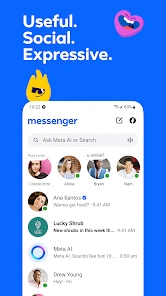
Once you're in, you'll notice that the app's layout is super user-friendly. All your chats are neatly organized, and starting a new conversation is as easy as pie. One of my favorite features is the group chat function. It's perfect for planning events or just goofing around with your squad. You can even customize chat colors and give nicknames to your friends – it's the little things that make conversations more fun!
More From Our News Desk

Clash of Clans Is Won Between the Battles

Android Auto Makes the Case for Quieter Car Software

MobiOffice: Transforming Mobile Productivity with Seamless Integration

EA SPORTS FC™ Mobile Soccer: Redefining Mobile Sports Gaming

How Microsoft OneDrive Became a Mobile Productivity Giant

How Google Translate Breaks Language Barriers Effortlessly
Another cool feature is the array of stickers and GIFs at your disposal. Sometimes a picture (or a sticker) is worth a thousand words, right? Plus, Messenger now has a "Secret Conversation" mode, which encrypts your messages for those times when you need that extra layer of privacy.
What Keeps It Useful Month to Month
One thing I appreciate about Messenger is its ability to keep me connected beyond just chatting. You can share your location, which is super helpful when you're trying to meet up with friends. And let's not forget the "Stories" feature, where you can share snippets of your day with your contacts. It's like a mini social media platform within the app!
But that's not all – the app also has a convenient payment feature. You can send and receive money right within your chat, which is perfect for splitting bills or sending a quick gift. It's all about keeping everything in one place, which is exactly what Messenger does best.
When It Becomes Too Much
All in all, Messenger is a versatile communication tool that's hard to beat. It's packed with features that cater to both casual users and those who like to stay connected on a deeper level. Whether you're sending a quick "hi" or catching up with a long-lost friend over video, Messenger has got your back. So, why not give it a whirl? You might just find it's the perfect addition to your app collection.
A Realistic Day-to-Day Test
Its recurring value becomes clearer in a small, ordinary situation: I’m arranging to meet friends after work. I can use a group thread to settle on a time, send my location when I’m nearby, and switch to a call if messages are causing confusion. That sequence is convenient because the conversation stays together rather than being scattered across texts and a separate calling app. It works best when the group already checks Messenger; if half the people ignore it, the same thread becomes another place to chase replies.
For family or friend groups that share plans, the combination of chat, voice and video is a sensible reason to keep it installed. It is less compelling as a replacement for every communication tool. A basic SMS app is often simpler for reaching people who do not use Messenger, while a service chosen specifically for private communication may suit someone who prioritizes privacy settings over social features. I would not choose an app just because it has more ways to react; the useful question is whether the people I contact are actually there.
Making Group Chats Easier to Use
For an event, I find it helps to turn the group thread into a practical record rather than a running stream of every thought. Keep the key time and place in a plain message, and use expressive replies for reactions instead of burying the plan in stickers. If plans change, send the new detail clearly in the same conversation. That small distinction can save people from scrolling through a lively chat to work out where to meet.
Group messaging is not always the best format for a decision that needs one clear answer. When several people reply at once, a direct question to the person who needs to confirm may be more effective than adding another message to the thread. I use the group for shared context and coordination, then switch to a one-to-one chat or call when a detail needs a specific response. That is a practical way to get the convenience of a group without expecting it to organize itself.
Small Habits That Reduce Friction
Group chats can become noisy when every side conversation lands in one place. I find it helps to keep a thread focused on a clear purpose—such as a trip or an ongoing family plan—and move unrelated conversation elsewhere. Custom colors and nicknames can make overlapping chats easier to recognize, but they do not replace checking who is in a group before sharing something intended for only one person. That extra glance is a small habit with real value when several conversations are active.
Location sharing is most useful as a short-lived coordination aid: I can send it when meeting someone, then return to ordinary messaging rather than treating location as a permanent update. Likewise, stickers and GIFs are good for adding tone when a brief reply might sound abrupt, but they can make practical details harder to scan. For an address, time, or payment arrangement, I prefer a plain sentence that is easy to find later.
Privacy, Payments, and the Trade-Offs
The privacy and payment tools deserve a little care rather than automatic trust. The original article describes Secret Conversation mode as encrypted, but I would treat that as a specific option to understand and select, not as a reason to assume every conversation has identical privacy protections. Before sending sensitive information, I check which chat I am using and whether its available settings fit the situation. For money, I use the in-chat option only when it is available and suitable for the people involved; for a simple split, I still make sure the amount and recipient are clear before confirming anything.
Another practical consideration is attention. Stories, expressive reactions, and active group threads can make one app feel like several destinations at once. If I mainly want reliable one-to-one messages, those extras may feel like clutter rather than value. It is reasonable to limit which conversations deserve notifications and to leave the app unopened when there is no reason to check it; the best routine is one that keeps contact convenient without turning every spare moment into a refresh.
Choosing Between Messenger and Other Chat Apps
Compared with SMS, Messenger is more engaging for groups and offers a richer mix of calls and expressive replies, but SMS remains the straightforward fallback when a contact is not on the same service. Compared with a minimalist messenger, Messenger can feel busier because social features sit alongside practical conversations. That is not automatically a flaw: if your circle shares Stories or uses group threads regularly, those extras may be part of the reason the app earns a place. If you want a quiet inbox, they may be distractions you would rather avoid.
I would not choose based on feature count alone. The better test is to notice where your conversations already happen and whether switching apps would make coordination easier or harder. A person who needs to reach relatives, friends, and Facebook contacts in one familiar place may find the compromise worthwhile. Someone whose priority is a narrowly focused private chat experience may prefer a service built around that priority, while keeping Messenger for the contacts who are only reachable there.
Who Should Keep It Installed
Messenger earns lasting space for people whose friends, relatives, or community groups already rely on it, especially when they regularly use calls, group planning, and quick location sharing. It can also be handy as a companion to Facebook connections, rather than a universal replacement for texting. If your contacts are spread across different services, or if you prefer a quieter app with fewer social extras, you may be happier using a simpler messaging option and keeping Messenger only for the people who need it.
It is free to download, while in-app purchases are listed from five cents to $739.99 per item, so I would check the purchase prompt carefully rather than assume every optional item is free. Its current version is 563.0.0.47.86, and the 4.7 average across roughly 112 million ratings suggests broad appeal, not a guarantee that its design suits everyone. With around 2.5 million written reviews, it is plainly a familiar choice; familiarity is useful only when it makes your actual conversations easier.
Keeping the App Manageable
The maintenance burden is less about complicated setup and more about deciding what deserves your attention. I would begin by keeping useful group threads distinct, muting conversations that are active but not urgent, and reviewing notification choices when the app starts pulling me back too often. This is a simple way to preserve the convenience of a shared family or event chat without treating every reaction as a request for an immediate answer. A messaging tool should fit around the day, not set its pace.
It is also worth separating the app’s practical role from its optional social side. If Stories are not useful to you, there is no need to make them part of your routine just because they are available. Likewise, a payment option is handy for a suitable exchange, but it should not replace checking the recipient and amount. Messenger works best, in my view, when I use the features that solve an actual problem and ignore the rest.
My Long-Term Verdict
Messenger’s strongest case is habit: when the people I care about are already there, the app makes it easy to move from a short message to a group discussion or a call without changing tools. Its weaker side is the extra social activity and the need to pay attention to privacy, purchases, and noisy threads instead of assuming every feature is right for every moment. I would keep it for the contacts and routines that genuinely benefit from it, not out of obligation to use every option. That is the test I use for any app that wants a permanent place on my phone: after the first-week novelty fades, does it make regular life simpler? For Messenger, the answer is yes when my circle uses it—and no when it becomes one more inbox I have to maintain.
Messenger Frequently Asked Questions
Can I choose which notifications Messenger sends me?
Messenger is designed for ongoing conversations, so notifications can help you notice incoming messages and calls. Before downloading, consider whether you want alerts throughout the day and check the app’s notification controls and your device settings after installation. Adjusting them to suit your routine can make it easier to stay reachable without letting every conversation interrupt you.
Can I use Messenger for group conversations and calls?
Yes. Messenger supports group chats as well as voice and video calling, making it useful for keeping several people in one conversation. You can also share photos, videos, and voice messages, so a group can exchange more than text. If you plan to use it with friends or family, their availability on Messenger will shape how convenient those conversations are.
Does Messenger let me share photos, videos, and other media?
Messenger supports sharing photos, videos, and voice messages, along with expressive options such as GIFs, stickers, and emojis. These tools can make conversations feel more personal than text alone. Keep in mind that media sharing can use mobile data and take up space on your device, so consider your connection and storage if you expect to exchange a lot of content.
How much storage and mobile data might Messenger use?
Messenger needs space on your device for the app and may use additional storage as you exchange messages and media. Sending or receiving photos, videos, and voice messages can also use mobile data, particularly when you are away from Wi-Fi. If you have a limited data plan or device storage, check those settings before downloading and consider using Wi-Fi for media sharing.
Can I use Messenger to contact people who do not have the app?
Messenger is built around communicating with people through the app, including conversations and calls. To make use of its messaging features with someone, they need a way to receive and respond to your message through Messenger. If you are choosing it for a particular group of friends or family, it is worth checking whether they use the app before making it your main way to stay in touch.
Pros
- User-friendly interface
- End-to-end encryption for privacy
- Seamless integration with Facebook
- Variety of chat features
- Customizable notifications
Cons
- Consumes significant battery life
- Frequent updates needed
- Ads can be intrusive
- Limited file sharing size
- Can be data intensive

- Category
- Communication
- Version
- 563.0.0.47.86