McDonald's Offers and Delivery
- 4.03K
- 4.3
- Installs
- 50.00M
- Price
- Free

Screenshots

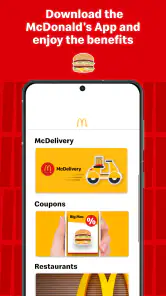
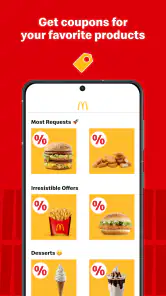
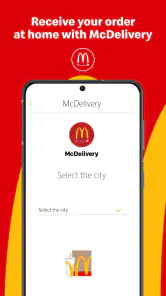
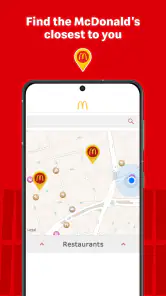
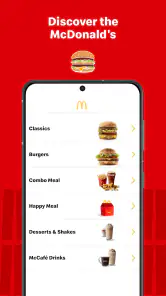
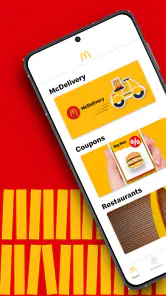

Analysis by Reviewed
For me, the most useful reason to open McDonald's Offers and Delivery is simple: I can check the available discounts before deciding what to order. That changes the app from a digital menu into a practical way to plan a McDonald’s meal around the offers on screen. It is a free Food & Drink app from Arcos Dorados, and its focus on coupons and promotions is most valuable when I’m already considering a visit or order—not when I’m looking for a general restaurant guide.
Let the offer guide the order
I’d treat the offers as a starting point, then check the menu and decide whether the deal actually suits the people eating. A coupon only helps if it matches what you want and the way you plan to get your food. Before heading out, I’d review the app while I still have time to choose; that avoids making a rushed decision at the counter based on a promotion I haven’t read carefully.
One useful habit is to check the available deal before settling on a particular meal. If I’m choosing lunch for myself, I can compare the promotion with my usual order and decide whether the saving is worth changing plans. For a family or group, I’d check each person’s preferences first rather than assume one offer will fit everyone. That small step makes the app more useful without turning a quick meal into a hunt for discounts.
A realistic moment when it helps
Imagine I’m finishing work and deciding whether to stop at McDonald’s on the way home or order food. I can open the app, look at the promotions, and use them to make that decision before I leave. If an offer fits, I have a reason to choose that meal; if none does, I can stick with my normal plan instead of buying something only because it looks discounted. The best use of a coupon is a meal you wanted anyway, at a better value.
This approach is also helpful when plans change. If I’m already near a restaurant, checking the app first can inform whether a promotion makes a quick stop worthwhile. If I’m at home, it can help me decide whether to order or cook. The app is most useful as a decision aid, not a promise that every meal will be cheaper or that every promotion will suit every visit.
Where it fits—and where it doesn’t
Compared with a general food-delivery app, this one is focused on McDonald’s promotions rather than helping me compare a wide range of restaurants. That narrow focus is a plus when I know what I’m craving and want to check for an offer. It is less useful when I’m undecided about cuisine, want to compare independent restaurants, or simply need the broadest choice nearby. In those situations, a multi-restaurant service or a regular web search is a better first stop.
I’d also avoid treating a displayed coupon as a guarantee that it applies to every order or situation. Read the offer details and check that it matches what you intend to buy before relying on it. That is a sensible step with any promotion, and it matters especially when you are choosing between a quick pickup and delivery. If saving money is the only reason for opening the app, take a moment to compare the offer with your normal order instead of adding food you would not otherwise want.
More From Our News Desk

Clash of Clans Is Won Between the Battles

Android Auto Makes the Case for Quieter Car Software

MobiOffice: Transforming Mobile Productivity with Seamless Integration

EA SPORTS FC™ Mobile Soccer: Redefining Mobile Sports Gaming

How Microsoft OneDrive Became a Mobile Productivity Giant

How Google Translate Breaks Language Barriers Effortlessly
Getting Started and Making the Most of It
First things first, downloading the app was a breeze. It’s available on both Android and iOS, so no matter what device you’re rocking, you’re covered. Once installed, the setup was straightforward. I just had to create an account or log in if you already have one. This process was quick, and within a few minutes, I was ready to explore the app.
Making a useful offer check
The practical value of a coupon depends on when I check it. I’d browse before leaving home or before deciding what to order, not while people are waiting behind me. That gives me time to read the conditions and compare the deal with my usual choice. It also makes it easier to abandon the promotion if it pushes me toward an order that does not suit my appetite or budget.
For a shared meal, I find it helpful to separate the decision into two parts: first decide what the group would actually eat, then see whether an offer matches. This avoids letting one appealing discount take over the whole order. If it fits only one person’s meal, it may still be worthwhile, but I would judge it on that basis rather than assume the entire group benefits.
When choosing between going to a restaurant and ordering, I’d check the offer first and then confirm that the option I plan to use makes sense. Promotions can have conditions, so I would not assume that a deal works identically for every way of ordering. The useful takeaway is simple: read the wording before building plans around it, and keep a backup choice in mind if the coupon does not fit.
Exploring the Features
The app puts deals at the center of the experience. I’d use the offers as a quick reason to revisit a familiar order, while still checking the menu rather than treating every promotion as an automatic bargain. The balance matters: a discount can be helpful, but a lower price is not much of a saving if it leads me to buy something I did not want.
Order customization can also matter when a standard meal needs a small adjustment. If I want to change an ingredient, I would make that decision while reviewing the order, before committing to it. That is more reliable than remembering a request at the last moment. The app’s usefulness here is practical rather than dramatic: it can make an order feel more suited to me, but I should still review the final choices carefully.
Location-based options are especially relevant when I’m away from my usual area. Rather than assuming a familiar restaurant is nearby, I can use the app to orient myself toward a McDonald’s outlet. I’d still check the details shown for the place I intend to visit, especially if I am in a hurry. This is a focused convenience for someone who already wants McDonald’s, not a substitute for a broad map or a tool for comparing every nearby place to eat.
Delivery, pickup, and the decision before checkout
For delivery, the app is most helpful when I want to keep the process in one place: consider an offer, choose food, and follow the order if tracking is available. Seeing progress can be reassuring when I’m waiting at home, but I would treat any arrival estimate as a guide rather than a reason to plan something time-critical around the meal.
Pickup and delivery solve different problems. If I’m already passing a restaurant, stopping in may be more convenient than waiting at home; if I’m settled in and do not want to go out, delivery may suit me better. I’d make that choice first, then see whether the promotion supports it. A coupon should not be the only factor, because convenience, timing, and what the people eating actually want can matter more than a small saving.
Before confirming an order, I’d take a final look at the items and any selected changes. This is a useful habit whenever ordering on a phone: it catches a mismatched meal or an adjustment I did not mean to make. I would also read the offer conditions at that stage rather than assume the discount has carried through simply because I saw it earlier.
Performance and Usability
I was quite impressed with how smooth the app runs. Navigating through the menu was a piece of cake, and the overall user interface is clean and intuitive. Even if you’re not tech-savvy, you’ll find it easy to use. The app is also pretty lightweight, so it doesn’t hog much space on your phone, which is always a bonus.
However, like any app, it’s not without its quirks. There were a couple of times when the app took a little longer to load, especially during peak hours. But honestly, given the wealth of features it offers, this was a minor inconvenience.
That occasional wait changes how I’d use it in a crowded or rushed situation. I would check the promotion before reaching the counter instead of relying on the app to load at the exact moment I need to order. If it is slow, having already thought through a regular choice makes the delay less frustrating. For a quick visit, this bit of preparation is more valuable than repeatedly refreshing the screen.
A measured recommendation
All in all, the McDonald's Offers and Delivery app is a must-have for any fast-food lover. It brings the convenience of delicious meals right to your doorstep while offering some sweet deals on the side. While there’s some room for improvement in terms of load time, the app’s benefits far outweigh the minor hiccups. So next time you’re craving some McDonald’s, give this app a whirl. Trust me, your taste buds will thank you!
Who will get the most from it
I’d recommend it most to people who already visit McDonald’s now and then and want a quick way to check promotions before ordering. The app has an average rating of 4.3 from around 1.7 million ratings, and it has been installed over 50 million times. Those figures suggest a broad audience, but they don’t mean the offers will be equally useful to everyone. It is rated for Everyone, and version 4.24.0 requires Android 10 or later; the app first arrived on March 27, 2017.
If you rarely eat at McDonald’s, you may not get enough from it to justify keeping another app on your phone. The same goes for anyone who prefers choosing among many restaurants or wants to plan a meal without promotions influencing the decision. For regular customers, though, opening the app before ordering is a low-effort check that can make a familiar choice feel more worthwhile. Just keep the focus on what you actually want to eat, and let a suitable offer help—not dictate—the decision.
Questions worth settling before you rely on it
Is it useful if I only want to browse? Yes, if you are considering McDonald’s and want to see whether an offer changes your mind. If you are looking for dinner ideas across different cuisines, it is too narrow to be your main browsing tool. I’d use a general restaurant service to explore options, then open this app when I already know McDonald’s is a serious possibility.
Does an offer automatically mean the cheapest choice? Not necessarily. I would compare the promotion with my normal order and read its conditions, then decide whether the food itself makes sense. The app can help me notice a deal, but it cannot make an unwanted purchase worthwhile. That distinction is especially useful when ordering for other people, whose preferences may not match the featured promotion.
Should I use it for every visit? I would, if checking takes little effort and I am already planning to order. I would not let the search become a chore or delay a meal when I have already made up my mind. A quick look is enough; if nothing fits, I can move on without feeling that I have missed something essential.
My bottom line for regular customers
What I like most is the narrow, understandable purpose: this is a way to check McDonald’s deals and make a more informed choice, not a guide to the whole food scene. That focus keeps it useful for regular customers, while naturally limiting its value to people who rarely eat there. As a free app from Arcos Dorados, it is easy to try if promotions are relevant to your routine.
I’d keep it on my phone if I order from McDonald’s often enough to benefit from checking before I choose. I’d skip it if I prefer independent restaurants, want a single app for every takeaway option, or find that promotions tempt me into spending on food I did not plan to buy. Used with a little restraint, it can make a familiar meal more convenient to consider. The best result is not chasing every coupon; it is spotting one that genuinely suits the meal I already wanted.
McDonald's Offers and Delivery Frequently Asked Questions
What should I check before installing McDonald's Offers and Delivery?
Before downloading, make sure your device runs Android 10 or later and that the app is available in your country. McDonald's Offers and Delivery is a Food & Drink app from Arcos Dorados, focused on McDonald's promotions and ordering options. Checking compatibility and regional availability first can help you decide whether it suits your device and the services you want to use.
Is McDonald's Offers and Delivery suitable for children?
The app has an Everyone age rating, so its stated content category is suitable for a broad audience. It focuses on McDonald's offers and food-ordering experiences. Parents may still wish to guide younger users when they browse deals, select food, or use ordering features, especially if the app is being used on a shared device.
Does McDonald's Offers and Delivery require an account to use its features?
The app brings McDonald's promotions and ordering options together on a phone, making it useful for people who want to browse offers or place orders. For ordering, the app's flow may ask you to create an account or log in. If you are mainly interested in exploring discounts, install the app and see which options are available in your region.
Is McDonald's Offers and Delivery free to download?
Yes, the app is free to download. It is designed for people who want to explore McDonald's offers and ordering options from their phone, with discounts and coupons highlighted as a central feature. Before installing, check that your device meets the app's operating system requirement. The app is rated for Everyone, making its stated age category suitable for a broad audience.
What devices can run the McDonald's Offers and Delivery app?
The app is available for Android devices running version 10 or later. Checking your device's operating system before downloading can help avoid compatibility problems. McDonald's Offers and Delivery is a Food & Drink app from Arcos Dorados, and its focus is on bringing McDonald's promotions and app-based services together in one place.
Pros
- Exclusive offers and discounts available.
- Fast and convenient food delivery service.
- User-friendly interface for easy navigation.
- Customizable orders to suit preferences.
- Real-time order tracking available.
Cons
- Limited delivery areas and locations.
- Occasional app crashes and bugs.
- Menu items may vary by location.
- Delivery fees can be relatively high.
- Requires internet connection to function.

- Category
- Food & Drink
- Version
- 4.24.0