foodpanda: food & groceries
- 9.18K
- 4.1
- Installs
- 100.00M
- Price
- Free

Screenshots

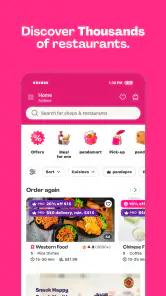
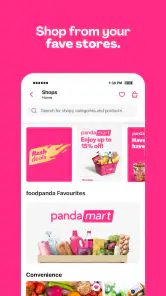

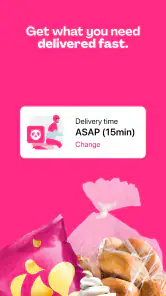
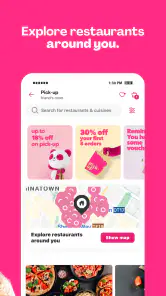
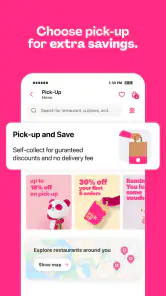
Analysis by Reviewed
When I use a delivery app, the tricky part is often not choosing dinner but figuring out whether the order will work smoothly from start to finish. foodpanda: food & groceries brings restaurant meals and grocery shopping together, which can save a trip when I’m busy or staying in. It is a free Food & Drink app from Foodpanda GmbH, a subsidiary of Delivery Hero SE, and its focus is practical convenience rather than a complicated planning system.
Where orders can get stuck
The broad choice is useful, but it can also make the first decision harder: restaurant delivery and grocery shopping serve different needs, and browsing without a plan can turn a quick order into a long scroll. I get more out of the app when I decide what I need first, then compare the relevant options rather than treating the whole catalog as one menu.
It also helps to review the cart before placing an order. Check that the selected items and any customizations match what you intended, especially when ordering for more than one person. This simple pause can prevent a frustrating mismatch between what you thought you added and what you actually requested. If an option or item is unavailable, choosing another suitable listing is more practical than building a meal around something you cannot order.
Setup checks that save time
Getting started is generally straightforward, but the useful check is whether the app is showing the right context for your order. Confirm your delivery details before browsing deeply, then look through the choices that are actually relevant to where you are. That way, you are less likely to spend time planning around a restaurant or grocery selection that does not suit the order you intend to place.
The app is rated for Everyone, and its current version is 25.48.1, with Android 6.0 listed as the minimum operating-system requirement. It has been available since November 19, 2013, and has grown to over 100 million installs. I see those figures as signs of a well-established service, not a promise that every restaurant, grocery option, or delivery experience will be identical in every area.
Recovering a workflow when something feels off
If an order flow seems confusing, I would first retrace the steps rather than immediately start over: check the selected items, the delivery details, and the payment choice. The app offers several payment methods, including cards and cash on delivery, so confirming the method you meant to use can prevent an avoidable last-minute snag. If a screen does not respond as expected, closing and reopening the app is a reasonable basic troubleshooting step; I would also check that the connection is working before assuming the order itself is the problem.
For a planned meal or grocery run, scheduling can be more useful than placing an order at the moment you need it. I would still treat a scheduled order as a convenience, not a guarantee against every change in availability or timing. For an everyday example, if I know I will be working through dinner, I can choose the meal earlier and arrange the order around that plan instead of interrupting work to browse while hungry.
More From Our News Desk

Weather by Xiaomi Review: Clear at a Glance, Less Clear Up Close

X Under Pressure: Can It Recover When Posting Goes Wrong?

Clash of Clans Is Won Between the Battles

Android Auto Makes the Case for Quieter Car Software

MobiOffice: Transforming Mobile Productivity with Seamless Integration

EA SPORTS FC™ Mobile Soccer: Redefining Mobile Sports Gaming
When a different option makes more sense
Compared with calling a restaurant directly, using the app puts browsing, customization, and ordering in one place. That is handy when I want to compare choices without making several calls. A grocery store visit, on the other hand, gives me direct control over selecting fresh items; if choosing each piece of produce matters more to me than saving the trip, shopping in person may be the better fit.
I would also skip delivery when I have a strict budget and can pick up food myself, or when I need a particular item that is not shown among the available choices. Delivery is most valuable when the saved time or effort is worth more to me than handling the errand personally. Grocery delivery is especially useful for planned essentials, while a quick shop can be preferable when I need to inspect substitutions or make a very specific selection.
Using foodpanda for meals and groceries
Ever found yourself sitting at home, craving your favorite meal but feeling too lazy to step out? Enter foodpanda: food & groceries, the app that’s got you covered when hunger strikes without warning. Let me take you through my experience with this lifesaver of an app.
Getting Started with foodpanda
First things first, downloading and setting up foodpanda was a breeze. Available on both Android and iOS, the app took no time to install and get running. Once inside, the interface was super intuitive. I didn’t have to second guess where to find what—everything was laid out in a user-friendly manner. Creating an account was straightforward, and I was ready to dive into the world of food and grocery delivery.
Exploring the Menu
Once logged in, the variety of options was staggering. From local eateries to international chains, foodpanda connects you to an impressive range of restaurants. I was like a kid in a candy store, scrolling through endless cuisines. Whether you're in the mood for a juicy burger or a fresh sushi roll, chances are, you'll find it here.
Ordering Made Simple
Ordering on foodpanda is as simple as it gets. Just pick your meal, customize it if needed, and add it to your cart. The app also offers an option to schedule deliveries, which is perfect if you’re planning a future meal or grocery run. When it comes to payment, you’ve got multiple choices, from credit cards to cash on delivery. The flexibility is fantastic, and I found this feature particularly convenient.
Delivery Experience
Now, let’s talk about delivery. One of the standout features of foodpanda is the real-time tracking. You can see exactly where your food is, which is reassuring when you're ravenous. The delivery time was impressive as well. My order arrived hot and fresh, right on time. The delivery personnel were courteous, adhering to all safety protocols, which was a relief.
Groceries at Your Doorstep
Apart from meals, foodpanda also excels at delivering groceries. This feature is a true game-changer. From fresh produce to household essentials, you can get your shopping done without leaving the comfort of your home. The quality of the products was top-notch, comparable to what you’d handpick from the store yourself.
Final Thoughts
In a world where convenience is king, foodpanda shines bright. It’s more than just a food delivery app; it’s a lifestyle companion. Whether you’re ordering dinner or stocking up your pantry, it’s a reliable partner in making your life easier. So the next time you’re hit with a craving or a grocery list that’s a mile long, you know who to call. Here’s to good food, hassle-free shopping, and more time to enjoy what you love!
Who will get the most from it?
I think this app is best for people who value having meal and grocery options together and want to handle an errand from home. It can suit a busy evening, a day when leaving the house is inconvenient, or a household that needs a few essentials alongside dinner. Someone who prefers comparing menus before choosing may also appreciate browsing in one place.
On the other hand, it is not the right answer for every meal. If I already know exactly what I want from a nearby place, ordering directly or collecting it myself may be simpler. If timing is critical, I would avoid treating any delivery estimate as a certainty and leave room for delays. The average rating is 4.1 from around 3.5 million ratings, with about 9,200 written reviews; that suggests many people use it, while individual experiences can still vary.
Making a mixed order easier to manage
When I am deciding between a prepared meal and groceries, I find it useful to think in terms of the job each order needs to do. A restaurant order is the straightforward choice when I want dinner ready without adding cooking or cleanup to a busy day. Groceries make more sense when I am filling a gap at home and can turn the delivery into several meals or useful basics. Keeping those goals separate makes browsing less distracting and helps me avoid adding extras just because they happen to catch my eye.
A practical routine is to make a short list before opening the grocery options, then check the cart against it before checkout. I would group essentials mentally by purpose—something for tonight, something for breakfast, or a household item—rather than trying to remember everything while scrolling. This is especially helpful when ordering for other people: ask about dietary preferences or must-have items first, then verify the final cart together. It is a small habit, but it reduces the chance that a convenient order arrives without the one item the household actually needed.
Choosing between app browsing and a direct order
The main advantage over calling places one by one is comparison: I can look across available restaurant choices and make a decision without switching between conversations. The trade-off is that a restaurant’s own menu or direct ordering route may be preferable if I have a specific question or a familiar request that needs clarification. I would use foodpanda when the choice is still open and convenience matters; if the order is unusual or exact details matter, I would contact the restaurant through a channel that lets me confirm them clearly.
For groceries, the comparison is different. A local shop gives me the chance to inspect every item and change my mind aisle by aisle, while delivery saves the trip and can make a planned essentials run easier. I would reserve delivery for products where a reasonable alternative is acceptable, and choose in-person shopping for produce or other items where I care about the exact piece. That distinction makes the service more useful, not less: it helps me use delivery where its convenience is strongest rather than expecting it to replace every kind of shopping.
Small checks that prevent avoidable confusion
Before confirming an order, I would read the cart from top to bottom rather than relying on the last thing I remember tapping. For food, that means checking the number of dishes and any chosen customizations; for groceries, it means checking quantities and whether the list still covers the reason I opened the app. If I am ordering for a group, I would also make sure everyone has settled on the same plan before placing the order. These checks are more useful than rushing through checkout and trying to correct a mistake afterward.
If something appears unavailable or a screen behaves unexpectedly, I would avoid repeatedly tapping the same control. First check whether the item is still in the cart and whether the delivery details remain correct. If the app seems stuck, a stable connection and a close-and-reopen are sensible first steps. For an order that matters, I would keep the confirmation details available and use the relevant in-app help or order support if the basic checks do not resolve the issue, rather than placing a duplicate order in a hurry.
Who may prefer another approach?
This is less compelling for someone who lives near the shop or restaurant they already prefer, has time to go there, and values choosing items personally. It may also be a poor match for a very tight schedule: even a convenient ordering flow cannot make delivery the same as having food in hand immediately. In those situations, pickup, a direct call, or a quick visit gives me more control over the timing and the exact selection.
It is also worth separating app friction from the wider delivery process. A slow screen can sometimes be a connection issue, while an unavailable choice may reflect what can be served or supplied at that moment. I would check the basics before blaming the app, but I would not keep troubleshooting endlessly if the order is time-sensitive. Switching to a backup meal or buying essentials nearby can be the more sensible response than spending the evening trying to force one option to work.
My practical verdict
My advice is to use foodpanda with a clear purpose: choose a meal, plan a grocery list, or schedule ahead when that suits your day. Check the cart and delivery details before submitting, and keep a backup plan if the order is important or time-sensitive. With those small habits, it can be a convenient alternative to calling around or making a separate trip, without pretending that delivery replaces the control of shopping or collecting items yourself.
Overall, I see it as a useful option rather than an automatic first choice. It is at its best when I want to compare available meals, combine a planned essentials run with staying home, or avoid interrupting a busy stretch of the day. It is not the tool I would rely on for an exact last-minute need or for groceries I want to hand-pick. If that balance suits your routine, the app is worth trying; if control over timing, selection, or direct communication matters more, a local shop, pickup, or direct order may serve you better.
foodpanda: food & groceries Frequently Asked Questions
Does foodpanda offer both food and grocery delivery?
Yes. Foodpanda is designed for ordering restaurant meals and groceries through one app. You can browse the options available from restaurants and grocery stores serving your area, then place an order for delivery. The selection depends on your location, so what you see may vary from one address to another.
What should I check before placing my first order on foodpanda?
Before ordering, enter your delivery address and review the restaurants or grocery stores available nearby. Check the items in your basket, any delivery details shown, and the payment options offered for your location. The app is free to download, but the cost of food or groceries and any delivery charges are separate from the download.
Is foodpanda free to download, and what devices can I use it on?
Foodpanda is free to download and is available for Android and iOS devices. On Android, it requires version 6.0 or later. The app is rated Everyone, so it is suitable for a general audience. Keep in mind that downloading the app is separate from placing an order; the cost of any food or groceries and related delivery charges depends on your order and location.
What is foodpanda and how does it work?
Foodpanda is a popular food and grocery delivery app available on Android and iOS. It connects users with local restaurants and grocery stores, allowing them to order meals and groceries directly through the app. Users can browse various menus, customize their orders, and track deliveries in real-time. The app offers a convenient solution for those looking to enjoy food from their favorite local eateries or get groceries delivered to their doorstep.
Is foodpanda available in my location?
Foodpanda operates in numerous cities across multiple countries, but its availability depends on your specific location. To check if foodpanda services are available in your area, you can download the app and enter your address or visit the foodpanda website for more information. The app continues to expand its reach, so even if it's not available now, it may be in the future.
Pros
- Wide variety of restaurants to choose from.
- User-friendly interface and easy navigation.
- Quick delivery with real-time tracking.
- Frequent discounts and offers available.
- Multiple payment options for convenience.
Cons
- Delivery fees can be high in some areas.
- Limited restaurant options in rural areas.
- Occasional delays during peak hours.
- Customer support could be more responsive.
- App sometimes crashes unexpectedly.
- Category
- Food & Drink
- Version
- 25.48.1