Swiggy: Food Instamart Dineout
- 3.41K
- 4.6
- Installs
- 100.00M
- Price
- Free

Screenshots

Analysis by Reviewed
In the first few days, Swiggy: Food Instamart Dineout can feel like a handy answer to several small errands: choosing dinner, filling a gap in the pantry, or sorting out a meal with friends. I find that combination appealing because it gives me a reason to open one app for different plans, rather than keeping separate tools for ordering food and browsing groceries. The real test, though, is whether that convenience still helps once the novelty of having everything together wears off.
When the all-in-one approach helps
A realistic use case is getting home late, realizing there is nothing ready to eat, and remembering that breakfast supplies are running low too. I can look for a prepared meal and add a few grocery essentials to a separate plan instead of turning the evening into a trip to the shops. That works best when I decide what is urgent first: a ready-to-eat dinner solves tonight, while groceries are for later. Treating both as one impulse order can make the cart less focused than it needs to be.
This setup suits busy households, people living alone, and anyone who values having food, grocery shopping, and restaurant plans in one place. It is less compelling if I usually cook from a planned weekly shop, prefer choosing produce in person, or already have a delivery service that meets my needs. For a single missing ingredient, a nearby shop may be quicker and simpler; for a special meal, browsing restaurants directly can be more useful than opening a broad food app.
The Latest on Swiggy: Food Instamart Dineout
Keeping the habit useful
After the first week, I would judge Swiggy by whether it improves an ordinary routine rather than by how many options it displays. One practical habit is to make a short grocery list before opening Instamart, then use the app to check whether it is worth ordering those items together. This reduces aimless browsing and helps separate genuine convenience from the temptation to add snacks or extras. For restaurant meals, I would compare the final order details and delivery estimate before committing, rather than choosing only by the dish photo or discount.
The Dineout side serves a different occasion from delivery: it is for planning a meal out, not simply solving hunger at home. That distinction matters when comparing Swiggy with a restaurant’s own booking route or a dedicated local dining option. A combined app is convenient when I am already deciding between staying in and going out, but someone who values detailed restaurant research may prefer a service focused only on dining. Availability and the usefulness of offers can also depend on where I am, so I would check the actual choices for my location before making plans around them.
What is Swiggy: Food Instamart Dineout?
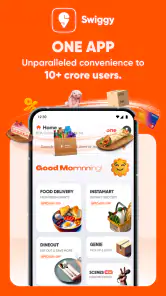
So, what's all the fuss about? Swiggy is an app that has brilliantly combined food delivery and grocery shopping into one seamless experience. Imagine being able to order your favorite dish from the comfort of your couch, while also picking up some essentials for tomorrow's breakfast. Yep, that's exactly what Swiggy offers!
Food Delivery at its Best
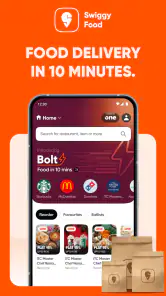
The food delivery section of the app is a lifesaver. With a wide range of restaurants to choose from, you can satisfy any craving. Whether you're in the mood for some spicy Indian curry, a cheesy Italian pizza, or just a simple salad, Swiggy's got you covered. The app is super easy to navigate – just browse through the options, pick your meal, and voila! It’s on its way to you.
More From Our News Desk

Android Auto Makes the Case for Quieter Car Software

MobiOffice: Transforming Mobile Productivity with Seamless Integration

EA SPORTS FC™ Mobile Soccer: Redefining Mobile Sports Gaming

How Microsoft OneDrive Became a Mobile Productivity Giant

How Google Translate Breaks Language Barriers Effortlessly

Why Google Sheets Is the Ultimate Mobile Productivity Tool
Introducing Instamart
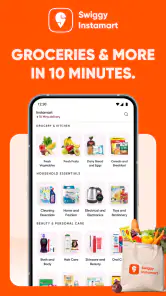
Now, let’s talk about the Instamart feature. This part of the app allows you to shop for groceries as if you were at your local supermarket, minus the long checkout lines. Need some fresh veggies, bread, or even some late-night snacks? Instamart lets you add them to your cart and have them delivered in a jiffy. It’s perfect for those "oops, I forgot to buy milk" moments.
Dineout for the Social Butterfly
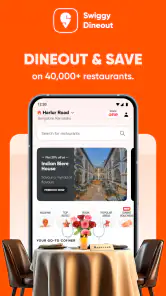
If you're someone who enjoys eating out but hates the hassle of making reservations, the Dineout feature is a game-changer. It lets you reserve tables at some of the best restaurants in town, ensuring you never miss out on a great dining experience. Plus, there are often exclusive discounts and deals available when you book through the app.
What to expect from regular use
Swiggy is free to download, and its Everyone content rating makes it suitable for a broad audience. Developed by Swiggy, it has been available since June 16, 2015; the current version is 4.96.4, and it requires Android 7.0 or later. Its 4.6 average from around 11 million ratings and more than 100 million installs suggest that it has become a familiar choice for many people, though popularity does not guarantee that every local restaurant or grocery selection will suit you.
The short-term appeal is easy to understand, but recurring value depends on how often you genuinely need each part. If I rarely eat restaurant food and shop for groceries in person, the app may not earn a regular place in my routine. If I use delivery occasionally, Instamart for forgotten basics, and Dineout when arranging a group meal, the combination has more staying power. I would still avoid opening it just to browse when I have no plan; that is when convenience can turn into an unfocused order.
Small trade-offs that matter over time
One thing I would keep in mind is that a smooth interface does not remove the need to check the details of each order. Restaurant menus, grocery items, and dine-in arrangements serve different needs, so I would confirm the selected items and the plan before placing an order or booking. When timing is tight, I would also keep a backup in mind rather than assume any delivery or table reservation will fit a fixed schedule. Those checks take little effort and make the app more dependable as a tool instead of a substitute for planning.
Compared with using separate restaurant, grocery, and booking apps, Swiggy’s main practical advantage is having these different tasks under one roof. The trade-off is that an all-in-one service may not be the best place for every task: a physical store gives me direct control over grocery selection, while a restaurant’s own channels can be preferable when I want to deal with that venue specifically. I see Swiggy as a useful default for everyday convenience, not a reason to abandon alternatives that work better for a particular meal or shopping trip.
Making each section earn its place
For me, the best way to avoid letting an all-in-one app become clutter is to give each section a clear job. Food delivery is for meals I have decided I want someone else to prepare; Instamart is for a short list of things that would otherwise interrupt the day; Dineout is for an outing that already has a date, a group, or a restaurant in mind. This mental split is more useful than treating the three as one continuous shopping experience. It also makes it easier to close the app when the right answer is cooking, walking to a nearby shop, or contacting a restaurant directly.
A small but useful workflow is to check the restaurant or grocery choice before getting distracted by deals. I would first identify the dish or essentials I actually need, then compare the final order details and the available alternatives. A discount can make a planned purchase more attractive, but it is not a reason to add something I would not otherwise buy. For Dineout, I would treat an offer as a bonus after confirming that the restaurant and timing suit the group, rather than letting the deal choose the evening for us.
One of the standout features of Swiggy: Food Instamart Dineout is its reliability. The delivery times are usually spot on, and the customer service is prompt and helpful if you ever run into any issues. Plus, the app frequently updates its interface, making sure that users have the smoothest experience possible.
When a different option is the better one
There are times when the convenience of ordering is not worth giving up direct control. If I want to inspect fruit or vegetables myself, a physical grocery shop is the more reassuring choice. If I need one basic item immediately, going to a nearby store can avoid the waiting and decision-making involved in delivery. And if a meal out depends on specific details, such as a particular venue or a group’s preferences, checking with the restaurant directly may be simpler than relying on a broad app to cover every part of the plan.
The same applies to people who prefer a highly deliberate weekly routine. Someone who plans meals, shops in person, and rarely eats out may find that Swiggy solves too few recurring problems to justify opening it often. By contrast, a person whose schedule changes from day to day can benefit from having several food-related options ready in one place. I would decide based on my actual week, not on the number of services available: convenience is valuable only when it replaces a real errand or makes a plan easier.
In conclusion, whether you're looking to enjoy a meal at home, stock up on groceries, or dine out with friends, Swiggy has something to offer. It’s a versatile app that makes life a little bit easier, and let's be honest, who doesn't need that every now and then?
My long-term verdict
I would keep Swiggy installed if I regularly use at least two of its roles, or if delivery and dining plans come up often enough to justify having them together. It is especially convenient when a busy day makes a small errand feel like a chore. If I mostly prefer cooking from planned groceries, dislike ordering through apps, or need certainty that a particular local option is available, I would rely on my usual alternatives instead. For me, its lasting value comes from solving a real recurring problem—not from trying every section simply because it is there.
That is why I would judge it over an ordinary month rather than by a particularly convenient first order. If I find myself using one part repeatedly and another only once in a while, that is still a sensible outcome; each section does not need to become a habit. I would keep a simple note of what I actually ordered or booked and whether it saved effort, then adjust my routine accordingly. If the app mostly leads to browsing without a clear need, I would cut back rather than mistake screen time for usefulness.
My overall recommendation is for people who want flexible food options and are comfortable checking the details before placing an order or making a plan. It can be a practical companion for irregular schedules, shared meals, and small grocery gaps, while a dedicated shop, restaurant channel, or dining service may be better for more specialized needs. The lasting benefit is convenience with intention: use the section that fits the moment, keep an alternative for situations where control or certainty matters more, and let the app earn its place through regular usefulness.
Swiggy: Food Instamart Dineout Frequently Asked Questions
Can I download Swiggy for free, and what should I check before installing?
Swiggy is free to download, and its age classification is Everyone. Before installing, check that your phone’s operating system is compatible and that you have enough available storage. The Android version requires Android 7.0 or later. Once installed, you can explore the app’s food delivery, Instamart grocery, and Dineout sections and decide which services suit your needs.
Who develops Swiggy, and is it an established app?
Swiggy is developed by Swiggy and has been available since June 16, 2015. It is a well-established food and drink app with over 100 million installs and an average rating of 4.6 from around 11 million ratings. Those figures offer useful context before downloading, while the app’s usefulness for you will depend on which services are available in your area.
Can I use Swiggy on an iPhone as well as an Android phone?
Swiggy is an app in the Food & Drink category, and it is available for Android and iOS users. The Android version requires Android 7.0 or later. Check the app store on your device for the version compatible with your phone, then set your location in Swiggy to explore food delivery, Instamart groceries, and Dineout options.
What should I expect when I first open Swiggy?
Swiggy brings together restaurant food delivery, Instamart grocery shopping, and Dineout restaurant deals. After opening the app, choose the service that fits your plans and browse the options available for your location. You can explore the different sections before settling on an order or a dining option, which makes the app useful for several food-related needs in one place.
Does Swiggy work the same way everywhere?
The services and choices you can browse depend on your location. Set your area in the app to see which restaurants, grocery options, and Dineout deals are available nearby. This is especially helpful before planning a delivery or a meal out, since the relevant options are tailored to where you are rather than being identical for every user.
Pros
- Wide variety of restaurants available.
- User-friendly interface and easy navigation.
- Fast delivery in most locations.
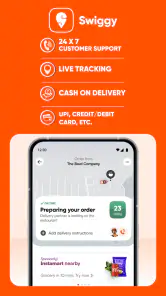
- Real-time order tracking feature.
- Attractive deals and discounts offered.
Cons
- Limited availability in smaller towns.
- Occasional delays during peak hours.
- High delivery charges for small orders.
- Customer service response can be slow.
- App crashes on older phone models.
- Category
- Food & Drink
- Version
- 4.96.4