Blinkit: Grocery in 10 minutes
- 2.03K
- 4.8
- Installs
- 100.00M
- Price
- Free

Screenshots



Analysis by Reviewed
For me, the real test of a grocery app is not the thrill of one fast delivery; it is whether I still find it useful after the novelty wears off. Blinkit is built around quick access to everyday purchases, and that can be genuinely handy when a small gap in the kitchen disrupts a meal. I see its strongest role as a practical backup for immediate needs, rather than a replacement for every planned grocery shop.
When speed becomes a habit
The first week is easy to appreciate: instead of pausing dinner to make a store run, I can check whether the missing item is available and place an order. A realistic example is discovering halfway through cooking that there is no milk or eggs. A rapid delivery can get the evening back on track, while a planned supermarket trip would take more time and a larger shop may be unnecessary.
Over time, I would use it most for top-ups, forgotten essentials, snacks, and household basics—not as my only way to shop. That distinction matters. A quick order can solve an urgent problem, but it does not automatically make it the best place to compare a full basket, choose every piece of produce in person, or plan meals for the week. Keeping a short running list before opening the app also helps me avoid turning a single missing item into a string of impulse additions.
The Latest on Blinkit: Grocery in 10 minutes
What everyday use asks of you
The interface and organized categories make browsing approachable, while search is useful when I already know what I need. My practical tip is to search by the exact item first, then check the relevant category if the result is not what I expected. For a small emergency order, that is quicker than browsing broadly; for a larger top-up, categories can help me spot essentials I might otherwise forget.
There is still a trade-off between convenience and control. With an in-person shop, I can inspect each item and make substitutions on the spot. Ordering through an app is simpler when time matters, but I have to be comfortable choosing from what is displayed and relying on the delivery process. If selecting produce personally is central to how I shop, a traditional store or a scheduled grocery service may suit me better.
Who is likely to keep it installed?
I think Blinkit is a good fit for people who regularly face small, time-sensitive gaps in their groceries, especially when a nearby shop is inconvenient. It may also work well for households that want a quick way to replenish commonly used items between planned shops. I would be less likely to recommend relying on it for someone who prefers one carefully budgeted weekly trip, enjoys comparing brands aisle by aisle, or needs a particular item that is not available in their local selection.
Availability and delivery timing are practical questions to check for your own address and order, rather than assumptions to build into a routine. I would also review the final basket before confirming: speed is useful, but it is easy to overlook an extra item or choose a substitute that does not fit the recipe. That quick check is a small habit that makes repeat use feel more deliberate.
More From Our News Desk

Weather by Xiaomi Review: Clear at a Glance, Less Clear Up Close

X Under Pressure: Can It Recover When Posting Goes Wrong?

Clash of Clans Is Won Between the Battles

Android Auto Makes the Case for Quieter Car Software

MobiOffice: Transforming Mobile Productivity with Seamless Integration

EA SPORTS FC™ Mobile Soccer: Redefining Mobile Sports Gaming
As a Food & Drink app from Blinkit, Blinkit: Grocery in 10 minutes is free and rated for Everyone. Its 4.8 average from around 4.5 million ratings suggests that many people value this kind of convenience, and it has passed 100 million installs. The app was released on December 17, 2014, and version 17.65.0 requires Android 7.0 or later. I would treat those figures as context, not a promise that every order or location will feel the same.
One useful way to decide whether it belongs in your routine is to notice what kind of shopping problem you actually have. If the problem is an occasional missing staple, a quick order can be a sensible fix. If it is that the household has no plan for meals or groceries, opening a delivery app may only solve one symptom at a time. I would use a shared note or a short list on the fridge for recurring essentials, then check that list before ordering. This keeps the app focused on filling a genuine gap rather than becoming the place where I make every food decision from scratch.
Where it fits beside other ways to shop
Blinkit sits in a different lane from a weekly supermarket trip. A local store offers direct inspection and the freedom to change course while browsing; a planned delivery is better suited to building a considered basket around a list. Blinkit’s value is strongest when the task is narrower and the need is nearer-term. That distinction is especially useful for fresh ingredients: I might order a missing cooking staple, but prefer to choose produce myself when ripeness, appearance, or a particular quantity matters to the dish.
It also helps to separate speed from value. I would not assume that a smaller, faster order is automatically the best choice for a household budget. Before checkout, I would ask whether the item is needed now, whether it can wait until the next planned shop, and whether I am adding anything merely because it is visible while browsing. That quick mental check is more useful than treating convenience as a reason to order by default.
For someone new to the app, a low-stakes first order makes more sense than relying on it for a complicated meal. I would choose familiar items, confirm the address, and see how the selection and delivery work in my area. Once I know what is reliably available for my needs, I can decide whether it deserves a regular place in my routine. If a precise brand or ingredient is essential, I would check the item carefully before building the rest of dinner around it.
Ever found yourself in the middle of cooking and realized you’re out of a crucial ingredient? Or perhaps you've simply run out of your favorite snack and are too comfy to step out? Enter Blinkit, the app that promises to deliver groceries to your doorstep in just 10 minutes. As someone who's always on the lookout for conveniences in this fast-paced world, I decided to give it a whirl, and here’s how it went.
Getting Started with Blinkit
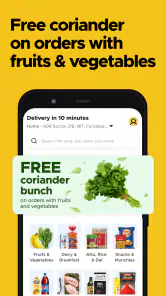
First things first, downloading and setting up Blinkit was a breeze. Available on both Android and iOS, the app was easy to find and took mere seconds to install. Upon opening it, the interface felt intuitive and user-friendly. Signing up was straightforward, and I was soon on my way to browse through a plethora of grocery items, ranging from fresh produce to household essentials.
Browsing and Ordering
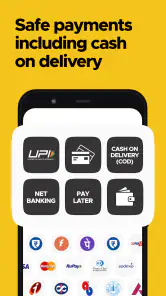
One of the things I loved about Blinkit was the categorization of products. Everything was neatly organized, making it easy to find what I needed. There’s even a search bar for those of us who know exactly what we want. I decided to test the 10-minute delivery claim by ordering some eggs, milk, and a packet of chips. The checkout process was smooth, with various payment options available, including online payments and cash on delivery.
The Delivery Experience
Now, the real test was whether they could stick to their 10-minute promise. To my surprise, the delivery executive was at my door in just under 10 minutes, groceries in hand. The items were fresh, and the delivery person was polite and professional. This speedy service would be a lifesaver for those with a tight schedule or sudden grocery needs.
Why Blinkit Stands Out
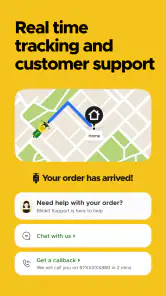
What sets Blinkit apart from other grocery delivery apps is not just its speed but also its reliability. The app regularly updates users on the status of their order, providing real-time tracking which is a feature I found particularly useful. Moreover, the range of products available is impressive, ensuring that users can find nearly everything they need for their household.
Another strong point is the customer service. On one occasion, I had a query regarding an item, and their support team was quick to respond and resolve my issue. It’s these little things that make Blinkit a go-to app for grocery shopping.
Even with a straightforward interface, I would treat the basket as a final checklist rather than simply tapping through checkout. For a recipe, I would confirm that the chosen product is the right kind and amount, then make sure the order still covers the actual need. This is a useful safeguard when I am distracted or placing an order between other tasks. A fast process is most helpful when it reduces friction without encouraging me to skip the small checks that prevent a disappointing purchase.
Final Thoughts
In a world where time is of the essence, Blinkit offers a solution that is both convenient and efficient. Whether you’re a busy professional, a parent, or just someone who values their time, this app can significantly ease your grocery shopping woes. It’s more than just the speed; it’s about providing a seamless, reliable service that you can count on. Give it a try, and you might just find yourself wondering how you ever managed without it!
Making repeat orders feel worthwhile
After the first few uses, I would judge Blinkit by how well it fits into the household routine, not by whether every delivery feels impressive. A useful approach is to keep the app for the items that cause real disruption when they run out, while leaving larger planned purchases for a supermarket or another grocery service. That division can make the convenience feel intentional instead of habitual spending by default.
Compared with going to a local shop, the app saves the trip but gives me less direct control over choosing items. Compared with a scheduled grocery delivery, its appeal is immediacy rather than planning a full basket ahead. Neither alternative is automatically better: if I need one essential now, speed wins; if I want to inspect produce, compare options, or organize a week’s meals, shopping in person or planning a larger delivery is often the calmer choice.
Small checks that prevent frustration
I would make a habit of checking the address and the contents of the basket before placing an order, especially when ordering in a hurry. Search can be efficient for familiar products, but checking the listing carefully helps avoid confusing similar items. For a recipe, I would verify the size or type of the ingredient rather than assuming the first result is the one I normally buy. These are modest steps, yet they matter more when the order is meant to rescue a meal on a deadline.
Another question is whether the app is useful when I need several things rather than one. It can be, provided the items are available for the delivery area and I am comfortable with the selection on screen. For a broad weekly shop, I would compare the completed basket with my list and consider whether a regular store trip offers better control. The fastest option is not always the most economical or satisfying one for every kind of shop.
For a busy household, the practical test is whether small orders prevent more disruptive detours without multiplying into a stream of unnecessary ones. I would keep a few dependable pantry basics in reserve where possible, then use a rapid top-up for the genuinely inconvenient exception. That approach makes the service a safety net, not a substitute for knowing what is in the kitchen. It also helps answer the question of whether it is worth keeping installed: if the app repeatedly solves a real local problem, it has a clear role; if I rarely need urgent top-ups, a normal shop may be simpler.
What may wear thin
Convenience can become fatigue if I open the app whenever I feel like a snack or add unnecessary items just because ordering is easy. I would set a simple personal rule: use it to solve a specific need, then close the basket once that need is covered. That keeps the app useful without letting quick top-ups quietly replace a more considered food routine.
My long-term verdict is that Blinkit earns a place on my phone as a backup for time-sensitive grocery gaps, not as a universal answer to shopping. Its appeal is clearest when a missing staple matters right now; its limits become clearer when choice, inspection, or a carefully planned basket matters more. If that balance matches how you shop, it is worth trying and keeping available for the occasions when a store run is the least convenient option.
Blinkit: Grocery in 10 minutes Frequently Asked Questions
Can I browse Blinkit before creating an account?
You can start by checking whether Blinkit serves your area and browsing the products shown for that location. Shopping apps commonly ask for account details before an order can be completed, so be prepared to follow the sign-in or registration steps presented in the app. Reviewing the available categories first can help you decide whether its local selection fits what you need.
Can I use Blinkit to plan a grocery list or repeat a regular shop?
Blinkit is designed for ordering groceries and other everyday items, so you can browse its selection and add the products you want to a cart. This can be convenient when you need to gather several essentials in one order. For recurring purchases, check the options visible in the app while shopping; the useful features may depend on the current app experience and your account.
Is Blinkit free to download, and what devices can run it?
Blinkit is free to download and is listed for Android devices running version 7.0 or later. It is a Food & Drink app from Blinkit, designed for ordering groceries and other everyday items. Before installing, check that your device meets the minimum requirement and that you have enough space for the app. The age rating is Everyone.
Does Blinkit work on iPhone and iPad?
Blinkit is an app for grocery and everyday-item shopping, and its iOS availability can depend on the device and region. If you use an iPhone or iPad, search for Blinkit in the Apple App Store and check that the app is offered for your device before downloading. The Android version is listed for devices running Android 7.0 or later.
What is Blinkit and how does it work?
Blinkit is a rapid grocery delivery app that promises to deliver groceries to your doorstep in just 10 minutes. Users can browse through a wide range of products, including fresh produce, household items, and snacks. The app uses your location to find the nearest delivery hub and employs local riders to ensure quick delivery. Simply add items to your cart, checkout, and wait for your groceries to arrive shortly.
Pros
- Fast delivery service within 10 minutes.
- Wide range of grocery items available.
- User-friendly interface for easy navigation.
- Multiple payment options for convenience.
- Efficient customer support services.
Cons
- Limited delivery areas restricts access.
- Occasional out-of-stock items.
- App crashes during peak hours.
- Higher delivery fees during rush times.
- Limited promotions and discounts.
- Category
- Food & Drink
- Version
- 17.65.0