McDonald's
- 398.82K
- 4.2
- Installs
- 50.00M
- Price
- Free

Screenshots
Analysis by Reviewed
When I’m deciding what to eat on a busy day, a familiar menu can make the choice easier—but getting from “I’m hungry” to a correctly placed order is where an app can either help or get in the way. McDonald’s is McDonalds USA, LLC’s free Food & Drink app for people who want to browse the menu, use deals and rewards, and place an order without relying on the usual counter queue. I find it most useful when I already know I want McDonald’s and would rather sort out the order before reaching the restaurant.
Reading the menu and finding your way around
The app’s purpose is straightforward: it brings ordering, deals and rewards into one place. In practice, that makes it a useful alternative to deciding at the counter, especially if I want a little time to compare choices or adjust an order before committing. The layout is described as clean and intuitive in my experience, though “easy” is always personal: someone who is unfamiliar with mobile ordering may still need a first visit to learn where menu choices, offers and order steps appear.
McDonald’s has a 4.2 average from around 2.1 million ratings, and it has been installed over 50 million times. Those figures suggest a widely used app, but they don’t guarantee that every screen or ordering moment will feel smooth to every person. I’d judge it by a simple test: can you find the item you want, understand the available choices, and review the order before sending it? If that process feels comfortable, the app can take some pressure out of choosing in a busy restaurant.
Controls, customization, and sensory comfort
I like being able to make a meal feel more like my own rather than settling for the default combination. The original review describes changes such as adding pickles, leaving out onions, or choosing apple slices with a Happy Meal. That kind of adjustment can be handy for personal preference, but it also makes careful review worthwhile: I would pause on the order summary before placing anything, particularly when ordering for someone else or managing several people’s requests.
For someone who finds spoken ordering stressful, being able to make choices on a screen may feel calmer. It can also help a group settle on items without trying to remember every request while standing at the counter. On the other hand, a touchscreen is not automatically comfortable for everyone. Small tap targets, scrolling, glare, or the need to move through several screens can be tiring, and I would not assume that the app offers a specific accessibility setting unless I could see it on my own device.
When mobile ordering fits—and when it doesn’t
A realistic use case is leaving work late, knowing what the family wants, and placing the order while there is still time to review it. I’d collect everyone’s choices first, check each customization, then confirm the restaurant and pickup plan before finishing. That workflow is less rushed than trying to relay a complicated order from memory, but it depends on being able to use the phone safely and having enough time to complete the steps.
Mobile ordering is not always the better route. If I’m already at the restaurant and need to ask a question about an item, speaking with staff may be clearer than trying to resolve it through the screen. Likewise, if the phone is nearly out of battery, the connection is unreliable, or I’m in a hurry and have not learned the ordering flow, the counter can be the simpler choice. I also wouldn’t use the app while driving; it’s better to make choices while parked or before setting off.
More From Our News Desk

Weather by Xiaomi Review: Clear at a Glance, Less Clear Up Close

X Under Pressure: Can It Recover When Posting Goes Wrong?

Clash of Clans Is Won Between the Battles

Android Auto Makes the Case for Quieter Car Software

MobiOffice: Transforming Mobile Productivity with Seamless Integration

EA SPORTS FC™ Mobile Soccer: Redefining Mobile Sports Gaming
A closer look at the everyday experience
Before I look at how deals and rewards fit into the experience, I’d start with the setting: a menu that feels manageable at home can be harder to navigate in bright light, with one hand occupied, or while a group is waiting. I find it helpful to treat the app as a way to prepare choices in advance, then use the next section to weigh when those choices are genuinely easier than ordering another way.
Deals and rewards need a little attention
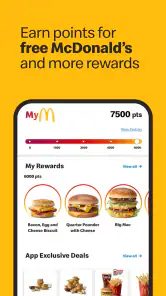
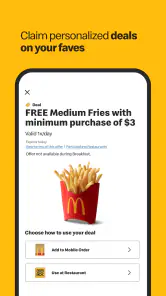
The app brings offers and a rewards system into the ordering experience. The original review describes earning points from spending and redeeming them for items, which can make repeat visits feel more worthwhile. My practical advice is to look at an offer’s conditions before building an order around it, and to check that the deal appears in the order before completing checkout. An offer is only useful if it fits what you were planning to buy; adding something unnecessary just to chase a reward can cancel out the value.
I’d also make a habit of checking deals before deciding what to eat rather than after. That small change can help me compare the available choices without turning a quick meal into a hunt for the “best” promotion. Offers can change, so I treat them as a possible bonus, not as a guaranteed reason to choose one meal over another. For someone who visits only occasionally, the core convenience of browsing and ordering may matter more than building a rewards balance.
How it compares with other ways to order
Compared with ordering at the counter, the app gives me more room to browse and review choices at my own pace. The counter is still better when I want to ask a question, explain a request in my own words, or avoid using a phone. A third-party food-ordering service may be more convenient when I’m comparing several restaurants in one place, while McDonald’s own app is the more direct option when I’ve already chosen this restaurant and want its deals or rewards in the same flow.
That distinction matters: I wouldn’t install it expecting a general restaurant directory. Its value is tied to McDonald’s, so it makes the most sense for people who already choose the chain from time to time. If I’m looking for a wider mix of local cuisines or want to compare delivery options across businesses, a broader ordering service is a better starting point. If I simply want to decide between McDonald’s menu choices and place an order, the dedicated app keeps the task focused.
Who is likely to find it useful?
I’d recommend it to regular customers who like checking offers, people who prefer to make menu decisions before arriving, and anyone ordering a few customized meals who wants to review each choice carefully. It can also suit someone who feels more at ease tapping through an order than speaking over a busy counter, provided screen navigation is comfortable for them. The app is free, rated for Everyone, and its current version is 25.104.1; it runs on iOS 9 or later, making the listed minimum an older iOS release rather than a requirement for a particular recent phone.
I’d skip it if you rarely eat at McDonald’s, strongly prefer face-to-face ordering, or find phone-based menus more frustrating than helpful. It is also not a substitute for checking an order when accuracy matters: I’d review the selected items and changes before confirming, especially when ordering for a child, a group, or someone with a specific preference. The app can organize choices, but the person placing the order still needs to make sure those choices match what everyone asked for.
Remaining friction and a more inclusive way to use it
Clear navigation is only one part of access. A person may be able to understand the menu but still find repeated tapping difficult; another may be comfortable with touch controls but need more time to read choices. The setting matters too: a bright screen can be hard to see outdoors, while a noisy restaurant can make any last-minute decision distracting. I find the best approach is to browse before arriving, when there is room to take breaks and check the order without holding up a line.
There are also practical questions worth settling before relying on mobile ordering. Is the app available for your device? The minimum operating system listed is iOS 9, so I would check compatibility in the relevant app store before planning around it. Can you pay and collect in the way you want? I’d inspect the available choices during checkout, since the useful options depend on what the app presents for that order. If a screen is difficult to read or operate, switching to staff assistance is a reasonable workaround rather than forcing the app to fit every situation.
McDonald’s was released on October 24, 2014, and its ongoing version updates show that the digital experience is maintained over time. That does not mean every change will make ordering easier for every user, so I’d keep the app current if I rely on it and still allow a little time to adapt when its screens change. McDonald’s is a familiar name, but the app is best judged as a practical ordering tool: it can reduce decision pressure, while still leaving users responsible for checking their selections and choosing a comfortable way to order.
My take on using it day to day
Have you ever found yourself craving a quick bite and thought, "Hey, what about some fries?" Well, if you’re anything like me, you've probably found yourself heading straight to the golden arches of McDonald's. But wait, there's more! Let me dish out all the juicy details about the McDonald's app that makes grabbing your favorite meal a whole lot easier.
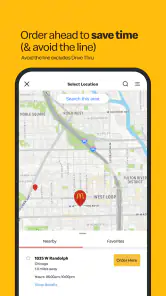
Let’s be honest, in this fast-paced world, who doesn’t love a little convenience? The McDonald's app is like your personal fast-food genie. With just a few taps, you can have your Big Mac ready for pick-up, no lines, no wait. Talk about a dream come true for us burger lovers! Imagine this: You’re chilling at home, feeling a bit peckish, and boom! You open the app, place your order, and by the time you reach the restaurant, your meal is hot and ready. It’s like magic, but with fries!
Deals and Offers Galore
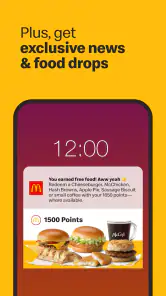
If there’s one thing that gets me more excited than a perfectly salted fry, it’s a good deal. And the McDonald's app does not disappoint. Every time I open it, there’s a new offer waiting to make my meal even more satisfying. From discounted meals to exclusive items, the app is a treasure trove of savings. It’s no wonder I find myself checking it before every visit. Pro-tip: Keep an eye out for those limited-time offers, they’re worth it!
And here’s a cool feature – the app’s rewards system. Every dollar you spend earns you points that you can later redeem for free items. It’s like getting rewarded for eating, and I’m totally here for it!
User-Friendly Interface
Let’s talk about the app’s design because, let’s face it, nobody likes fumbling through a confusing app when hunger strikes. The McDonald's app has a clean, intuitive interface that even my tech-challenged friends can navigate with ease. Finding your favorite meal, customizing your order, and even locating the nearest restaurant is just a breeze. Plus, the app’s integration with mobile payment options ensures a seamless experience from order to pick-up.
Feeling adventurous? The app even lets you customize your order. Extra pickles, hold the onions, or maybe a side of apple slices with that Happy Meal? You name it, the app makes it happen.
Keeping It Fresh
What really sets the McDonald's app apart is how it keeps things fresh and exciting. With regular updates, the app introduces new features and enhancements that keep the experience engaging. Whether it's new menu items or improved functionality, it’s clear that McDonald's is committed to keeping its digital experience as delightful as its food.
In conclusion, if you haven’t downloaded the McDonald's app yet, you’re missing out. It’s the perfect companion for any fast-food enthusiast. Whether it’s the convenience, the savings, or the customization, the app has something for everyone. So next time you’re in the mood for a quick bite, let the app do the heavy lifting while you enjoy every delicious moment. Happy munching!
McDonald's Frequently Asked Questions
Is the McDonald's app available in my country or region?
The McDonald's app is published by McDonalds USA, LLC, and its ordering, offers, and other services can depend on your location. Before downloading, check whether the app is available in your local app store and whether participating McDonald's restaurants near you support the features you want. What you can browse or use may differ from one area to another.
Can I browse the menu and check nutrition information in the McDonald's app?
The app is designed around McDonald's food and ordering, and it can help you explore meal choices before placing an order. Menu details and available options may vary with location, so selecting a restaurant can make the information more relevant to your visit. If nutrition is important to your choice, review the details shown in the app for the items available to you.
Do I need to create an account to use the McDonald's app?
An account can make it easier to use the app’s ordering and rewards features, particularly if you want to keep track of your activity across visits. Before downloading, consider whether you are comfortable signing in and managing account details on your phone. You can also explore the app to see which features are available without signing in, since access may depend on the feature and location.
Which devices can run the McDonald's app?
The McDonald's app is available for Android and iOS, and its current version is 25.104.1. It requires Android 9 or a later version, or iOS 9 or later. Checking your device’s operating system before downloading can help you avoid compatibility problems. The app is free, so the main requirement is having a compatible phone and enough room to install it.
What features does the McDonald's app offer to enhance my experience?
The McDonald's app provides a variety of features designed to enhance your dining experience. It includes mobile ordering for quick pickup, exclusive deals and discounts, a restaurant locator, and a customizable favorite orders section. Additionally, the app offers nutritional information, enabling you to make informed choices about your meal. Regular updates ensure new features and improved functionality.
Pros
- User-friendly interface with easy navigation.
- Convenient mobile ordering and payment.
- Exclusive deals and discounts available.
- Quick access to nutritional information.
- Customizable menu options.
Cons
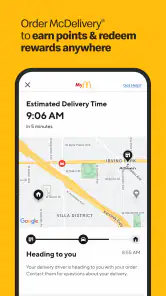
- Limited delivery areas may restrict access.
- App may occasionally crash or freeze.
- Some features require location services.
- Inconsistent order accuracy reported.
- Limited language options for app use.
- Category
- Food & Drink
- Version
- 25.104.1