PedidosYa - Delivery Online
- 7.92K
- 4.6
- Installs
- 50.00M
- Price
- Free

Screenshots






Analysis by Reviewed
I see PedidosYa - Delivery Online as most useful when convenience matters more than having every meal or household item in hand immediately. It brings restaurant and store ordering into one place, which can save time on a busy day, but delivery still depends on what is available around you. I’d consider it a practical option for people who already use delivery, rather than a reason to order every small thing.
Start with your address, not the app’s broad promise
Before deciding whether this service suits you, I’d check what it actually shows for the address where I expect to use it. Delivery apps can feel extensive when you browse them generally, yet the useful question is whether the restaurants and shops you would choose are reachable from home or work. That local check tells you more than a large overall audience can.
I would also think about the sort of order I place most often. If I mainly want a familiar dinner from nearby restaurants, the restaurant listings are the key test. If I want household top-ups as well, I’d see whether the stores in my area carry the kinds of everyday items I tend to run out of. A single app is convenient only when its local selection matches real habits.
A better way to compare an order
When choosing between similar meals, I’d compare the full basket rather than focusing on one appealing menu item. Add the likely sides or drinks, review any customizations, and look at the total at checkout before committing. That is a more useful comparison than judging two restaurants by a main dish alone, and it helps me decide whether delivery still feels worthwhile once the order is complete.
I’d use the same approach for groceries, but with a different question: is this a quick top-up or a shop where I need to make careful choices? Delivery is naturally more attractive when I know exactly what I need and want to avoid leaving home. For produce or products where I want to inspect alternatives personally, going to the shop gives me more control.
Small decisions that make delivery work better
For a shared order, I’d settle on the choices before opening checkout, then give the basket a final pass for quantities and requested changes. That reduces the chance of overlooking a detail when several people are contributing opinions. It also makes it easier to notice when an extra item has pushed a casual meal beyond the amount I intended to spend.
If the order is meant to solve a time problem, I’d distinguish between “convenient” and “urgent.” A delivery can save a trip and let me keep working or caring for someone at home, but it still involves waiting and a handoff. If I need food at a precise moment, I’d avoid cutting the timing close and consider pickup or another immediate option instead.
More From Our News Desk

Weather by Xiaomi Review: Clear at a Glance, Less Clear Up Close

X Under Pressure: Can It Recover When Posting Goes Wrong?

Clash of Clans Is Won Between the Battles

Android Auto Makes the Case for Quieter Car Software

MobiOffice: Transforming Mobile Productivity with Seamless Integration

EA SPORTS FC™ Mobile Soccer: Redefining Mobile Sports Gaming
Who is likely to get the most from it?
I’d recommend trying PedidosYa to people who order meals often enough to value browsing several nearby options, and to households that sometimes need restaurant food and small store errands in the same routine. It can be especially handy when bad weather, a packed workday, or an awkward trip makes staying home the better choice. The main benefit is not that delivery replaces every other way of getting food; it gives you another practical route when the circumstances fit.
On the other hand, someone who cooks nearly every meal, lives where the selection is thin, or wants to inspect every grocery item may get little from keeping a delivery app in regular rotation. I’d also think twice about using it for a highly time-sensitive meal. In those cases, cooking, collecting an order, calling a nearby restaurant, or shopping in person may be simpler and more predictable.
What is PedidosYa?
PedidosYa is a food and drink app from PedidosYa S.A. for finding participating restaurants and shops and ordering from a phone. It is free to download, rated for Everyone, and has an average rating of 4.6 from around 1.9 million ratings. Its 50 million-plus installs suggest it has become a familiar choice for many users, though popularity alone cannot tell you whether the selection near your home is good.
The User Experience
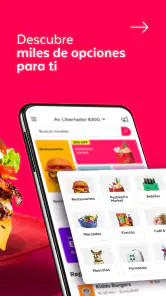
Let's talk about the user experience because, let's face it, the easier an app is to use, the better. When you first open PedidosYa, you're greeted with a clean, intuitive interface that makes navigation a breeze. You can search for specific restaurants or browse through categories like pizza, sushi, or healthy food. It's all super straightforward.
Once you've found what you're looking for, placing an order is as simple as adding items to your cart and checking out. You can pay through various methods, including credit card or cash on delivery, which is a nice touch for those who prefer flexibility.
For a useful first order, I’d compare a few nearby menus before settling on a familiar dish. Restaurant names can catch the eye, but checking the item details and the final checkout total helps avoid choosing based on the headline alone. If the basket is for more than one person, I find it sensible to confirm each item and any requested changes before placing the order; a quick review is easier than trying to correct a mismatched meal later.
Features That Stand Out
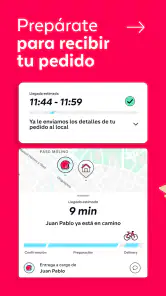
One of the features I really appreciate is the real-time order tracking. You can see exactly where your delivery is and get updates on its status. No more guessing games about when your food will arrive!
Another cool feature is the ability to schedule orders. So if you know you're going to be busy at a certain time, you can plan ahead and have your meal arrive exactly when you need it. It's little touches like this that make the app so user-friendly.
Tracking is most helpful as a way to understand how an order is progressing, not as a promise that arrival will happen at an exact minute. I’d use scheduling for a predictable lunch break or a planned dinner, while leaving more slack for an important appointment or guests who are already waiting. If timing is critical, ordering earlier is the safer workflow than relying on an estimate at the last moment.
Wide Range of Options
Whether you're in the mood for a gourmet meal or just need to restock your pantry, PedidosYa has you covered. The app partners with a wide range of restaurants and stores, so you're bound to find something that tickles your fancy. Plus, they frequently offer promotions and discounts, which is always a bonus.
The real value of that mix is being able to solve different errands in one familiar ordering flow: a quick dinner when the fridge is bare, or a small grocery top-up when stepping out is inconvenient. It does not automatically make delivery the best choice for every shop. For a large weekly grocery haul, I’d still compare the convenience of delivery with choosing items in person, especially if I want to inspect produce or substitute products myself.
Choosing between delivery and the usual alternatives
Against calling a restaurant directly, browsing in the app is useful when I have not settled on a meal and want to compare menus without making several calls. A direct call or pickup can be better when I already know exactly what I want and prefer to arrange collection myself. Neither route wins every time: the app helps with discovery and a consolidated ordering process, while direct contact can suit a simple, familiar order.
For groceries, I see the choice as a trade-off between convenience and personal selection. A short delivery order makes sense when I know the products I need and would rather stay home. A visit to the shop is more appealing when I want to compare brands, choose fresh items by sight, or make substitutions on the spot. Before relying on delivery for a planned meal, I’d check the available items and order details rather than assuming every preferred option will be there.
It is also worth treating promotions as a reason to compare, not as a reason to add things I did not need. A discount may make an order more attractive, but my decision would still depend on the basket and the convenience of having it delivered. If I am ordering a small item that is easy to pick up on the way home, the extra step of delivery may not be worth it even when an offer catches my eye.
When It Fits—and When It Doesn't
A realistic use case is getting home late, realizing there is nothing ready for dinner, and checking nearby menus before deciding whether to order food or pick up essentials from a store. The app can reduce the effort of making that choice, particularly when leaving home is awkward. For a student sharing a meal or someone juggling work and household tasks, having restaurant and store options together can be more useful than switching between separate services.
Compared with calling a restaurant directly, an ordering app makes browsing and comparing options easier; compared with going out, it trades control over collection time and handling for convenience. The better alternative depends on the moment. If I’m already nearby and want food promptly, pickup or a direct call may be simpler. If I care most about seeing every grocery item myself, shopping in person is the safer fit.
There are trade-offs worth keeping in mind. The choice you see depends on the area, and a broad selection on the app does not guarantee that every restaurant or store will be available at your address. Delivery also adds a handoff and waiting period that a meal eaten on-site avoids. I’d check the order details and total before confirming, and I would not rely on a delivery order when a strict deadline leaves no room for delay.
Final Thoughts
All in all, PedidosYa - Delivery Online is a solid choice for anyone looking to simplify their life a little. It's reliable, easy to use, and offers a wide variety of options to suit your needs. Whether you're a busy professional, a student, or just someone who loves the convenience of delivery, this app is definitely worth a try.
It is less compelling for someone who rarely orders in, has limited participating options nearby, or prefers to choose groceries personally. The app has been available since March 12, 2012, and its current version is 9.44.8.3, with Android 7.0 as the minimum operating system requirement. I’d treat it as a handy option to keep available, then decide order by order whether delivery beats cooking, pickup, or a quick trip to the shop.
So next time hunger strikes, why not give it a whirl? You might just find that it's exactly what you've been looking for.
PedidosYa - Delivery Online Frequently Asked Questions
Can I browse local options before placing an order?
Yes. You can enter your address or use location services to see which restaurants, supermarkets, and delivery options are available in your area. Browsing first is a useful way to check whether PedidosYa has choices that suit what you need before committing to an order. Availability can vary by location, so the options shown in the app are the most relevant ones to review.
Do I need an account or location access to use PedidosYa?
Location information helps PedidosYa show services and delivery options for your area. You can also enter your address to check what is available nearby. This makes it easier to browse relevant restaurants and stores before placing an order. If you prefer not to enable location services, entering an address gives you another way to identify local options.
Can I order meals and groceries in the same way?
PedidosYa is designed for ordering from restaurants as well as supermarkets, so the basic process is to browse the options available for your location, select what you want, and place the order for delivery. Whether you are looking for a prepared meal or grocery items, the app brings those choices together in one place. Local availability determines what you can browse.
Is PedidosYa free to download, and what devices can run it?
PedidosYa is free to download and is listed for users of all ages. It is an app in the Food & Drink category, developed by PedidosYa S.A. The current version is 9.44.8.3, and it requires Android 7.0 or later. Before installing, check that your device meets that minimum requirement and has enough available storage.
What is PedidosYa and how does it work?
PedidosYa is an online delivery service that connects users with a variety of restaurants and stores for food and grocery delivery. Users can browse through available options in their area, place an order, and have it delivered directly to their doorstep. The app also allows users to track their orders in real-time, ensuring a convenient and streamlined delivery experience.
Pros
- Fast delivery times
- Wide range of restaurant options
- User-friendly interface
- Real-time order tracking
- Frequent promotional discounts
Cons
- Limited availability in rural areas
- Occasional app crashes
- High delivery fees
- Inconsistent customer service
- Limited payment options
- Category
- Food & Drink
- Version
- 9.44.8.3