DoorDash: Food, Grocery, More
- 681.51K
- 4.7
- Installs
- 50.00M
- Price
- Free

Screenshots
Analysis by Reviewed
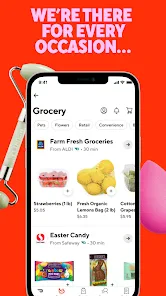
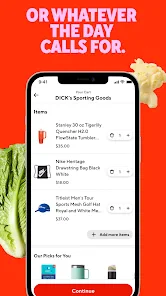
On a busy evening, I find a delivery app most useful when it helps me make a decision without turning dinner into another chore. DoorDash is built around that practical moment: I can look for a familiar meal, compare nearby options, and place an order from my phone. It also reaches beyond restaurant food into grocery and retail essentials, which makes it more flexible than an app I would open only for takeout. I’d still check the final order details before paying, but for days when going out is inconvenient, it can be a handy place to start.
Simplicity at Your Fingertips
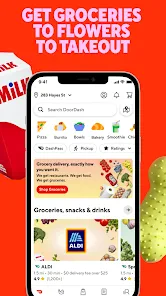
The first thing that struck me about DoorDash - Food Delivery is how incredibly user-friendly it is. As soon as you launch the app, you’re greeted with a neat and clean interface. Everything is laid out so intuitively that even if you’re not tech-savvy, you’ll find navigating through it a breeze. You can easily search for your favorite restaurants or explore new ones. The search bar is like a magic wand that brings up whatever craving you have at the moment.
A Plethora of Choices
One of the standout features of this app is the sheer variety of cuisines available. Whether you’re in the mood for some spicy Indian curry, a classic cheeseburger, or a refreshing sushi platter, DoorDash has got you covered. The app partners with a multitude of restaurants, giving you a smorgasbord of options. What’s more, it also includes ratings and reviews, so you can have a sneak peek at what you’re getting into before placing your order.
Seamless Ordering Process
Ordering food through DoorDash is as smooth as butter. Once you’ve made your choice, the app guides you through a straightforward ordering process. You can customize your order, choose your preferred payment method, and even schedule deliveries for later. It’s like having a personal food concierge at your disposal.
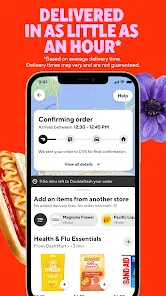
And speaking of deliveries, let me tell you, the real-time tracking feature is a game-changer! It’s like watching your food journey in real-time from the restaurant to your doorstep. You get to know exactly when your food will arrive, which is perfect for those who like to plan their meals to the minute.
Deals and Discounts
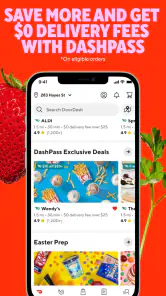
Who doesn’t love a good deal? DoorDash frequently offers promotions and discounts that make your dining experience even more delightful. Keep an eye on the app for special offers, and you might just snag a fantastic deal on your favorite dishes.
More than a dinner shortcut
The everyday scenario where I see the broader appeal is getting home late with too little time to cook and an empty fridge. I can check restaurant choices for dinner, then look at grocery or retail essentials in the same app rather than switching between separate services. That convenience is most useful when I already know what I need; for a full weekly grocery shop, I’d still compare selection and totals carefully before committing.
More From Our News Desk

Weather by Xiaomi Review: Clear at a Glance, Less Clear Up Close

X Under Pressure: Can It Recover When Posting Goes Wrong?

Clash of Clans Is Won Between the Battles

Android Auto Makes the Case for Quieter Car Software

MobiOffice: Transforming Mobile Productivity with Seamless Integration

EA SPORTS FC™ Mobile Soccer: Redefining Mobile Sports Gaming
A small workflow tip: decide on the meal before browsing deals. Promotions can make an option look tempting, but a discount is only useful if the food suits your plans and the complete checkout total feels reasonable. I also treat restaurant ratings as a sorting clue, not a guarantee. When choosing a new place, I read several comments and check the menu details instead of relying on the score alone.
Where it fits—and where it doesn’t
Compared with calling a restaurant, DoorDash makes it easier to scan menus, customize an order, and keep an eye on delivery progress in one place. Compared with a restaurant’s own ordering option, though, I wouldn’t assume the app is always the better value or has every menu item. If I’m ordering from a nearby favorite, I’d consider the restaurant’s direct option as well. For groceries, a dedicated store service may make more sense when I need a very specific selection or want to plan a larger shop.
The app is a good fit for people who value convenience, like having several kinds of local options together, or want to schedule a meal around a busy day. It is less compelling if you prefer to pick up food yourself, want the fewest possible charges, or are particular about choosing every grocery item in person. Delivery also depends on what is available for the address and time, so I’d check the options before building a meal plan around it.
What to expect from the current app
DoorDash is a free Food & Drink app developed by DoorDash. It has an average rating of 4.7 from around 5.6 million ratings, with more than 50 million installs, and is rated for everyone. Version 15.249.5 is the current version, while the app’s release dates back to March 26, 2015. Those details show an established service and a current release, but they don’t tell me that every local restaurant, grocery option, or delivery experience will be identical. Availability and the usefulness of the choices are what I’d judge first in my own area.
For existing users, the practical question is whether the current version works smoothly on their device and continues to make ordering straightforward. The app supports Android 8.0 and later, which is worth checking before installing on an older phone. I’d also keep an eye on the order summary before confirming: customization, timing, and the final amount matter more to a particular meal than a broad promise of convenience.
A measured recommendation
My advice is to use DoorDash as a convenient way to compare options, not as a reason to stop comparing. Check the menu, delivery estimate, and total at checkout, especially when trying a restaurant for the first time or ordering essentials rather than a prepared meal. If a deal is available, confirm that it applies to the items you actually want. These simple checks help avoid the common trap of choosing quickly and discovering that the order doesn’t suit your budget or timing.
Overall, DoorDash - Food Delivery is worth trying if you want restaurant ordering, grocery options, and other essentials gathered in one app. I like its straightforward flow and the ability to follow an order, while recognizing that the best choice can still be a pickup order, a restaurant’s own service, or a specialist grocery option. If convenience is your priority and the local selection works for you, it can earn a place on your phone; if careful in-person selection or minimizing delivery costs matters more, you may be happier with an alternative.
Making a useful first order
For a first try, I’d keep the order simple rather than using the app to coordinate several needs at once. Pick a restaurant you already recognize, add only the items you’re confident about, and review any customization before moving to checkout. That gives you a clean sense of how the menu, timing information, and tracking fit together without making the experience depend on an unfamiliar dish or an elaborate grocery list.
If I’m ordering for more than one person, I decide on a shared plan before browsing. It is easy for everyone to add tempting extras when menus are open, so agreeing on the main meal and any dietary needs first makes the final review much quicker. I also double-check quantities and substitutions where the app presents choices. This is especially worthwhile for essentials, where a small selection mistake can be more frustrating than an imperfect restaurant side dish.
Planning around timing and changes
Scheduled delivery can be handy when I know roughly when a meal will be needed, but I wouldn’t treat a scheduled time as a reason to leave everything to the last minute. I’d place the order with enough flexibility to handle a change in plans, then use tracking as a useful status check rather than watching it continuously. If the timing matters because people are waiting or I have a short break, pickup or a nearby direct order may be the less stressful choice.
One practical way to compare choices is to look at the whole task, not just the menu price. A restaurant order may be convenient for dinner, while a grocery run may be better if I need to choose produce carefully or buy many items at once. DoorDash’s breadth is valuable when I want to browse across types of errands, but it doesn’t remove the need to decide whether delivery is the right method for that particular job.
What the version number can—and can’t—tell me
The current version number gives existing users a useful reference when checking whether their app is up to date, and the long-running release history suggests this is a mature product rather than a brand-new ordering experiment. Still, a version number by itself is not a promise that every screen or option will look the same for every user. I’d focus on whether the app on my device lets me find the right local choices, review an order clearly, and follow the delivery in the way I need.
For someone deciding whether to install it, the practical compatibility check is straightforward: the Android minimum is 8.0, so an older device may not meet the requirement. The app is free to download and its age rating is Everyone, but the cost of a delivered order is a separate decision made at checkout. I’d check the complete total before confirming rather than treating the app’s free download as an indication that delivery itself has no cost.
Who benefits most from having it handy
I’d recommend trying it if your routine often involves getting dinner to a home or workplace, if you want to compare restaurant menus without calling around, or if combining a meal order with a small essentials run would save you a trip. It can also suit a household with different cravings, since browsing options together may be easier than negotiating over one paper menu. The strongest reason to keep it installed is not that every order is ideal, but that it can make several common errands easier to start from one place.
I’d skip it, or at least avoid relying on it, if delivery charges are a deal-breaker, you need precise control over grocery selection, or you already have a cheaper and more dependable way to order from the places you use most. Likewise, if the local choices near your address are limited, the convenience of browsing a broad service may not translate into a useful selection. Checking what is actually available before planning around the app is the sensible test.
What I’d watch for in continued use
With a service that develops through regular app releases, I’d judge future changes by whether they make the basics clearer: accurate menus, understandable order totals, useful timing information, and a straightforward path to resolve an ordering mistake. Those are the details that affect an ordinary dinner more than a new visual flourish. For current users, keeping the app updated is a reasonable way to receive its latest version, while checking the order carefully remains the part only the user can control.
My overall view is practical rather than unconditional: DoorDash can be a helpful everyday option when its local selection and delivery terms suit the occasion. I’d use it to compare, make a deliberate choice, and keep an eye on the checkout details. When the goal is low-cost pickup, a large carefully chosen grocery shop, or direct contact with a favorite restaurant, another route may still serve me better. That balance is what makes it useful without making it my answer to every meal or errand.
DoorDash: Food, Grocery, More Frequently Asked Questions
Can I install DoorDash on my device?
DoorDash is a free Food & Drink app developed by DoorDash, and it is listed for everyone. The Android version requires Android 8.0 or later. Before downloading, check your device’s operating-system version and make sure you are installing the app version intended for your device. DoorDash brings food, grocery, and retail essentials together, with the options you can use depending on your location.
Do I need to know exactly what I want before opening DoorDash?
No. You can enter your location and browse the food, grocery, and retail options available nearby before deciding what to order. Seeing the businesses and choices that appear for your address can help you explore without committing to a purchase. The selection is location-dependent, so browsing in the app is the practical way to see whether it has what you are looking for.
Can DoorDash help me discover nearby places to eat or shop?
DoorDash lets you browse participating restaurants, grocery stores, and retailers based on your location. That makes it possible to explore local options as well as place an order. What appears will depend on the businesses serving your address, so the listings may look different from one neighborhood to another. Enter your location to see which local choices the app brings together.
Does DoorDash have an age restriction?
DoorDash is listed for everyone, making it broadly accessible to users interested in food, grocery, and retail ordering. The app itself focuses on browsing and ordering essentials rather than entertainment content. Anyone using it should still follow their household’s rules about accounts, purchases, and payment methods, especially when a younger person is involved in placing an order.
Can I look at the app before deciding whether it is right for me?
You can enter your location and explore the food, grocery, and retail options shown nearby before deciding whether to place an order. This is a useful way to see whether participating businesses serve your address and offer the kinds of choices you need. If you do decide to order, follow the app’s account and checkout steps to manage the purchase.
Pros
- Wide range of restaurant options.
- Real-time order tracking.
- User-friendly interface.
- Multiple payment options available.
- Efficient customer service.
Cons
- Delivery fees can be high.
- Occasional delays in delivery.
- Limited availability in some areas.
- Service charges may apply.
- Inconsistent food quality.
- Category
- Food & Drink
- Version
- 15.249.5