Local Weather Forecast - Radar
- 16.01K
- 4.8
- Installs
- 10.00M
- Price
- Free
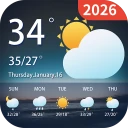
Screenshots
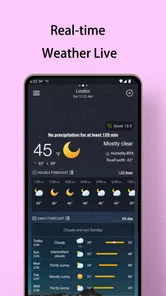
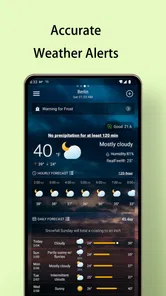
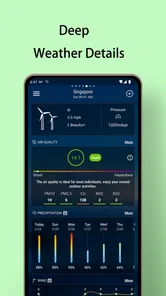
Analysis by Reviewed
I judge a weather app by what it helps me do between checking the sky and walking out the door. Local Weather Forecast - Radar is aimed at that everyday gap: it brings local conditions and forecast tools together so I can make a practical plan without turning a quick check into a research project. It is free to try, and its mix of radar, forecast views, alerts, widgets, and air-quality information gives it a broader role than a temperature-only display.
Choosing the right level of detail
Not every outing needs the same kind of forecast. For a short trip to the grocery store, I mainly want to know whether rain is likely soon. If I’m planning a longer walk, I care more about how conditions may change over the next few hours. I’d start with the simplest view that answers the question, then open the radar or hourly forecast only when the decision actually depends on timing.
That small habit helps keep weather checking useful rather than compulsive. A forecast can inform whether I bring a jacket or shift an errand, but repeatedly refreshing it won’t make uncertain conditions certain. For plans that can be moved, I’d choose a flexible window and check again before leaving. For plans that cannot be moved, I’d use the outlook to prepare rather than assume it will unfold exactly as shown.
Making the forecast part of a routine
A practical workflow is to check once while getting ready, use the widget for a quick reminder later, and open the full app if the conditions look questionable. That gives each part of the experience a job: the main forecast helps with the first decision, the home-screen glance reduces the need to reopen it, and radar can add context when rain is the specific concern. I wouldn’t keep every alert enabled just because it is available; notifications are most useful when they flag something I genuinely need to act on.
There is also a useful distinction between knowing what is likely and deciding what is safe. A radar view can help me think about whether precipitation appears to be moving toward my area, but I would not use it to make a risky call during severe conditions. If an outdoor event, commute, or trip depends on safety, I’d check relevant official guidance as well. The app works best as a day-to-day planning aid, not as the only source for high-stakes weather decisions.
That approach is particularly helpful for people whose plans involve several short transitions. I might leave home on foot, spend time indoors, and then walk back later; one glance before the first leg may not answer what I need for the return. Rather than relying on memory, I can keep the widget visible and revisit the hourly forecast before heading out. It is a simple workflow, but it turns the app’s different views into practical checkpoints instead of a pile of information.
For parents coordinating school pickup, for example, a quick check before leaving can help with clothing and whether to carry rain protection. Someone who cycles to work may want to compare the conditions around departure with the forecast for the journey home. Neither case requires expert weather interpretation; both benefit from checking at the moment a decision is due. I’d still build in a backup plan when being caught in bad weather would cause a real problem.
More From Our News Desk

Weather by Xiaomi Review: Clear at a Glance, Less Clear Up Close

X Under Pressure: Can It Recover When Posting Goes Wrong?

Clash of Clans Is Won Between the Battles

Android Auto Makes the Case for Quieter Car Software

MobiOffice: Transforming Mobile Productivity with Seamless Integration

EA SPORTS FC™ Mobile Soccer: Redefining Mobile Sports Gaming
What’s in the Forecast?
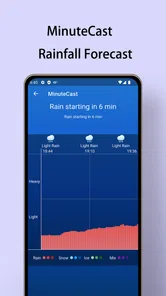
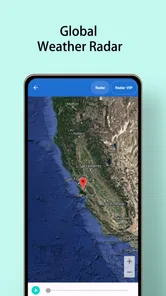
Let’s talk about its features. The app gives you real-time local weather updates with impressive accuracy. I mean, it’s like it knows when I’m just about to step out without my jacket. The radar feature is super nifty too—it shows you live precipitation maps, so you can track storms as they move across your area. No more guessing if that dark cloud is heading your way!
Easy Peasy Navigation
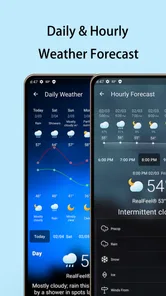
One thing I absolutely love about the app is how straightforward it is. The interface is clean and user-friendly. Even if tech isn’t your thing, you’ll navigate through it like a pro. The main screen gives you the current temperature, humidity, wind speed, and all the juicy details you need to plan your day. Swiping through the hourly and weekly forecasts feels as smooth as a summer breeze.
For a more useful check, I’d look at the hourly view when timing matters, then use the weekly outlook for broad planning rather than treating it as a fixed schedule. Radar is a different kind of aid: it can help me judge whether precipitation appears to be approaching, but it is not a substitute for an official warning or a reason to take risks in dangerous conditions. That distinction matters if I’m deciding whether to start a long drive or head out on a trail.
Custom Alerts and Widgets
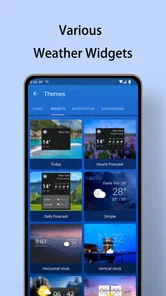
How about those custom alerts? Yes, please! You can set up notifications for severe weather warnings, which is a lifesaver if you live in areas prone to sudden weather changes. Plus, the app has some neat widgets that you can plop right on your home screen, giving you instant access to weather updates without even opening the app. Talk about convenience!
The widget is especially handy for a quick glance while getting ready: it keeps weather information visible without making me open the forecast every time. Alerts serve a different purpose, so I’d use them selectively for conditions I genuinely need to know about. Too many notifications can become background noise, while a relevant warning has a better chance of catching my attention. If you rely on alerts for safety, keep your phone’s notification settings in mind and check local official sources during serious weather.
And let’s not forget the air quality index—super important these days. The app provides updates on air quality, which is a great addition, especially for those of us who like to keep our lungs happy.
Getting more from a quick check
One non-obvious benefit of having air-quality information alongside weather is that it can change the plan even when the sky looks inviting. If I’m deciding between an outdoor workout and an indoor one, I’d consider both the weather and the air-quality reading rather than letting sunshine make the choice for me. The same applies to a long walk with someone sensitive to poor air: the forecast is more useful when I treat these details as a combined picture, not as isolated numbers.
I’d also use radar to answer a narrow question, not to predict the whole day. For instance, if a shower seems possible before a short errand, the map may help me decide whether to wait a little or bring a raincoat. It is less useful as a promise that a route will stay dry. Local conditions can differ over short distances, and a map is a snapshot to support judgment, not a guarantee for every street.
If I’m sharing plans with another person, I’d make the handoff concrete: agree on when we’ll check again and what change would make us postpone or move indoors. That avoids treating one person’s early glance as a final verdict for everyone. A forecast app can help a group coordinate, but the decision still needs to account for the activity, the people involved, and how easy it is to change course.
Where it fits among weather apps
Compared with a basic phone weather display, the combination of a radar map, hourly and weekly views, alerts, widgets, and air-quality information gives me more ways to make a decision without switching between separate tools. On the other hand, someone who only wants the temperature at a glance may find a built-in forecast simpler. People who need specialist storm analysis or highly technical meteorological detail may prefer a dedicated service for that purpose; this is better suited to everyday planning than to replacing expert or official guidance.
The app is rated for Everyone, has an average rating of 4.9 from around 179,000 ratings, and has been installed over 5 million times. It was released on January 22, 2021, and version 1.5.5 requires Android 6.0 or later. Those figures suggest broad use, but they don’t tell me whether a forecast will match every neighborhood or personal need, so I’d still judge it by how useful its local outlook is where I live.
That local test matters more than popularity when choosing a forecast app. I’d compare what it says with the conditions I actually encounter over ordinary days, especially if my neighborhood has hills, a waterfront, or other features that can make nearby weather feel different. I wouldn’t expect every forecast to get every brief shower right; I would look for whether the app helps me make better decisions often enough to justify keeping it on my phone.
Who will get the most from it
I think it suits people who check the weather as part of a routine: commuters, dog walkers, families planning pickups, and anyone who wants a quick way to combine a forecast with a radar glance. The widget can make it easier to check without opening the full app, while alerts can help people who need a nudge when conditions matter. If you already know you want more than a current temperature but don’t need specialist analysis, the mix feels sensible.
I’d be less inclined to recommend it to someone who wants the smallest possible display and never looks beyond today’s temperature. A built-in phone forecast may be enough and require less setup. It is also not the right sole tool for someone making safety-critical decisions about severe storms, remote travel, or technical outdoor activity. In those situations, I’d use specialist and official sources as appropriate, and treat this app as an additional everyday reference.
Another practical question is whether it costs anything to start using. The app is free, with in-app purchases listed at $2.99 to $4.99 per item. I’d begin with the free experience and decide whether it covers my routine before considering any purchase. That is a straightforward way to avoid paying for something I may not need, particularly if my use is limited to checking conditions and looking at the forecast.
Why It’s a Keeper
So, why should you download this app? Well, besides its killer features, it doesn’t drain your battery or hog your data. It’s efficient and reliable, two things I always look for in an app. And hey, it’s free! Although there are in-app purchases ranging from $2.99 to $4.99 per item, the free version is more than enough for day-to-day use.
The main trade-off is that the app’s broad set of information can be more than a minimalist user needs, and forecasts should never be mistaken for certainty. If you want a straightforward way to check local conditions, see precipitation on radar, and keep a forecast within reach on your home screen, it makes sense to try the free experience first. If your priority is a specialist forecast or you rarely check weather at all, another option—or simply the phone’s built-in display—may suit you better.
Vitality App Studios has shaped this into a general-purpose weather companion rather than a tool for one narrow activity. I’d give it a place in my routine if I regularly need to decide what to wear, when to leave, or whether an outdoor plan needs a backup. The rating of 4.9 reflects how warmly many users respond to it, but my own recommendation would still depend on how well its local forecast fits the places I go.
In a nutshell, the app is a useful companion for anyone who likes to stay one step ahead of the weather. Whether you’re planning your next adventure or just figuring out what to wear tomorrow, it gives you practical information in one place. So go ahead, give it a whirl—I promise you won’t look at the weather the same way again!
Local Weather Forecast - Radar Frequently Asked Questions
Is Local Weather Forecast - Radar available for iPhone and iPad?
Local Weather Forecast - Radar is an Android app, so it is intended for compatible Android devices rather than iPhones or iPads. If you use an Apple device, check its app store for a weather app made for iOS. Android users can check their operating system version before installing to make sure the app is compatible.
What does Local Weather Forecast - Radar help you do day to day?
The app is designed to make local weather information easier to consult when planning everyday activities. Its focus is forecasts and radar, so it may be useful when deciding what to wear, when to travel, or whether to adjust outdoor plans. The experience is centered on weather rather than broader travel, news, or calendar tools.
Is Local Weather Forecast - Radar suitable for children and families?
Local Weather Forecast - Radar has an Everyone content rating, making it suitable for a general audience. Families can use it as a practical way to check weather conditions and plan outdoor activities together. As with any app, parents may wish to review its available settings and in-app purchase options before letting children use it independently.
Who develops Local Weather Forecast - Radar, and what devices can run it?
Local Weather Forecast - Radar is a weather app developed by Vitality App Studios. It is rated for Everyone and requires Android 6.0 or later, so it is worth checking your device’s operating system before downloading. The app is free to install, with optional in-app purchases. Its current version is 1.5.5.
What features does the Local Weather Forecast - Radar app offer?
The Local Weather Forecast - Radar app provides a comprehensive suite of weather tracking features. Users can access real-time weather updates, detailed forecasts, and interactive radar maps. It also includes severe weather alerts, humidity levels, wind speeds, and sunrise/sunset times, making it an essential tool for planning daily activities or travel.
Pros
- Accurate local weather updates
- Interactive radar maps
- Customizable weather alerts
- User-friendly interface
- Detailed 7-day forecasts
Cons
- Ads can be intrusive
- Limited features in free version
- Occasional app crashes
- Requires internet connection
- Battery consumption is high












