Hub Video Downloader
- 806.00
- 4.5
- Installs
- 10.00M
- Price
- Free

Screenshots



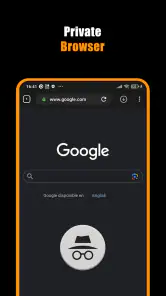
Analysis by Reviewed
When I want a video available away from a reliable connection, a downloader can be more useful than another streaming app. Hub Video Downloader is built around that practical job: it offers a way to download videos for offline viewing, with privacy and ease presented as part of the appeal. I’d consider it for occasional, straightforward offline viewing rather than assume it can handle every video source or replace a full media library.
A sensible first test before you travel
I would start by choosing a short, permitted video that I already know I want to watch, rather than trying to build a queue immediately. That gives me a low-stakes way to see whether the source is compatible and whether the downloaded copy is easy to locate. I would also switch off the connection briefly before playback; seeing a file listed is not quite the same as confirming it is actually available offline.
This is especially useful if you are preparing for a commute or trip with several legs. A download that works on home Wi-Fi may save frustration later, while discovering a source limitation only after leaving is much less convenient. For an occasional viewer, this small trial can answer the practical question that matters most: does the app fit the specific video sources I rely on?
What free access does—and does not—tell you
The app is free to download, so trying it does not require an upfront payment. It is developed by DOSA Apps, is listed for everyone, and sits in the video player and editing category. Its optional in-app purchases range from $0.99 to $99.99 per item. That is a wide span, so I would check what a particular purchase unlocks before paying rather than treat the app as entirely cost-free.
The important distinction is between free access and the value of paid options. The free download gives you a chance to judge whether its workflow suits you; the purchase range alone does not explain which functions cost extra or whether you would need them. If your needs are modest, I would start without buying anything and only consider a purchase after seeing a clear benefit in your own use.
Its audience figures suggest that many people have tried it: it has over 10 million installs and an average rating of 4.5 from around 86,000 ratings, alongside 806 written reviews. Those numbers can help establish that it is widely used, but they cannot guarantee that a particular source will work for you or that the app’s interface will fit your habits. I’d treat them as context, not a promise.
Where the value comes from
The strongest practical value is having a video ready when internet access is inconvenient. Think of saving something before a commute, a flight, or a day in a place with patchy reception. Instead of repeatedly buffering or relying on mobile data, you can plan ahead and watch offline. That benefit depends on being able to download the video you want, so it is worth testing the workflow with a legitimate source you actually use.
More From Our News Desk

Weather by Xiaomi Review: Clear at a Glance, Less Clear Up Close

X Under Pressure: Can It Recover When Posting Goes Wrong?

Clash of Clans Is Won Between the Battles

Android Auto Makes the Case for Quieter Car Software

MobiOffice: Transforming Mobile Productivity with Seamless Integration

EA SPORTS FC™ Mobile Soccer: Redefining Mobile Sports Gaming
There is also a useful difference between downloading for a specific trip and building a permanent collection. For a one-off journey, a simple save-and-watch routine may be enough. For a growing library, you will care more about how files are organized, how much device storage they take, and how easily you can find them later. I would make a small test download first, then check where it appears and whether the playback experience is convenient before saving several videos.
That small test is more than a precaution: it helps you spot the practical costs that a free price does not show. Video files can occupy substantial storage, and offline copies need to be managed just like other media on a phone. If space is tight, choose only the videos you expect to watch soon and remove them afterward. This keeps the app useful without letting downloads quietly crowd out photos or other files.
Tradeoffs to consider before relying on it
A downloader is only as useful as its compatibility with the video sources you want. I would not assume that every site, format, or protected stream can be saved. Some services restrict downloading or provide their own offline mode; in those cases, their official app is usually the more dependable and appropriate choice. Hub Video Downloader makes most sense when the source permits saving and the app’s available workflow supports it.
Privacy is part of the app’s stated appeal, but I would not interpret that wording as a substitute for checking how the app behaves on your device. Before using it for sensitive material, review the permissions Android requests and the privacy information available in the app’s store page. Keep downloads to content you have the right to save, too. A private-feeling interface does not change the rules set by a video creator or service.
There is a tradeoff between convenience and control. A dedicated downloader may offer a more direct route to an offline file than juggling browser tabs or relying on a streaming service’s temporary downloads. But those built-in service downloads can be better integrated: they may appear alongside your usual watch history and work within the service’s own rules. If you already pay for a streaming service primarily for offline viewing, its official feature may be simpler than adding another app.
Storage and file management are another reason not to download indiscriminately. A video that is easy to save can be easy to forget, especially if you download several before a trip. I recommend deciding in advance what you actually plan to watch, checking available space, and clearing finished files afterward. This is a basic habit, but it prevents the offline convenience from turning into clutter.
How it fits beside other video options
Compared with watching in a browser, a downloader is appealing when you know you will lose connectivity and want to prepare in advance. Compared with a standard video player, its distinguishing purpose is getting videos onto the device as well as enjoying them offline. A player that only handles files you already have may be better if you mainly organize personal videos, while a streaming app’s own download tool is often preferable for content inside that service.
These alternatives are not interchangeable. A streaming service can offer a familiar catalogue and an integrated offline mode, but access may depend on that service’s rules and your account. A browser is convenient for immediate viewing but less reassuring when reception is unreliable. A standalone downloader can fill the gap for permitted sources, yet its usefulness depends on source compatibility and a workflow that feels clear. I would choose based on where the videos come from, not simply on which app has the broadest-sounding description.
Making offline viewing less fiddly
One practical way to keep a separate downloader manageable is to treat downloads as temporary travel supplies rather than an archive. Before saving anything, I would decide when I expect to watch it and whether it needs to stay on the phone afterward. That simple rule makes it easier to avoid duplicate copies and gives me a clear cleanup point when the journey is over.
If I were preparing several videos, I would test one first, then save the rest only if the same source behaves as expected. This avoids spending time on a batch of downloads that may not suit the app’s workflow. I would also keep the first few files modest in number, especially on a phone that is already tight on space; the convenience of offline access is less valuable if it leaves too little room for everyday use.
Who is most likely to get value
I can see this app suiting someone who often prepares a few videos before travelling, spends time in areas with weak connectivity, or wants an offline option without building a complicated media setup. It may also appeal to a person who prefers to test a free app before deciding whether an optional purchase is worthwhile. The current version is 3.1.5, and it requires Android 8.0 or later, so device compatibility is an easy first check.
It is a weaker fit if you expect one downloader to work with every platform, want a carefully organized long-term video archive, or already use an official service that handles offline viewing well. I would also skip it if you are uncomfortable checking permissions or managing downloaded files yourself. Those are not unusual concerns: a separate download workflow can add steps where an official in-app option might feel more seamless.
For a realistic routine, I would install it before a trip rather than wait until the station or airport. I’d try one permitted video on home Wi-Fi, confirm that it plays offline, and note how much storage it uses. Then I’d save only what I’m likely to watch and remove it when finished. That sequence tests the essentials—source compatibility, offline playback, and file cleanup—without committing money or filling the phone unnecessarily.
For someone who watches mainly at home on a stable connection, the extra step of downloading may not add enough to justify another app. Likewise, people who want a polished catalogue, synced viewing progress, or a lasting collection may prefer a streaming service or a dedicated media library designed around those habits. I see this as a focused utility for a particular gap, not a replacement for those broader tools.
My buy-or-skip verdict
Hub Video Downloader is worth considering if you want a direct way to prepare permitted videos for offline viewing and are willing to check that it works with your sources. Its free entry point makes a cautious trial reasonable, while the in-app purchase range means I would not assume every useful option is included at no cost. Try the basic workflow first, and pay only if a clearly understood addition solves a problem you actually have.
Overall, I’d recommend giving it a look for occasional, planned downloads—not as a universal answer to offline video. The most sensible choice depends on your source: use an official service’s download option when it already meets your needs, and consider this app when a separate downloader offers a practical route that those alternatives do not. If your test video saves and plays as expected, it can earn a place in a travel routine; if compatibility or file handling feels awkward, there is little reason to force it.
Hub Video Downloader Frequently Asked Questions
What is Hub Video Downloader used for?
Hub Video Downloader is intended to help users save supported online videos to a device for later viewing. The exact sites, formats, and download options can vary by app version and source, so check the app’s current listing and in-app instructions before relying on a particular feature. Downloading should be limited to content you own, have permission to save, or that is offered for download by its provider.
How do I download a video with Hub Video Downloader?
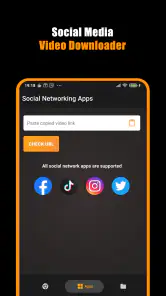
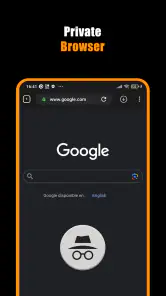
The usual process is to open a supported video source, use the app’s built-in browser or paste a video link, and choose a download option if one is available. You may need to grant access to storage so the file can be saved. Menus and supported sources can change between versions, and some sites may block downloads, so follow the app’s prompts rather than assuming every link will work.
Is Hub Video Downloader free, and does it contain ads or in-app purchases?
Pricing and monetization can differ depending on the platform, region, and current release. Before installing, review the app’s store page for its price, advertising disclosures, and any listed in-app purchases or subscriptions. Also check the app itself for optional paid features. Do not assume that a feature described online is included at no cost, since publishers can update their offerings over time.
Where are downloaded videos stored, and can I watch them offline?
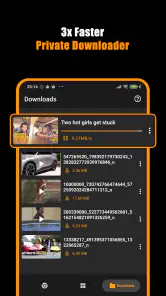
Videos that download successfully are generally saved on the device, but their location and visibility depend on the app’s settings, operating system, and storage permissions. Look for a downloads or library section in the app, and check whether files can also be opened through your device’s file manager. Offline playback may depend on the downloaded format and whether the file remains accessible after updates or cleanup.
Is it legal and safe to use Hub Video Downloader?
The app’s availability does not automatically grant permission to copy videos. Respect copyright, the source service’s terms, and any restrictions on the content; save only material you are authorized to download. For safety, install the app from a trusted official store, review its requested permissions and privacy information, and avoid entering passwords or personal details on unfamiliar pages opened through an in-app browser.
Pros
- Supports downloading videos for offline viewing.
- Simple interface makes common actions easy to find.
- Built-in browser helps locate videos without switching apps.
- Download progress is visible while files are being saved.
- Downloaded videos can be watched without an internet connection.
Cons
- Some websites may block downloads or change how their videos load.
- Downloaded files can take up considerable storage space.
- Availability and features may vary by device or app version.
- Background downloads may pause when battery or data limits apply.
- Use is limited to videos you have permission to download.
- Category
- Video Players & Editors
- Version
- 3.1.5