FOX Weather: Daily Forecasts
- 1.84K
- 3.8
- Installs
- 1.00M
- Price
- Free

Screenshots


Analysis by Reviewed
Before I leave home, I usually want a practical answer: will the weather change my plans, and how soon do I need to act? FOX Weather: Daily Forecasts brings forecasts, storm tracking, and live news together in one weather app from FOX News Network, LLC. I find that combination most useful when a quick glance is not enough and I want context for what is approaching.
Starting with the day’s decision
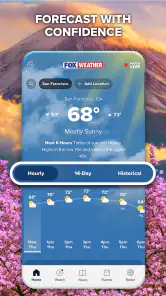
My routine is to check the current conditions first, then compare the hourly forecast with the broader outlook. That order helps me decide whether to bring an umbrella, shift a walk, or allow extra time for a trip. Rather than treating a weekly forecast as a promise, I use it as a planning guide and check again closer to the time I need to go out.
For example, if rain might affect an afternoon errand, I can look at the forecast and radar before leaving, then revisit the app if the sky changes. That is a more useful workflow than relying on a glance out the window alone. Weather can vary from place to place, though, so I would make sure the app is showing the location relevant to the plan rather than assuming conditions nearby are identical.
Making the forecast useful outside the house
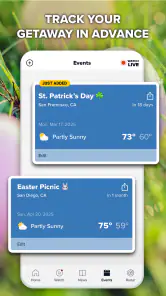
A forecast becomes more useful when I connect it to a specific decision instead of checking it out of habit. If I have a commute followed by an outdoor appointment, I would look at the hours covering both parts of the day, not just the conditions at the moment I open the app. That helps me decide whether to bring rain gear, change shoes, or leave a little flexibility in the schedule.
For a family outing, I would also share the practical conclusion rather than simply saying “the weather looks fine.” For instance, I might suggest leaving earlier if storms could complicate the drive, while keeping an indoor alternative in mind. This is a small but useful handoff: the forecast informs a plan, and the people involved agree on what they will do if conditions shift. It is less about predicting every detail and more about avoiding a preventable scramble.
When comparing forecasts, I try not to treat a difference between two apps as proof that one is useless. A broad daily summary may smooth over local changes, while radar gives a visual picture that still needs interpretation. If the decision has real consequences—such as whether to travel during severe conditions—I would check local official guidance as well. FOX Weather can help me notice developing weather and understand coverage around it, but it should not be the sole basis for an urgent safety call.
Weather at Your Fingertips
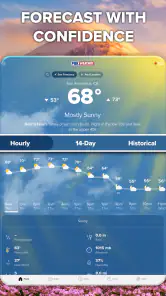
First off, let’s talk about the interface. The moment you open FOX Weather: Daily Forecasts, you’re greeted with a sleek, intuitive design that doesn’t overwhelm with information. It’s like the app knows exactly what you need, and it’s all laid out in a way that’s easy to digest. You get your current weather, the hourly forecast, and, of course, the all-important weekly outlook. It’s like peeking into the future but without the crystal ball.
More From Our News Desk

Weather by Xiaomi Review: Clear at a Glance, Less Clear Up Close

X Under Pressure: Can It Recover When Posting Goes Wrong?

Clash of Clans Is Won Between the Battles

Android Auto Makes the Case for Quieter Car Software

MobiOffice: Transforming Mobile Productivity with Seamless Integration

EA SPORTS FC™ Mobile Soccer: Redefining Mobile Sports Gaming
From forecast to follow-through
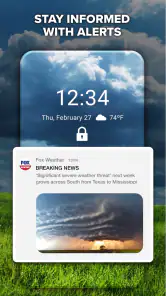
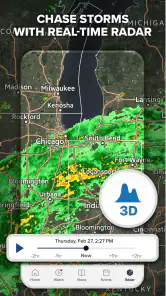
What really sets this app apart are its features. Have you ever been caught in the rain because you didn’t know it was coming? With the app’s minute-by-minute precipitation forecasts, those days are behind you. It’s almost uncanny how precise it is. Plus, the radar maps are interactive, allowing you to track storms as they develop. You can even customize alerts for severe weather, ensuring you’re always a step ahead of Mother Nature.
For a more careful check, I would use the radar to understand the direction and development of a storm, then use an alert as a prompt to look again rather than as a substitute for judgement. That distinction matters if you are deciding whether to continue an outdoor activity: a forecast can help you prepare, but changing conditions still deserve attention. If you are sharing plans with someone else, the useful handoff is simple—check the same forecast before setting off and agree on what would make you postpone or change route.
One detail that is easy to overlook is the difference between a notification and a plan. An alert can draw attention to a weather change, but it cannot decide whether your particular walk, drive, or event should continue. I would use it as a reason to reopen the forecast, check the radar, and reassess the next step. That habit is more dependable than assuming an alert will arrive at exactly the moment a local change matters.
Another practical trade-off is how much information to consult. For a quick trip to the shop, current conditions and the hourly view are probably enough. If I am planning a long outdoor stretch, I would take the extra moment to inspect the radar and consider how easily I can get indoors if the weather turns. This keeps the app from becoming an endless stream of updates: I use the detail in proportion to the decision.
Another thing I love is the video content. If you’re the type who likes a little visual flair with your weather updates, you’ll appreciate the live streaming and on-demand video forecasts. It’s like having your very own weather channel, available whenever you need it. And for those of us who are a bit obsessed with tracking weather patterns, the app’s detailed weather news stories and analysis are pure gold.
The video and news are most worthwhile when a developing weather event needs more explanation than a number or map can give. They also make this feel different from a stripped-down forecast app, where the emphasis is usually on conditions and alerts rather than a live-news experience. I would not open a stream every time I need to know whether to take a jacket; for that, the forecast view is the quicker tool. The extra coverage is there when I want background, not a requirement for using the basics.
Choosing the right tool for the situation
Compared with the usual minimal weather app, FOX Weather puts more emphasis on combining forecasts with storm coverage and news. That can be a genuine advantage when I want to follow an event and understand what is happening beyond my immediate street. A simpler alternative may be better for someone who only wants a fast temperature check, prefers fewer layers of content, or needs an app that remains useful when a connection is weak.
I would not judge it only by how many screens it offers. The more useful question is whether I will actually use the added coverage. If I regularly check storm movement, or find it helpful to hear a forecast explained, the extra material has a purpose. If I rarely watch weather video and never need more than a basic outlook, those additions may feel like distractions rather than benefits. In that case, keeping a lightweight weather tool as the default makes sense.
For people deciding whether to switch, there is no need to make the choice all-or-nothing. I would try FOX Weather for the situations where its combination of radar and reporting is valuable, while keeping a familiar alternative available for quick checks or poor connectivity. Over time, the difference becomes clear: one may be better for a short glance, while this app is more compelling when I want to follow a weather story from forecast to context.
Who will get the most from it
I’d recommend it to people who like having forecasts and weather coverage in the same place, especially anyone who follows storms or wants to check conditions before commuting, exercising outdoors, or making weekend plans. A useful habit is to check the hourly view at the point when a decision is still easy to change, then use radar or an alert if the weather looks unsettled. That avoids treating a broad outlook as a minute-by-minute guarantee.
It also suits people who like to understand why a forecast matters, not just see a number. A live or on-demand explanation can help put a developing event into context, while the radar offers a different way to inspect what may be moving through. I would especially consider it if I planned outdoor activities often enough to benefit from checking more than once, but did not want a separate news source and weather tool for every situation.
If you only want a lightweight glance at the temperature and have limited data or an unreliable connection, a simpler weather app may suit you better. This app’s live and video material can take longer to load when connectivity is poor, so I would not depend on streaming while offline or in a dead zone. For urgent safety decisions, I would also cross-check official local guidance; a consumer forecast is helpful context, not a replacement for emergency instructions.
A few considerations
While the app is a powerhouse of weather information, I did notice that it can be a bit data-heavy. If your internet connection is spotty, loading times can be a tad slow. But honestly, that’s a small price to pay for the wealth of information you’re getting. Also, there are ads, but they’re not too intrusive and frankly, it’s a fair trade-off for a free app that offers this much value.
FOX Weather is free to download and is rated for Everyone. It has an average rating of 3.8 from around 3.8 thousand ratings, with over a million installs. Optional in-app purchases range from $1.99 to $12.99 per item, so I would check the purchase details before confirming anything; the core appeal for me is having useful weather information without paying to download the app. Those figures suggest it has found an audience, but they do not tell me whether its forecasting style will match your needs.
Because it mixes quick forecasts with richer media, I would make a small distinction in how I use it on the move. Before leaving home, I can use the forecast and radar to prepare. Once I am travelling, I should not be trying to follow a video or repeatedly inspect a map while driving; checking beforehand, or asking a passenger to help, is the safer handoff. The same principle applies to outdoor plans: use the app to make a sensible decision before conditions become difficult to assess.
One practical question is whether it makes sense as a replacement for a familiar weather app. I would keep it if I valued storm tracking and live news alongside ordinary forecasts; if I mainly wanted a minimal screen that loads quickly on weak service, I would lean toward a simpler alternative. Another is whether the video is essential: it is not. You can use the forecast and radar as the day-to-day tools and turn to coverage only when added explanation is useful.
Another question is whether the app works for someone who is not deeply interested in weather. I think it can, as long as that person sticks to the straightforward forecast checks and treats the extra reporting as optional. You do not need to follow every storm story to get practical value from planning around an hourly outlook. On the other hand, if even a few extra choices make an app feel cluttered, a simpler option may be more comfortable.
The developer is FOX News Network, LLC, and the app has been available since October 21, 2021. I see its identity as part of the experience: it is not only a forecast screen, but also a place to follow weather coverage. That makes it a more natural fit for someone who welcomes news alongside the outlook, and a less obvious choice for someone who wants weather information without editorial video or reporting.
So, is FOX Weather: Daily Forecasts worth the download? Absolutely! Whether you’re planning a weekend hike, a day at the beach, or just need to know if you should carry an umbrella, this app has got you covered. It’s reliable, user-friendly, and packed with features that make it a must-have for anyone who likes to stay ahead of the weather. Give it a try, and you might just find yourself looking forward to the next forecast!
FOX Weather: Daily Forecasts Frequently Asked Questions
Can I watch weather coverage in the app, or does it only show forecasts?
FOX Weather is not limited to forecast screens: its summary highlights both checking forecasts and watching live news, alongside tracking storms. That makes it useful if you want weather information presented as coverage as well as practical forecast details. The experience is centered on weather, so you can use it to follow conditions and keep up with weather-related news in one app.
What does FOX Weather show when I open it?
FOX Weather is designed to bring together forecast information, weather coverage, and storm tracking. You can use it to check forecasts, follow changing conditions, and watch live news, with radar maps and alerts among the features described for the app. What appears most useful will depend on the location and information you want to follow, but the focus is on helping you stay informed about weather.
Is FOX Weather suitable for the whole family?
FOX Weather has an Everyone content rating, so it is presented as suitable for a broad audience. Its purpose is to help people check forecasts, follow storms, and keep up with weather coverage. As with any app, parents can decide whether its news and alert content fits their household, but the age rating makes it an option for general family use rather than an app intended only for adults.
What features does the FOX Weather app offer?
The FOX Weather app provides a variety of features to keep users informed about the latest weather conditions. Key features include real-time weather updates, detailed forecasts, severe weather alerts, and interactive radar maps. Users can personalize their experience by setting up notifications for specific weather conditions and viewing weather reports relevant to their location, making it a comprehensive tool for weather tracking.
Is the FOX Weather app free to download and use?
Yes, the FOX Weather app is free to download and use. Users can access the core features without any cost, including daily forecasts, weather alerts, and radar maps. However, it is important for users to check if there are any optional in-app purchases or subscription services for additional features or ad-free experiences.
Pros
- User-friendly interface enhances experience
- Accurate weather predictions ensure reliability
- Customizable alerts for severe weather updates
- Interactive radar maps for detailed insights
- Free to use with no hidden charges
Cons
- Limited international coverage
- Occasional slow loading times
- Ads can be intrusive at times
- Requires internet for full functionality
- Battery drain on prolonged use
- Category
- Weather
- Version
- Varies with device













