FOX Nation: Celebrate America
- 8.69K
- 3.9
- Installs
- 1.00M
- Price
- Free

Screenshots





Analysis by Reviewed
I find FOX Nation: Celebrate America easiest to judge as a viewing habit rather than a one-time download. Its appeal is clear if you want American-themed entertainment, television, films, and documentaries in one place, but the real question is whether that selection keeps earning your attention after the first few sessions. For me, it makes the most sense as a focused destination for people who already enjoy this kind of programming, not as a replacement for every news or streaming app on a phone.
Why the first week feels appealing
The app is free to download, and its Teen age rating makes it accessible to a broad audience, though the content itself will still suit some tastes better than others. FOX News Network, LLC develops it, and it sits in the news and magazines space while also offering a distinctly video-led experience. That mix is useful if you want to move between current-affairs viewing and longer-form programs without treating them as the same thing.
In a realistic evening routine, I could open it after dinner, look for a documentary or show that fits my mood, and watch for a while without needing to plan a whole night around it. That low-effort entry is part of its first-week charm. If you are curious about its point of view or enjoy patriotic themes, the app gives you a direct way to sample that programming style.
Choosing a good first session
I would give the first visit a small purpose rather than trying to explore every corner. Pick one topic you already care about, then see whether the programs available around it hold your attention beyond a short preview. This is a more useful test than judging the app by its first screen: a polished presentation can make browsing feel inviting, but the real fit comes from whether the actual subject matter is what you want to spend time with.
If I were trying it with a family member, I would also agree on what kind of viewing we were looking for before handing over the phone or putting it on a larger screen. The Teen rating is a general age guide, not a promise that every program will suit every household or every younger viewer. I would choose content together rather than treating the rating as a substitute for checking a specific program’s subject and tone.
What keeps it useful from month to month
The app has an average rating of 3.9 from around 18,000 ratings, alongside roughly 8,700 written reviews, and it has passed one million installs. I treat those figures as context rather than a guarantee that it will suit me: an app can be widely tried and still be a narrow match for a particular viewer. Its lasting value depends less on how much content appears at first glance and more on whether you return for the subjects and presentation it offers.
Compared with a general streaming service, FOX Nation is more specific in its editorial identity; compared with a conventional news app, it leans toward watching programs rather than simply scanning headlines. That focus is a strength when you know what you want, but it also makes the app less useful if your goal is a broad mix of viewpoints or a quick, text-first news check. I would pair it with other sources rather than ask it to cover every side of a story.
More From Our News Desk

Weather by Xiaomi Review: Clear at a Glance, Less Clear Up Close

X Under Pressure: Can It Recover When Posting Goes Wrong?

Clash of Clans Is Won Between the Battles

Android Auto Makes the Case for Quieter Car Software

MobiOffice: Transforming Mobile Productivity with Seamless Integration

EA SPORTS FC™ Mobile Soccer: Redefining Mobile Sports Gaming
Turning occasional viewing into a routine
For month-to-month use, I would make it a planned stop rather than a default one. For example, if I had a quiet Sunday afternoon, I might look for one longer program and treat that as a deliberate viewing choice; on a busy weekday, I would be less likely to open a video-focused app when all I need is a quick update. Separating those needs helps me decide whether the service adds something distinct or merely duplicates time I already spend elsewhere.
That distinction matters if you share a household’s viewing time with other services. A dedicated collection can be worthwhile when it gives you a subject or style you repeatedly seek, but it may not earn permanent space if your interests change from week to week. I would reassess after a few sessions: if I keep returning to specific programs, the app has a role; if I only browse without choosing anything, that is a practical sign that the fit is weaker than the first impression suggested.
Small habits that reduce friction
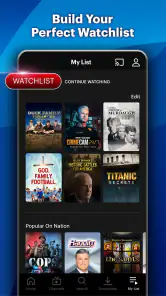
One practical approach is to decide what you want from a session before opening the app: a longer documentary, a show, or a news-oriented viewing break. That simple choice can keep browsing from taking longer than watching. If you often stop partway through a program, a watchlist can help you keep track of what you intend to return to, rather than relying on memory or searching again.
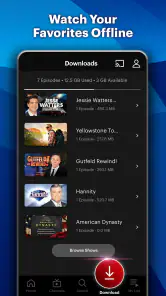
For someone who watches on more than one screen, device syncing can make it easier to continue elsewhere. I would still treat that as a convenience, not a reason to assume every device will feel identical. Likewise, the reported offline viewing option is handy for planning around a commute or unreliable connection, but it is worth checking what is available for offline use in the app before depending on it for a trip.
Planning around a commute or shared screen
Offline viewing is most useful when it is part of a little bit of advance planning. If I expected a stretch without reliable internet, I would check the app beforehand, choose what I actually want to watch, and confirm that the program is ready for offline use. I would not leave that decision until I was already travelling; a feature only reduces friction when I have checked the specific content I need in advance.
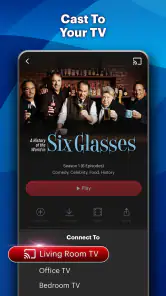
For shared viewing, I would use the phone to find a program first and then decide whether the bigger screen is worth setting up. That keeps the choice focused and avoids turning a short break into a long search session. If the household wants a broadly varied evening of comedy, drama, and unrelated genres, a general streaming service is more likely to meet everyone’s tastes without compromise.
All-American Content at Your Fingertips
When I first launched the app, I was greeted with a sleek and intuitive interface that made navigation feel like a breeze. The main attraction here is undoubtedly the vast array of shows and documentaries that celebrate American culture, history, and values. From exclusive interviews to gripping documentaries, FOX Nation: Celebrate America offers a rich tapestry of content that’s both informative and entertaining.
Features That Stand Out
The app is packed with features designed to enhance your viewing experience. What caught my eye was the offline viewing option, which is perfect for those long commutes or when Wi-Fi is just not cooperating. Another stellar feature is the customizable watchlist that lets you keep track of your favorite shows and movies. Plus, the app’s ability to sync across devices means you can start watching on your phone and seamlessly switch to your tablet or smart TV.
One thing I particularly appreciated is the live streaming option for FOX News, which keeps you connected with the latest happenings across the nation. It’s like having a direct line to the pulse of America, right in your pocket.
A Smooth User Experience
The developers have clearly put a lot of thought into ensuring the app runs smoothly. I didn’t experience any lag or crashes, which is a huge plus. The content loads quickly, and the video quality is top-notch, even when streaming live. It’s these small details that make using FOX Nation: Celebrate America a delight rather than a chore.
Moreover, the app’s design is easy on the eyes, with a layout that’s both modern and functional. Whether you’re a tech newbie or a seasoned app user, you’ll find it easy to navigate through the various sections.
Maintenance, costs, and signs of fatigue
Although the download is free, in-app purchases range from about $9 to $71 per item. I would check the purchase details before committing, especially if you are only testing whether the programming fits your routine. The free entry point lowers the barrier to trying it, but it does not mean every viewing option is included at no cost.
The maintenance burden is mostly about attention: deciding whether to keep the app on your home screen, managing a watchlist, and resisting the habit of opening it without a particular program in mind. If you only want occasional breaking-news alerts or a broad selection of unrelated entertainment, another news reader or general streaming service may be a better everyday fit. FOX Nation is more rewarding when its specific subject matter is exactly what you came to watch.
Content fatigue is possible when a service has a strong editorial and cultural focus. I would notice whether I am choosing programs because they genuinely interest me or simply because they are easy to find. Alternating it with other sources and formats can make the experience feel more intentional, while also helping keep any single app from becoming my only lens on current events.
What to check before paying
Because individual in-app purchases vary considerably in cost, I would open the details for the particular option I was considering rather than infer what is included from the free download. The practical question is not simply whether there is a charge, but whether the access offered matches how often I expect to watch. Someone who only wants to sample a program should be cautious about committing before understanding the purchase terms presented in the app.
I would also think about how much video I realistically watch on a phone. A longer program may be more comfortable on a tablet or television, while a quick news-oriented check is easier to fit into a short break. If the app’s main material does not fit the screen or the time I actually have available, its catalog can be appealing in theory without becoming a regular part of my day.
Who should keep it installed?
I would recommend giving it a try if you enjoy American history and culture programming, prefer video to headline feeds, or want a dedicated place to browse this particular kind of entertainment. It may also suit households where one person wants documentary-style viewing while another uses the app for news-related streams. If your main need is neutral, fast fact-checking, extensive international coverage, or a wide-ranging catalog across genres, I would choose a complementary service instead.
The app was released in November 2018, so it has had time to establish its place among mobile media options. That history alone does not make it a lasting essential; the better test is whether you find something worth watching often enough to justify keeping it installed. I would start with a clear purpose, explore the available programs, and review any in-app purchase choices before making it part of a regular routine.
When another app is the better choice
If I need a quick, text-first account of a developing story, I would reach for a news reader rather than expect a video library to be the fastest route. If I want reporting from several perspectives, I would consult more than one source, since one focused service should not be treated as a complete picture. And if I am looking for a broad entertainment catalog that changes mood from one night to the next, a general streaming app is likely to be a more flexible fit.
Those alternatives do not make this app pointless; they clarify its best role. It is for viewers who actively want this particular mix of programs and are comfortable using other tools for different needs. Keeping that boundary in mind makes it easier to enjoy the content without expecting one app to handle news reading, wide-ranging entertainment, and every point of view at once.
Final Thoughts
So, is FOX Nation: Celebrate America worth downloading? If you’re someone who enjoys content that celebrates American culture while keeping you informed with the latest news, then absolutely! It’s a well-rounded app that offers a little something for everyone. The combination of exclusive content and user-friendly features makes it a must-try for anyone looking to add a touch of red, white, and blue to their daily media consumption.
In a nutshell, this app is like a pocket-sized celebration of America, ready to entertain and inform you wherever you go. Give it a whirl and see if it doesn’t become your new favorite way to experience all things American.
Does it earn a lasting place?
My longer-term test would be simple: after the novelty of exploring a new catalog fades, do I still have a reason to open it? A useful answer comes from tracking my own choices for a little while, not from keeping a large watchlist that I never revisit. If I repeatedly choose a program here for a particular evening or subject, the app is earning its space. If I keep opening it and leaving without watching, I would remove it or return only when I have a specific interest.
That is why I see its strongest value as recurring, intentional viewing rather than constant background use. The focused identity can make it a satisfying destination for the right person, while also limiting its usefulness for someone whose media habits are built around fast headlines or a different mix of entertainment. I would keep it installed when the programs themselves become part of my routine, and skip it when that interest is only occasional.
FOX Nation: Celebrate America Frequently Asked Questions
What kind of viewing experience should I expect from FOX Nation: Celebrate America?
FOX Nation: Celebrate America is a video-focused app for viewers interested in entertainment, TV shows, movies, documentaries, and other programming. Its presentation centers on watching content rather than reading news articles, so it may suit people looking for programs to stream in one place. The app is free to download, while access to subscription content may require an in-app purchase.
Is FOX Nation: Celebrate America suitable for younger viewers?
The app has a Teen content rating, so parents and guardians may want to review that guidance before allowing younger viewers to use it. FOX Nation: Celebrate America includes shows, movies, documentaries, and other video programming, with topics that may vary from one title to another. Consider the rating alongside your family’s preferences and the specific content being watched.
Do I need to pay immediately after installing FOX Nation: Celebrate America?
No, downloading FOX Nation: Celebrate America is free, so installing it does not by itself require you to choose a paid plan. In-app purchases are available, and you can review the subscription options presented in the app before making a purchase. Check the plan and billing terms carefully at checkout so you understand what you are agreeing to.
Is FOX Nation: Celebrate America free to download, and what might I pay for?
FOX Nation: Celebrate America is free to download, so you can install the app before deciding whether to subscribe. The service offers in-app purchases, with subscription options shown in the app. Check the current plan details and billing terms before confirming a purchase, since choosing a subscription is separate from downloading the app. The app is rated Teen, which is useful to consider when deciding whether it is suitable for younger viewers.
Who develops FOX Nation: Celebrate America, and what kind of app is it?
FOX Nation: Celebrate America is a News & Magazines app developed by FOX News Network, LLC. Its focus is video entertainment, including TV shows, movies, documentaries, and other programming. The app has an average rating of 3.9 from around 18,000 ratings, offering a general sense of how users have responded to it. Its content is aimed at viewers interested in FOX Nation programming and related entertainment.
Pros
- Wide range of American-focused content.
- User-friendly interface
- easy to navigate.
- High-quality streaming with minimal buffering.
- Exclusive interviews and documentaries.
- Ad-free experience for subscribers.
Cons
- Limited to US-centric content only.
- Subscription required for full access.
- Occasional app crashes reported.
- Content not suitable for all age groups.
- No offline viewing option available.
- Category
- News & Magazines
- Version
- Varies with device













