Time Warp Scan - Face Scanner
- 2.33K
- 4.4
- Installs
- 10.00M
- Price
- Free

Screenshots
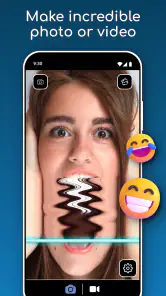
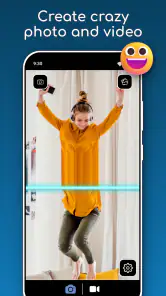
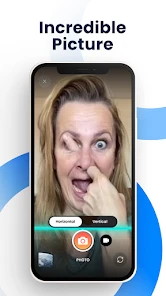
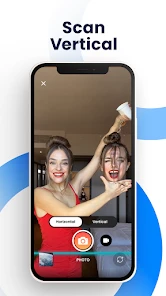
Analysis by Reviewed
I find a time-warp camera most rewarding when I treat it as a little experiment rather than a full photo studio. The fun comes from watching a moving subject turn into a stretched or oddly shaped image, then trying a small change in pose or timing to see what happens. Time Warp Scan - Face Scanner is built around that playful effect, and its appeal is less about polishing a perfect portrait than capturing a funny moment worth sharing.
What affects the pace of a scan
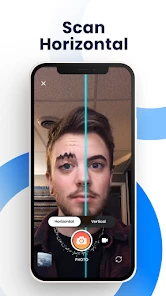
The effect works by freezing the picture progressively, line by line, so the subject’s movement during the scan shapes the result. That makes the app feel immediate: you can try a pose, see the distortion, and adjust for another attempt without needing to learn a complicated editing workflow. In my experience, a clear background and a steady phone make it easier to judge what the scan is doing. If the subject moves too quickly, the result can look chaotic; slower, deliberate movement gives you more control over the joke.
For a useful first test, keep the phone still and move only one thing at a time: raise an eyebrow, turn your head, or lift an arm as the scan passes. That simple approach helps you understand how the line moves and makes it easier to repeat a result. It also avoids the common disappointment of changing your pose, the camera angle, and the subject all at once, then not knowing which change created the funny shape.
When repeated tries put it to work
Short bursts of use suit this kind of camera better than a long photo session. At a family get-together, for example, I’d pass the phone around and let each person choose one small movement, then compare the results. That keeps the activity easy to follow for children and adults, while giving everyone a chance to try the same idea with a different expression. If a take misses, it’s simple to have another go; the trade-off is that the best result may depend on timing and cooperation rather than on an automatic correction.
It’s also a handy way to make a quick visual gag for a group chat, especially when a normal selfie feels too ordinary. I’d capture a few attempts before sharing, since the first scan may catch someone between expressions. The app supports photos and videos, so you can choose a still image for a quick punchline or a moving clip when the changing distortion is the point. For a carefully composed portrait, though, a standard camera and a conventional editor give you more control over framing and retouching.
Reliability, limits, and fit
Because the effect depends on movement being captured as the scan progresses, results can vary from one attempt to the next. I wouldn’t rely on it for a predictable, polished image or an important event photo. It makes more sense as a casual camera for playful experiments, where an imperfect take can still be entertaining. Keeping the phone steady and avoiding a cluttered background are practical ways to make the result easier to read, rather than signs that the app is doing heavy editing behind the scenes.
It is a free photography app from Braly JSC, with optional in-app purchases priced from $0.49 to $9.49 per item. Its average rating is 4.4 from around 35,000 ratings, and it has passed 10 million installs. The app is rated for Everyone, which fits its straightforward, silly premise. Version 3.7.0 requires Android 7.0 or later. Those details make it approachable for many Android users, although a phone’s camera and general performance can still affect how comfortable a recording session feels; I’d keep clips brief if a device starts to feel warm or sluggish.
More From Our News Desk

Weather by Xiaomi Review: Clear at a Glance, Less Clear Up Close

X Under Pressure: Can It Recover When Posting Goes Wrong?

Clash of Clans Is Won Between the Battles

Android Auto Makes the Case for Quieter Car Software

MobiOffice: Transforming Mobile Productivity with Seamless Integration

EA SPORTS FC™ Mobile Soccer: Redefining Mobile Sports Gaming
A playful camera, not an all-purpose editor
Compared with a usual camera app, this one gives up some control over conventional composition in exchange for a distinctive scan effect. Compared with a general editing app, it is quicker to try but less suited to fine adjustments afterward. I’d recommend it to anyone who wants an easy novelty for selfies, pets, or a relaxed get-together, and skip it if the goal is dependable portraits, detailed retouching, or a serious video workflow. The release date was March 4, 2022, and the current version is 3.7.0; more importantly for everyday use, its best results come from simple ideas and a little patience. For a free way to turn a spare minute into a shared laugh, I think it earns a place on the phone, as long as you know its limits.
Choosing subjects and setting up a quick take
The effect is easiest to understand when the subject has a clear outline against what’s behind them. I’d start with a face or a single arm rather than a crowded group, then try a second person once the timing makes sense. Pets can be funny subjects, but they rarely hold still on cue, so I’d treat their scans as happy accidents instead of planning around a precise pose. For a group, take turns rather than moving everyone at once; that makes it easier to see whose motion created the distortion.
A practical everyday use is making a quick clip before sending a message to a friend: choose one simple gesture, keep the camera steady, and do a couple of takes. If you want a still image, pause to check the framing before starting; if you want the movement itself to be the joke, use video. Sharing is convenient, but I’d review the result first so a private face or background detail doesn’t end up in a group chat by mistake. That small check is useful with any camera app, especially when people nearby didn’t expect to be included.
What to expect from the phone
I wouldn’t judge performance only by how quickly the screen responds. Capturing video and processing an effect can feel different across devices, and the phone’s camera, available resources, and current workload all matter. If the preview stutters or the phone becomes uncomfortable during repeated recordings, close other demanding apps, shorten the next clip, and let the device rest before trying again. Those are sensible general steps, not a promise that every slowdown will be fixed; for a quick novelty, brief sessions are usually a better fit than repeatedly recording long clips.
The app is lightweight in concept, but that doesn’t mean every phone will produce identical results. A newer or more capable device may feel smoother, while an older phone can make recording less comfortable, particularly if several apps are already active. I’d also make sure there is enough room to keep the clip I want before starting a run of takes. If the camera experience remains unreliable on a particular device, a built-in camera is the safer choice for an important moment; the scan effect is best saved for when experimentation matters more than certainty.
Who will get the most from it
I’d suggest it to someone who enjoys silly camera effects and wants a quick activity that doesn’t demand editing skills. It can work well as a conversation starter at home, a playful pet experiment, or a spontaneous clip for friends. It is less compelling if you rarely share novelty images or expect every capture to look polished on the first try. The main trade-off is straightforward: the unusual distortion is the reason to open it, but the same dependence on timing makes it less predictable than a standard selfie camera.
If you’re deciding whether to keep it, ask what you want from your camera. For dependable photos, use the phone’s regular camera; for detailed adjustments, choose an editor; for quick, oddball images created through movement, this app has a more specific purpose. I’d keep expectations modest, use one clear subject, and stop once the joke has landed rather than chasing a perfect result. That approach makes the experience feel light instead of frustrating.
Getting Started with the Time Warp Magic
The first thing you'll notice when you open Time Warp Scan - Face Scanner is how straightforward it is. The interface is clean and intuitive, which is always a plus in my book. No one likes to spend hours trying to figure out how an app works, right? The main feature of the app is its ability to freeze a frame line by line, allowing you to create hilarious distorted images. Think of it as a modern-day version of those funhouse mirrors that used to make you look like you had a giant head and tiny feet!
Features That Stand Out
One of the coolest things about this app is its versatility. You can use it for both photos and videos, which opens up a world of possibilities. Want to see what your face looks like when stretched like a piece of gum? Or maybe you're curious about how your pet would look with a human-sized nose? The app lets you do all that and more. And let me tell you, the possibilities for pranking your friends are endless!
I also appreciate the fact that the app doesn't bombard you with ads every five seconds. It's a breath of fresh air compared to some other apps out there. Plus, it offers some in-app purchases if you're looking to unlock additional features, but the free version is more than enough to keep you entertained for hours.
Playing with Friends and Family
If there's one thing I've learned, it's that this app is a huge hit at gatherings. Whether you're hosting a party or just hanging out with your family, Time Warp Scan is a surefire way to get everyone laughing. The app's simplicity makes it accessible to people of all ages, so don't be surprised if you find your grandma giggling at her own distorted reflection!
Another neat feature is the ability to share your creations directly from the app. Whether you want to post your warped selfies to social media or send them to your friends for a good chuckle, it's all just a tap away. The app makes it incredibly easy to spread the joy (and laughter) around.
Making a result feel intentional
One small trick I find useful is to decide on the visual punchline before pressing record. A slow head turn creates a different kind of surprise from a sudden hand movement, and choosing one idea gives the scan a cleaner subject to work with. If I’m experimenting alone, I use a simple repeatable gesture rather than trying to improvise a whole performance. That makes the next attempt easier to compare and helps me tell whether the timing or the movement is responsible for a better result.
Lighting and background matter in a practical way, too. A busy room can make a warped outline harder to read, while a plain wall or uncluttered corner lets the distortion stand out. I wouldn’t rearrange a room for a casual clip, but shifting a step away from patterned curtains or a window glare can make the image less confusing. It’s a useful trade-off: a little setup can improve clarity, but the app is most enjoyable when that setup stays quick and low-effort.
When a different camera is the better tool
For a school project, a work profile picture, or a family photo that needs to be dependable, I’d reach for the regular camera first. Its familiar framing and predictable capture are more valuable than an entertaining distortion in those situations. If I want to transform a finished portrait with several careful adjustments, an editor is also a better match because I can work on the image after taking it. This scan app is strongest when the motion itself is part of the idea, not when I need precise control over the final look.
It is also worth thinking about where the result will be viewed. A stretched face can read instantly on a phone screen but may be less clear when several people or lots of background detail compete for attention. Before sending a clip, I’d check that the joke survives at the size friends are likely to see it and that the person in it is happy to share it. That quick review is more useful than making endless takes in pursuit of a technically perfect distortion.
Keeping a casual session comfortable
For a short session, I’d make a few varied attempts, look at them together, and keep the strongest one rather than recording the same movement repeatedly. That gives the app a clear purpose and avoids turning a novelty into a tedious retake loop. If the phone begins to lag, feels warm, or struggles to show a smooth preview, I’d pause instead of assuming the next take will suddenly be better. Closing other busy apps and choosing a shorter recording are reasonable first steps, but a regular camera remains the sensible fallback when the moment cannot be repeated.
People often wonder whether they need a clever idea to enjoy it. I don’t think so: an exaggerated smile, a slow turn, or a raised hand is enough to learn the effect. The more useful question is whether you enjoy experimenting with timing. If you want a camera to make the decision for you and deliver a polished result automatically, this is not the right fit; its charm comes from trying a simple action and seeing how the scan interprets it.
Final Thoughts
In conclusion, Time Warp Scan - Face Scanner is a delightful little app that brings out the child in all of us. It's simple, fun, and perfect for anyone looking to add a bit of silliness to their day. Whether you're using it to entertain yourself, prank your friends, or just kill some time, it's definitely worth a download. So, why not give it a try and see what kind of hilarious creations you can come up with?
Time Warp Scan - Face Scanner Frequently Asked Questions
Is Time Warp Scan - Face Scanner safe for children to use?
The app is rated Everyone, and its camera-based effects are intended for general audiences. Children can use it to experiment with amusing photo and video distortions, while parents may want to guide how and where creations are shared. The app’s creative focus is on applying a visual scan effect, so families can decide whether that kind of camera activity suits their preferences.
Who makes Time Warp Scan - Face Scanner, and how popular is it?
Time Warp Scan - Face Scanner is developed by Braly JSC. It has attracted a sizeable audience for a photography app, with over 10 million installs and an average rating of 4.4 from around 35,000 ratings. Those figures suggest that many people use it for playful camera effects, though whether its style suits you will depend on the kind of photos and videos you enjoy making.
Is Time Warp Scan - Face Scanner suitable for beginners?
Yes. The app is built around a straightforward camera effect: position yourself or an object in the frame, then watch as the scanning line creates a distorted image or video. You can experiment with poses and the scan direction to see how the result changes. Its simple creative focus makes it approachable even if you have not used photo-effect apps before.
What can I create with Time Warp Scan - Face Scanner?
Time Warp Scan - Face Scanner is an innovative app that allows users to create unique and entertaining images or videos by using a time warp effect. As the scanner moves from top to bottom or side to side, users can capture distorted images that resemble funhouse mirror effects, making it popular for creative social media posts. The app’s store summary also describes creating unique photos and videos with the popular TikTok time warp scan filter.
What is Time Warp Scan - Face Scanner?
Time Warp Scan - Face Scanner is an innovative app that allows users to create unique and entertaining images or videos by using a time warp effect. As the scanner moves from top to bottom or side to side, users can capture distorted images that resemble funhouse mirror effects, making it popular for creative social media posts.
Pros
- Easy-to-use interface for quick scans.
- Delivers fun and creative photo effects.
- Regular updates with new features.
- Works smoothly on most devices.
- Free to download with optional in-app purchases.
Cons
- Limited editing tools compared to competitors.
- Occasional ads can interrupt experience.
- Requires camera access
- affecting privacy.
- Some features need a stable internet.
- In-app purchases can be pricey.
- Category
- Photography
- Version
- 3.7.0












