Magicbricks Buy, Rent Property
- 799.00
- 4.3
- Installs
- 10.00M
- Price
- Free

Screenshots





Analysis by Reviewed
When I look for a home, the hardest part is often not finding one listing I like; it is keeping a useful shortlist while prices, locations, and property types compete for attention. Magicbricks is built around exploring homes and other property in India for buying or renting, and I find that broad search role more useful than treating it as a single-purpose browsing app. It is a free House & Home app from MagicBricks Reality Services Ltd, with a 4.2 average from around 304,000 ratings and more than 10 million installs. It is rated for everyone, although optional in-app purchases range from $6.99 to $219.99 per item.
Exploring the Features of Magicbricks
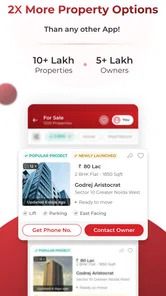
First off, let's talk about what you can do with Magicbricks. It's not just about buying or renting; the app offers a comprehensive platform for exploring properties. Whether you're looking for a cozy apartment, a spacious villa, or even a commercial space, Magicbricks has got you covered. The app provides detailed listings with high-quality images, prices, and even a map view, so you can get a real sense of the neighborhood.
Turning a broad search into a practical shortlist
The central capability is the combination of property filters and a map view. I would start with a realistic budget and a small set of location and property-type preferences, then widen one filter at a time if the results are too narrow. This makes it easier to see whether the real obstacle is the chosen area, the property style, or the spending limit, instead of changing everything and losing track of what improved the search.
The map is useful for comparing where listings sit, but I would treat it as a first screening tool, not proof that a place fits daily life. A pin can help me compare areas at a glance; it cannot replace checking a route at the time I would actually travel or visiting the street. I would save a short list of plausible options and verify important details directly before making a decision.
Finding Your Perfect Match
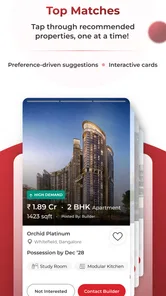
The search functionality is super intuitive. You can filter properties based on your budget, location, property type, and other preferences. It's like having a personalized property matchmaker! And if you're someone who likes to stay updated on the go, Magicbricks offers push notifications for new listings that match your criteria. So, you're always in the loop, even if you're busy with a million other things.
Notifications are most helpful when the search criteria are focused. If I set an overly broad search, a steady stream of possibilities can become noise rather than a shortcut. I would begin with the areas I can genuinely consider, then adjust the search if suitable listings are scarce. For a renter, that might mean comparing a couple of neighborhoods near work; for a buyer, it could mean keeping the budget fixed while testing nearby areas.
How I would use it during a house hunt
Imagine I have a free hour after work and want to narrow down rental options before arranging visits. I can check the images and listed price, use the map to compare locations, and keep only the places that seem worth a closer look. Rather than trying to decide from a screen, I would note questions about the property and contact the owner or agent to clarify them before spending time travelling. That simple order—filter, compare, ask, then visit—makes browsing more purposeful.
More From Our News Desk

Weather by Xiaomi Review: Clear at a Glance, Less Clear Up Close

X Under Pressure: Can It Recover When Posting Goes Wrong?

Clash of Clans Is Won Between the Battles

Android Auto Makes the Case for Quieter Car Software

MobiOffice: Transforming Mobile Productivity with Seamless Integration

EA SPORTS FC™ Mobile Soccer: Redefining Mobile Sports Gaming
Compared with relying only on general classified ads or asking contacts to send individual listings, a dedicated property app gives me a more organized way to browse different types of homes and compare locations in one place. Personal referrals can still be better when trust or local knowledge matters most, and direct visits remain essential for judging condition and surroundings. I see Magicbricks as a discovery and comparison tool, not a substitute for those checks.
Making the shortlist useful beyond the screen
I get more value from a property search when I decide what would make a listing a genuine possibility before I start scrolling. For a rental, I might separate non-negotiables—such as a workable commute or a suitable layout—from preferences I can compromise on. For a purchase, I would keep my budget and preferred areas visible while comparing options. This prevents a polished photograph or an attractive price from distracting me from the basics that will matter after moving in.
A practical habit is to compare a few candidates at a time rather than trying to remember every listing. I would write down the location, asking price, the details I need to confirm, and whether I have contacted someone. That small record helps when several homes have similar pictures or descriptions. It also makes a follow-up call more specific: instead of asking a vague question, I can point to the exact detail that might rule a property in or out.
Another useful trade-off is to use filters to create a manageable pool, not to make the pool perfect. If a search produces nothing, loosening one preference at a time tells me more than removing every constraint at once. A slightly wider area may be worth exploring, while a budget that is already firm may not be. I would rather understand which compromise creates realistic options than fill a shortlist with places I would never actually consider.
Why I Personally Love Magicbricks
What really sets Magicbricks apart for me is its user-friendly interface. I mean, let's be real; nobody wants to navigate a clunky app, especially when you're making such a big decision. The design is sleek and straightforward, making it easy to browse through listings without any hassle. Plus, the app's got a neat feature where you can directly connect with property owners or agents, which saves you the trouble of dealing with middlemen.
That direct contact is a useful starting point, but I would still approach each conversation with a checklist: confirm the current availability, ask what is included in the quoted amount, and arrange a viewing before committing. The listing gives me a reason to make contact; it does not settle the practical questions that affect a move. Keeping notes for each option also helps avoid mixing up details when several places look similar.
Questions I would resolve before arranging a visit
A listing can be a useful invitation to ask questions, but I would not assume that every detail visible on screen tells the whole story. Before travelling, I would confirm that the property is still available, clarify the quoted amount and what it covers, and ask whether the images reflect the current condition. Those checks are especially worthwhile when the visit would take a substantial part of the day or require travel across town.
I would also think about the viewing itself as a separate step from browsing. Photos can help me rule out an obviously unsuitable layout, but they cannot show how the street feels at a busy time, whether the rooms suit my furniture, or whether the surrounding area works for my routine. If a home remains promising after a conversation, an in-person visit is the point where I can test those questions rather than relying on a map pin or attractive images.
For someone moving to a new city, the map can help compare broad locations, but I would pair that with local advice and a real journey along the route I expect to use. A neighborhood that looks convenient at a glance may not fit my actual schedule. Conversely, a place slightly farther away might be a better option if the route and surroundings suit me. The app helps organize that comparison; it cannot make the personal decision on my behalf.
Who benefits most—and when I would look elsewhere
I think the app suits people who are actively comparing Indian properties across more than one neighborhood, especially renters and buyers who want to filter before making calls. It can also help someone early in the process who is still working out which locations and property types fit their needs. If I only want a trusted recommendation in one small locality, or I am not prepared to verify listings and visit in person, I would start with local contacts instead of relying on an app search alone.
Coverage can vary by place, so a search in a smaller town may offer fewer choices than one in a larger market. In that situation I would widen the location thoughtfully and use local sources alongside the app, rather than assume a short results page represents every available home. The app is most valuable when its search gives me a useful starting pool, not when I expect it to replace local knowledge.
It is also a better fit for someone who is comfortable making follow-up calls or messages than for a person who wants every decision settled inside an app. A renter with a tight timeline may appreciate a way to screen several areas before arranging viewings, while someone who already has a dependable local broker and only needs one specific property may gain less from a broad search. I would use the app as one part of the process when its range helps, and lean more heavily on local contacts when their knowledge is the main advantage.
Compared with asking friends to forward individual options, browsing here gives me a more consistent way to compare locations and property types. Compared with general classified listings, its focus on property makes the search feel more relevant to a home hunt. Neither comparison means it should replace personal recommendations: a friend may know whether a particular street suits a family, and an agent may know details that a listing cannot convey. I would combine those sources rather than insist on using only one.
A few things to keep in mind
While Magicbricks is pretty fantastic, it's not without its quirks. Sometimes the app can be a bit slow to load, especially if you're checking out properties with lots of images. But hey, a little patience goes a long way when you're on the path to finding your perfect home. Also, while the app covers a wide range of cities, some smaller towns might have fewer listings.
On a slower connection, I would avoid opening a long run of image-heavy listings at once and first compare the basics that matter to me, such as location and price. Images are valuable for screening, but they cannot reliably answer questions about upkeep, noise, light, or how a room feels in person. I also would not pay for an optional purchase simply because I am browsing: I would first decide whether the free search already supports the way I am looking.
That matters because a property search can tempt me to treat more browsing as progress. It is not always progress. If I keep checking notifications without refining what I want, I may spend time reviewing options that are outside my budget or too far from the places I need to reach. I would use alerts as prompts to revisit a focused search, not as a reason to react to every new possibility.
There is also a limit to what a clean interface can solve: property decisions involve details that need confirmation and sometimes professional or local judgment. I would not send money or make a commitment based only on a listing, and I would make sure the person I contact can answer practical questions before I plan around a property. That caution is not a criticism of the app so much as a sensible boundary for any online property search.
The current version is 9.5.5.7, and the app has been available since December 5, 2011. For me, its strongest role is helping turn a broad hunt into a manageable set of properties to investigate. If you are willing to check details with owners or agents and follow up with real visits, it is a practical place to begin; if you need certainty from a listing alone, it is not enough. Overall, if you're in the market for a new property or just curious about real estate trends, Magicbricks is definitely worth a download. It's a powerful tool that simplifies the house-hunting process, giving you more time to focus on what really matters – finding a place that feels like home.
Magicbricks Buy, Rent Property Frequently Asked Questions
Can I search for properties in a particular Indian city or locality?
Yes. Magicbricks focuses on properties in India, and you can use its search tools to look for options in a location that suits you. Filters such as location, price, and property type help narrow the results, whether you are browsing broadly or comparing homes in a particular area. Review each listing carefully, since the details and suitability of a property should be checked before making a decision.
Is Magicbricks suitable for people who are buying, selling, or renting?
The app is intended to support all three activities: buying, selling, and renting property in India. Buyers and renters can explore listings, while owners can use the app to advertise a property. The features you use will depend on your goal, so it is worth deciding whether you are searching for a place or preparing a listing before you begin.
Can I browse Magicbricks before creating an account?
Magicbricks is designed around browsing property listings and searching with available filters, which gives you a way to explore options and compare them with your requirements. If you plan to contact someone or publish a property, you may need to provide account or listing details as part of that process. Share personal information thoughtfully and check what the app requests as you use each feature.
Does Magicbricks help me compare property prices and local areas?
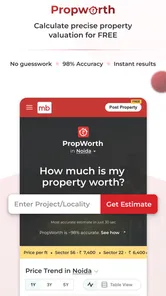
The app includes tools such as price trends and locality reviews, alongside property listings and search filters. These can provide useful context when comparing places or considering whether a listed price fits your plans. Treat these tools as aids to your research rather than a substitute for checking the property, its location, and the details directly with the relevant contact.
Can I save or organize properties that I want to revisit?
Magicbricks offers search tools that can help you manage the process of exploring and shortlisting properties. As you compare options, keep track of the details that matter most to you, such as location, price, and property type. Availability of specific organizational features can vary by app version, so check the controls shown in the app while browsing.
Pros
- User-friendly interface for easy navigation.
- Wide range of property listings available.
- Detailed property information provided.
- Advanced search filters enhance usability.
- Secure and reliable transaction process.
Cons
- Limited customer support availability.
- Some listings may be outdated.
- Occasional app crashes reported.
- In-app ads can be intrusive.
- Limited features in the free version.







