

Zillow 3D Home Tours
- 203.00
- 3.9
- Installs
- 100.00K
- Price
- Free

Screenshots
Analysis by Reviewed
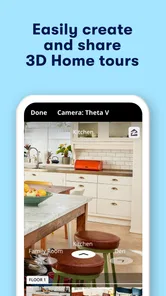
When I am looking at a home online, I want more than a row of still photos. Photos can make a small room feel generous, hide an awkward connection between spaces, or leave me wondering whether the layout would actually work for daily life. Zillow 3D Home Tours takes a different approach: it is a House & Home app built around virtual tours for real estate, so I can explore a property in a more spatial way before deciding whether it deserves a viewing.
My first impression is that this is best understood as a viewing tool rather than a complete home-search service. The useful question is not simply whether a listing has attractive images. It is whether moving through a digital tour helps me answer practical questions sooner: Is the bedroom far enough from the living area? Does the kitchen connect naturally to the dining space? Can I understand the route from the entrance to the main rooms without relying on a floor plan?
The right reason to use this app is confidence, not entertainment. A virtual tour cannot replace standing inside a property, checking noise, noticing smells, testing storage, or judging the condition of surfaces. It can, however, make the first stage of property research more informed. That distinction shapes my recommendation throughout this review.
How I would decide whether it belongs in my home-search routine
I would judge its place in my routine by whether it changes a real decision, not by how engaging a tour feels on the first try. After a few listings, I’d ask whether it helped me rule out poor layouts, compare homes more clearly, or make a viewing more focused; then I’d look at what keeps the habit useful over time.
Start with the questions that photos cannot answer
I would not open a 3D tour just to admire decoration. I would use it to investigate the relationship between spaces. If I am considering a home for myself, I want to know whether furniture placement seems realistic, whether a hallway consumes more space than expected, and whether the rooms connect in a way that matches my routine. Those are decisions that a collection of carefully selected photographs often leaves incomplete.
A useful first pass is to move through the property as if I were arriving home. I look at the entry, follow the natural route toward the living areas, and then check how easily I can reach the kitchen, bathrooms, bedrooms, and outdoor spaces shown in the tour. On a second pass, I focus on practical friction: tight transitions, rooms that appear isolated, and areas that seem to depend on another room for access.
This method is more valuable than repeatedly circling the same attractive room. It turns the tour into a layout check. I can also compare several homes using the same mental checklist instead of allowing the best staging or widest lens to dominate my judgement.
More From Our News Desk

 Instagram
Instagram’s Power Comes From Its Place in Your Phone
A close look at how Instagram turns Meta’s reach, recommendation systems and everyday camera habits into durable platform power—and what that costs users.

 Gmail
GmailGmail in a Busy Inbox: Who Benefits Most?
From first account to crowded workday, Gmail earns its place through dependable search and flexible sorting—but its best fit depends on how much inbox maintenance you can tolerate.

 Prime Video
Switching to Prime Video: What Changes in Your Viewing Routine
Prime Video can make a compelling second home for streaming, but switching means learning a different catalog, rental layer, and route from browsing to playback.

 Universal TV Remote Control
Universal TV Remote Control Works Best as a Reliable Backup
A phone remote earns its place through quick setup and reliable habits. Here is how to get more from Universal TV Remote Control—and where its limits show.

 Weather - By Xiaomi
Weather by Xiaomi Review: Clear at a Glance, Less Clear Up Close
Xiaomi’s weather app makes everyday forecasts quick to scan, but its calm surface can leave useful details and recovery paths harder to find than they should be.

 X
XX Under Pressure: Can It Recover When Posting Goes Wrong?
A resilience-focused review of X, examining setup, mistaken posts, interruptions, weak connections, and the gaps that matter when recovery needs to be dependable.
Latest News



Use it before scheduling, not instead of scheduling
For a renter or buyer comparing many properties, the biggest benefit is filtering. A tour may reveal that a home feels too compartmentalized, that the main bedroom is exposed to a busy shared area, or that the apparent open-plan layout is less open than the photos suggested. Discovering that early can save a trip and help me reserve in-person visits for realistic candidates.
There is an important trade-off here. A digital tour can increase my understanding of arrangement while reducing my awareness of atmosphere. A camera shows surfaces and connections, but it does not reproduce the exact sense of scale, daylight at a particular hour, temperature, sound, or the feeling of walking across a floor. I treat a tour as a screening layer between listing photos and a physical visit.
Remember what the app is and what it is not
Zillow 3D Home Tours is a free app from Zillow Group, categorized under House & Home. It is suitable for Everyone, which makes it approachable for households that want to inspect homes together without a specialized real-estate workflow. The app was released on October 26, 2020, and its current version is 2026.12.2 for devices running operating system 10 or later.
Those details matter mainly because they set expectations. This is not a premium professional tool that I need to budget for before I can try it. It is also not an app I would choose for a full property transaction, legal inspection, renovation measurement, or a definitive assessment of condition. Its strength is the visual walk-through, and my results are best when I keep that purpose in view.
Where the virtual format saves real effort
Imagine I am moving to a new city and have a Saturday available for viewings. I find several homes that look promising in photographs. Instead of treating every one as equally worthy of a trip, I can use the tours to examine the layout first. One property may turn out to have a bedroom opening directly toward a busy living zone. Another may have a kitchen that looks spacious in a single image but feels disconnected from the rest of the home. A third may make sense immediately because the route through the rooms matches how I live.
That process does not tell me which home is best. It tells me which homes deserve more time. In a crowded search, that is a meaningful advantage. I can also show a tour to a partner or family member who cannot attend the initial research session, then discuss the same spaces rather than trying to describe them from memory.
Three habits that make the tours more useful
First, I compare the digital tour with the listing photographs instead of accepting either view on its own. Photos are often better for judging finishes, windows, appliances, and details; the tour is better for understanding sequence and proximity. When the two impressions conflict, I mark the property for closer investigation rather than deciding immediately.
Second, I revisit the entrance and the less glamorous spaces. The first room presented in a listing is usually chosen for impact, but the entry, corridors, utility areas, and transitions often determine whether a home feels convenient. A tour lets me spend attention where a marketing image might not lead me.
Third, I keep a short question list while exploring. For example: where would everyday bags go, can guests reach a bathroom without crossing private areas, and does the furniture shown leave usable walking space? These questions reveal a less obvious strength of the format: it encourages me to evaluate a home as a sequence of actions, not merely as a set of rooms.
Where this app has its strongest advantage
The clearest win is spatial context. A still image can be excellent at showing a fireplace or a renovated kitchen, but it rarely explains how that feature relates to the rest of the home. A virtual walk-through gives me a better chance of understanding orientation, room order, and the visual connection between areas.
That advantage is especially useful when listings use wide-angle photography. Wide lenses can make rooms appear more expansive and can blur the boundary between a genuinely open layout and a room photographed from a carefully chosen corner. Moving through the tour gives me another perspective on whether the apparent openness survives as I inspect the property from different positions.
I also like the tour format for revisiting a shortlist. On a second look, I can focus on questions I did not think of initially. The first session may be about overall flow; the next may be about whether a home can support working from home, hosting visitors, or separating quiet and noisy activities. That repeatability is more useful than it sounds, because property visits are often rushed and memory can merge several homes together.
A better tool for shared decisions
When several people are involved, a tour can reduce the weakness of second-hand descriptions. I can guide someone through the same digital spaces and ask for an opinion about a particular relationship, such as the distance between the kitchen and dining area or the privacy of a bedroom. This is more concrete than sending a handful of photos and saying that the home “feels nice.”
Still, I would not treat a shared tour as proof that everyone has experienced the property equally. One person may be more sensitive to room proportions, another to storage, and another to light or access. I use the tour to create a common reference point, then keep a separate list of things that require an in-person check.
Why the app may not be enough for every property
The format depends on the quality and completeness of the tour attached to a listing. If important rooms are absent, if the path is confusing, or if the capture makes proportions difficult to judge, the benefit drops quickly. I would not assume that a polished-looking tour answers every question about the home. Missing context can be just as important as visible context.
There is also a learning curve in interpreting virtual space. Some rooms look larger or smaller depending on where the camera is positioned and how I move through them. I try not to estimate exact dimensions from appearance alone. If a sofa, desk, bed, or wheelchair must fit comfortably, I need measurements from the listing or the agent and should verify them in person.
People who mainly want neighborhood information may find a different kind of property-search experience more useful. A 3D tour concentrates on the inside of a home. It does not substitute for checking transport, local services, traffic, nearby construction, or the character of the surrounding streets. For those decisions, maps, local research, and a physical visit remain more appropriate.
How it compares with the usual alternatives
The simplest alternative is a standard photo gallery. Photos are faster to scan and often clearer for close details, but they leave more of the layout to my imagination. I prefer photos when I am checking finishes or comparing the condition of specific features; I prefer the tour when I am testing how the rooms connect.
A floor plan is another useful comparison. It can be more precise for dimensions, door positions, and room proportions, provided it is clear and accurate. However, a plan is abstract. It may tell me that two rooms are adjacent without giving me the same intuitive sense of sightlines, sequence, and visual separation. The strongest workflow combines the plan, photographs, and tour rather than declaring one format the winner.
A physical viewing remains the most complete option for judging atmosphere and condition. It is also the most demanding in time and travel. The app earns its place by helping me decide which homes justify that effort. It is not a replacement for the visit; it is a way to make the visit list more selective.
Who should skip it or use it only briefly
I would not make this the center of my process if I am already certain that I need precise measurements, a detailed condition report, or neighborhood-level evidence. In those cases, a floor plan, inspection, map research, or an in-person appointment will answer the important questions more directly.
I would also be cautious if I tend to make quick decisions based on visual polish. A smooth virtual walk-through can create a strong emotional impression, but it may draw attention away from maintenance, accessibility, lease terms, ownership costs, or practical defects. I would write down those non-visual questions before I start, so the tour supports my decision instead of steering it.
The practical cost of switching to this workflow
Because the app is free, the main cost is not money. It is attention. To get value from it, I need to slow down enough to explore a home consistently and record what I notice. If I only glance at the first attractive room, I am not really using the format to its advantage.
There is also a small comparison cost. Once I begin using tours, I may want to review photos, plans, and notes alongside them. That can make the process feel more involved than scrolling through listings. In my view, that extra effort is worthwhile for expensive or time-consuming decisions, but it may be unnecessary when I am casually browsing or already know that a property is unsuitable for another reason.
The switch is easiest when I use a repeatable routine: inspect the route through the home, revisit private and service areas, compare the tour with photos, record questions, and then decide whether an in-person viewing is justified. This avoids the common mistake of treating each tour as a free-form browsing session with no conclusion.
What I would expect on a compatible device
The app supports devices running operating system 10 or later. Before relying on it during a busy search, I would install it on the phone or tablet I plan to use and make sure the experience is comfortable for longer viewing. A larger screen can make room relationships easier to study, while a phone is more convenient for checking listings while traveling.
I would also avoid judging a property during a distracted moment. Virtual tours reward patience: I need to pause, change direction, and look at transitions rather than simply letting the presentation carry me forward. If a tour feels awkward to navigate, I would not automatically blame the home. I would separate problems with the viewing experience from evidence about the property itself.
How established the app feels in practice
The app has an average rating of 3.9 from around 709 ratings, with over 100K installs and 203 written reviews. I read that as a sign of a useful but not universally effortless experience. The numbers suggest that people are finding value in the concept while leaving room for differences in device comfort, tour quality, and personal expectations.
That mixed impression fits my own judgement. A virtual home tour is highly valuable when the listing has been captured well and I am trying to understand layout. It is much less valuable when I need certainty about measurements, condition, or the surrounding area. The app is therefore more dependent on the situation than a simple score can communicate.
My recommendation for renters, buyers, and curious browsers
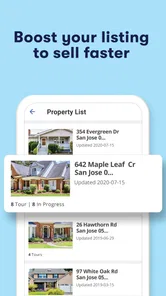
I recommend Zillow 3D Home Tours to renters and buyers who are comparing several properties and want a faster way to understand interior flow before arranging visits. It is particularly useful for people relocating, coordinating a search with someone else, or trying to avoid wasting time on homes that look appealing only from carefully selected photographs.
I would recommend it less strongly to someone who wants a complete real-estate research package in one place. For that person, the tour should be one part of a broader process involving listing details, plans, neighborhood checks, direct questions, and an in-person inspection. The app can improve the visual side of that process, but it cannot carry the whole decision.
My final advice is simple: use the tour with a checklist and a skeptical eye. Walk through the home as if you already lived there, look for inconvenient connections as well as attractive rooms, and write down anything that needs physical confirmation. If the layout survives that test, schedule a real viewing. If it does not, the app has still done its job by helping you reject a poor fit early.
For a free House & Home app focused on virtual real-estate tours, Zillow 3D Home Tours has a clear and practical role. I would not use it to replace photographs, floor plans, or physical visits. I would use it to connect those tools, turning a quick listing search into a more informed decision about where my time is worth spending.
Zillow 3D Home Tours Frequently Asked Questions
Can I use Zillow 3D Home Tours without creating an account?
You can explore Zillow 3D Home Tours as a way to view properties, but the full experience may depend on how you access a listing and which Zillow features you want to use. The app focuses on virtual tours for real estate, so it is most useful when you have a particular home in mind or want to browse listings that include a tour.
Is Zillow 3D Home Tours free to download?
Yes. Zillow 3D Home Tours is free to download, making it easy to try as a real estate browsing tool without paying an upfront app price. The app is intended for viewing virtual home tours, while any costs associated with buying, renting, or arranging services for a property are separate from downloading the app.
What is Zillow 3D Home Tours?
Zillow 3D Home Tours is a feature that lets users explore selected properties through interactive, room-by-room virtual tours. Instead of viewing only standard listing photos, you can move through a home, change your viewpoint, and get a better impression of the layout before arranging an in-person visit. Availability depends on the property and the tour created by the listing agent or homeowner.
Can I create a 3D home tour with Zillow?
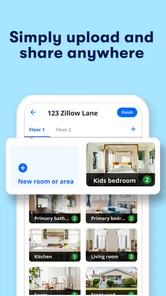
In many cases, eligible agents, homeowners, and property professionals can create a Zillow 3D Home Tour using compatible smartphones or supported 360-degree cameras. The exact process, equipment requirements, and publishing options may change over time. Before starting, check Zillow’s current instructions, ensure the rooms are well prepared, and confirm that your device meets the required technical specifications.
Do I need special equipment to view Zillow 3D Home Tours?
No special equipment is normally required to view a Zillow 3D Home Tour. You can usually open the tour on a compatible phone, tablet, or computer and navigate by tapping, dragging, or using on-screen controls. A stable internet connection is recommended because interactive tours can use more data than ordinary listing photos, particularly when viewed over mobile networks.
Pros
- Immersive walkthroughs help buyers assess layouts before scheduling a visit.
- Listings can be explored remotely
- saving time for relocating buyers.
- Smooth navigation makes it easy to move between rooms and viewpoints.
- Useful for comparing multiple properties from the comfort of home.
- Virtual tours remain accessible outside traditional open-house hours.
Cons
- Tour availability depends on agents uploading compatible 3D scans.
- Image quality can vary between properties and scanning equipment.
- Virtual views may not reveal odors
- noise
- or actual room dimensions.
- Large tours may consume significant mobile data and storage cache.
- Some listings may have outdated tours after renovations or price changes.









