Apartments & Rentals - Zillow
- 9.32K
- 4.8
- Installs
- 5.00M
- Price
- Free

Screenshots
Analysis by Reviewed
Rental searching is one of those tasks that can take over an evening: comparing addresses, checking prices, and trying to remember which place had the good layout. I find Apartments & Rentals - Zillow most useful as a way to organize that early search on a phone, rather than as a substitute for visiting a property or confirming details with its manager.
Quick searches, with a little patience
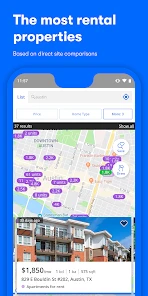
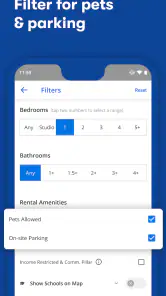
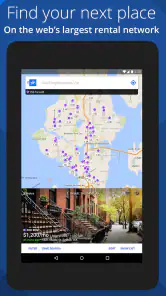
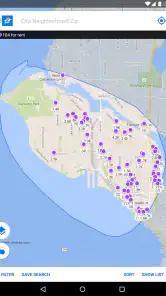
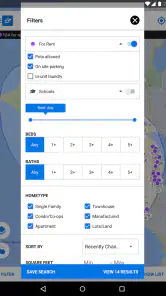
The app is free, made by Zillow, and belongs in the house-and-home category. Its central job is straightforward: help me browse apartments and houses for rent, with listings refreshed daily. I can narrow a search by location, price range, and bedroom count, which is a practical starting point when I need to turn a broad area into a manageable shortlist.
I would not treat a fast-looking search as a promise that every listing is still available. Rental information changes, and a fresh result is still only a reason to ask questions, not proof that a home can be rented on my timeline. When a place catches my eye, I check the details and contact the landlord or property manager before making plans around it.
When browsing gets intensive
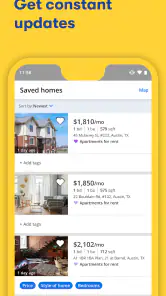
The app is especially handy when I am comparing several neighborhoods or need to keep an eye on new options while working through a move. I can set preferences, save promising homes, and return to them later instead of relying on memory or a trail of screenshots. For a realistic search, I might review listings during a commute break, save a few that fit my budget and location, then revisit the strongest candidates at home and arrange questions or viewings.
That workflow has a trade-off: alerts can help me notice fresh possibilities, but they can also make a competitive search feel relentless. I would set criteria carefully and use notifications for a focused search window, then adjust them if they are surfacing too many unsuitable places. A saved listing is a useful comparison point, not a guarantee that the unit remains open.
What the listing can and cannot settle
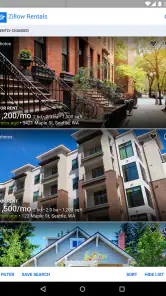
Photos, floor plans, descriptions, and virtual tours on some properties can help me rule out obvious mismatches before spending time on a visit. Neighborhood information is useful for forming questions, too. Still, images and remote tours cannot tell me everything about noise, the feel of a building, or whether a room works for my furniture. I use them to decide what deserves a closer look, then verify important details directly.
Compared with opening a succession of individual property-manager pages, Zillow gives me a single place to browse and save candidates. That is convenient at the discovery stage, while a landlord’s own site or direct conversation may be better for confirming current availability, application steps, and property-specific requirements. I would use both when the search becomes serious rather than assuming one app covers every part of renting.
More From Our News Desk

Weather by Xiaomi Review: Clear at a Glance, Less Clear Up Close

X Under Pressure: Can It Recover When Posting Goes Wrong?

Clash of Clans Is Won Between the Battles

Android Auto Makes the Case for Quieter Car Software

MobiOffice: Transforming Mobile Productivity with Seamless Integration

EA SPORTS FC™ Mobile Soccer: Redefining Mobile Sports Gaming
Reliability and device fit
Zillow has a 4.8 average from around 71,000 ratings, and more than 5 million installs. Those figures suggest many people use it, but my own practical test is whether it helps me make a clear next move: save a candidate, compare it, or contact someone. If a search feels cluttered, I would tighten the filters and reopen only the listings that meet my essentials instead of repeatedly scrolling through a broad feed.
The app is rated for everyone and needs Android 10 or later. It is currently version 2025.49.1.97683, so anyone with an older Android device should check compatibility before planning to rely on it. For a long search session, I would also keep the shortlist focused; browsing many photo-heavy listings can be tiring on a small screen, even when the search itself is simple.
Exploring the Interface
First off, the interface is smooth and intuitive. As soon as you fire up the app, you’re greeted with a clean, user-friendly design. The search bar is right at the top, ready to whisk you away into a world of rental possibilities. You can easily filter results based on location, price range, number of bedrooms, and more. It’s kind of like having a personal real estate agent in your pocket!
Features that Stand Out
One of the standout features of Apartments & Rentals - Zillow is the detailed listings. Each property comes with high-quality photos, floor plans, and comprehensive descriptions. You can even take virtual tours of some listings, which is a game-changer in our digital age. Plus, the app provides neighborhood information, helping you get a feel for the area before you commit to a visit.
Another cool feature is the push notifications for new listings. Set your criteria and let the app do the heavy lifting. It’s like having a 24/7 scout finding the best places for you. This feature is especially handy in competitive rental markets where properties get snapped up quickly.
Making the Most of the App
To get the best out of this app, I’d suggest setting up your preferences as detailed as possible. The more information you provide, the more tailored the results. Also, don’t forget to save your favorite listings. You can easily compare them later, which is super helpful if you’re as indecisive as I am!
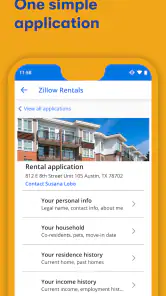
Moreover, the app allows direct communication with landlords or property managers, saving you the hassle of multiple phone calls and emails. It streamlines the whole process, making it not only efficient but also less stressful.
Final Thoughts
All in all, Apartments & Rentals - Zillow is a powerful tool for anyone in the market for a new place. It takes the stress out of property hunting with its extensive database and user-friendly features. Whether you’re looking for a trendy studio downtown or a family home in the suburbs, this app has got you covered. Give it a try, and you might just find your dream home without breaking a sweat!
Where it fits in a real rental search
I would recommend it most to renters who are still exploring options: someone moving across town, a student comparing areas, or a household balancing commute, space, and budget. It is less useful if you already have a specific building in mind and simply need its current application packet; in that case, contacting the property directly is the more efficient route.
A practical tip is to separate non-negotiables from preferences before searching. I would keep the filters for essentials such as location and bedroom count, then judge softer factors—light, storage, or how a floor plan might suit daily routines—by reviewing the listing itself. This avoids filtering out a workable home because of an overly narrow first pass, while still keeping the results relevant.
Performance in everyday use
For ordinary browsing, the clear layout and direct search controls make it feel approachable rather than demanding. I would expect the experience to be most comfortable when I have a stable connection and time to inspect listings individually; a quick scan on a small screen is fine for saving candidates, but it is not the best setting for weighing every detail. I cannot judge performance across every device from the interface alone, so I would avoid treating a smooth session as a guarantee of identical speed everywhere.
If the app feels sluggish or stops responding during a busy search, I would first narrow the area and reduce the number of results I am trying to inspect, then close and reopen it before continuing. That is ordinary troubleshooting, not a special Zillow recovery feature. The app’s usefulness does not depend on keeping it open all day: saved candidates and focused notifications make it easier to return when I have time to compare carefully.
A balanced performance verdict
My view is that Zillow works best as a discovery and organization tool, not as the final authority on a rental. Its combination of search, saved options, listing detail, and contact routes can cut down the messy first stage of a move. The friction is familiar but important: listings need direct verification, and a phone screen cannot replace an in-person look at a home or neighborhood. Used with that distinction in mind, it is a sensible free option for building a shortlist without making the app responsible for the whole decision.
A shortlist that works for more than one person
When I am searching with a partner, roommate, or family member, I would use saved listings as a shared conversation starter rather than assume that one person’s favorites automatically make a good joint shortlist. Each person can name a few deal-breakers first, then compare the same homes against them: commute, layout, likely household routines, and the costs that need to be checked with the manager. This makes the app useful even when we disagree, because we can point to a specific floor plan or description instead of arguing from memory.
I would also keep a simple note outside the app for details that are not easy to compare from listing to listing, such as the date someone answered, a question still waiting on a reply, or whether a viewing has been arranged. The app helps collect options, but a separate short record can prevent two people from contacting the same manager twice or forgetting which listing needs follow-up. That is a small habit, but it makes a long search feel less scattered.
How I would compare candidates fairly
It is tempting to judge a rental by the most polished photos, so I try to compare like with like. I look at the floor plan and description alongside the images, and I note what is not shown clearly enough to decide remotely. A spacious-looking living room may matter less if the bedrooms do not suit the household, while a less striking listing might have a layout that supports everyday routines better. I would not let attractive photography outrank practical needs.
Another useful distinction is between a listing that is worth asking about and one that is ready for a visit. A candidate can make the first cut because its location and general shape fit, then move to the viewing stage only after basic questions are answered. This two-step approach helps avoid filling a calendar with visits to places that were never plausible, without expecting the app itself to settle questions only a landlord or an in-person inspection can resolve.
When a different route makes more sense
For a renter who wants to investigate a whole area, browse different kinds of homes, and keep possibilities together, this is a sensible place to begin. If I already know the exact building, however, I would go straight to its management office or website for the most direct route to current details. Likewise, someone who values a personal agent’s guidance more than independent browsing may prefer to start with a local professional and use Zillow only as a way to understand the broader set of options.
It is also not the best tool for making a rushed decision from a phone screen. A listing can help me decide what to ask and whether a home deserves a visit, but a lease choice involves details that need careful review. I would pause if the description leaves important points unclear, ask the manager rather than infer an answer from photos, and avoid treating a quick response or a saved result as a substitute for reading the actual terms.
Questions I would settle before committing
People often ask whether they can find a place and finish the rental process entirely in the app. I would think of it primarily as a way to discover, compare, and make contact; the next steps depend on the property and its manager. Before applying, I would ask about the current availability, the full costs, the lease timing, and what documents or procedures the property requires. Those answers belong in direct communication, not in assumptions based on a listing.
Another common concern is whether an alert means a home is newly available and ready to rent. I would treat it as a prompt to check, not a reservation or confirmation. If a listing looks promising, I would contact the manager promptly, then revisit the saved entry after hearing back so my shortlist reflects what is still realistic. The app can help me notice and organize opportunities, while the manager is the person to confirm the status and requirements.
For someone wondering whether the app is suitable for a first-time renter, I think it can be, provided they use it as a research aid and ask basic questions without embarrassment. Comparing layouts and neighborhoods can clarify what matters before a viewing. But a new renter should not feel pressured to understand every part of a lease from a listing page; asking the property manager to explain application steps and reviewing terms carefully are still essential parts of the process.
Who gets the most value from it
I would choose Zillow when I want a broad, phone-friendly starting point and enough detail to decide which homes deserve follow-up. It suits people who can spend a little time refining a search and checking candidates instead of expecting one tap to produce a perfect match. The app is free, and its Everyone content rating makes it broadly accessible, while the Android requirement is a practical consideration for anyone using an older device.
My recommendation is measured rather than unconditional: it can make the early hunt more organized, especially when I save a manageable number of plausible homes and verify each one before acting. Its best contribution is not a promise that the right rental is waiting in the results, but a clearer path from browsing to a sensible question, a viewing, or a decision to move on.
Apartments & Rentals - Zillow Frequently Asked Questions
Is Zillow’s Apartments & Rentals app available for both Android and iOS?
Zillow’s Apartments & Rentals is a mobile app for people who want to explore rental homes on their phones. Before downloading, check that your device meets the operating-system requirement shown in its app store. The app is free, and its general-audience rating makes it suitable for a broad range of users interested in browsing houses and apartments for rent.
Who develops Apartments & Rentals - Zillow, and what is it designed for?
The app is developed by Zillow and sits in the House & Home category. Its purpose is to help people view houses and apartments for rent, with listings updated daily. It is geared toward renters searching for a home rather than users looking for a specialized property-management tool, so its main appeal is having rental options and search features together in one app.
Is Zillow’s Apartments & Rentals app suitable for first-time renters?
It can be a useful starting point if you are renting for the first time and want to browse houses and apartments for rent in one app. Search filters help narrow listings by your preferences, while saved properties make it easier to revisit options. Take time to review each listing and confirm important details with its contact before deciding whether to apply.
What features does Zillow's Apartments & Rentals app offer?
Zillow's Apartments & Rentals app offers a comprehensive suite of features to assist in finding your next home. Users can search for apartments and rental homes using detailed filters such as location, price range, amenities, and more. The app also provides virtual tours, neighborhood insights, and the ability to contact landlords directly. Additionally, users can save their favorite listings and receive notifications for new properties and price changes.
Is Zillow's Apartments & Rentals app free to use?
Yes, Zillow's Apartments & Rentals app is free to download and use. Users can browse listings, use search filters, and save properties without any cost. However, certain premium features or services, such as promoted listings or enhanced landlord services, may incur additional charges. The app's core functionality remains entirely free for renters.
Pros
- User-friendly interface
- Comprehensive property listings
- Advanced search filters
- Real-time market data
- Detailed neighborhood info
Cons
- Limited customer support
- Occasional listing inaccuracies
- Ads can be intrusive
- High app data usage
- Limited international listings
- Category
- House & Home
- Version
- 2025.49.1.97683