YouCam Perfect - Photo Editor
- 39.51K
- 4.0
- Installs
- 100.00M
- Price
- Free

Screenshots
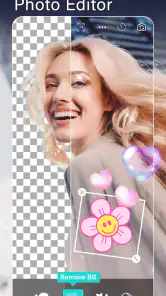
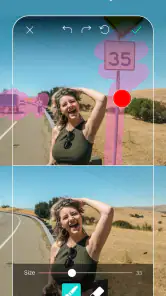
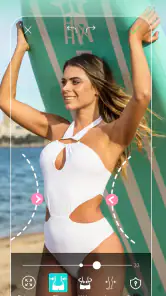
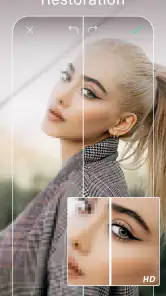
Analysis by Reviewed
When I want to make a quick portrait look a little more polished without opening a desktop editor, YouCam Perfect - Photo Editor is the kind of app I reach for. It is a free photography app from Perfect Mobile Corp., aimed at people who want hands-on beauty adjustments and playful effects in one place. I find it most appealing when I want to edit a picture for sharing, rather than carefully retouch every detail for professional work.
What you can do with the free app
You can start using it without paying, which makes it easy to try the editing style before deciding whether you want anything beyond the free experience. The app has a 4.0 average from around 2.1 million ratings, and it has been installed over 100 million times. Those figures suggest a broad audience, though they don’t tell you whether its look will suit your own photos.
There are in-app purchases, with items ranging from about $0.69 to $119.99. I’d treat that range as a reason to check the specific item and its price before buying, not as a promise that every useful tool requires payment or that one purchase unlocks everything. If you only need occasional touch-ups, try your usual workflow first and spend only if a clearly useful option is offered to you.
The Latest on YouCam Perfect - Photo Editor
How to judge the purchase before you commit
The practical question is not whether a paid option exists, but whether it solves a recurring problem for you. If I edit one portrait for a profile now and then, free access may be enough. If I find myself returning to the same kind of edit and repeatedly reaching a paid choice, I’d compare the exact purchase with the time it saves. I would not treat the highest listed item price as the cost of using the app, nor assume that paying once removes every later prompt.
Before spending, I’d make a note of the edits I actually use over several sessions: perhaps a small portrait correction, a crop, or a collage for a family update. That makes it easier to distinguish a useful tool from an effect that is entertaining once but won’t become part of my routine. The free starting point is valuable because it lets me test whether I like the app’s style before making that decision.
Transform Your Photos with Ease
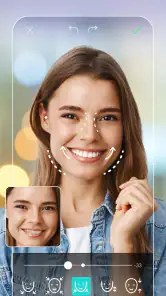
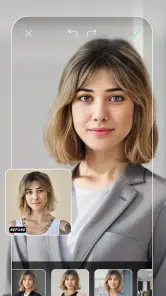
The first thing that caught my eye about YouCam Perfect is how user-friendly it is. From the moment you open the app, you’re greeted with a sleek interface that’s easy to navigate, even if you’re not tech-savvy. With a few taps, you can whiten teeth, smooth skin, and even reshape your face! It’s like having a personal beauty salon at your fingertips.
Stunning Features That Stand Out
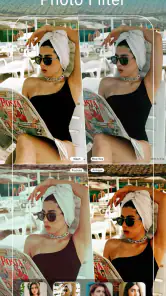
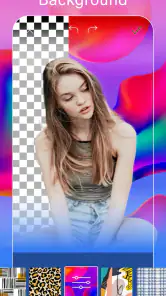
What makes this app a gem are its features. You’ve got the basic tools like cropping and rotating, but what’s really cool are the advanced features. Imagine adding a dreamy bokeh effect or enhancing the colors in your sunset photos to make them pop. The "Magic Brush" feature is particularly fun, allowing you to add sparkles and glitters with just a swipe. Talk about adding some pizzazz to your pics!
More From Our News Desk

Android Auto Makes the Case for Quieter Car Software

MobiOffice: Transforming Mobile Productivity with Seamless Integration

EA SPORTS FC™ Mobile Soccer: Redefining Mobile Sports Gaming

How Microsoft OneDrive Became a Mobile Productivity Giant

How Google Translate Breaks Language Barriers Effortlessly

Why Google Sheets Is the Ultimate Mobile Productivity Tool
Oh, and did I mention the animated effects? If you’re tired of static images, you can bring them to life with fun animations. Whether it’s hearts fluttering around your head or snowflakes gently falling, these effects add a playful touch to your images.
Choosing effects with a clear purpose
For a quick social post, I’d decide what the picture needs before browsing effects. A sunset that already has strong color may only need a restrained adjustment, while a plain background can be a better canvas for a decorative brush or animation. This small pause helps me avoid stacking several treatments simply because they are available. I also keep a clean copy of the original so I can return to it if an experimental version stops feeling like the moment I wanted to keep.
Animated decoration is best understood as a playful presentation choice rather than a substitute for correcting a photo. I’d use it for a casual greeting or a themed post, but leave it off a professional headshot or an image where the subject should remain the focus. The same effect can feel charming on a phone screen and distracting when it competes with a busy background, so previewing the whole frame matters.
Making edits that still look like your photo
For a believable portrait, I recommend treating the face and body adjustments as finishing touches rather than starting points. Crop first so you know which parts of the frame matter, then make one small change at a time and compare it with the original. A selfie that looks flattering at full-screen size can look overworked when posted, so I check the result at the size friends are likely to see it. This matters especially with reshaping: subtle edits preserve the person’s expression and the background lines around them.
A practical everyday example is a group photo where the lighting is fine but one person is caught mid-blink or the composition feels crowded. I’d use the crop and basic adjustments to improve the frame before adding decorative effects. If I’m preparing a profile picture, I’d keep the treatment restrained; for a party invitation or a playful post, the sparkles and animations make more sense. The app’s strength is giving both approaches a place, but choosing the right one is still up to me.
A simple workflow for portraits and group shots
When I’m editing a group picture, I try not to let the portrait controls become the main event. I first check whether a tighter crop can remove empty space without cutting off anyone, then look at the whole image for balance. Only after that would I make a small adjustment to an individual face. That order matters because a crop can change which details draw the eye, and it may make an extra retouch unnecessary.
For a selfie intended for a profile, I’d also compare the edited image with a version that has only been cropped. If the second one already feels clear and recognizable, I would stop there. This is a useful check when an editor offers several ways to refine appearance: a tool can be easy to use and still be the wrong choice for a particular photo. Preserving expression and recognizable features is more important to me than maximizing the number of edits.
Collage Maker and Templates
Feeling creative? The collage maker feature lets you combine multiple photos into one stunning masterpiece. With a plethora of templates to choose from, your creativity knows no bounds. Whether it’s a birthday celebration or a travel diary, you can create a beautiful story with ease.
The app also offers seasonal templates to keep your photos fresh and festive. From Halloween to Christmas, you’ll find a variety of themes to match the occasion.
Making a collage that stays readable
For a small trip recap, I’d pick a few photos with a clear subject in each, then use a layout that gives the best image the most room. Filling every space can make faces and scenery hard to read, so I’d rather leave a slot unused or choose fewer pictures than force in every snapshot. Templates are handy for getting a finished composition quickly, while a plain grid in a general-purpose editor may suit someone who wants tighter control over spacing and borders.
Compared with the usual single-photo editors, this app feels more geared toward quick portraits, decorative touches, and ready-made compositions. That breadth is useful when I want to finish a social post in one sitting. If I’m adjusting color across a whole set of travel photos or need precise control over tone and detail, I’d choose a dedicated editing tool instead; the beauty-first workflow here isn’t necessarily the most direct route for that job.
Where it fits among photo editors
I see it as a convenient all-rounder for people who move between selfie touch-ups, fun effects, and collages, rather than as a replacement for every kind of photo software. A basic phone editor is often quicker for a simple crop or rotation, and a more specialized editor is a better match when I want close control over color or consistency across several images. The benefit here is having expressive portrait options and composition tools together, not necessarily having the deepest controls in each area.
That distinction helps set expectations. If I’m making a casual post for friends, I value being able to try a portrait adjustment and a decorative finish in one workflow. If I’m preparing a set of product images or trying to keep a consistent visual style across a series, convenience matters less than repeatable precision. In that case, I’d use a tool built around detailed adjustments and treat this app as an occasional creative option.
Easy Sharing and Cloud Backup
Once you’ve created your masterpiece, sharing it with friends and family is a breeze. The app allows you to instantly share your photos on social media platforms like Instagram, Facebook, and Snapchat. Plus, with its cloud backup feature, you never have to worry about losing your edited photos. They’re safely stored, ready for you whenever you need them.
One thing I really love is how the app keeps things updated. The developers are always adding new features and effects, so it never feels outdated. This keeps me coming back for more, always eager to try out the latest tools.
Keeping an edit organized
A small habit that makes my editing less messy is to decide which version I intend to share before I start experimenting. I’ll keep the original as the reference, make a restrained version for a profile or family message, and only then try a more playful variation if the photo suits it. This avoids confusing a decorative experiment with the version I actually want to keep. It also gives me a clear stopping point: once the useful version is ready, further tweaks need a reason.
Cloud backup can be helpful when I want edited images available beyond the moment I finish them, but I still wouldn’t use it as my only way of organizing important pictures. I’d keep meaningful originals in the place I normally store personal photos and make sure I know which copy is edited. That is especially sensible for family pictures or travel memories where the unaltered image may matter later.
Who should try it—and who might prefer another editor
I’d recommend it to someone who regularly takes selfies, enjoys making collages, or wants quick, expressive edits without learning a complicated interface. It is also a reasonable choice for a casual user who wants to explore beauty tools before paying for anything. The age rating is Teen, so it is worth keeping that in mind when deciding whether it is appropriate for a younger person.
I’d skip it if my main goal were meticulous photo correction, a consistent look across a large batch of images, or an edit that must remain entirely natural. Beauty controls can tempt you to keep adjusting long after a photo already looks good, and decorative effects won’t suit every audience. For those cases, a simpler editor or a more precise desktop workflow is likely a better fit.
Who gets the most from its mix of tools
I think it fits someone who likes making a picture feel finished before sharing it, but doesn’t want every edit to become a project. A person preparing a quick birthday collage, refreshing a casual selfie, or adding a light seasonal touch to a message can get practical value from the combination. The app is less compelling for someone who rarely edits portraits or prefers photos to stay untouched; in that case, a phone’s built-in tools may already cover the occasional crop or brightness adjustment.
It is also worth considering how you feel about beauty editing. If small changes help you express the look you want, the controls can be enjoyable. If face reshaping makes you uncomfortable, or if you find yourself comparing your natural appearance with heavily edited images, I would avoid those tools and use the app only for cropping, collages, or effects. Being selective is part of getting a result you still feel good about later.
My take on the value
My verdict is that YouCam Perfect - Photo Editor is worth trying if the free access covers the edits you actually make. I wouldn’t buy an item just because it appears in the app; I’d first check exactly what it adds and whether I’ll use it more than once. For quick portraits, playful effects, and collages, it offers a convenient mix. For careful, natural-looking image work, I’d reach for a more focused editor instead.
Overall, I’d start with the free experience and judge it by a few real photos rather than by the number of tools on offer. If the results are easy to make and suit the way I share pictures, that convenience can be enough. If I keep running into a paid choice, I’d pause and decide whether the specific option changes my routine; otherwise, I’d stick with the free tools or use another editor. That makes the decision straightforward: try it for expressive, fast edits, and skip the purchase unless it clearly earns a place in your everyday photo workflow.
YouCam Perfect - Photo Editor Frequently Asked Questions
What kinds of photos can I edit with YouCam Perfect?
YouCam Perfect is a photography app for working on selfies, portraits, and other everyday pictures. Its tools focus on face and body edits, beauty adjustments, filters, and photo enhancement, so it may suit people who want to polish a portrait or give an image a different look. You can begin with a straightforward filter or try more detailed adjustments when you want greater control.
Can I adjust how strong an edit looks in YouCam Perfect?
The app is designed for photo editing, including beauty effects, filters, and portrait adjustments. That makes it useful for experimenting with different looks rather than treating every picture the same way. You can try an edit and decide whether it suits the image before settling on a result. If you prefer a natural finish, use the available adjustments thoughtfully; stronger changes may create a more stylized appearance.
Can I use YouCam Perfect to improve a photo before sharing it?
Yes. YouCam Perfect is intended to help users enhance pictures, with tools for portrait edits, filters, and image quality enhancement. It can be a convenient stop before sharing a selfie or another photo, especially if you want to make a few changes in one app. The result depends on the image and the edits you choose, so it is worth reviewing the finished picture before posting or sending it.
Is YouCam Perfect - Photo Editor suitable for beginners?
Yes. YouCam Perfect - Photo Editor is approachable for people who want to improve a picture without learning professional editing software. Its focus on selfies, beauty edits, filters, and photo enhancement makes it easy to explore common adjustments. More involved tools give you room to experiment as you get comfortable, so beginners can start with simple changes and gradually try a more polished look.
What features does YouCam Perfect - Photo Editor offer?
YouCam Perfect - Photo Editor comes packed with a variety of features designed to enhance your photos effortlessly. It provides tools for beautifying selfies, removing unwanted objects, and applying artistic effects. Users can also enjoy face reshaping tools, body slimming options, and a wide array of filters and frames. This app is perfect for anyone looking to elevate their photo editing game without needing professional software.
Pros
- User-friendly interface for quick edits.
- Wide range of editing tools.
- Real-time beautification features.
- Regular updates with new features.
- Available for both Android and iOS.
Cons
- Contains in-app purchases.
- May drain battery quickly.
- Ads can be intrusive at times.
- Requires internet for full features.
- Some features need a premium upgrade.
- Category
- Photography
- Version
- Varies with device












