YouCam Makeup - Selfie Editor
- 91.06K
- 4.2
- Installs
- 100.00M
- Price
- Free

Screenshots
Analysis by Reviewed
I like virtual makeup most when I treat it as a preview rather than a promise. A lipstick shade that looks appealing on a store display can feel very different against my own face, and YouCam Makeup - Selfie Editor gives me a quick way to explore that kind of change in a photo or on screen. It’s a photography app from Perfect Mobile Corp., and its central appeal is easy to understand: experiment with beauty looks without first reaching for real products.
A low-commitment way to test a look
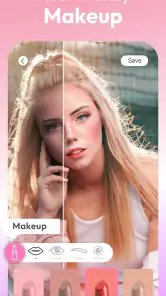
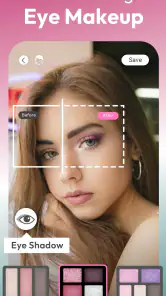
Trying a bolder eye or lip color digitally can help me narrow down what I actually want to attempt. I’d use the app to compare a few options before getting ready for a dinner, a celebration, or a profile photo—not to decide exactly how a product will look in person. Screen lighting, the original photo, and the way a digital effect sits on the face can all influence the result, so I treat the preview as inspiration rather than a reliable shade match.
That distinction is useful if you’re curious about changing your usual style but don’t want to buy products or spend time removing a look you dislike. It also makes the app approachable for someone who is still learning what colors or makeup styles they enjoy. The best outcome isn’t necessarily a dramatic edit; sometimes a subtle comparison is enough to give you an idea to try with your own makeup.
Experimenting with virtual makeup
Have you ever wished you could try on different makeup styles without the hassle of actually applying them? Well, YouCam Makeup has got you covered. This nifty app allows you to virtually test a variety of makeup looks, from bold lip colors to dramatic eyeshadows, all with just a few taps on your screen. It’s like having a magic mirror that lets you experiment without the commitment.
How the editing feels in practice
First off, the app’s real-time makeover feature is pretty impressive. You can see your new look instantly as you play around with different makeup styles. The level of customization is mind-blowing; you can adjust everything from the intensity of your blush to the shape of your eyeliner. Plus, the app offers a plethora of trendy looks curated by professional makeup artists, so you’re always in the loop with the latest beauty trends.
For a more useful comparison, I’d change one element at a time instead of tapping through many looks in a row. Keeping the same photo while adjusting a single detail makes it easier to notice whether a softer blush or different eyeliner shape is doing the work. A front-facing photo with clear, even light is also a better starting point than a dim or heavily filtered image; if facial details are hard to read, the makeup preview may feel less convincing. That small bit of care makes the result more helpful for choosing a direction.
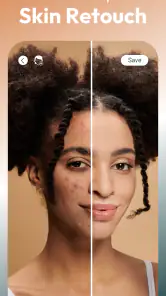
Another standout feature is the skin analysis tool. This nifty addition provides insights into your skin’s condition, helping you choose the right products and routines. I mean, who doesn’t want a personalized skincare guide?
More From Our News Desk

Weather by Xiaomi Review: Clear at a Glance, Less Clear Up Close

X Under Pressure: Can It Recover When Posting Goes Wrong?

Clash of Clans Is Won Between the Battles

Android Auto Makes the Case for Quieter Car Software

MobiOffice: Transforming Mobile Productivity with Seamless Integration

EA SPORTS FC™ Mobile Soccer: Redefining Mobile Sports Gaming
Making a useful comparison rather than collecting filters
One practical way to get more from the editing is to decide what question you want the preview to answer before opening the app. For example, if I’m unsure whether a photo needs a stronger lip or simply a little more definition around the eyes, I’ll test those separately and compare each version with the original. This keeps the session focused and makes it easier to tell whether an effect improves the image or just makes it busier.
I also find it helpful to judge an edit at the size where I’ll actually use it. A detail that looks convincing when enlarged may be too strong when the selfie is viewed as a small profile image. For a photo I plan to share, I’d check the full image and a reduced view before settling on a version. That quick double-check is a simple way to catch an effect that has become distracting.
When a quick selfie edit is the goal
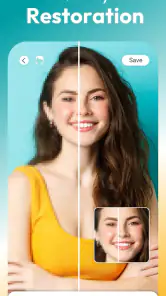
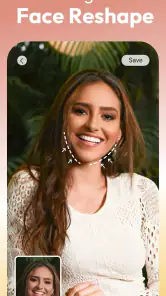
Let’s talk selfies because, let’s face it, we all love a good selfie. The YouCam Makeup app not only enhances your photos with its intelligent editing tools but also offers fun filters and effects to spruce up your snaps. Whether you’re going for a natural look or something more glamorous, this app has you covered. The app’s precision in detecting facial features ensures that your makeup looks seamless and realistic, rather than a poorly pasted-on job.
A realistic everyday use would be getting ready to share a casual photo and wanting to see whether a brighter lip or a more polished eye suits the picture. I’d make the edit, compare it with the original, and keep the result only if it still looks like me. That last check matters: a filter can be fun, but too many adjustments can make a portrait feel less natural or less useful as a genuine reference for a real-life look.
Compared with a basic photo editor, the appeal here is the beauty-specific approach: makeup changes and facial details are the focus, rather than general cropping, exposure, or broad image adjustments. If I only wanted to correct lighting or tidy up a landscape, I’d choose a conventional editor instead. If I wanted to test a look before a night out or make a beauty-themed selfie, this app is the more direct place to start.
A small workflow for getting ready
Imagine I’m leaving for dinner and have taken a quick selfie while getting ready. I could use a clear photo to compare a natural option with a more noticeable lip, then decide whether the stronger color suits the outfit and the mood of the evening. I’d avoid stacking unrelated effects just because they’re available; a focused change gives me a better idea of what I might recreate with real makeup and saves time when I’m deciding what to wear.
If the goal is a picture for a work profile or another setting where I want to look like myself, I’d keep the edit especially light. A virtual preview can help me choose a tidy, polished direction, but I wouldn’t use it to create a face that I couldn’t reproduce in person. For a playful party image, on the other hand, I’d be more willing to experiment. The right level of editing depends on what the photo is meant to communicate.
Hair previews and the limits to keep in mind
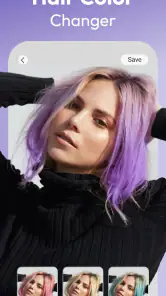
Oh, and did I mention the hair color changer? Yep, you can virtually try out new hair colors without any mess or commitment. It’s perfect for those who want to test the waters before making a big change.
I’d use that preview to compare general directions—such as whether I prefer a warmer or cooler impression—rather than treating it as a guarantee of how a salon color will turn out. A photo can’t show every real-world detail of a color change, and a digital effect is no substitute for discussing a specific result with a stylist. The same practical caution applies to the skin analysis tool: I see it as a prompt for exploration, not a diagnosis or a replacement for professional advice.
There is also a trade-off in having so many ways to alter a face: it can take a little restraint to stop before every feature has been changed. I’d save a version that still feels recognizably like the original, especially for a profile picture, and keep more playful edits for images where creativity matters more than realism. People who dislike beauty filters, want strictly documentary photos, or need a full desktop-style editing workflow may be happier with a different tool.
What it does well—and where a different editor makes sense
Beauty editing is a more specialized job than general photo cleanup. A standard editor is usually the better choice when I want to crop a group shot, adjust the overall brightness, or make a landscape look clearer. This app makes more sense when the decision is specifically about a portrait: whether a makeup style suits the image, or whether a beauty-oriented edit feels right for the occasion. Keeping those jobs separate avoids expecting one tool to be equally good at every kind of photography.
It’s also worth remembering that a digital preview is not the same as testing makeup in person. A real product can behave differently depending on the light, the rest of the look, and how it is applied. I’d use the app to shortlist ideas, then make the final decision based on what I like in the mirror. That is a more realistic use than treating a simulated result as a promise about a purchase or a salon appointment.
Who will get the most from it
The app is free to download, with optional in-app purchases ranging from about seventy cents to around one hundred and twenty dollars per item, so I’d explore the experience before deciding whether any paid extras are worthwhile. It has an average rating of 4.2 from around 4.2 million ratings, and more than 100 million installs. It has been available since August 7, 2014, is rated for Everyone, and sits in the photography category. Those details point to a widely used option, but they don’t tell me whether its style will suit every face or editing preference.
Since the app is free to download, I’d begin by trying the parts that matter to me rather than assuming I need to pay to get value from it. The optional purchases vary considerably in cost, so it makes sense to check what an item offers and whether I would use it repeatedly before spending anything. Someone who only wants an occasional preview can keep the app as a sometimes tool; frequent portrait editors may be more interested in exploring its extra options.
I’d recommend it most to people who enjoy experimenting with makeup, want a quick beauty-focused selfie editor, or are curious about trying a different hair color before making a real change. Someone who rarely edits portraits, prefers a natural camera image, or mainly needs standard photo corrections may not get enough from it to make it part of their routine. If you’re trying it for the first time, start with one feature, compare the result with your unedited image, and see whether the effect helps you make a choice rather than simply adding more edits.
It may also suit people who are still building confidence with makeup choices. The low-stakes format lets you explore a direction before committing time to applying it, and comparing restrained variations can help you identify what you like. But if you already know your routine and don’t enjoy editing selfies, there may be little reason to add another step. The app is most useful when you have a specific portrait or style decision in mind, not as something you need to open every day.
A playful tool, best used with perspective
In conclusion, YouCam Makeup - Selfie Editor is an absolute must-try for anyone who loves makeup and selfies. It’s user-friendly, packed with features, and offers a fun and creative way to explore new looks. Whether you're a makeup newbie or a seasoned pro, this app will undoubtedly add a splash of excitement to your beauty routine. So go ahead, download it, and let your creativity run wild!
Remember, beauty is all about experimenting and having fun, and this app is the perfect tool to do just that. Happy beautifying!
YouCam Makeup - Selfie Editor Frequently Asked Questions
Can I edit a photo without applying makeup?
Yes. YouCam Makeup is not limited to virtual cosmetics: its editing tools also let you adjust selfies and explore appearance changes beyond makeup. You can leave makeup effects unused and focus on other edits, such as filters or changes to your overall look. If you prefer a subtle result, try adjustments gradually and compare the edited image with the original before saving or sharing.
Can I use YouCam Makeup to preview a different hairstyle or hair color?
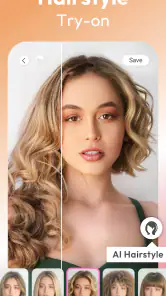
Yes. Hair filters are part of the app’s virtual makeover options, so you can explore changes to hair color and hairstyles as part of an edited look. These previews can help you experiment with a style before deciding whether it suits you. Results are digital edits rather than a guarantee of how a real hairstyle or color will look, so treat them as inspiration.
Can YouCam Makeup edit more than just my face?
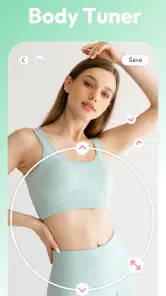
Yes. YouCam Makeup’s tools extend from face edits to full-body adjustments, and the app’s summary highlights a body tuner alongside virtual makeup and hair filters. This makes it useful for people who want to experiment with a broader portrait edit rather than focusing only on cosmetics. The effect you choose is up to you, so review edits before keeping or sharing an image.
Is YouCam Makeup free to download, and does it include paid options?
YouCam Makeup is free to download, with some features available at no cost and optional in-app purchases for additional tools, looks, filters, or effects. The listed purchase options range from around seventy cents to around one hundred twenty dollars per item. Check the available options in the app before making a purchase, especially if you share a device or payment method with someone else.
Can I use YouCam Makeup without creating an account?
YouCam Makeup is a photography app for trying virtual makeup and editing selfies. Before downloading, consider whether you are comfortable with any sign-in or setup steps the app may ask you to complete. You can review the app’s privacy choices and permissions during setup and decide what you are comfortable sharing before using its editing tools.
Pros
- Wide range of makeup styles available.
- Real-time skin beautification features.
- User-friendly interface and navigation.
- Virtual try-on for hair colors and styles.
- Extensive community for inspiration.
Cons
- Some features require in-app purchases.
- Occasional app lags and crashes.
- Limited options in free version.
- Heavy on device battery usage.
- Requires internet for full functionality.
- Category
- Photography
- Version
- Varies with device












