YouCam Video Editor & Retouch
- 406.00
- 3.6
- Installs
- 1.00M
- Price
- Free

Screenshots
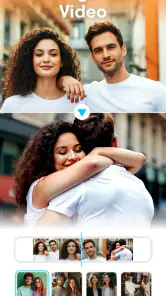
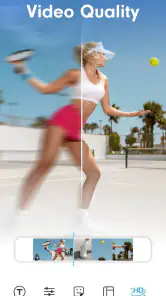
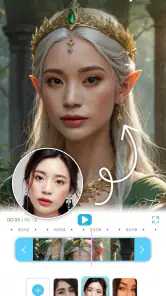
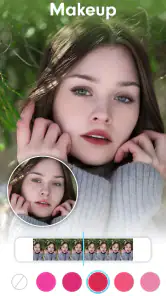
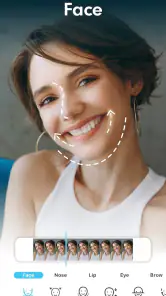
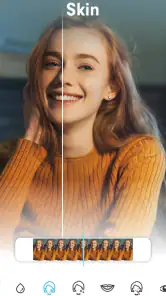
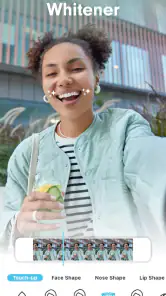
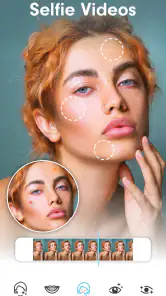
Analysis by Reviewed
I tend to reach for a phone editor when I want a finished clip without turning a quick idea into a long desktop project. YouCam Video Editor & Retouch is aimed at that kind of casual, portrait-focused editing, and its AI image-to-video and text-to-video direction gives it a more creative starting point than a basic trimming tool. The useful question is whether that approach fits the way you actually make videos.
Start with one visual idea
The most useful way to approach AI video creation is to think of it as a way to explore a look, not as a replacement for deciding what your video should say. Before choosing a portrait or writing a prompt, I’d settle on one clear goal: add a hint of movement, set a particular mood, or turn a simple visual into something more eye-catching. That focus gives you a practical standard for judging the result. If the motion does not support the subject, it is probably not helping the post.
This is especially relevant when the source is a photo of a person. The appeal of animation is that a still image can feel more alive, but the face is also where an unnatural result tends to be most noticeable. I’d use a photo with a clear subject and a composition that leaves room around it, then look carefully at the face, hair, and image edges in the preview. A small visual glitch can matter more than a striking effect when the clip is viewed close up on a phone.
Turning a still idea into a moving clip
The central appeal is the possibility of building video from an image or a text prompt. In practice, that can help when you have a visual concept but not enough footage to make a conventional edit. You can begin with a still image or describe an idea, then use the result as a short creative asset rather than assembling every moment from scratch. I’d treat AI output as a starting point: review it carefully, keep what works, and be ready to adjust the concept if the result doesn’t match what you pictured.
How I’d use it in a real workflow
For a simple social post, I’d first decide what the viewer should notice, then choose an image or write a prompt around that single focus. A narrowly framed idea is easier to judge than a paragraph trying to specify every detail. Once I had a clip worth keeping, I’d move on to trimming and any finishing touches, rather than asking the generation step to solve the whole post. This keeps the process manageable and makes it easier to spot when an effect distracts from the subject.
A practical example: after taking a portrait for a casual birthday message, I might want a little motion without filming a separate scene. Starting from the photo could give me a more lively post, while a short text prompt could help explore a mood before I commit to a particular look. I’d check the face and the edges of the image closely before sharing; AI animation can produce odd details, and a brief preview is a better safeguard than assuming the first result is ready to publish.
Making the result easier to judge
One decision that can save time is separating experimentation from finishing. I’d first try the image or prompt that best expresses the main idea, then make one deliberate change if the result is off: simplify the wording, choose a less busy source image, or shift the intended mood. Changing several things at once makes it harder to tell what improved the result. It also helps to keep the original photo untouched so I can compare the generated clip with the source and decide whether the movement adds anything.
More From Our News Desk

Clash of Clans Is Won Between the Battles

Android Auto Makes the Case for Quieter Car Software

MobiOffice: Transforming Mobile Productivity with Seamless Integration

EA SPORTS FC™ Mobile Soccer: Redefining Mobile Sports Gaming

How Microsoft OneDrive Became a Mobile Productivity Giant

How Google Translate Breaks Language Barriers Effortlessly
For a post with a short caption or greeting, I’d leave visual breathing room rather than choosing an image crowded with details. Motion and text both compete for attention, so a restrained source can make the finished clip easier to read. I’d also watch the full preview once without pausing to inspect effects, then watch it again for visual oddities. The first pass tells me whether the post feels coherent; the second catches details I may have missed.
Where it fits among phone editors
Compared with a traditional mobile timeline editor, the appeal here is less about painstaking control over every cut and more about creating a visual starting point quickly. A standard editor is usually the better fit when your video depends on precise timing, several source clips, or careful sound and scene arrangement. A photo editor, meanwhile, may be enough if you only need to improve a still image. I’d choose this app when the image-to-video or text-to-video idea is the reason I’m making something in the first place, not simply because I need to crop a clip.
There is a useful trade-off in that convenience. AI can help turn a blank page into something you can react to, but it does not replace your judgement about whether the motion feels natural or the result communicates the right idea. Prompts may need a couple of tries, and overly elaborate instructions can make it harder to identify what caused an unwanted result. I’d keep a clean copy of the source image and avoid relying on generated movement for a clip where exact visual accuracy matters.
When another kind of editor makes more sense
If I’m putting together several recorded moments from a trip, a tutorial, or an event, I’d reach for a timeline-first editor. That kind of project depends on arranging shots, choosing exact in and out points, and making transitions and sound fit together. A still-to-video workflow is less suited to that job because the main creative step is generating motion from an image or idea, not assembling a sequence of footage. Likewise, if I only want to brighten or retouch a photo, opening a video editor may add steps without improving the result.
The distinction is useful before downloading: this app is best considered a creative companion for short visual experiments, not a universal replacement for every editing tool on a phone. If your usual posts start with a portrait or a visual concept, it may give you a fresh route from idea to clip. If you already have footage and know exactly how the finished edit should unfold, manual controls are likely to matter more than AI generation.
Who gets the most from it
I think it suits people who make occasional social videos, enjoy experimenting with portraits, or want a quick way to explore a concept before using a more controlled editor. It is less compelling for someone who mainly edits long footage, needs detailed timeline work, or wants predictable, frame-by-frame results. Those users are better served by a conventional editor built around manual assembly. If your main goal is a polished, natural-looking portrait, a still-image retouching app may also be the simpler choice.
It is also a reasonable fit for someone who is curious about AI-assisted video but does not want to begin with a complicated desktop workflow. The important caveat is that an easy creative starting point does not guarantee a finished post. You still need to decide whether the output looks right, whether it suits the person or subject in the image, and whether it is appropriate for the context in which you plan to share it. For a formal presentation or an important announcement, I’d favor a predictable edit over a result that depends on generated motion behaving exactly as hoped.
A practical check before sharing
One small workflow tip is to make the source image do more of the work: choose a clear subject, avoid clutter that competes for attention, and keep the prompt focused on one movement or mood. That gives you a better basis for judging the output and makes revisions less random. I’d also preview the finished clip at the size people will actually see it on a phone; a detail that looks fine while editing can become distracting in a compact social post.
Before sharing, I’d ask three simple questions: does the motion draw attention to the subject, does the clip still make sense without an explanation, and is there anything visually strange that I would not want people to notice? If the answer to the last question is yes, I’d revise or choose a different source rather than assuming viewers will overlook it. This quick check is particularly worthwhile for portraits, where subtle changes can affect whether a person still looks like themselves.
Cost and expectations
The app is free to install, with in-app purchases ranging from $1.99 to $119.99 per item, so I’d explore the available workflow before spending on anything. It is rated for Everyone and is developed by Perfect Mobile Corp. It has a 3.6 average from around 15,000 ratings, with over 1 million installs. Those figures suggest a substantial audience, though they don’t tell me whether its particular AI results will suit your taste.
For that reason, I’d treat the first session as a test of fit rather than a commitment to build a whole editing routine around it. Try a low-stakes idea and see whether the generated look is useful to you before considering any paid options. If you mostly want straightforward cuts, filters, or detailed control, another editor may be a better use of your time. The right choice depends less on a broad promise of “easy editing” and more on whether you want this particular image-led way of starting a video.
What to expect from the editing tools
Have you ever wanted to edit videos like a pro but felt overwhelmed by the complexity of most editing software? Well, let me tell you about YouCam Video Editor & Retouch. It's like having a mini studio right in your pocket. I gave it a whirl, and here's the scoop.
First Impressions: User-Friendly Interface
When I first opened the app, I was immediately struck by its clean and intuitive interface. It’s like the developers took a peek inside my brain and figured out exactly what I needed. The layout is straightforward, making navigation a breeze even for those who aren't tech-savvy. You’ll find everything you need right at your fingertips, and trust me, you won’t be lost in a maze of options.
Edit Like a Pro
What really sets this app apart is its powerful editing tools. You can trim, cut, and merge clips with ease. But wait, there’s more! The app offers a variety of filters and effects that can transform your videos from ordinary to extraordinary. I got to play around with some transitions and honestly, they add such a professional touch. It’s like having a magic wand for video editing.
Retouch Features
Now, let's talk about the retouching aspect. This app doesn't just stop at editing; it goes a step further by allowing you to retouch your videos. Whether it’s smoothing out skin tones or adding a pop of color to your lips, the retouch features are spot on. It's perfect for those moments when you need to add a little glam to your videos.
Sharing Made Easy
Once you’ve crafted your masterpiece, sharing it is a piece of cake. The app integrates seamlessly with popular social media platforms, so you can share your creations with your friends and followers without any hassle. I posted a video on Instagram, and the feedback was nothing short of amazing.
In conclusion, YouCam Video Editor & Retouch is a fantastic app for anyone looking to dive into the world of video editing without getting lost in a sea of complicated tools. It’s user-friendly, packed with features, and just plain fun to use. Whether you’re a seasoned pro or just getting started, this app will help you create videos that are sure to impress. Give it a try, and you might just find yourself addicted to video editing!
YouCam Video Editor & Retouch Frequently Asked Questions
Do I need an internet connection to use YouCam Video Editor & Retouch?
An internet connection may be useful when exploring AI-powered creation options or accessing online app content, while editing video already available on your device may be possible without it. The exact experience can depend on the feature you choose and how the app handles that task. If you expect to edit while offline, it is sensible to open the app and check which tools remain available.
How much does YouCam Video Editor & Retouch cost, and are there optional purchases?
YouCam Video Editor & Retouch is free to download, with optional in-app purchases ranging from $1.99 to $119.99 per item. That range means the cost can vary depending on what you choose to buy, so review the purchase details shown in the app before confirming anything. You can try the free app first and decide whether any paid options suit the way you plan to edit.
Can I create videos from photos or text with YouCam Video Editor & Retouch?
The app is described as an AI image-to-video and text-to-video editor, so creating video from images or text is part of its stated purpose. This may appeal if you want to turn still material or written ideas into a video without starting with recorded footage. The available creation options can shape the result, so explore the app’s tools to see whether they fit your project.
Can I use YouCam Video Editor & Retouch to make videos for social media?
YouCam Video Editor & Retouch can be considered for personal video projects, including clips you intend to share on social platforms. Its editing and retouching focus may help you prepare footage before sharing, but the final result depends on your source material, chosen edits, and device. Check the export options and the destination platform’s requirements when preparing a video for upload.
Does YouCam Video Editor & Retouch need a powerful phone?
A newer or more capable device may provide a smoother experience, particularly when working with larger video files or demanding edits. Editing and exporting can put more strain on a phone than simply watching a clip, so performance may vary from one device to another. Before downloading, make sure your device meets the minimum operating-system requirement and has enough available storage for projects.
Pros
- Intuitive user interface for easy editing.
- Wide range of effects and filters.
- Supports HD video editing.
- Seamless social media sharing.
- Regular updates with new features.
Cons
- In-app purchases required for premium features.
- May consume significant device storage.
- Occasional ads interrupt workflow.
- Limited export formats in free version.
- Requires internet for full functionality.
- Category
- Video Players & Editors
- Version
- 1.57.3













