Yaelokre OC Maker
- 179.00
- 3.2
- Installs
- 1.00M
- Price
- Free

Screenshots
Analysis by Reviewed
When a creative app is used on a shared phone or tablet, the real test is not just whether it can make an appealing character. It is whether each person can take a turn, keep track of their own ideas, and leave the device ready for the next person. Yaelokre OC Maker is a focused character-design app, so it suits short, casual sessions better than a household project that needs shared accounts or coordinated editing.
A turn-taking project for a shared screen
I can picture siblings taking turns designing characters while waiting at home: one makes a first draft, saves or shares it, and the next person starts with a different concept. The appeal is that the activity is visual and easy to understand without requiring everyone to learn a full drawing program. It can also give a parent and child a simple prompt for talking about a character’s look, expression, or outfit.
For a smoother shared session, I’d agree on whose turn it is and where finished images should go before opening the app. That small bit of planning matters when several people use one device, because a creative project can be personal even when the screen is shared. I would avoid treating the app as a shared archive unless everyone is comfortable with the same device and its saved work.
A useful routine is to decide on a short prompt before handing over the device: for example, each person can make a character with a different mood or role. The prompt gives the session a natural stopping point and makes it easier to compare ideas without turning the activity into a competition. If a child wants to continue later, I’d ask them to describe the choices they made or keep a brief note of the character concept, rather than assuming another household member will remember which design was theirs.
Keep projects and expectations separate
A character maker is a good starting point for a single design, but it is not automatically a substitute for a personal sketchbook or a dedicated art workspace. If different household members want to develop ongoing characters, I’d have each person keep a simple note of their character idea and identify their exported image clearly. That makes it easier to pick up a design later without relying on memory or assuming one person’s work belongs to everyone.
There is also a useful creative trade-off here: preset visual choices can help someone get past a blank page, but they may not offer the freedom of drawing every detail by hand. I’d use the app to explore silhouettes, outfits, and expressions, then move to a drawing app if I wanted precise revisions or a finished illustration. That combination is more practical than expecting a character maker to do the work of a complete art studio.
For a shared tablet, I’d also separate the design stage from the keeping stage. A quick character experiment can be made just for fun, while a design someone wants to reuse deserves a clear name and a place in their own collection. This small distinction can prevent an impulsive test from being mistaken for a finished character. It is especially helpful if several people are taking turns and the device’s image gallery contains work from more than one person.
More From Our News Desk

Weather by Xiaomi Review: Clear at a Glance, Less Clear Up Close

X Under Pressure: Can It Recover When Posting Goes Wrong?

Clash of Clans Is Won Between the Battles

Android Auto Makes the Case for Quieter Car Software

MobiOffice: Transforming Mobile Productivity with Seamless Integration

EA SPORTS FC™ Mobile Soccer: Redefining Mobile Sports Gaming
Age, trust, and sharing habits
The app is rated for Everyone, which makes its intended audience broad, but an age label is not a replacement for household rules about sharing. If a younger user wants to post a character publicly or send it to someone, I’d check the destination together and make sure they understand what they are sharing. The safest habit is to treat each exported design as something the creator chooses where to send, rather than assuming that every creation should be posted.
Its social and sharing elements may be motivating for people who enjoy seeing other designs, while a user who prefers private, uninterrupted drawing may get more from an offline sketching tool. I’d also make sure everyone knows which person is using the device before opening or changing a project. That is a practical boundary, not a special family feature, and it avoids confusion when a device passes between people.
For a parent deciding whether to let a child explore it, I’d make the first session a joint one and use it to agree on what “sharing” means in that household. A finished character can be shown to someone nearby without being posted anywhere, and those are different choices worth explaining. This is a straightforward way to keep the creative part enjoyable while giving a younger user a chance to practice making thoughtful decisions about their work.
Unleashing Creativity with Yaelokre OC Maker
Yaelokre OC Maker is a unique app that caught my attention recently, and I just had to dive in to see what all the fuss was about. Spoiler alert: it’s pretty cool! Let me take you through my experience with this creative tool.
Alright, let’s start with the basics. Yaelokre OC Maker is an app that allows you to create original characters (OCs) with an array of customization options. If you’re into character design or just love getting creative, this might just be your new favorite app. From the moment I opened it up, I was greeted with an intuitive interface that made navigating the features a breeze. It’s important to note that the app runs smoothly on both Android and iOS, which is a major plus in my book.
Diving Into the Features
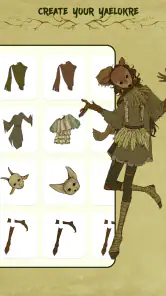
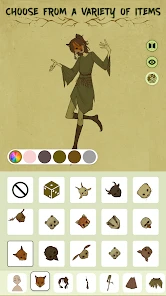
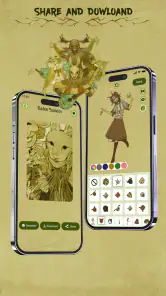
Yaelokre OC Maker provides a wide variety of customization options. You can choose different hairstyles, facial features, outfits, and even accessories. It’s almost like playing dress-up, but for your digital characters! What I found particularly impressive is the level of detail you can achieve. The app even allows you to tweak facial expressions and poses, which means you can really bring your character to life. I spent hours just playing around with the different combinations, and I have to say, it’s quite addictive.
Another highlight of the app is its user-friendly interface. Everything is neatly organized, and the touch controls are responsive. There’s no lag or frustrating glitches, which is something I always worry about with apps that have a lot of graphical content. Plus, the app doesn’t bombard you with ads, which is a refreshing change from many other free apps out there.
One practical way to make the most of a character maker is to build around a single visual anchor instead of changing every detail at once. I’d choose an expression, hairstyle, or outfit as the character’s signature, then see which other options support that idea. This keeps experimentation focused and makes it easier to tell whether a design feels coherent. It also helps when several people are sharing the device: each person can explain the one choice that defines their character, rather than needing to remember every tap.
Sharing and Community
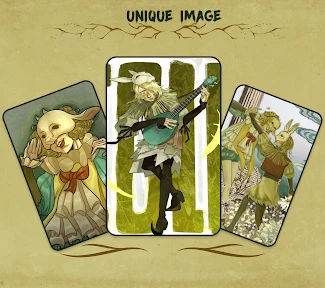
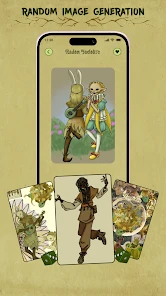
Once you’ve created your masterpiece, Yaelokre OC Maker makes it easy to share your character with friends or on social media. There’s also a community aspect to the app, where you can see what other users have created. It’s inspiring to see the creativity of others, and it can give you ideas for your own designs. I found myself scrolling through the community gallery more times than I’d like to admit!
The app also allows for easy saving and exporting of your characters, so you can use them in other projects or just keep a collection of your creations. Whether you’re a budding artist or just someone who enjoys dabbling in character design, this app has something for everyone.
I’d treat the community as a source of visual prompts rather than a template to copy. If a design catches your eye, notice what makes it work—perhaps a strong contrast between the expression and outfit—and try applying that principle to a different character idea. That approach makes browsing useful even if you do not intend to post your own work. For anyone who prefers to keep creations private, the character-making activity can still be worthwhile without turning every finished image into a public contribution.
Final Thoughts
In conclusion, Yaelokre OC Maker is a delightful app that offers a great way to express yourself creatively. The customization options are extensive, the interface is user-friendly, and the community aspect adds an extra layer of fun. It’s an app that doesn’t just entertain but also inspires. Whether you’re looking to kill some time or seriously invest in character design, this app is worth checking out.
Overall, I’d say Yaelokre OC Maker is a must-try for anyone interested in character creation. It’s a tool that encourages creativity and provides endless hours of fun. So, why not give it a shot and see what characters you can bring to life?
Who will get the most from it
I’d recommend it most to fans who want a quick way to shape an original character and enjoy experimenting with a particular visual style. It can be a playful first step for a young creator, or a low-pressure way for an experienced artist to test a character’s appearance before drawing them in detail. If your main goal is polished illustration, layered editing, or complete control over every mark, a general-purpose drawing app is likely the better fit.
The app is free, developed by MayZing Tech, and sits in the art and design category. It has an average rating of 3.2 from around 2,400 ratings, alongside roughly 179 written reviews, so I would approach it with measured expectations rather than assuming every user has the same experience. It has passed 1 million installs, is rated Everyone, and its current version is 1.0.5. It was released on December 7, 2024, and requires Android 7.0 or later.
That rating is a useful reminder to approach it as a particular fan-focused creative tool, not as a guaranteed fit for every kind of character work. Before building a large cast, I’d make one sample and check whether the available visual choices match the style you have in mind. A quick test is more informative than committing an afternoon to a design that you ultimately want to redraw from scratch. Because the app is free, trying that small experiment is a low-stakes way to decide whether its approach suits you.
It is also worth separating “making a character” from “finishing an illustration.” The first is where this app’s focused customization can be handy; the second usually calls for more control over composition, line work, and edits. If you are using the result for a story, roleplay, or personal reference, a clear character concept may be enough. If you want a poster-ready piece or need to make precise changes to a pose, I would move the design into a drawing app instead of expecting this one to replace it.
A practical way to try it
For a first session, I’d make one character with a clear idea in mind rather than tapping through every option at random. Choose a defining feature first—perhaps an expression or outfit—and let the other choices support it. This makes the finished design feel more intentional and helps reveal whether the available customization suits your taste. If you are creating several characters, giving each a distinct visual cue can also make a small collection easier to remember.
A realistic everyday use would be a short creative break between other activities: decide on a character prompt, make a draft, then save or share the result only if you want to keep it. For a household, that could mean one person makes a character while waiting for a meal, then hands the phone to someone else rather than expecting a long collaborative session. The app works better as a sequence of individual turns than as a shared editing workspace, so I would keep the goal modest and avoid making plans that depend on everyone editing the same project.
Compared with the usual alternatives, this sits between a dress-up activity and a full drawing app. A general art tool gives more freedom but asks the user to draw and refine details themselves; a character maker can make initial choices feel faster and less intimidating, while limiting the kinds of edits available. For someone who mainly wants to invent a look, that trade-off is sensible. For someone who wants to control every line or assemble a polished scene, the extra effort of a drawing program is worth it.
If you are choosing it for a child, I’d consider both the creative fit and the household’s sharing expectations. The Everyone rating is reassuring as an age-context signal, but it does not decide how a family handles community browsing or posting. A parent who wants a quiet, private drawing activity may prefer a tool centered on personal sketching. Someone happy to guide a child through character choices and discuss where finished work goes may find this more engaging than handing over a blank canvas.
When more than one person uses the same device, a few habits make the experience clearer: agree on turns, name or otherwise identify saved images, and avoid opening another person’s work without asking. Those are ordinary coordination choices rather than built-in family controls. They matter because individual designs can carry a sense of ownership even when they are made on a shared screen. If the household needs separate accounts, private workspaces, or ongoing joint editing, I would choose a tool designed around those needs instead.
In the end, this is a playful, specialized option rather than an all-purpose art tool. I’d try it if character customization and browsing other people’s designs sound enjoyable, especially for a relaxed shared-device activity with sensible turn-taking. I’d skip it if you need detailed illustration controls or a clearly separated workspace for several people. That distinction makes it easier to decide whether its quick, character-focused approach matches what you actually want to create.
Yaelokre OC Maker Frequently Asked Questions
Is Yaelokre OC Maker suitable for beginners, or do I need art experience?
Yaelokre OC Maker is aimed at making character creation approachable, so you can start shaping an original character without needing formal art skills. Its focus is on customizing a character rather than drawing every detail from scratch. If you enjoy experimenting with a character’s appearance and developing ideas visually, it can be a convenient starting point for a personal design.
What is Yaelokre OC Maker and what can I do with it?
Yaelokre OC Maker is an innovative app designed for creating original characters (OCs) with ease and creativity. Users can customize a wide range of features such as hair, eyes, clothing, and accessories to build unique avatars. It's a versatile tool for artists and storytellers looking to visualize their characters in a fun, interactive way.
Is Yaelokre OC Maker free to use, and are there in-app purchases?
Yes, Yaelokre OC Maker is free to download and use, offering a variety of basic features at no cost. However, it also includes in-app purchases that allow users to access premium content, additional customization options, and exclusive designs to enrich their character creation experience.
On which devices can I run Yaelokre OC Maker?
Yaelokre OC Maker is available for both Android and iOS devices. It requires Android version 5.0 and up or iOS 11.0 or later. The app is optimized for smartphones and tablets, ensuring a smooth experience on both platforms, but performance may vary based on your device's specifications.
How can I save and share my characters created in Yaelokre OC Maker?
Users can save their characters directly to their device's gallery or within the app's storage. Sharing is made easy with options to export your creations to various social media platforms or messaging apps. This feature allows you to showcase your creative work with friends and the online community effortlessly.
Pros
- Highly customizable character design
- User-friendly interface
- Wide range of outfit options
- Includes various accessories
- Regular updates with new features
Cons
- Limited export options
- Some features require in-app purchases
- Occasional app crashes
- Limited support for older devices
- Takes considerable storage space
- Category
- Art & Design
- Version
- 1.0.5













