World Clock – World time clock
- 22.00
- 3.7
- Installs
- 100.00K
- Price
- Free
Screenshots
Analysis by Reviewed
When I need to coordinate with someone far away, the first challenge is often not finding a meeting slot but knowing what the clock actually says in their city. World Clock – World time clock is built around that simple problem: it gives me a place to check other time zones without turning a quick question into a search through my phone. That focused purpose is useful, though it also means I judge it as a time reference rather than a full travel or weather tool.
Checking the time without guesswork
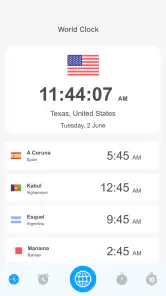
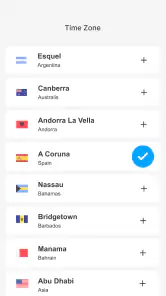
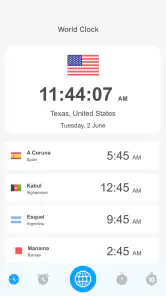
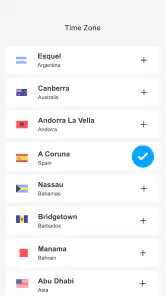
First things first, I love how simple and intuitive the UI is. You don’t have to be a tech wizard to navigate through the app. The moment you open it, you’re greeted with a clean interface that just screams efficiency. Adding different time zones is a breeze. Just type the city name, and voila, you have all the world’s time zones right at your fingertips!
Useful when several clocks matter
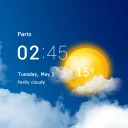
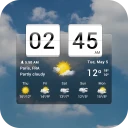
One of the features I can’t stop raving about is the ability to customize the clock display. Whether you prefer an analog or digital look, World Clock – World time clock has got you covered. Plus, the fact that you can label each clock with a custom name is a small but mighty feature that keeps everything organized.
Those labels are more valuable than they first sound. If I’m keeping an eye on a client’s city, a relative’s location, and a colleague’s office, a personal label can remind me why each time matters instead of leaving me to remember a list of places. My practical tip is to name clocks for the person or purpose, not just repeat the city name. That makes a glance more useful when I’m moving quickly between tasks.
For a small list, I’d also put the places I check most often where I can recognize them quickly and remove clocks that have stopped being useful. This keeps the display from turning into a directory I have to scan every time. If two people are in the same city, labels can distinguish the reason for tracking that time without making the location itself harder to identify.
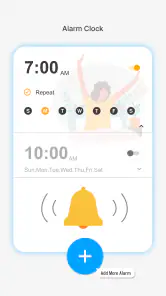
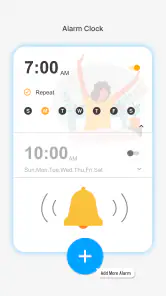
Oh, and let’s not forget about the alarm feature! It’s perfect for those of us who juggle multiple time zones. You can set alarms for different time zones without breaking a sweat. Trust me, waking up for that 3 AM conference call with Tokyo has never been easier.
I’d still treat a time-zone alarm as a prompt to double-check an important appointment, especially when a meeting invitation already has a specified local time. A sensible workflow is to confirm the event in the calendar first, then use the clock as a quick reference and reminder. That avoids relying on mental arithmetic when a call crosses midnight or falls near a daylight-saving change.
More From Our News Desk

Weather by Xiaomi Review: Clear at a Glance, Less Clear Up Close

X Under Pressure: Can It Recover When Posting Goes Wrong?

Clash of Clans Is Won Between the Battles

Android Auto Makes the Case for Quieter Car Software

MobiOffice: Transforming Mobile Productivity with Seamless Integration

EA SPORTS FC™ Mobile Soccer: Redefining Mobile Sports Gaming
For an early call, I would check both the city clock and the calendar event before setting a reminder, then make sure the alarm is meant for the time I need to wake up, not simply the time the other person’s city shows. That distinction sounds obvious, but it is easy to mix up when planning across date boundaries. The app can make the comparison less fiddly; it does not replace confirming which day the appointment falls on.
Reliability, with sensible checks
What I really appreciate is the app’s reliability. There’s nothing worse than an app crashing right when you need it the most. With World Clock – World time clock, I haven’t encountered any glitches, which is a huge relief. The app runs smoothly, and updates are regular, ensuring you’re always in sync with the rest of the world.
Another handy feature is the daylight saving time adjustments. The app does all the heavy lifting for you, automatically updating the time zones as needed. It’s one less thing to worry about, and I’m all for that kind of convenience.
For everyday planning, that adjustment matters most when I’m comparing cities in different regions rather than assuming a fixed number of hours between them. If I’m arranging a recurring call, I would check the clocks again when seasons change; the local time difference can shift even if neither person changes their routine. The app helps me see the current comparison, while the meeting invite remains the better source for the agreed appointment.
A useful habit is to check the comparison again close to the date of a recurring event instead of saving a mental offset and trusting it indefinitely. This is especially helpful when one location changes its clocks and another does not. Seeing the local times together reduces the chance of a casual miscalculation, but the calendar entry is still the one I would trust for the actual start time.
Who will get the most from it
This is a good fit for people who regularly speak with family, customers, teammates, or friends in other countries and want a dedicated view of their chosen places. It can also help a traveler keep home time visible while away. A realistic use is checking the clocks before calling a family member: rather than estimating whether they are likely to be asleep, I can glance at their city and choose a more considerate moment.
It is also handy for someone whose day has a few recurring international touchpoints but who does not need a full planning system. I might check a relative’s local time before sending a message, then leave a client’s clock visible while preparing for a call. Those are separate needs, but a short, clearly labeled city list can cover both without repeatedly searching the same places.
Compared with checking a search engine or opening a general-purpose clock app, a world clock is most useful when I revisit the same locations. Keeping several cities together saves repeated searches and makes comparisons easier. On the other hand, someone who only needs another city’s time once in a while may find a web search or the phone’s built-in clock sufficient. And if the real task is planning a meeting with availability across a team, a scheduling service is more appropriate than a clock alone.
That difference helps me decide whether to install it: the benefit is not merely seeing a foreign time once, but having familiar places ready when I need them. A built-in clock may be enough for a single home-and-travel comparison, while a calendar or scheduling tool is better for finding a time that works for several people. This app sits between those uses: it is a focused reference for repeated checks, not a replacement for coordination.
For a freelancer handling a call from home, for example, I could keep the client’s city under a descriptive label, glance at it before proposing a slot, and then put the confirmed time into my calendar. If the client travels or changes office locations, I would update which city I am checking rather than assume the old clock still represents them. The app supports a straightforward routine, but the accuracy of that routine still depends on choosing the right place.
Trust, cost, and control
The app is a free weather-category listing from AalphaTech, though the time-zone purpose is what matters in daily use. It has a 3.7 average from around 830 ratings and has passed 100,000 installs. I’d read that as evidence that people are finding the basic idea, not as a guarantee that it will suit every device or routine. It is rated for Everyone, runs on Android 5.0 or later, and its current version is 1.2.3.9.
There are optional in-app purchases priced from $0.99 to $4.99 per item, so I would check the purchase screen carefully before choosing anything beyond the free use. I also prefer to make a quick review of an app’s visible permission prompts and choices when I install it, particularly for a utility I expect to open briefly and often. I wouldn’t assume that a world clock needs access to personal details simply because it displays time zones; I’d decide based on the actual prompts shown on my device.
For a utility that I open for a quick glance, I want the choices on screen to be easy to understand and the purchase decision to remain separate from checking a clock. I would read any prompt before accepting it and pause if an option did not seem necessary for the way I intend to use the app. That is a practical way to keep control without making assumptions about how the app handles information.
When a tool is used around family or work schedules, even a city label can reveal something about what I am tracking if someone else sees my screen. I’d use neutral labels if that matters in my setting, and I’d avoid keeping a long list of locations just because adding them is convenient. The useful choice is a list that serves my routine, not the largest list I can assemble.
That cautious approach is useful for any small utility: keep the city list limited to places I genuinely check, use clear labels, and avoid treating a convenient reference as a substitute for an official calendar invitation. The app’s strength is that it makes selected local times easy to compare; it is not a reason to share more information or change how I manage sensitive appointments.
A measured recommendation
In a world that’s increasingly interconnected, having a reliable time zone app is essential, and World Clock – World time clock fits the bill perfectly. Whether you’re a globe-trotter, a business professional, or someone who just loves knowing the time in Paris at a glance, this app is a must-have.
Overall, I’d say this app has not only helped me manage my time better but has also made me feel more connected with the world. So, if you’re on the hunt for a dependable and user-friendly world clock app, look no further. Give it a try, and you might just wonder how you ever lived without it!
My recommendation is more measured than “must-have”: it earns a place on my phone if I regularly track a handful of locations and value a simple, at-a-glance comparison. If I rarely check other time zones, or need advanced calendar coordination rather than a clock, I’d stick with the tools I already use. For frequent international calls, though, the combination of city search, recognizable labels, display choice, and time-zone alarms makes this a practical option—as long as I confirm important appointments at the source.
I would skip it if I need a shared team schedule, detailed travel planning, or a way to negotiate everyone’s availability; a clock can show local time, but it cannot make those decisions for a group. I’d also choose a simpler built-in option if I only need an occasional conversion. The strongest reason to keep this one is a repeated habit: checking the same places often enough that a dedicated, labeled view saves effort.
Before relying on it for a new routine, I’d try the city search with the places that matter, choose labels that make sense at a glance, and test the alarm workflow well ahead of an important call. If the setup feels clear and the comparison fits how I plan my day, it is an easy tool to keep. If I find myself opening it only to repeat what my calendar already shows, I would not force it into my routine.
For me, its value comes from reducing small bits of friction, not from doing every part of international scheduling. I can quickly see whether it is a reasonable hour to call, then use the calendar or the other person’s confirmed appointment time for the final check. Used that way, this focused world clock is a sensible companion for frequent cross-border conversations, with enough restraint to know when another tool is the better choice.
World Clock – World time clock Frequently Asked Questions
Is World Clock – World time clock free to download, and are there in-app purchases?
World Clock – World time clock is free to download, so you can try its world-time features without an upfront purchase. The app also offers in-app purchases priced from $0.99 to $4.99 per item. Whether you need any paid options depends on how you plan to use it; the basic idea is to help you check time zones around the world.
What is World Clock – World time clock?
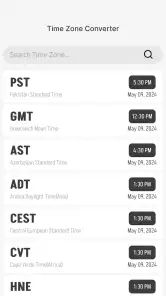
World Clock – World time clock is an application designed to provide users with the ability to view the current time in various cities and time zones around the world. It is particularly useful for travelers, business professionals, and anyone who needs to keep track of time differences globally. The app offers features such as customizable clock faces, time zone conversion, and daylight saving time adjustments.
How can I customize the clock faces in World Clock – World time clock?
In World Clock – World time clock, users can personalize their clock faces by choosing from a variety of styles and themes to match their preferences. The app allows you to adjust the appearance of the clock display, including colors and fonts, to suit your taste. This feature enhances user experience by allowing for a personalized look and feel of the time displays.
Does World Clock – World time clock support offline usage?
Yes, World Clock – World time clock supports offline usage to a certain extent. While you need an internet connection to initially download city time data or updates, the app stores this information locally on your device. This means you can access the current time in selected cities and perform time zone conversions even when you are offline, making it convenient for frequent travelers.
Can I set alarms for different time zones using World Clock – World time clock?
World Clock – World time clock allows users to set alarms for different time zones, which is particularly useful for managing international meetings or events. You can configure alarms to alert you according to the local time of any selected city, ensuring you never miss important appointments regardless of the time zone differences. This feature is crucial for global communication and scheduling.
Pros
- Easy to use interface
- Supports multiple time zones
- Customizable clock widgets
- Offline functionality
- Minimal battery usage
Cons
- Ads can be intrusive
- Limited free features
- Occasional syncing issues
- No dark mode available
- Some features require purchase
- Category
- Weather
- Version
- 1.2.3.9