Windy.app - Enhanced forecast
- 5.28K
- 4.7
- Installs
- 10.00M
- Price
- Free

Screenshots
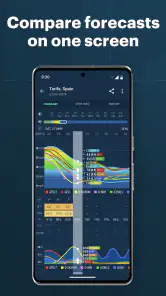
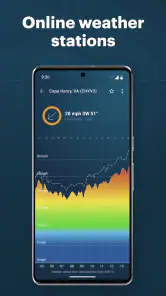
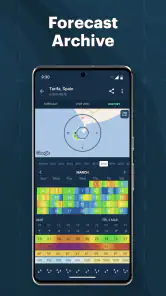
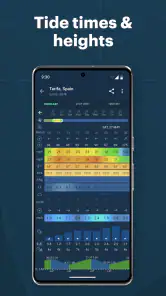
Analysis by Reviewed
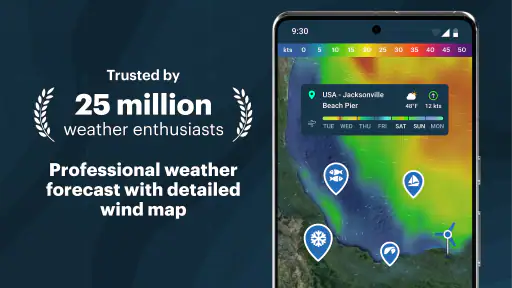
In my first week with Windy.app, I kept opening it before heading outside simply because the map and detailed conditions made weather feel more useful than a single rain icon. I can check wind direction and speed, look at tides and waves, and use the forecast to think through whether a plan still makes sense. That extra detail is the app’s clearest appeal: it is built for people whose day depends on what the weather is doing, not just whether it is sunny.
When a forecast changes the plan
A practical example is a beach day that starts with a quick forecast check at breakfast. If the wind looks less comfortable than expected, I can compare the map with the local conditions and consider a different stretch of coast or a later start. For a sailing outing, wind direction and speed matter more than a generic “partly cloudy” label; for a walk, a simpler forecast may be enough. I find it useful to decide in advance which details actually affect my activity, so the extra information helps rather than distracts.
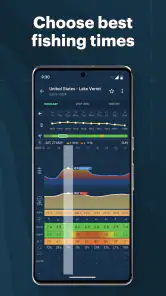
The map is most valuable when I’m choosing between nearby places, while tides and waves are relevant when the destination is the shore. Those tools are not a guarantee that conditions will be safe, though. I’d treat the forecast as one input, check it again before setting off, and use local safety guidance for activities where changing weather could put someone at risk. Anyone who only wants a quick umbrella reminder may find a standard weather app faster and less busy.
Making it useful after the novelty fades
The lasting value comes from turning the app into a small planning habit rather than browsing every layer just because it is there. Before an outdoor plan, I’d check the forecast for the actual location, focus on the conditions tied to the activity, then revisit the plan closer to departure. That routine is more useful than repeatedly checking broad forecasts without a decision in mind. It also makes the map easier to read over time: I learn which information I need and which details I can ignore.
If I’m heading out with other people, I would use the forecast to start a practical conversation—whether to leave earlier, choose a sheltered route, or postpone—rather than treating one screen as a final verdict. For a commute or indoor-focused day, that level of planning is probably unnecessary. This distinction matters: Windy.app earns a place on my phone when I’m regularly making weather-sensitive plans, but it may not become a daily essential for someone whose routine rarely changes with the forecast.
First Impressions
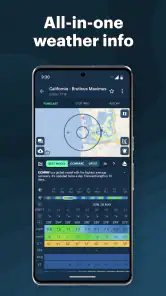
The first thing that struck me about Windy.app was its sleek and user-friendly interface. It's not one of those apps that overwhelm you with options and settings right off the bat. Instead, it offers a clean, intuitive layout that makes it easy to navigate, even for someone who's not particularly tech-savvy. The main screen gives you a snapshot of the current weather conditions, complete with temperature, wind speed, and a brief forecast overview. It's straightforward, and I appreciate that.
Features That Stand Out
One of the standout features of Windy.app is its detailed weather forecasts. It doesn't just stop at the basics like temperature and precipitation; it dives deep into specifics like wind patterns, gusts, and even atmospheric pressure. For someone who's into activities like sailing or kite surfing, this detailed wind information is pure gold. Another feature I find incredibly handy is the app's ability to provide localized weather forecasts. No matter where you are, Windy.app gives you precise weather details for your exact location, making it perfect for spontaneous trips.
More From Our News Desk

Weather by Xiaomi Review: Clear at a Glance, Less Clear Up Close

X Under Pressure: Can It Recover When Posting Goes Wrong?

Clash of Clans Is Won Between the Battles

Android Auto Makes the Case for Quieter Car Software

MobiOffice: Transforming Mobile Productivity with Seamless Integration

EA SPORTS FC™ Mobile Soccer: Redefining Mobile Sports Gaming
Additionally, the app's community feature is worth mentioning. It connects you with other users who share weather updates and tips about various outdoor spots. It's like having a network of weather enthusiasts right at your fingertips, offering insights you wouldn't get from a standard weather app.
Performance and Usability
In terms of performance, Windy.app is top-notch. The app runs smoothly, with no noticeable lags or crashes. The developers clearly put a lot of effort into ensuring that it functions well on both Android and iOS devices. As for usability, the app's design is straightforward, and the information is easy to digest, which means you won't need to spend ages figuring out how to use it. Just a few taps, and you're good to go.
It's also worth noting that Windy.app is compatible with a variety of devices, ensuring that you get the best possible experience regardless of your phone or tablet's specifications. Plus, they offer regular updates, which keep the app running smoothly and introduce new features to enhance the user experience further.
Details worth weighing
Windy Weather World Inc makes this free weather app, and it has a 4.7 average from around 366,000 ratings, with over 10 million installs. It is rated for everyone, and the current version is 86.0.0. The basic download costs nothing, while in-app purchases range from $4.99 to $299.99 per item, so I’d check what an optional purchase includes before paying. The app has been around since March 13, 2016, and supports Android 6.0 and later.
Compared with the weather app already on a phone, Windy.app is less about the fastest possible glance and more about exploring conditions for a particular place. That is a useful difference for sailors, surfers, kiteboarders, and people planning coastal outings; it is not automatically an advantage for someone who only needs a simple rain alert. A good way to avoid information overload is to start with one question—such as whether the wind suits your plan—and only inspect other details when they could change your decision.
Performance and everyday trade-offs
Maps and multiple kinds of weather information can make an app feel more involved than a basic forecast, especially when I’m in a hurry or checking an unfamiliar area. I would avoid assuming that a detailed display is always a more certain forecast: local conditions can change, and a map is a planning aid, not a substitute for judgement. If I only need to know whether to carry a jacket, my phone’s default forecast is likely quicker. If I’m choosing when or where to go outside, the added context has a clearer purpose.
For regular use, I’d keep the app for trips and activities where wind, waves, or tides influence the decision, and let simpler tools handle routine checks. The strongest workflow is to check the destination rather than relying only on the weather around home, then look again before leaving. That small habit makes the app’s extra detail actionable without turning weather-checking into a chore.
Planning beyond the first look
One useful way to make the map work harder is to compare locations only when the choice is realistic. If I have two beaches or launch points in mind, I can use the mapped conditions to help decide which deserves a closer look; comparing distant places that I would never travel between adds complexity without helping the decision. I also try to separate “interesting” information from “decision-making” information. Wind may be central for a board sport, while tide timing could matter more for a shoreline visit. Starting with the relevant condition keeps the screen from becoming a weather puzzle.
For a day out with a flexible schedule, I’d check the destination early, make a provisional plan, and then revisit conditions nearer the time. If the forecast looks unsuitable, I can adjust the start time or pick a different activity instead of assuming the morning’s check will remain accurate all day. That does not make the forecast infallible; it simply gives me a practical reason to return to it. For serious water or wind exposure, I would combine the app with local advice and sound judgement rather than relying on any single forecast source.
Where it fits among weather apps
Most built-in weather apps are designed to answer a quick question: what is happening nearby, and should I expect rain or temperature changes? That is a better fit for routine errands because the information is familiar and easy to scan. Windy.app takes a different route by making the map and activity-specific conditions more prominent. I find that distinction useful when choosing an outdoor location, but it can feel like unnecessary work if all I need is a glance before walking to the bus stop.
I would not replace every weather source with it automatically. For a simple daily forecast, the default app may be the more convenient choice; for wind-dependent plans, the extra view of direction, speed, tides, and waves gives Windy.app a clearer role. Using both selectively is reasonable: one for quick checks and the other when the weather could change where or when I go. The point is not to collect forecasts, but to use the one that answers the question at hand.
What keeps the habit manageable
The main maintenance burden is attention rather than upkeep. A detailed weather app can invite repeated checking, especially when a plan is still days away and the forecast is not yet a practical guide. I get more value by choosing a check-in point that matches the outing: an early look to decide whether the plan is plausible, followed by another check before departure. For ordinary days, I would not keep opening it without a reason.
It also helps to decide what would actually make me change plans before reading the forecast. If a certain wind direction, tide timing, or wave condition matters to the activity, I can focus on that instead of interpreting every available detail. This makes the app feel like a tool rather than a feed to browse. The habit is sustainable when each visit leads to a decision; it becomes tiring when I’m checking out of curiosity and then doing nothing differently.
Who is likely to keep it installed?
I see the strongest case for people who regularly plan sailing, surfing, kiteboarding, beach visits, or other outdoor activities where wind and water conditions shape the experience. It can also suit anyone who likes comparing nearby outdoor locations before committing to a route or meeting place. A casual user may still appreciate the map, but the benefit depends on whether the added detail answers a recurring question rather than merely looking impressive on the first day.
On a normal workday, for example, I might use a basic forecast to decide whether to take a coat. If I’m meeting friends at the coast on the weekend, I have a different set of questions: will the wind make one spot more comfortable, should we go earlier, and is the shoreline plan worth keeping? That is when the map and marine-related information give me a more useful reason to open the app. If my weeks rarely include these decisions, I would skip making it my main weather app and stick with the quickest option.
Final Thoughts
All in all, if you're looking for a reliable, feature-rich weather app, Windy.app should be on your radar. Whether you're planning a weekend hike, a sailing trip, or just want to know if you should take an umbrella to work, this app has got you covered. It's easy to use, packed with useful features, and connects you with a community of like-minded weather watchers. Give it a try, and you'll see why it's become a staple on my phone.
So, next time you're checking the weather, remember that there's an app that not only tells you what to expect but also enhances your outdoor experience. Happy adventuring!
Who will keep it installed?
I’d recommend trying it if weather is part of how you choose an outdoor destination or schedule an activity. The combination of mapped conditions with wind, tide, and wave information gives those users a reason to return beyond the first few curious checks. It is less compelling if you want only a minimal forecast, dislike exploring weather details, or rarely make plans affected by conditions. For everyone else, the sensible test is whether those details change a real decision during an ordinary week; if they do, the app can earn a lasting spot rather than remaining a novelty.
Windy.app - Enhanced forecast Frequently Asked Questions
Can I use Windy.app to check conditions on an interactive weather map?
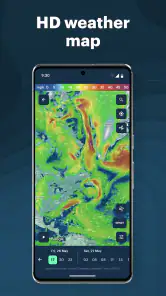
Yes. Windy.app’s weather map is a central way to explore conditions, with the store summary highlighting wind direction and speed, tides, and waves. It can be useful when a general forecast is not enough and you want to look at weather patterns in a particular area. You can also use the app’s weather widget to keep forecast information close at hand.
Does Windy.app include a weather widget, and what is it useful for?
Windy.app includes a weather widget alongside its map and forecast features. A widget can make it more convenient to check weather information without opening the app each time, while the app itself gives you a place to explore maps and conditions in more detail. If quick access to weather is important to you, the widget is one of the features worth considering before you download.
Is Windy.app free to download, and are there in-app purchases?
Windy.app is free to download, so you can try its weather maps and forecasts without paying upfront. It also offers in-app purchases, with options ranging from $4.99 to $299.99 per item. Check the purchase details in the app before confirming anything, especially if you only need basic weather information or want to compare available features first.
What devices and age groups is Windy.app intended for?
Windy.app is a weather app for users of all ages, with an Everyone content rating. It requires Android 6.0 or later on Android devices. The interface and tools are relevant to people checking everyday conditions as well as those planning outdoor activities, so the app can be useful whether you want a quick forecast or a closer look at weather maps.
What features does Windy.app offer for weather forecasting?
Windy.app provides a comprehensive set of features for weather forecasting, including real-time wind maps, detailed weather statistics, and forecasts for various outdoor activities. Users can access interactive weather maps that display wind, waves, temperature, and atmospheric pressure. The app’s summary also highlights wind direction and speed, tide times, and waves. Additionally, it offers personalized alerts, allowing users to receive notifications about specific weather conditions in their favorite locations.
Pros
- Detailed weather forecasts
- User-friendly interface
- Real-time updates
- Global coverage
- Customizable alerts
Cons
- Requires internet connection
- Ads in free version
- Battery consumption
- Limited offline features
- Subscription for full access
- Category
- Weather
- Version
- 86.0.0











