Windfinder Pro: Wind & Weather
- 289.00
- 4.7
- Installs
- 100.00K
- Price
- $12.99

Screenshots
Analysis by Reviewed
Before I choose a weather app, I ask a simple question: do I need a broad picture of rain and temperature, or am I making plans where wind direction and changing conditions matter? That distinction is what makes Windfinder Pro: Wind & Weather worth considering. It is a weather app from Windfinder, aimed especially at people who spend time on the water or outdoors, and its focus is more specialized than the general forecast apps I reach for when I only want to know whether to take a coat.
That focus is useful, but it also sets expectations. I would treat the forecast as a planning aid, not a guarantee that conditions at a specific beach, harbor, or fishing spot will match every prediction. Wind can vary across short distances, and local terrain or exposure can change what you experience. For a casual walk, a simpler weather app may be quicker; when wind is central to the decision, a dedicated view is easier to act on.
Choose it when wind affects the plan
The strongest reason to try this app is that it gives wind-focused planning a place of its own. A sailor deciding whether to head out, a surfer choosing when to go, or an angler weighing a trip can look beyond a general “sunny” or “cloudy” summary. I find it more useful to ask whether the wind direction and gusts suit the activity than to rely on a pleasant-looking icon alone.
It can also help with decisions that are less dramatic than a full day on the water. If I have a short window after work, I can compare the forecast with the time I actually have instead of assuming the morning’s conditions will hold through the afternoon. For a kite session or a breezy coastal walk, that extra attention to wind can change whether I pack gear, choose another spot, or stay home.
Where its focused approach helps
The app’s wind-and-weather emphasis makes it a better fit for outdoor plans where direction, gusts, waves, or tides are part of the decision. The practical benefit is not simply seeing more information; it is having a reason to check the conditions before committing to travel or equipment. I would use it to compare a few possible outing times and locations, then make a cautious call based on the full picture rather than one headline number.
Windfinder Pro is a paid app, priced at $12.99, with in-app purchases ranging from $0.99 to $9.49 per item. I would think about that cost in terms of how often I need wind-specific forecasts. If I check conditions regularly for sailing, surfing, or fishing, paying for a specialist tool can make sense. If I only check the weather now and then, a free general-purpose alternative may be enough. The app is rated for Everyone, and its average rating is 4.7 from around 15,000 ratings, which suggests broad appeal without telling me whether it suits my particular routine.
One useful habit is to check the forecast before leaving and again when plans are close, especially if a long drive or equipment setup is involved. I would also compare conditions at the exact destination rather than assuming a nearby town tells the whole story. That is a small workflow change, but it helps prevent a common mistake: making a wind-sensitive plan from a broad regional forecast.
More From Our News Desk

Weather by Xiaomi Review: Clear at a Glance, Less Clear Up Close

X Under Pressure: Can It Recover When Posting Goes Wrong?

Clash of Clans Is Won Between the Battles

Android Auto Makes the Case for Quieter Car Software

MobiOffice: Transforming Mobile Productivity with Seamless Integration

EA SPORTS FC™ Mobile Soccer: Redefining Mobile Sports Gaming
Why Windfinder Pro Stands Out
First off, let's talk about what makes Windfinder Pro a cut above the rest. It's not just your run-of-the-mill weather app. Oh no, this bad boy is laser-focused on delivering incredibly accurate wind forecasts and weather conditions. It's like having a personal meteorologist in your pocket, minus the awkward small talk.
The User-Friendly Interface
One thing I absolutely adore about this app is its user-friendly interface. Even if you're not exactly tech-savvy, navigating through the app is a breeze. Pun intended! The layout is clean, intuitive, and packed with all the features you need without feeling cluttered. It's like the app designers knew exactly what we weather enthusiasts were looking for.
Features that Make a Difference
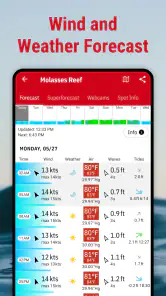
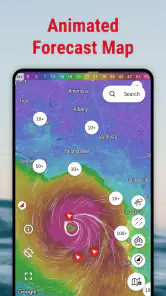
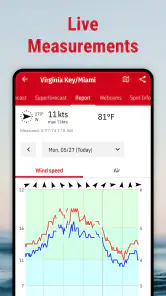
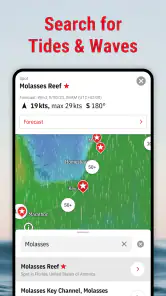
Let’s dive into the features, shall we? From real-time wind speed, direction, and gusts, to tide charts and wave heights, Windfinder Pro covers it all. The app also provides weather forecasts for over 45,000 locations worldwide, so no matter where you are, you've got the info you need right at your fingertips.
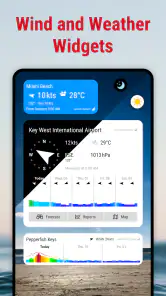
One feature that knocks it out of the park is the Wind Preview. It gives you a detailed forecast for the next 10 days, which is perfect for planning your outdoor adventures. Plus, the app’s super handy widgets let you keep tabs on the weather right from your home screen.
Performance and Reliability
Now, we all know that an app can have a gazillion features, but if it crashes every time you try to open it, what's the point, right? Thankfully, Windfinder Pro is as reliable as they come. In all my time using it, not once has it let me down. It's fast, responsive, and updates the weather data in real-time, ensuring you're always in the loop.
Not to mention, the app's ability to work offline is a huge plus. Imagine being out at sea, miles away from a reliable internet connection, and still being able to access crucial wind and weather data. Now that's what I call a lifesaver!
Final Thoughts
So, if you're someone who loves spending time outdoors and relies heavily on the weather, Windfinder Pro: Wind & Weather is a must-have. It's packed with features, easy to use, and incredibly reliable. Whether you're surfing, sailing, or just planning a day at the beach, this app has got your back.
In a world where weather apps are a dime a dozen, finding one that truly delivers is like finding a needle in a haystack. But with Windfinder Pro, you’ve struck gold. So go ahead, download it, and let the wind guide your adventures!
How it fits alongside other weather apps
I would not necessarily replace every weather app on my phone with this one. A general forecast app is often the faster choice for checking rain, temperature, or the day’s broad outlook, while Windfinder Pro is the one I would open when wind is the deciding factor. Keeping both approaches in mind avoids expecting a specialist forecast to be the best answer to every everyday weather question.
For a realistic example, imagine planning a Saturday surf session with a friend who has limited time. I would check the intended spot and compare the forecast at the times we could actually arrive, then use the wind and wave information to decide whether to go early, wait, or choose another activity. I would still treat the result as guidance: conditions can shift, and a forecast cannot replace local judgement or safety checks.
Who should pay, and who can skip it
The price is easiest to justify if wind checks are part of your regular routine and a missed window would waste a trip. If you only want occasional temperature and rain updates, paying for a specialist app is harder to recommend; a standard weather app may cover that need with less commitment. Windfinder has built this app around outdoor conditions, so the value depends on whether you will use that extra focus often enough.
There is also a small learning curve in deciding which details matter for your activity. A beginner may see several kinds of conditions and still be unsure how to translate them into a go-or-no-go decision. I would start by checking the forecast for a familiar location, note how the conditions feel when I arrive, and use that experience to interpret future forecasts more sensibly. The app can inform a choice, but it cannot make that choice for you.
Plan around the forecast, not just the screen
Wind Preview is useful for looking ahead, but I would use a longer-range forecast to narrow down possible days rather than treating it as a promise. As the outing gets closer, checking again gives me a better basis for deciding whether to travel or prepare equipment. A home-screen widget can make quick checks convenient, while opening the app for the chosen location is the more deliberate step when the plan depends on local conditions.
The app has been available since June 15, 2010, and version 3.38.4 requires Android 7.0 or later. It has more than 100,000 installs, but those figures are less important to me than whether its wind-focused approach matches my plans. I would also remember that offline access is helpful only for information already available on the device; I would check and save what I need before heading somewhere with weak reception rather than assume fresh forecasts will load without a connection.
My recommendation
For sailors, surfers, kite users, anglers, and other people whose plans depend on wind, I can recommend giving Windfinder Pro a serious look. Its focused forecasts, location planning, and glanceable widgets suit repeat outdoor use better than a generic weather summary. For someone who mostly checks whether it will rain on the commute, I would choose a simpler option instead and keep the specialist tool for the days when wind actually changes the plan.
My main advice is to use it as one part of a decision, not as an automatic green light. Check the relevant location, revisit the forecast close to departure, and compare what it predicts with what you know about the spot. If that workflow matches the way you spend time outside, the app’s specialization is its strongest reason to install it; if not, its extra focus may simply be more than you need.
Build a routine that suits your activity
I get the most value from a specialist forecast when I use it consistently rather than opening it only after plans are already fixed. For a regular fishing spot, for example, I would check the same location at a few different stages: while choosing a possible day, before leaving, and once more if the outing is delayed. That makes it easier to notice whether a change in conditions matters to my own plans, instead of treating each forecast as an isolated verdict.
For a group outing, I would share the practical conclusion rather than just a screenshot full of figures: whether the timing looks workable, which location seems more suitable, and what could make us change course. This is especially helpful when people have different levels of experience. The app can support a common plan, but a confident-looking forecast should not pressure anyone into an activity they consider unsafe.
Use the detail without overreading it
Wind direction is most useful when I connect it to the place I intend to visit. A forecast for a nearby town may not describe an exposed stretch of coast or a sheltered harbor in the same way, so I would use location choice as part of the planning itself. If two candidate spots are available, comparing each separately can be more informative than focusing on a single favorite and hoping the conditions suit it.
I would also avoid making a decision from one appealing detail alone. A promising wind reading does not automatically mean the whole outing will be comfortable, and the broader weather picture still matters. This is where the app’s mix of wind and other outdoor conditions earns its place: it encourages a more complete check, while leaving the final judgement with the person who knows the activity and the location.
What to expect from a paid specialist
Paying for a dedicated weather tool makes most sense when it changes a repeat decision, not simply because it contains more information than a basic forecast. I would ask myself whether I regularly compare locations, plan around wind, or need a longer view before committing to travel. If those checks happen only once in a while, the purchase may feel unnecessary even if the app is well suited to them.
The listed in-app purchase range is another reason to check the current purchase choices carefully before spending beyond the app price. I would decide what I need from the core experience first and avoid assuming that every optional purchase is essential. The sensible test is whether the features I actually use improve my planning enough to justify the total cost, rather than buying extras just because they are available.
Choosing between a specialist and a general forecast
When the question is simply whether to carry an umbrella, a broad weather app is usually the more direct tool. When the question is whether a wind-sensitive outing is worth the drive, Windfinder Pro has a clearer role. I see these as different jobs rather than a contest where one app must replace the other: a general app can handle routine checks, while a dedicated wind view can take over when the outing depends on more than rain and temperature.
That distinction also helps set expectations for new users. If you are unfamiliar with wind forecasts, start with one activity and one location rather than trying to interpret every available condition at once. Compare what the forecast suggested with what you experienced, and gradually learn which details influence your own decisions. It is a practical way to get more from the app without mistaking a dense forecast for certainty.
My final call
I would choose this app if wind is a recurring part of my outdoor planning and I want a focused way to compare places and possible times. Its specialist angle, Wind Preview, widgets, and outdoor-oriented information make it more compelling for sailors, surfers, anglers, and kite users than a standard daily forecast. The 4.7 average from around 15,000 ratings and more than 100,000 installs give a sense of its reach, but my recommendation rests on whether that use case matches yours.
If your weather needs are mostly routine, I would save the money and stick with a general-purpose option. If you regularly plan around wind, I would try Windfinder Pro with a familiar location, check the forecast close to departure, and treat it as one input alongside local knowledge and sensible safety decisions. That is where its added detail becomes useful rather than just extra information on a screen.
Windfinder Pro: Wind & Weather Frequently Asked Questions
What is Windfinder Pro used for?
Windfinder Pro is a weather app for checking wind forecasts and weather reports, particularly when planning activities outdoors. Its focus is useful for people who want to consider wind alongside the weather before heading out for sailing, surfing, kite sports, fishing, or similar plans. The app is built around practical conditions rather than general entertainment, so it is most relevant when weather can shape your plans.
Who develops Windfinder Pro, and what kind of app is it?
Windfinder Pro is made by Windfinder and belongs to the weather category. It is designed around wind forecasts and weather reports for activities such as sailing, surfing, kite sports, fishing, and other outdoor plans. That specialized focus may make it a better fit for people who regularly check wind conditions than for someone looking only for a broad, occasional glance at the weather.
Is Windfinder Pro a separate app from Windfinder, and who makes it?
Windfinder Pro is the paid version of Windfinder, a weather app developed by Windfinder. It focuses on wind forecasts and weather reports for activities such as sailing, surfing, kite sports, fishing, and other outdoor plans. If you are comparing it with the free version, the main appeal is its additional forecast features and an experience designed for people who regularly check wind conditions.
What does Windfinder Pro cost, and are there any additional purchases?
Windfinder Pro is listed at $12.99, and the app also offers in-app purchases ranging from $0.99 to $9.49 per item. Keep in mind that the price and purchase options shown in an app store can vary by region or change over time. It is worth reviewing the store’s purchase details before downloading so you understand which costs apply to your account.
What features does Windfinder Pro offer compared to the free version?
Windfinder Pro offers several advanced features not available in the free version, including detailed wind and weather forecasts, real-time updates, and access to professional weather models. Additionally, subscribers can enjoy an ad-free experience, long-term forecasts up to 14 days, and customizable alerts to ensure they never miss critical weather changes.
Pros
- Accurate wind forecasts for various locations.
- Intuitive and user-friendly interface.
- Detailed weather parameters like temperature.
- Offline mode available for remote areas.
- Customizable notifications for weather changes.
Cons
- Requires a subscription for full features.
- Battery consumption can be high on use.
- Limited free version features.
- Occasional data update delays.
- No in-app tutorials for new users.
- Category
- Weather
- Version
- 3.38.4












