WeatherSight - Live Forecast
- 302.00
- 4.1
- Installs
- 1.00M
- Price
- Free
Screenshots
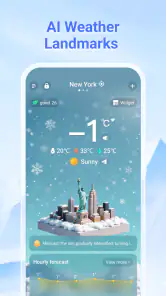
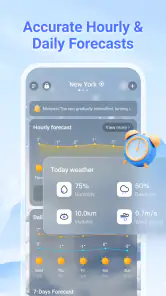
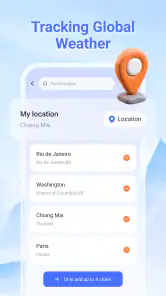
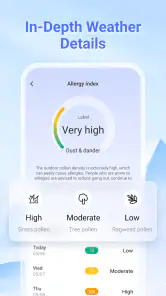
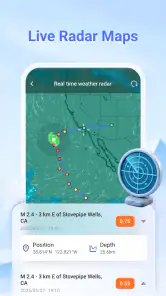
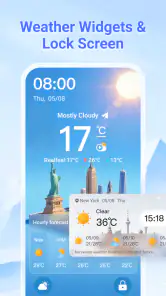
Analysis by Reviewed
My first test for any weather app is whether it changes a real decision before I step outside. WeatherSight is a focused weather app from Houpumobi Tech, and I see its value in checking current conditions and a forecast without turning a simple question into a research session. I would use it to choose a jacket, decide whether to pack rain protection, or time a walk. A forecast remains guidance, though, not a promise about exactly what the sky will do.
Who will get the most from a quick forecast
I think this app makes most sense for someone who checks the weather as part of ordinary planning rather than for someone who wants a professional forecasting dashboard. If your daily choices are whether to walk, cycle, carry an umbrella, or leave a little earlier, a straightforward forecast can be enough. The useful question is not whether an app displays the most information, but whether it helps you make a better choice without slowing you down.
It is also a reasonable option for people who want a separate weather app but do not want to pay to try one. WeatherSight is free, and its Everyone content rating makes its intended audience broad. I would still try it on ordinary days first: compare what it says with the conditions outside and see whether the layout and location feel right for your routine before leaning on it for plans that matter.
A routine built around useful checks
I use a weather app best when each visit answers a specific question, so this section looks at turning quick checks into a calm, repeatable routine rather than a habit of refreshing. I also find it useful to decide in advance what would change my plans, which makes the forecast easier to act on. From there, I can consider which settings deserve attention before building faster check-ins.
Start with the question you actually need answered
My most practical way to use WeatherSight is to open it with a decision in mind. If I am heading out soon, I want to know what conditions are like now and what may change during the part of the day I will be outside. If I am planning something later, I look for the forecast period that matches that plan instead of treating a single current reading as the whole story. That simple habit makes a weather app more useful than repeatedly glancing at it without knowing what I am checking.
WeatherSight is positioned as a real-time forecast app, so the natural workflow is to use it as a quick reference and then revisit it when the timing matters. For example, before a commute I would check once while getting ready and again shortly before leaving if the weather looks unsettled. The second check is not busywork: conditions can shift, and a fresh look is more useful than relying on a forecast I saw hours earlier.
I also recommend separating immediate decisions from longer-range plans. A forecast can help me decide whether to take a walk this afternoon, but I would avoid treating an outlook several days away as a firm promise for an outdoor event. WeatherSight makes most sense when I use the information at the level of certainty appropriate to the decision: near-term conditions for what I am doing now, and a broader forecast only for rough planning.
More From Our News Desk

Weather by Xiaomi Review: Clear at a Glance, Less Clear Up Close

X Under Pressure: Can It Recover When Posting Goes Wrong?

Clash of Clans Is Won Between the Battles

Android Auto Makes the Case for Quieter Car Software

MobiOffice: Transforming Mobile Productivity with Seamless Integration

EA SPORTS FC™ Mobile Soccer: Redefining Mobile Sports Gaming
Build a repeatable check-in habit
The helpful part of a weather routine is consistency. I would check the same things in the same order: current conditions, the portion of the forecast that covers my plans, then any change that could affect whether I go out or what I bring. This reduces the temptation to scan every available detail and makes it easier to notice what has actually changed since my last visit.
A realistic example is deciding whether to cycle to a nearby appointment. I would check WeatherSight before getting ready, consider whether the forecast suggests conditions that would make the ride uncomfortable, and make a final call before leaving. If the weather looks uncertain, I would choose a backup rather than assuming the app can remove that uncertainty. That is a sensible role for a forecast tool: it supports a decision without making it for me.
For a household, the same routine can help avoid vague messages such as “it might rain.” I would share a concrete takeaway instead: check again before leaving, or bring a light layer because conditions may change. The app is most useful when its forecast leads to a clear action. If I find myself reopening it without learning anything new, I would wait until closer to the next decision rather than checking constantly.
Settings are worth treating as part of the forecast
Before relying on any weather app, I make a point of checking its available settings and making sure the displayed information is understandable to me. Units are a basic example: temperatures and other measurements are only useful if I can read them at a glance without mentally converting them. I would also check that the location being used matches the place I care about, especially if I am travelling or comparing home with a destination.
I am careful not to assume that a location setting is automatically correct just because an app opens. A forecast for the wrong place can look convincing while being irrelevant. When a trip is involved, I would verify the location shown before using the forecast to pack or set off. If the app offers choices about how location is handled, I would select the option that fits my own comfort and routine rather than granting more access than I need for my use.
Notifications, if available in the version I am using, are another setting I would evaluate based on real value rather than enable by default. A timely warning can be helpful, but repeated updates that do not affect my plans become noise. I would keep alerts only if they help me act, and I would still open the app for a fresh check before an important outdoor activity. Weather information is more useful when the settings support attention rather than interrupt it.
Faster patterns for everyday decisions
The quickest approach is to connect a check to an existing moment in the day. I would look at the forecast while deciding what to wear, before loading a bag, or just before walking out. That is more reliable than trying to remember a forecast from breakfast. It also gives the information a purpose: if the answer will not change what I do, there may be no reason to check again yet.
Another useful pattern is to check the forecast at the destination, not just where I am standing, whenever my plans take me elsewhere. Weather can vary from one place to another, and a home forecast should not be treated as a substitute for the conditions where I will spend the afternoon. If I am making a trip, I would confirm the destination and the relevant time window rather than infer conditions from my current surroundings.
I also find it helpful to make one decision from the forecast and then stop browsing. If the plan is a short walk, the useful questions are whether conditions look comfortable and whether I need a layer or rain protection. A more elaborate analysis may be unnecessary. For a longer outdoor commitment, I would check closer to the start and keep a fallback plan. This is a practical trade-off: quick checks are efficient, while higher-stakes plans deserve a more cautious approach.
WeatherSight is free, which makes it easy to try as a daily reference without first committing money. It has a 4.1 average from around 18,000 ratings, and it has been installed over a million times. Those figures suggest that it has found an audience, but they do not tell me whether its forecasts will suit a particular town or personal routine. I would judge it by whether the information is clear and useful where I live, not by popularity alone.
Use repeatable shortcuts, not imagined automation
A useful shortcut is a small personal rule, not necessarily a special button in the app. For a morning departure, I would check the relevant time period while getting dressed, then make a second visit only if the first forecast suggests that conditions may affect the route or what I carry. That habit keeps the app from becoming a stream of distractions and gives me a clear reason to reopen it.
For a weekend plan, I would separate the decision into two stages: use an early forecast to decide whether the idea is broadly workable, then check again nearer the outing before committing to details. This avoids the common mistake of treating an early outlook as fixed. If the plan involves several people, I would share the practical conclusion and the time of the next check, rather than forwarding a forecast without context.
Where a simple forecast stops being enough
The main limitation of relying on a compact weather app is not unique to WeatherSight: forecast details can be less dependable the farther out I look, and local conditions may not match a broad prediction. I would be especially cautious when planning activities where a change in weather could create safety concerns. For those decisions, I would consult an appropriate local source as well and avoid treating a general forecast as a substitute for official guidance.
There is also a difference between knowing that weather may change and knowing exactly how it will affect a specific plan. A forecast can help me prepare, but it cannot tell me whether my personal commute, garden, or outdoor event will feel comfortable in every respect. I still need to use common sense, consider the setting, and make a backup plan when the consequences of getting it wrong matter.
Compared with a built-in phone weather app, WeatherSight is worth choosing only if I prefer its presentation or find its forecast easier to use. The standard app already available on a phone may be enough for someone who wants an occasional temperature check and does not want another app to manage. At the other end, people who need specialist tools for work, detailed analysis, or safety-critical planning should look for a service built around those needs rather than expect a general-purpose forecast app to cover everything.
I would also skip it if I am looking for a full planning system that coordinates trips, calendars, or outdoor activities. WeatherSight’s role is to provide weather information; I would not assume it replaces those tools. The app is a better fit for someone who wants a direct forecast check than for someone who expects weather data to become an automated assistant for every plan.
What to expect before installing
WeatherSight is listed as a free app for everyone, and its current version is 2.5.0.0, with Android 9 as the minimum operating system. It was released on December 8, 2025. These details make it straightforward to assess basic compatibility, though my decision would still depend on whether the app’s information and layout work well for my location and habits.
The strongest reason to try it is convenience: if I want a dedicated place to check current weather and a forecast, it offers that focused purpose without a purchase price. The reason to be selective is equally simple: a forecast app earns a place on my phone only if I trust its presentation enough to use it and if it adds something to the weather tool I already have. I would test it during ordinary days first, then decide whether it is dependable enough for plans that matter more.
A measured recommendation for people who like a routine
My recommendation is for people who want a quick weather check and are willing to make it part of a sensible routine. The app is most valuable when I verify the location, look at the time period that matches my plans, and return for a fresh check when conditions could change. Those small habits do more for good decisions than repeatedly refreshing without a reason.
WeatherSight is not the right choice for everyone. If your built-in weather app already answers your daily questions clearly, switching may bring little benefit. If your plans depend on highly specialized or safety-focused information, use a more appropriate source alongside any general forecast. But for everyday choices—what to wear, whether to carry rain protection, or when to make a final call before heading out—I find a focused weather app like this useful when treated as guidance rather than certainty.
Overall, I would try WeatherSight as a practical companion for routine planning, then keep it only if its forecasts are easy to understand and relevant where I live. Its best use is not predicting every detail of the day; it is helping me make a better-informed choice at the right moment. That is a modest job, but for a weather app, doing it clearly and consistently is exactly what I want.
My final check before making it a habit
In my own evaluation, I would give it a few different kinds of ordinary days rather than deciding after one glance: a routine commute, an errand with a fixed time, and a plan that can easily be moved indoors. That gives me a feel for whether the forecast is legible and useful across more than one situation. I would not expect every prediction to match the weather perfectly; I would look instead for a clear basis for practical choices and a reason to prefer this app over the tool already on my phone.
With 302 written reviews alongside its rating, there is some user feedback to consider, but I would treat it as context rather than a substitute for trying the app in my own area. Weather conditions and expectations differ, so the same experience may not translate neatly from one person to another. For Android users, the stated minimum is version 9, and the current release is 2.5.0.0; checking that basic compatibility before installing is a simple way to avoid an unnecessary detour.
My bottom line is practical: WeatherSight suits people who want a focused weather reference and are comfortable making the final call themselves. If you need specialist interpretation, dependable decision support for hazardous conditions, or a richer set of planning tools, a different service is the better fit. If your needs are everyday and your own trial shows that the forecast is clear for your location, it can earn a place in a modest, repeatable routine.
WeatherSight - Live Forecast Frequently Asked Questions
What is WeatherSight - Live Forecast?
WeatherSight - Live Forecast is a weather app intended to help you check current conditions and see what the forecast may bring. Before downloading, note that features, forecast details, and layout can vary by app version and location. Check the store listing for the latest description and screenshots, since those are the best way to confirm which tools are currently available.
Does WeatherSight provide live weather updates and forecasts for my location?
The app’s name suggests live conditions and forecasts, but update frequency and location coverage can depend on your device settings, internet connection, and the weather data sources used by the app. You may need to allow location access or enter a place manually. Review the app’s permissions and listing to understand how it handles location and what forecast information it offers.
Is WeatherSight - Live Forecast free to download, and does it include purchases or ads?
Pricing and monetization can change, so check the Google Play or Apple App Store listing before installing. An app may be free to download while offering subscriptions, in-app purchases, or advertising, and paid features may differ between platforms or regions. Read the store’s pricing details and any subscription terms carefully so you know what, if anything, will cost extra.
What permissions does WeatherSight need, and is my location information private?
A weather app may request location permission to show conditions for where you are, but you can often choose approximate location, allow access only while using the app, or enter a location yourself if those options are supported. Permission controls and data practices may vary by device and version. Consult the app’s privacy policy and store privacy disclosures before sharing personal information.
Will WeatherSight - Live Forecast work on my phone, and can I rely on it for severe weather decisions?
Compatibility depends on your Android or iOS version, device, and the app’s current requirements, which are listed in the relevant app store. Forecasts are estimates and may differ from actual conditions, particularly when weather changes quickly. Use official local weather services and emergency alerts for severe-weather warnings, and do not rely on a single app for urgent safety decisions.
Pros
- Clear hourly forecasts make it easier to plan activities throughout the day.
- Live weather updates help you respond to changing conditions.
- Useful forecast details support everyday decisions about travel and outdoor plans.
- A focused weather layout makes key information easy to find.
- Helpful for checking conditions at a glance before heading out.
Cons
- Forecast accuracy can vary by location and weather provider.
- Some areas may receive less detailed or less timely data.
- Frequent live updates may use mobile data and battery power.
- Weather alerts can become distracting if enabled for many conditions.
- Users seeking advanced radar or climate tools may find its features limited.
- Category
- Weather
- Version
- 2.5.0.0











