Weather
- 1.25K
- 4.5
- Installs
- 10.00M
- Price
- Free
Screenshots
Analysis by Reviewed
I judge a weather app by what it helps me decide before I step outside, and the radar is the feature I’d pay attention to here. Weather, from Weather Radar Team, is a free weather app for Android users who want to follow changing conditions, especially thunderstorms, rain, and snow. Its 4.5 average from around 204,000 ratings suggests that plenty of people find it useful, but my main question is simpler: does the map help turn a forecast into a practical plan?
Why the radar matters
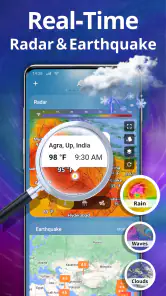
A written forecast gives me the broad picture; a radar view can help me think about what may be moving toward my area. That distinction matters when the sky looks uncertain and I need to choose whether to walk, cycle, or wait before heading out. The app’s map is described as interactive, with radar images, satellite data, and severe weather alerts, making it the natural place to check when a general chance of rain is not enough to guide my next move.
I would treat that view as a planning aid, not a promise about the exact moment rain will reach my doorstep. Weather can change, and a map is most useful when I check it again before committing to a longer trip. That modest habit is a more realistic way to use any radar than assuming one glance settles the day.
Putting a changing forecast to work
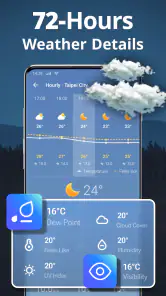
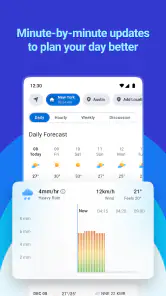
On an ordinary morning, I’d first check the broader forecast, then use the map if rain or a storm could affect my commute or errands. If the plan is flexible, that can help me decide whether to leave earlier, take a covered route, or postpone an outdoor stop. Later, an hourly view can help me revisit the choice without treating a weekly outlook as precise timing.
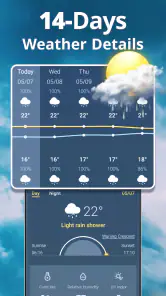
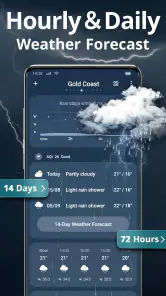
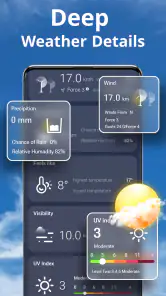
The app also offers daily and weekly forecasts, along with details such as humidity, wind speed, UV index, and air pressure. I find those most useful when they answer a specific question: whether wind might make a walk unpleasant, or whether I should prepare for stronger sun. Checking every reading out of habit can become noise, so I’d focus on the details that affect what I’m doing.
For a weekend get-together, the useful workflow is to check the forecast while making plans, then look at the radar again nearer the time. I could share an update with friends if conditions change, rather than asking everyone to interpret a general forecast themselves. That does not make the weather predictable, but it can make a group decision less awkward.
Where it fits among weather choices
Compared with a basic phone weather screen, this app appears more oriented toward looking closely at conditions: the interactive map sits alongside multiple forecast horizons and extra readings. That can be an advantage if I want to inspect a developing rain or snow situation. If I only need a quick temperature check, though, the weather panel already on my phone may be faster and less distracting.
More From Our News Desk

Weather by Xiaomi Review: Clear at a Glance, Less Clear Up Close

X Under Pressure: Can It Recover When Posting Goes Wrong?

Clash of Clans Is Won Between the Battles

Android Auto Makes the Case for Quieter Car Software

MobiOffice: Transforming Mobile Productivity with Seamless Integration

EA SPORTS FC™ Mobile Soccer: Redefining Mobile Sports Gaming
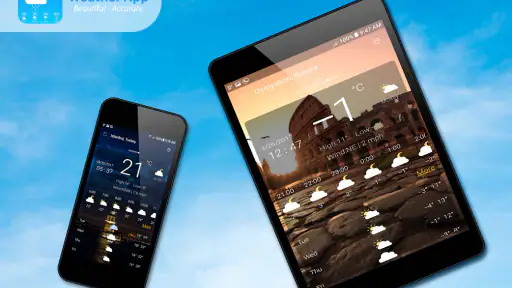
Notifications and widgets offer two different ways to keep an eye on conditions. I’d use a widget when I want a glance before leaving home, and reserve alerts for changes that could actually alter my plans. Setting notifications too broadly risks making them easy to ignore; a selective setup is more likely to be helpful than turning on every warning.
Useful limits to keep in mind
Radar is not a substitute for local judgement. If conditions look threatening, I would not rely on a reassuring screen to overrule what I can see around me or an official safety warning. Likewise, I would recheck before a long outdoor activity rather than assume a weekly forecast will hold. The app’s range of information is useful, but it can also tempt me to check repeatedly without improving the decision.
The app is free to download, with optional in-app purchases listed from $0.99 to $9.49 per item. It is rated for Everyone, has more than 10 million installs, and its current version is 7.6.6; it requires Android 7.0 or later. Those details make it a straightforward option to try on a compatible Android device, while the purchase range is worth knowing if you prefer to avoid optional spending.
Who will get the most from it?
I can see this working best for someone who regularly plans around outdoor errands, walks, or meet-ups and wants more than a single temperature number. It is also a sensible fit for people who like seeing conditions on a map before deciding what to do. If you rarely check forecasts or prefer the quickest possible glance, a built-in weather app may suit you better.
My practical recommendation is to start with the radar and the forecast view you actually need, then add a widget or a carefully chosen notification only if it saves effort. That keeps the app useful rather than turning weather-checking into a routine in itself. Weather has a clear purpose for anyone who wants to watch rain and storms more visually, while its value depends on using that information to make a real decision.
A routine that keeps the map useful
I would make the radar part of a short decision routine rather than something I leave open all day. First, I’d check the forecast for the time I expect to be out; then I’d open the map only if rain or snow could change the plan. A final look before leaving is more valuable than several checks hours in advance, especially when an outdoor commitment is easy to move. This approach makes the app’s visual strength serve a clear purpose instead of encouraging constant refreshing.
There is also a useful distinction between planning a route and deciding whether an activity is safe. For a routine walk, the map may help me choose a better time or bring a rain jacket. For a hike, a long drive, or any situation where severe conditions could create danger, I would consult official local guidance as well and make a conservative choice. A radar image can add context, but it should not become the only source I trust.
Small choices that reduce weather-checking friction
A widget is most helpful when I place it where I already look while getting ready, because then it can answer the quick “do I need a coat?” question without opening another screen. I would keep alerts for meaningful changes rather than every shift in conditions; otherwise, notification fatigue can make an important warning easier to miss. The trade-off is simple: more updates may feel reassuring, but a smaller number of relevant prompts is easier to act on.
When sharing plans with other people, I would send the practical conclusion rather than expect everyone to read the map the same way. “Let’s meet earlier” or “let’s move indoors” is clearer than forwarding a weather screen without context. That makes the sharing option useful as a coordination aid, not as a substitute for agreeing on a backup plan. For an event that matters, choosing an indoor alternative in advance can be more sensible than trying to make a last-minute forecast guarantee.
What to expect from forecasts and purchases
People often want to know whether a radar can tell them exactly when rain will begin. I would not use it that way. The map helps me assess changing conditions visually, while the hourly forecast gives another way to think about timing; neither removes uncertainty. For a short trip, that combination can be enough to choose whether to carry an umbrella. For a long outdoor day, I’d check again closer to the activity and keep a backup option.
Another practical question is whether the app is useful without paying. It is free to download, and the listed optional purchases mean there may be paid extras, but I would begin with the available forecast and map tools before deciding whether anything else is worth buying. If you prefer an entirely no-cost experience, check purchase prompts carefully and do not assume an optional item is needed for basic weather checks. The listed range is a reminder to make that choice deliberately, not a reason to spend before trying the app.
When another weather option makes more sense
For someone who wants only the current temperature on the home screen, a built-in weather panel is likely the more convenient choice: there is little benefit in opening a map when the answer is simply whether it is cold outside. On the other hand, people who regularly need to judge rain or snow around a commute may appreciate having radar and forecast details together. The distinction is not that one type of app is universally better, but that this one makes more sense when visual context affects a decision.
I would also be cautious about treating any weather app as a guarantee. Forecasts can differ, and local conditions can shift faster than a person’s plans. If the information appears inconsistent with what I see outside, I would pause and reassess rather than follow the screen automatically. That is especially important for severe weather: alerts and map layers can help me pay attention, but official instructions and immediate conditions should take priority.
Who should install it—and who can skip it
This is a good fit for Android users who enjoy checking a map, make regular outdoor plans, or want to compare a broad forecast with a closer look at rain and storms. Weather Radar Team has built an app with enough different kinds of information to support more than a quick glance, and its 4.5 average rating reflects a substantial audience finding value in that approach. It has been available since September 27, 2017, and the current version is 7.6.6, so it is an established option rather than a brand-new experiment.
I would skip it if I rarely check the weather, dislike looking at forecast details, or simply want the fastest possible answer from a phone’s built-in screen. It may also be the wrong sole source for someone making high-stakes decisions about dangerous conditions; no convenient map should replace official local advice. For most everyday users, though, its best role is modest and clear: use the radar when the weather might change what you do, and ignore the extra detail when it will not.
A practical recommendation
My overall advice is to try the map on a day when rain is relevant, then decide whether seeing conditions visually genuinely improves your choices. If it helps you leave with the right gear, adjust a walk, or warn friends before a plan becomes inconvenient, the app has earned a place in your routine. If you find yourself checking repeatedly without changing anything, a simpler forecast screen may be a better match.
Alright folks, let's talk about something we all love to hate: the weather. No matter where you are, it's always a hot topic (pun intended). Enter the Weather app, your new trusty sidekick for all things meteorological. I’ve taken it for a spin, and let me tell you, it’s like having a meteorologist in your pocket, minus the fancy degree and the green screen.
What Makes the App Stand Out?
First off, the Weather app hits you with a clean and intuitive interface right from the get-go. No need to fumble around trying to figure out what button does what. It’s all laid out in a way that just makes sense. You know that feeling when you find cash in your old jeans? Yeah, it’s kind of like that.
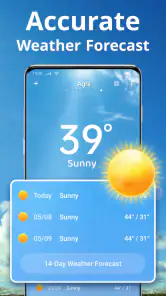
The app provides hourly, daily, and weekly forecasts, which is pretty standard. But the real magic lies in its detailed data. We’re talking humidity levels, wind speeds, UV index, and even air pressure. It's like they took the weather channel and crammed it into your smartphone. And the best part? It's accurate. I mean, eerily accurate, like predicting-your-crazy-aunt’s-weather-complaints accurate.
Features You’ll Love
One of my favorite features is the weather map. It’s interactive and gives you a visual feast of radar images, satellite data, and even severe weather alerts. Imagine watching a storm roll in from the comfort of your couch—no raincoat required.
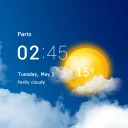
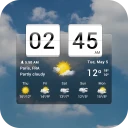
Another nifty feature is the customization. You can tailor notifications based on your preferences, which means no more waking up at 6 AM to an alert about a light drizzle. Unless you're into that sort of thing. Plus, it’s got widgets galore, perfect for a quick glance without even opening the app.
Oh, and did I mention the app’s got a social aspect? You can share weather updates with friends. It may not sound exciting, but it's surprisingly handy when planning an outdoor get-together or giving your buddy a heads-up about that impending rainstorm.
Final Thoughts
All in all, the Weather app is a solid choice for anyone who likes to stay one step ahead of Mother Nature. It’s easy to use, packed with features, and most importantly, it's reliable. You might even find yourself checking it just for fun. So go ahead, give it a download, and never let the weather catch you off guard again.
And there you have it, folks. Your new go-to app for all things weather. Now, if only it could do something about those surprise summer thunderstorms...
Weather Frequently Asked Questions
Does Weather show severe weather alerts and radar maps?
The app is designed for people who want to keep an eye on changing conditions, including thunderstorms, rain, and snowfall. Its listed features include severe weather alerts and interactive radar maps, which can help you check conditions visually as well as read a forecast. These tools may be useful when deciding whether to adjust outdoor plans.
Can I check forecasts for more than today?
Yes. Weather provides detailed forecasts for up to 10 days, alongside real-time updates. A longer outlook can help with planning ahead, while current updates are more useful for decisions happening soon. As with any forecast, conditions can change, so it makes sense to revisit the app when your plans depend on the latest weather.
Does Weather include air quality and UV information?
The app includes information such as the air quality index and UV index, as well as sunrise and sunset times. These details give you more context for planning time outdoors beyond temperature and precipitation. The available features can be useful for different routines, whether you are checking conditions for a walk, a commute, or another daily activity.
What does the Weather app’s store summary say it can forecast?
The Weather app is a weather app whose store summary highlights forecasts for thunderstorms, rain, and snowfall. That makes it relevant for checking on several types of changing conditions before making plans. Its short description is simply “Weather,” so users looking for a dedicated weather tool can quickly understand its purpose.
Is the Weather app suitable for my device and family?
The app is listed for devices running Android 7.0 or later, and its content rating is Everyone. It is developed by Weather Radar Team and was released on September 27, 2017. These details can help you decide whether it fits your device and household before downloading; the app is also available at no cost, with optional purchases.
Pros
- Accurate weather forecasts
- User-friendly interface
- Customizable alerts
- Detailed radar maps
- Supports multiple locations
Cons
- Ads can be intrusive
- Premium features are paid
- Battery consumption is high
- Limited offline functionality
- Occasional data refresh lag
- Category
- Weather
- Version
- 7.6.6