Weather & Widget - Weawow
- 51.56K
- 4.9
- Installs
- 5.00M
- Price
- Free

Screenshots
Analysis by Reviewed
Imagine waking up in the morning, peeking out the window, and trying to decipher whether it’s a t-shirt or a sweater kind of day. Enter Weather & Widget - Weawow, a delightful app that turns checking the weather into an experience rather than a chore. Having played around with it for a while, I can honestly say this app is a breath of fresh air in the weather app landscape.
A weather check the whole household can share
I find this app most useful when weather decisions affect more than one person. A quick look can help me think through whether to take a jacket, move a walk earlier, or leave extra time for a wet commute. Its photographs make the conditions easier to read at a glance, while the forecast details give me a reason to look closer when the day’s plans are less flexible. That combination works well on a shared household device, where people may want a fast answer without learning a complicated interface.
For example, on a busy morning I might check the hourly forecast before deciding whether a school run or grocery trip should happen before a rainier stretch. I can then tell someone else what I found, or leave the app open for the next person to check. This is ordinary coordination rather than a special family system: the app helps everyone consult the weather, but people still need to communicate plans themselves. I would not treat a forecast as a guarantee, especially when timing matters; I use it to make a better-informed choice and check again if conditions look changeable.
Personal setup without assuming everyone wants the same view
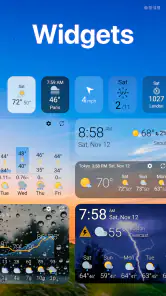
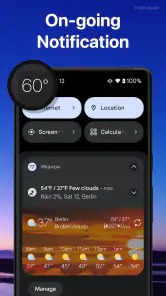
Weather apps often become more useful once their display suits the person using them. The widgets here are a practical starting point: I can put weather information where it is easy to notice, rather than relying on someone to remember to open the app. A household member who mainly wants a quick glance may prefer that, while someone who likes details can open the app and look further. It is a modest but useful division of effort, particularly when different people have different routines.
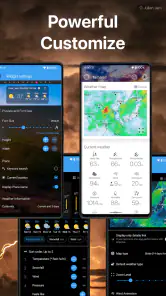
There is a trade-off with customization. A widget that looks good on one home screen may not be the clearest choice for another person, and a crowded screen can make even useful information harder to pick out. I’d begin with a simple layout and keep only the details I actually use in view. If several people share one device, it is worth agreeing on a display that remains readable to everyone instead of tuning it so heavily to one person that others have to hunt for the forecast.
People should also keep their own account boundaries in mind. I would not assume that sharing a device means sharing personal settings, contributions, or any sign-in details. If someone uses an account or uploads a photo, the household should decide whose activity it represents and avoid treating another person’s profile as a communal one. The weather itself is easy to consult together; personal choices about accounts and contributions deserve a little more care.
Planning together, while keeping the forecast in perspective
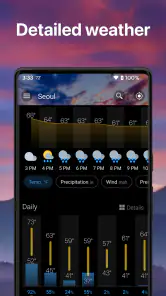
When I’m coordinating an outing, I use the hourly view to think about timing rather than treating the weekly outlook as a minute-by-minute promise. That distinction is useful for errands, outdoor meals, walks, and travel to appointments. A broad forecast can help with the first decision—whether the plan seems sensible—while a nearer look can help with the second: when to set off or what to bring. I still leave room for conditions to change, because no weather app can make an uncertain day completely predictable.
More From Our News Desk

Weather by Xiaomi Review: Clear at a Glance, Less Clear Up Close

X Under Pressure: Can It Recover When Posting Goes Wrong?

Clash of Clans Is Won Between the Battles

Android Auto Makes the Case for Quieter Car Software

MobiOffice: Transforming Mobile Productivity with Seamless Integration

EA SPORTS FC™ Mobile Soccer: Redefining Mobile Sports Gaming
A helpful habit is to compare the forecast with the actual sky before making a costly or inconvenient decision. The photography gives the app a human, visual quality, but a striking image should not be mistaken for a measurement at my exact location. I treat photos as atmosphere and local context, then rely on the forecast information for planning. If rain would seriously affect an event, I’d check again close to departure and keep a backup plan rather than making one early forecast carry all the responsibility.
This is where the app differs from a minimal built-in weather panel. A phone’s default option may be faster for someone who only wants the current temperature and a basic outlook. Weawow is more appealing to me when I want a richer presentation, more forecast details, or a widget that feels chosen rather than imposed. The reverse is also true: if I want nothing beyond a quick glance, the extra visual and customization options may be more than I need. A dedicated weather service with a particular alert or specialist feature may be a better fit for people whose decisions depend on that exact capability.
Visually Stunning and Intuitive
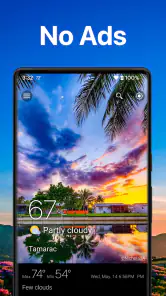
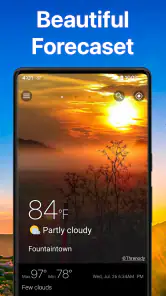
First off, let’s talk about the aesthetics. Weather & Widget - Weawow is not just any weather app; it’s a visual treat. The app employs stunning photography to represent the current weather conditions, which makes it feel like you’re looking out a window. It’s almost like having a mini art gallery in your pocket. The interface is sleek and easy to navigate, so you won’t find yourself lost in a sea of unnecessary information. Plus, it’s free of ads! Yes, you heard that right, no annoying pop-ups to interrupt your zen weather-checking moment.
Features That Shine
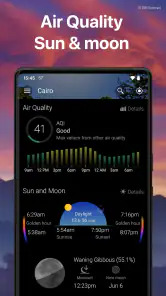
Digging a bit deeper, the app offers a variety of features that cater to both the casual user and the weather enthusiast. You’ve got your hourly and weekly forecasts, sure, but there’s so much more. One standout feature is the detailed information on wind speed, humidity, and precipitation. It’s like having a mini meteorologist in your pocket. And for those of you who like to plan your outfits or activities based on UV levels, Weawow’s got you covered with its UV index reports.
Another neat feature is the customizable widgets. You can choose from a range of widget sizes and styles to match your home screen aesthetics, keeping your weather updates both handy and stylish. It’s these little touches that make the app feel personal and user-friendly.
Community Driven and Accurate
Accuracy is key when it comes to weather apps, and Weawow delivers. The app sources data from reliable sources and also incorporates community-driven photography and reports. This means you’re not just getting algorithm-based forecasts, but insights from people on the ground. It’s a nice blend of technology and human touch, ensuring that what you see in the app aligns closely with what’s happening outside your window.
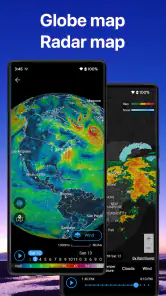
Moreover, the app’s community-driven aspect allows users to upload their own weather-related photos, adding a personal touch to the global weather map. It’s like being part of a worldwide weather community, sharing real-time insights and stunning visuals.
Age, trust, and the people behind it
Weawow is developed by Weawow, and its weather app has been available since May 1, 2017. It is rated for Everyone, which makes its age context straightforward for a household considering a shared weather tool. That rating does not replace a parent’s judgement about device use, accounts, or what a child shares online. I would still talk through any photo contribution with younger users and make sure they understand that posting something is different from simply checking the forecast.
The app’s store summary says it collects no data, and that it has no ads. Those are reassuring qualities for a family deciding whether to keep a weather app on a shared device, though I would still review device and account settings in the ordinary way rather than assuming a shared phone has no privacy considerations. A useful boundary is to let everyone consult the forecast while keeping personal accounts and any contribution decisions with the person responsible for them.
There is also a practical trust distinction between the forecast and community material. A community photo can help me picture local conditions, but it is not a substitute for checking the forecast fields or judging whether the information fits my plans. I value the human element most as context, not as proof. That keeps the app’s visual appeal in its proper role and helps avoid overconfidence when an outing depends on the weather.
Who will get the most from it
I’d recommend this to someone who checks the weather several times a day, enjoys a photo-led interface, or likes having more than a single headline number available. The combination of widgets, hourly and weekly outlooks, and details such as wind, humidity, precipitation, and UV gives different kinds of users a reason to open it. It is also a sensible choice for people who like to compare conditions before deciding what to wear or when to head out, without turning weather planning into a technical hobby.
On the other hand, a person who wants the fewest possible taps may prefer the phone’s built-in forecast. Someone who needs a particular kind of severe-weather notification or a specialist tool should check that the app meets that need before relying on it. I would not choose any general forecast as the sole basis for a safety-critical decision. For everyday plans, the app is useful; for situations where missing a warning has serious consequences, I’d use the appropriate official information as well.
It is free to download, while in-app purchases range from $2.00 to $50.00 per item. I see that as a reason to distinguish the basic decision to try it from any optional spending: I would first use the free app and see whether its layout and forecasts suit my routine. It has a 4.9 average from around 717,000 ratings, and more than five million installs, which suggests that many people have chosen to use it. Those figures are context, not a guarantee that its forecasts will match every location or personal preference.
Small habits that make it more useful
One practical way to use the app is to match the amount of detail to the decision. For clothes, a quick glance may be enough; for an outdoor plan, I would check the hourly view and relevant conditions such as precipitation and wind. UV information can also help me think beyond temperature when planning time outside. This is more useful than repeatedly checking every available field without knowing what question I’m trying to answer.
I’d also keep the widget focused. A compact view is helpful when I’m passing through the home screen, but the full app is where I can slow down and compare details. If a widget becomes visually busy, I would simplify it rather than adding more information just because the option exists. That small adjustment can make the difference between a tool people actually glance at and one they ignore.
For shared use, a simple routine works better than expecting everyone to interpret every forecast in the same way. One person can check the likely timing, another can look at the sky before leaving, and the group can agree on a fallback if the weather turns. The app supports that conversation with accessible information, but it does not make the household’s decision for anyone. I find that distinction honest and useful: it is a planning aid, not a substitute for judgement.
Version, value, and everyday fit
The current version is 7.0.5, and the app runs on Android devices with version 5.0 or later. It is designed as a weather app with widgets, so its value depends partly on whether you enjoy bringing information onto the home screen. I would try it on the device where I expect to use it most, then decide whether the widget, photography, and forecast detail improve my routine enough to keep it there.
For a household, the biggest benefit is not that everyone needs to become a weather enthusiast. It is that a clear shared glance can prompt a more useful conversation: should we take coats, leave earlier, or move an outdoor plan? The app gives that conversation a common starting point. If each person has a separate phone, each can set up their own display; if a device is shared, a simple layout and clear account boundaries help prevent one person’s preferences from becoming everyone else’s obstacle.
Final Thoughts
In the crowded world of weather apps, Weather & Widget - Weawow stands out not just for its functionality but for its beauty and community-centric approach. It’s rare to find an app that combines practicality with aesthetics so seamlessly. Whether you’re a weather aficionado or just someone who wants to avoid getting caught in the rain, Weawow is definitely worth a download. It’s not just an app; it’s an experience.
So, next time you’re heading out, check the weather with Weawow and enjoy the view. Trust me, you won’t be disappointed.
Weather & Widget - Weawow Frequently Asked Questions
Does Weather & Widget - Weawow work without an internet connection?
Weawow is a weather app, so an internet connection is useful for getting current conditions and refreshed forecasts. If you are heading somewhere with limited connectivity, you can check the app before you leave and keep the information already displayed in mind. For the latest weather details, reconnect and refresh the app when a connection is available.
Can I use Weawow to check weather for more than one location?
Weather & Widget - Weawow is intended for checking weather conditions and forecasts, which can be helpful when you are planning for different places. Look through the app’s location controls to choose the place you want to check, then review its available forecast information. This can make the app useful for comparing conditions before travel or keeping an eye on weather beyond your current area.
Does Weather & Widget - Weawow collect personal data?
Weawow describes the app as collecting no data, which may appeal to people who prefer a weather app with a privacy-conscious approach. It is also presented as an ad-free experience, so you can check forecasts without advertising interruptions. As with any app, review the permissions shown on your device during installation and decide whether they suit your preferences.
What features does Weather & Widget - Weawow offer?
Weather & Widget - Weawow offers a comprehensive suite of features including real-time weather updates, hourly forecasts, a 7-day weather outlook, and detailed weather maps. It also provides sunrise and sunset times, humidity levels, wind speed and direction, and radar images. The app is designed to be visually appealing with customizable widgets that can be adapted to your home screen.
Is Weather & Widget - Weawow free to use?
Yes, Weather & Widget - Weawow is free to download and use. It does not have any advertisements, which means you can enjoy a seamless and uninterrupted experience. There are no hidden fees or premium subscriptions required to access its core features, making it a great choice for those looking for a cost-effective weather app. Optional in-app purchases are available, so check their details before buying if you choose to support the app.
Pros
- Beautiful and customizable widgets
- Accurate and real-time weather updates
- Free with no ads or in-app purchases
- Detailed and comprehensive weather data
- Supports multiple locations
Cons
- Requires internet for updates
- Limited offline functionality
- Can be overwhelming with data
- Widgets may drain battery
- No radar imagery available
- Category
- Weather
- Version
- 7.0.5











