Weather & Rain Radar Forecast
- 41.00
- 4.8
- Installs
- 1.00M
- Price
- Free
Screenshots
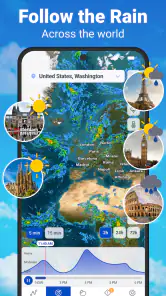
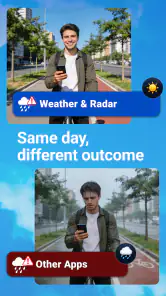
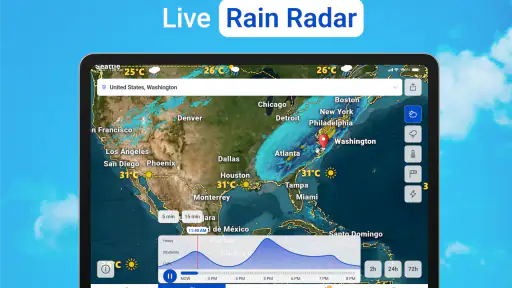
Analysis by Reviewed
When I’m deciding whether to walk, drive, or postpone an outdoor plan, I want more than a cheerful sun icon. I want to know whether rain is likely to reach my area soon, whether the wider forecast supports that impression, and how much confidence to put in either view. Weather & Rain Radar Forecast brings radar and longer-range forecasts together, making it a practical option for checking conditions before committing to the day.
It is a free weather app from Deep Orbit, with a 4.8 average rating and more than a million installs. Its focus is clear: help you look at rain and developing weather, then place that immediate picture beside a forecast covering up to two weeks. I find that combination more useful than a basic temperature screen when the question is not simply “What’s the weather?” but “Should I leave now, and what might change later?”
From a quick check to a workable plan
Start with the decision, not the forecast
The app makes most sense when I open it with a specific decision in mind. If I’m about to take a dog out, the nearby radar view is the part I would check first. If I’m planning a weekend trip, I would use the longer forecast as an early guide, then check again closer to departure. These are different jobs, and treating them as one question can lead to overconfidence: a two-week outlook is useful for spotting a broad pattern, not for deciding whether to leave home in the next ten minutes.
That distinction is one of the app’s strongest practical points. Radar is for checking what may be approaching; the extended forecast is for planning around what could be ahead. Neither should be treated as a promise. Weather shifts, and a coloured radar image can be difficult to interpret if you glance at it without checking its movement or comparing it with the forecast.
For a routine morning check, I would first look at the local conditions and then ask what I actually need to know: whether to carry a raincoat, change a route, or leave earlier. That small habit keeps the app from becoming a feed of weather information with no clear outcome. It also helps avoid making a firm plan from a distant forecast that will naturally become more relevant as the date approaches.
Use radar and the forecast as two separate steps
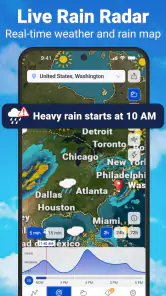
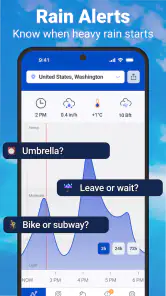
The rain radar is the feature I would reach for when timing matters. Before a short walk or school pickup, I’d use it to judge whether rain appears close enough to affect the outing. A useful tip is to compare the radar picture with the local forecast rather than relying on one screen alone. If the radar suggests a shower nearby but the broader outlook is unsettled, I would take a light waterproof layer instead of assuming the rain will miss me.
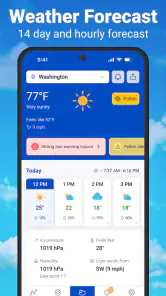
The longer outlook helps with a different kind of decision. When I have a day trip coming up, I can check whether the general pattern looks wet or calm and keep a backup plan in mind. I would not use an early forecast to choose an exact departure time several days ahead. Instead, I’d treat it as a planning signal, then return to the app nearer the day and make the final call with fresher information.
The app also covers severe-weather topics such as hurricanes, storms, and tornado alerts. That makes it relevant beyond everyday drizzle, but alerts are most useful when they lead to a sensible next step: checking local guidance, paying attention to official instructions, and preparing rather than repeatedly refreshing a screen. I see the app as a convenient way to keep weather information in view, not as a substitute for emergency services or local authorities.
Turn the check into a handoff
A weather app earns its place when its information travels with the plan. If I see a chance of rain before meeting someone outdoors, I can message them to suggest a covered location or a later start. If a drive looks likely to meet poor weather, I can leave extra flexibility in the schedule. The useful handoff is not a complicated feature; it is the moment I translate a forecast into a decision another person can act on.
For family routines, the same approach helps. I might check conditions before a child heads out, then tell them to take a jacket or expect a change of plans. For a small outdoor event, I would use the extended view to identify a possible weather risk, but confirm it again on the day before moving equipment or cancelling. That two-stage workflow is a more reliable use of a long forecast than treating it as a final verdict.
There is a trade-off here: radar can make weather feel more precise than it is. A map offers a vivid picture, but the picture still needs interpretation, especially when showers are patchy or the route crosses a broad area. For a longer drive, I would not make the decision from the conditions at my starting point alone. I’d check the general forecast for the trip and remain ready to adjust as circumstances change.
What the app does well—and what takes judgment
Compared with a basic phone weather panel, this app puts more emphasis on radar and severe-weather awareness. That is helpful when I need to understand rain around me rather than just see a temperature. Compared with a specialist forecasting tool, its broad appeal is its approachable mix of everyday outlooks and weather-event coverage. If I need highly technical meteorological analysis, I would choose a tool built for that purpose instead of expecting a general-use app to provide professional interpretation.
The two-week forecast is convenient for looking ahead, but its value depends on how I use it. It can help me avoid planning an outdoor activity on a period that appears consistently unsettled; it cannot make a distant day predictable in detail. I would also resist checking every small change in the outlook. For ordinary planning, checking at a sensible interval and then confirming close to the event is less stressful and more useful.
The app is free to download, with in-app purchases ranging from $1.49 to $11.99 per item. That gives new users a way to try its core weather experience before deciding whether any paid option is worthwhile. I would first use it for the situations I actually face—commuting, errands, walks, or planning a day outside—rather than paying simply because a purchase is available. The listing describes it as suitable for Everyone, and its weather focus is easy to understand across age groups.
Where the workflow can break
The main friction is that no forecast can remove uncertainty. A rain band can change course, and a forecast that looked useful while planning may need a fresh check before action. If I’m making a high-stakes decision, such as responding to dangerous weather, I would not rely on one app alone. I’d follow local official alerts and instructions, especially when those give specific safety guidance.
There is also a risk of information overload for people who only want to know whether to take an umbrella. If the radar and event coverage encourage you to keep checking, a simple weather widget or a minimal forecast app may suit you better. Likewise, someone who wants detailed climate history, advanced modelling, or a dedicated travel-planning system should look elsewhere. This app’s value is in bringing useful weather views together, not in being every kind of weather tool at once.
Version 126.0 is the current version, and the app has 23K ratings alongside 41 written reviews. Those figures suggest a substantial audience, though I would judge the experience by whether its forecasts and radar suit my own location and habits. Weather services can feel different from one region to another, so I’d test it during ordinary days before relying on it for an important outdoor plan.
Who should keep it on their phone
I’d recommend Weather & Rain Radar Forecast to someone who regularly has to make small, time-sensitive choices around rain: whether to walk, cycle, take a different route, or move an outdoor activity indoors. Its mix of radar, longer-range planning, and severe-weather coverage makes it more useful than a temperature-only screen, provided you treat forecasts as guidance and not certainty.
I would skip it if I rarely check the weather, prefer an uncluttered glanceable forecast, or need specialist data and analysis. For everyone else, the best approach is straightforward: use radar for the near-term question, the extended outlook to sketch a plan, and a fresh check before acting. That simple workflow is where this app feels most worthwhile—not because it can guarantee the weather, but because it can help turn a forecast into a better everyday decision.
Weather & Rain Radar Forecast Frequently Asked Questions
What can I do with Weather & Rain Radar Forecast?
Weather & Rain Radar Forecast is designed to help you check current conditions and plan for changing weather. Depending on the version and features available in your region, it may provide local forecasts, radar views of rain, temperature details, and weather alerts. Before relying on any forecast for travel or outdoor plans, check that the app has access to your correct location and review the forecast’s update time.
Does Weather & Rain Radar Forecast show live rain radar?
The app’s radar feature can help you see precipitation patterns and follow rain as it approaches, but radar images are not necessarily instantaneous. They may be delayed, refreshed at intervals, or limited by the coverage and data sources available in your area. Treat the radar as a useful planning aid rather than a guarantee of exactly when or where rain will fall.
Does the app require location access to work?
Location permission can help Weather & Rain Radar Forecast display conditions and forecasts for where you are, particularly when you travel. You may be able to enter a city manually instead, although available options can vary by version. If you allow location access, review your device’s permission settings and choose an access level that suits you; precise location is not always necessary for a general forecast.
Is Weather & Rain Radar Forecast free, and does it include ads or paid features?
Pricing, advertisements, and subscription options can differ between the Android and iOS versions and may change over time. Check the app’s store listing and its in-app purchase screen before downloading or starting a trial. If a subscription is offered, review its price, renewal terms, and cancellation instructions carefully so you understand any ongoing charges.
Can I rely on Weather & Rain Radar Forecast for severe-weather warnings?
The app may display weather alerts where supported, but alert availability and timing depend on regional coverage, data providers, and notification settings. Enable notifications if you want to receive available updates, and keep the app and your device settings current. For dangerous conditions, do not rely on one app alone: confirm warnings with your local meteorological or emergency authority.
Pros
- Radar maps make it easier to track approaching rain and storms.
- Hourly forecasts help with planning short-term activities.
- Weather alerts can provide useful warnings about severe conditions.
- Multiple forecast views offer more detail than a basic temperature app.
- A clean layout makes key weather information easy to scan.
Cons
- Forecast accuracy can vary by location and weather conditions.
- Radar and forecast data may update with a delay.
- Some features may require an internet connection.
- Frequent alerts can become distracting if not carefully configured.
- Ads or subscription prompts may interrupt the experience.
- Category
- Weather
- Version
- 126.0