Weather Radar by WeatherBug
- 413.93K
- 4.6
- Installs
- 10.00M
- Price
- Free

Screenshots
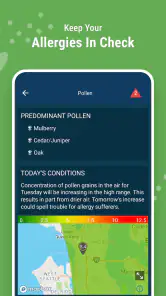

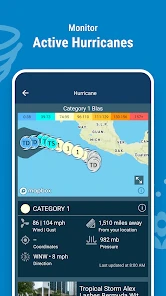
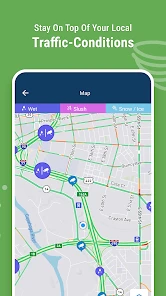
Analysis by Reviewed
Ever find yourself caught in a sudden downpour because you didn't check the weather forecast? We’ve all been there. That's why I decided to try out Weather Radar by WeatherBug, and let me tell you, it's been a game-changer for my daily routine!
Why the first week feels useful
The first few days with a radar app can feel rewarding because the benefit is immediate: I check the sky before leaving, see whether rain is nearby, and make a small adjustment. WeatherBug is a weather app from WeatherBug, and its focus on radar, storm tracking, local forecasts and rain alerts makes that first check feel more informative than glancing at a temperature alone. I would not keep it just because a map looks impressive, though. The real test is whether it helps me make better choices without turning every cloud into a reason to check my phone.
For someone deciding whether to install it, the key question is how often weather changes plans. A person who walks, cycles, gardens, commutes outdoors or schedules errands around dry spells has more reason to keep a radar tool close. Someone who spends most days indoors and only wants to know whether to wear a coat may find a built-in phone forecast quicker and less busy. I see WeatherBug as most worthwhile when a forecast affects a decision, rather than as something I need to watch continuously.
Getting Started with the App
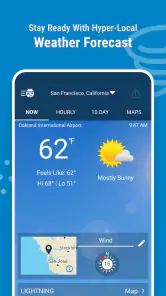
From the moment I downloaded Weather Radar by WeatherBug, I was impressed by its sleek interface. No need to fumble around trying to find the information you need; everything is right there at your fingertips. I mean, who wants to spend ages searching for the day's forecast, right?
Features You’ll Love
One of the first things that caught my eye was the real-time radar. It's super detailed and shows you exactly what's happening in the skies above. Whether you’re planning a picnic or just heading out for a jog, you can see if that ominous cloud is heading your way.
Another feature I found handy is the customizable alerts. Set them up for severe weather conditions like thunderstorms or high winds, and you’ll get a heads-up before things get wild. And listen, as someone living in a tornado-prone area, this is a lifesaver!
Why It Stands Out
Now, I’ve tried a few weather apps before, but what sets this one apart is its accuracy. The local neighborhood-level detail means you’ll get pinpoint forecasts tailored to your exact location. Plus, the app updates frequently, so you’re never caught off guard by a sudden shift in weather patterns.
More From Our News Desk

Weather by Xiaomi Review: Clear at a Glance, Less Clear Up Close

X Under Pressure: Can It Recover When Posting Goes Wrong?

Clash of Clans Is Won Between the Battles

Android Auto Makes the Case for Quieter Car Software

MobiOffice: Transforming Mobile Productivity with Seamless Integration

EA SPORTS FC™ Mobile Soccer: Redefining Mobile Sports Gaming
For those who like to dig a little deeper, there’s a nifty feature that provides live weather cameras. It's like having a sneak peek into the weather outside without stepping out. Perfect for those lazy days when you’re lounging on the couch.
Getting value beyond the first week
The initial appeal of a radar app is easy to understand: I open it, spot a rain band, and decide whether to take a jacket. The lasting value comes from making that check part of a routine rather than opening the map every few minutes. I’d use the local forecast for ordinary planning, then turn to radar when timing matters, such as choosing a walking route or deciding whether to bring outdoor plans forward. That division keeps the app useful without making weather watching a hobby.
A practical tip is to set only the alerts that would change what you do. A warning that affects your commute or an outdoor task can be worth a notification; too many routine pings can quickly become noise. Radar also needs interpretation: a colorful patch on the map is useful context, not a guarantee of exactly when rain will reach your door. I check the movement and compare it with the local forecast instead of treating one screen as a promise.
Making radar useful rather than distracting
I find it helps to decide what I need to know before opening the map. If I’m trying to choose when to walk the dog, I look for the broad direction and timing of nearby rain, then make a simple plan: go now, wait, or take a waterproof layer. If I’m checking out of curiosity, the same map can tempt me into refreshing without changing anything. That is when a useful tool starts consuming attention without giving much back.
There is also a difference between using radar for convenience and relying on it for safety. For ordinary plans, a quick look can help me judge whether to bring an umbrella or shift an outdoor chore. If severe weather is a concern, I would keep official local warnings in the loop rather than assume a radar view alone is a complete safety plan. A map helps me understand what may be approaching; it does not replace paying attention to alerts and local guidance.
Where it fits among weather apps
Compared with a basic phone weather screen, WeatherBug gives more emphasis to radar, storm tracking and alerts, which is helpful when conditions are changing nearby. A simpler forecast app may be better if all you want is a quick temperature glance and no extra detail. I’d choose this one when I expect to make decisions around rain or severe weather, but not necessarily as my only source for high-stakes safety planning; official local alerts remain important when a serious warning is issued.
For an everyday example, imagine I’m due to leave for an appointment and clouds are building. I can check the forecast first, then use the radar to judge whether leaving a little earlier or carrying an umbrella makes sense. If the map looks busy but the forecast suggests a passing shower, I avoid cancelling plans based on one dramatic-looking image. That small workflow is more useful than repeatedly refreshing the app without a decision in mind.
Choosing it for a particular routine
WeatherBug makes the most sense to me for people whose plans have an outdoor element but do not require specialist forecasting. A parent deciding whether a playground visit is still practical, a runner choosing between a nearby route and a later start, or someone who works in a garden can all benefit from checking both the local forecast and the radar. The point is not to predict every drop; it is to reduce avoidable surprises and make a reasonable choice with the information at hand.
It may be less suitable for a user who wants almost no interaction. If a quiet screen with just the day’s high and low is the goal, an uncomplicated forecast app is likely to feel calmer. WeatherBug’s richer weather focus is a strength when I need context, but extra detail only helps when I have a reason to use it. I would also avoid treating any consumer weather app as a substitute for professional planning where weather carries serious consequences.
Maintenance, limits and who should skip it
WeatherBug is a free weather app from WeatherBug, with an average rating of 4.6 from around 1.9 million ratings and more than 10 million installs. It is rated for Everyone, and version 5.116.0-56 requires Android 9 or later. Optional in-app purchases range from $1.99 to $399.99 per item, so I’d check what an offered purchase includes before paying. The free starting point makes it easy to try, but the purchase range is broad enough that I wouldn’t tap through a checkout without reading it carefully.
There is little upkeep if I keep my setup simple: choose the places I care about, decide which alerts matter, and revisit those choices when my routine changes. The trade-off is that location-based detail and notifications are most useful when the app can keep relevant information current, while constant alerts or frequent map checking can turn a practical tool into a source of distraction. If I rarely check the weather, dislike notifications, or only need a bare-bones daily high and low, the phone’s built-in forecast may suit me better.
Keeping it useful month after month
The habit I would keep is a quick check at moments when weather could change the plan: before a commute, before leaving for a walk, or while deciding whether an outdoor task can wait. I would not make a routine of studying the radar at fixed intervals when nothing depends on it. This distinction matters over time. A weather app earns its place by being available when I need a decision, not by demanding daily attention for its own sake.
When my schedule changes, I would also revisit which alerts are worth receiving. A notification that was useful during a period of outdoor work may become unnecessary later, while a new commute can make timely rain information more relevant. Keeping the setup aligned with real habits prevents alert fatigue. If I find myself dismissing notices without reading them, that is a practical sign to adjust the settings rather than blame the weather or keep every alert switched on.
One limitation of radar, including the kind of radar-centered approach WeatherBug offers, is that a map can appear more precise than the decision it supports. Weather moves, and local conditions can vary; the screen is best treated as a helpful snapshot alongside the forecast, not a guarantee that a shower will start or stop at an exact moment. I find that mindset makes the app more dependable in practice, because I use it to prepare for possibilities instead of expecting certainty.
Wrapping Up
All in all, I’d say Weather Radar by WeatherBug is a must-have app for anyone who likes staying one step ahead of Mother Nature. It’s user-friendly, packed with features, and incredibly reliable. So, if you're tired of being surprised by the weather, give this app a whirl. Trust me, your future dry self will thank you!
And one last thing, having access to such detailed weather information really puts you in control. It’s like having a personal meteorologist in your pocket. How cool is that?
Does it earn a lasting place?
For me, the lasting case is practical rather than exciting: I can check local conditions, use radar when timing matters, and choose whether an alert deserves my attention. That repeat usefulness is more valuable than novelty. I would keep it if weather often affects my plans and I can make the experience quieter by limiting checks and notifications. I would skip it if I only need a simple daily forecast or know I will ignore alerts.
The app is free to start, but I would approach optional purchases deliberately and read the terms shown in the app before buying. I would also make sure my phone runs Android 9 or later if I were installing the current Android version. With those expectations, WeatherBug is a sensible choice for someone who wants more weather context than a basic forecast provides, while still being easy to leave alone until a real decision comes up.
Weather Radar by WeatherBug Frequently Asked Questions
Can I view weather for more than one location?
Weather Radar by WeatherBug is designed to help users check local conditions and follow weather in multiple locations, which can be useful when planning a trip or keeping up with conditions where family and friends live. Its radar maps, forecasts, and alerts make it easier to compare changing weather without relying on a single location’s outlook.
Is Weather Radar by WeatherBug suitable for everyday weather checks as well as storms?
Yes. The app’s focus is not limited to severe weather: it combines local forecasts and daily weather news with radar maps, storm tracking, and live rain alerts. That mix can work for quick checks before leaving home as well as for following unsettled conditions. You can use the features most relevant to your plans and weather interests.
What is Weather Radar by WeatherBug, and who is it for?
Weather Radar by WeatherBug is a weather app for checking radar maps, local forecasts, storm tracking, live rain alerts, and daily weather news. It can be useful for anyone who wants weather information in one place, whether they are planning an outdoor activity, keeping an eye on changing conditions, or checking the forecast before heading out. The app is free to download and is rated for Everyone.
What features does Weather Radar by WeatherBug offer?
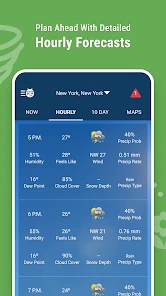
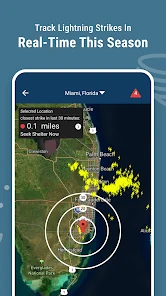
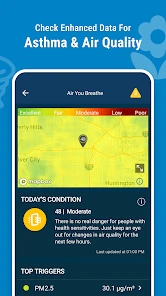
Weather Radar by WeatherBug provides comprehensive real-time weather information, including radar maps, local forecasts, severe weather alerts, and lightning detection. Users can customize alerts for their location, view hourly and 10-day forecasts, and access radar overlays for precipitation and storm tracking. The app also offers lifestyle forecasts for outdoor activities, making it a versatile tool for weather planning.
Is Weather Radar by WeatherBug free to use?
Yes, Weather Radar by WeatherBug is free to download and use. However, it also offers a premium version that removes ads and provides additional features, such as enhanced radar options and more detailed weather insights. Users can choose between the free version with basic features or upgrade to the premium version for an ad-free experience and advanced functionalities.
Pros
- Accurate weather forecasts
- Interactive radar maps
- Customizable alerts
- User-friendly interface
- Comprehensive weather data
Cons
- Contains ads
- Requires internet connection
- Limited free features
- Battery consumption
- Occasional loading delays
- Category
- Weather
- Version
- 5.116.0-56