Weather Now Launcher - Radar
- 5.88K
- 4.2
- Installs
- 5.00M
- Price
- Free
Screenshots
Analysis by Reviewed
I tend to trust a weather app more when it helps me answer a practical question—will rain reach my route, and when should I leave? That is the useful angle of Weather Now Launcher - Radar: it puts weather tracking close at hand, with radar as the feature I would check when a general forecast feels too broad. It is a free weather app from Homescreen Apps, rated for Everyone, and its focus is more immediate than a simple glance at tomorrow’s high.
Why radar changes the everyday check
A temperature number tells me whether to expect a warm or chilly day, but it does not show how a rain band is moving around my neighborhood. Radar can help fill that gap. If I am deciding whether to walk now or wait, looking at nearby precipitation is more useful than treating a daily rain symbol as a precise schedule. I would still read it as a planning aid, not a promise: local weather can shift, and the map should not replace common sense during severe conditions.
The app’s store summary points to NOAA weather and tracking for storms, rain, wind, and lightning, alongside local updates. That makes the radar-centered approach particularly relevant when conditions are changing, rather than when I only want a basic temperature check. Its name also puts it in the launcher-and-radar space, so it makes sense for someone who likes weather information close to the home screen instead of buried several taps into a general-purpose app.
A First Look at Weather Now Launcher
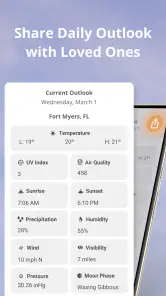
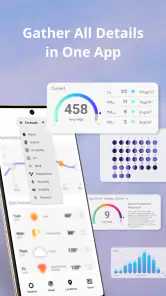
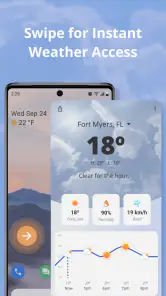
Upon installing the Weather Now Launcher - Radar, the first thing that catches your eye is its sleek and intuitive interface. It's like the app knows what you need even before you do. The home screen widget is not only customizable but also provides a snapshot of the current weather conditions, complete with temperature, humidity, and wind speed. It’s like having a tiny meteorologist living in your phone!
Features That Stand Out
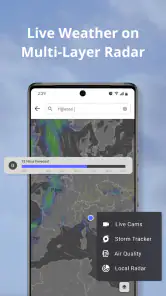
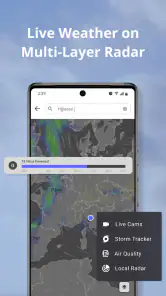
One of the standout features of this app is its real-time radar. Whether it’s a drizzle or a storm brewing, you can track it live, and plan your day accordingly. The radar is highly interactive and allows you to zoom in on specific areas, giving you a detailed look at what's happening in the atmosphere.
In practice, I would use the map to refine a decision rather than stare at it continuously. Before leaving, check the local conditions, then zoom out enough to see whether a patch of rain is isolated or part of a wider area. That wider view can prevent a common mistake: assuming a dry moment outside means the next part of a walk or drive will stay dry. For a commute, the useful question is not simply “is it raining?” but “does the weather near my destination look different from home?”
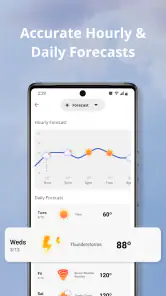
Moreover, the hourly and weekly forecasts are a godsend. You can view up to a week’s worth of weather predictions, which is perfect for planning trips or even just your daily commute. The updates are incredibly accurate, thanks to the app’s integration with multiple weather data sources.
More From Our News Desk

Weather by Xiaomi Review: Clear at a Glance, Less Clear Up Close

X Under Pressure: Can It Recover When Posting Goes Wrong?

Clash of Clans Is Won Between the Battles

Android Auto Makes the Case for Quieter Car Software

MobiOffice: Transforming Mobile Productivity with Seamless Integration

EA SPORTS FC™ Mobile Soccer: Redefining Mobile Sports Gaming
Making it useful without overchecking
A practical routine is to use the forecast for the broad plan and radar for the timing. For example, if I have an outdoor errand after work, I would first use the forecast to decide whether the day looks suitable, then check the radar closer to leaving to see whether rain is approaching. This division keeps the map from becoming a stream of distracting updates and makes the app useful even when I only have a few seconds to check my phone.
That approach also gives the widget a clear role: it is a quick reminder, not a substitute for the fuller view. A home-screen glance can tell me whether conditions deserve another look, while the radar helps me investigate. I would avoid making a long trip or safety decision from one snapshot alone, especially if storms are involved; weather maps are most helpful when treated as changing information rather than certainty.
User Experience and Interface
Using the app is a breeze, quite literally. The navigation is smooth, and everything is where you expect it to be. You won't find yourself lost in a maze of buttons and settings. Plus, it doesn’t hurt that the app runs seamlessly without any pesky ads popping up in your face every five seconds. It’s like the app respects your space and time.
One trade-off with a radar-first habit is that it can invite more checking than the decision deserves. If I only need to know whether to bring a light layer, a quick forecast is simpler; opening a map adds little. I would also keep expectations grounded about precision: zooming in can make the display feel exact, but a detailed view is not a guarantee that a shower will hit one particular street at a particular minute.
Compared with the usual weather alternatives, a basic phone weather panel is often faster for temperature and a broad daily outlook. A dedicated radar map is more useful when I care about the movement and location of precipitation. Weather Now sits closer to that second use, while still offering forecast information. If all I want is a minimal glance with no interest in maps, the built-in option may be enough; if I routinely plan around changing rain, this app’s emphasis is more compelling.
Another cool aspect is the widget customization. You can tweak the look and feel of your weather widget to match your phone’s theme, which makes it a fun little addition to your home screen rather than just a utilitarian tool.
Who gets the most from it
I can see this working especially well for people who walk, cycle, run errands on foot, or have outdoor plans that can shift by half an hour. A realistic example: before taking a dog out, I might check the local forecast, then glance at radar just before heading out. If rain is nearby, I can choose a shorter loop or wait a little; if the wider picture looks unsettled, I can plan differently rather than getting caught by relying on the current sky alone.
It is less suited to someone who wants a highly stripped-down screen and never checks weather beyond the morning. It may also be the wrong choice for anyone who expects radar to function as an exact street-level alarm or a guarantee of storm timing. I would use it to inform a decision, not to replace official warnings or local safety guidance when severe weather threatens.
Putting radar to work for a real day
For a day with several stops, I would check the forecast once while planning, then use radar only when the order or timing of those stops can still change. If I am choosing between walking to a nearby shop now and waiting until later, the map can help me judge whether rain appears to be moving toward the area. If the errand is fixed and I cannot change the schedule, watching the radar repeatedly may only add worry without changing what I do. That distinction is useful: radar earns its place when it can influence a decision.
I would also compare the map with the conditions outside rather than treating either one as infallible. A view of precipitation can help me understand the broader pattern, but hills, buildings, and the small scale of showers can make what I experience on one street differ from what a regional picture suggests. When the sky already looks threatening, I would take that seriously even if the map does not seem dramatic. Conversely, a small patch on screen is a reason to pay attention, not automatic proof that every plan needs to be cancelled.
For a commute, the destination check matters as much as the starting point. I might be leaving a dry neighborhood for a wetter one, or crossing an area where conditions are changing. Rather than zooming all the way in immediately, I would start with a view broad enough to include the route and destination, then narrow the map if a specific patch needs a closer look. This avoids mistaking a tiny slice of the picture for the whole journey and makes the radar a planning tool instead of a visual distraction.
Small habits that make the app more useful
The customizable widget works best when I treat it as a prompt to check, not as a complete report. Keeping weather visible on the home screen can reduce the effort of remembering to open an app, but a snapshot cannot answer every question about a changing storm. I would use it to notice that conditions deserve attention, then open the fuller view when I need to decide whether to delay, take an umbrella, or adjust an outdoor plan. That two-step habit keeps quick checks quick.
Another sensible habit is to separate “what should I expect today?” from “what is happening nearby right now?” The forecast is better suited to choosing clothes, scheduling outdoor work, or deciding whether a weekend plan needs a backup. Radar is the follow-up when timing and movement matter. Keeping those questions separate can make the information easier to interpret, especially if the forecast sounds unsettled but the immediate area is currently clear.
For lightning or storm concerns, I would be more cautious than I would be about a passing shower. A radar view can inform awareness, but I would not use it as my sole source for a safety decision or as permission to remain outdoors. If conditions become dangerous, local alerts and official guidance should take priority. That is not a weakness unique to this app; it is a sensible boundary for any consumer weather map.
Where it fits among weather choices
People often choose between a phone’s built-in weather panel, a forecast-focused app, and a radar-first tool. The built-in panel usually wins when speed and simplicity are the only goals. A forecast-oriented alternative may be preferable if I mainly want a clear view of upcoming temperatures and general conditions. Weather Now is more appealing when I want those basics within reach but also expect to inspect precipitation movement for a practical reason.
That focus comes with a trade-off: a map invites interpretation. Someone who enjoys checking weather patterns may find that useful, while someone who wants one plain answer could find it like extra work. I would not switch from a trusted option simply because radar is available; I would switch if I regularly need to choose when to go outside, adjust a route, or decide whether an outdoor task can wait. The right comparison is less about which app shows the most and more about which one supports the decisions I actually make.
If you are deciding whether the app is worth trying, the key question is how often a local change in rain or storms affects your plans. It is free, so there is no purchase decision to weigh, and it is suitable for everyone. But free does not automatically mean useful for every routine: if you only check the temperature once a day, the extra radar focus may go unused. If your day includes walks, outdoor breaks, or flexible travel, having that view close by can make a practical difference.
Who gets the most from it
I can see this working especially well for people who walk, cycle, run errands on foot, or have outdoor plans that can shift by half an hour. A realistic example: before taking a dog out, I might check the local forecast, then glance at radar just before heading out. If rain is nearby, I can choose a shorter loop or wait a little; if the wider picture looks unsettled, I can plan differently rather than getting caught by relying on the current sky alone.
It is less suited to someone who wants a highly stripped-down screen and never checks weather beyond the morning. It may also be the wrong choice for anyone who expects radar to function as an exact street-level alarm or a guarantee of storm timing. I would use it to inform a decision, not to replace official warnings or local safety guidance when severe weather threatens.
Where it fits on your phone
The app has a 4.2 average from around 39,000 ratings, with roughly 5.9 thousand written reviews, and has passed 5 million installs. It was released on June 26, 2023, and version 1.1.88 lists Android 9 as its minimum operating system. Those figures suggest a well-established free option, but the more important test is whether you will actually use radar: if you only want a daily high and low, a simpler alternative may suit you better.
Because the app is built around local weather information, I would make the first check from the place that matters to my plans, rather than assuming that the conditions where I happen to be are representative. That is especially helpful when checking a destination before setting off. It is a small workflow choice, but it keeps the map focused on the question I need answered instead of turning a quick glance into aimless browsing.
Ending Thoughts
All in all, the Weather Now Launcher - Radar is more than just a weather app; it’s a comprehensive tool that equips you with all the information you need to tackle the day, weather-wise. Whether you’re planning a picnic or just deciding whether to carry an umbrella, this app has got your back. So, if you’re on the hunt for a reliable weather app that’s packed with features and easy on the eyes, give Weather Now Launcher a whirl. Trust me, you won’t look at your regular weather forecast the same way again!
Weather Now Launcher - Radar Frequently Asked Questions
Who develops Weather Now Launcher - Radar, and what kind of app is it?
Weather Now Launcher - Radar is a weather app developed by Homescreen Apps. Its focus is helping users keep track of local conditions, including storms, rain, wind, and lightning. The name also mentions a launcher, so it is worth considering whether you want weather information alongside a home-screen experience before deciding if it suits the way you use your phone.
What does “Weather Now” mean when I open the app?
“Weather Now” is the app’s short description, and it reflects its emphasis on current weather information. The app is described as a live NOAA weather app for tracking storms, rain, wind, and lightning, with local updates. That makes it relevant if you want to check changing conditions as part of your daily routine, rather than treating weather as something to look up only occasionally.
Can I use Weather Now Launcher - Radar without changing my home screen?
Weather Now Launcher - Radar is a weather app, and its name also refers to a launcher. If you are deciding whether to download it, consider how you prefer to check forecasts and whether quick access from your home screen would be useful. The app is listed as suitable for everyone, so it is intended for a broad audience.
What does the app’s NOAA weather description mean for everyday use?
The app is described as a live NOAA weather app for tracking storms, rain, wind, and lightning, with local updates. That makes it relevant if you want to keep an eye on changing conditions as part of your daily routine. Its short description is Weather Now, so the emphasis is on convenient access to current weather information.
What features does Weather Now Launcher - Radar offer?
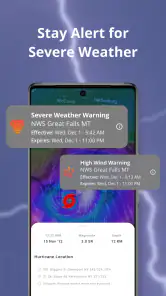
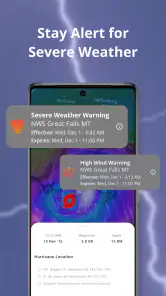
Weather Now Launcher - Radar is a comprehensive weather application that provides real-time weather updates, detailed radar images, and customizable alerts. Users can access minute-by-minute forecasts, severe weather warnings, and temperature trends for any location worldwide. The app also offers a sleek user interface with widgets for quick access to weather information directly from your home screen.
Pros
- Intuitive interface design
- Real-time weather updates
- Customizable widgets
- Multiple radar views
- Ad-free experience
Cons
- Limited free features
- Occasional data lag
- High battery usage
- Requires constant internet
- Paid version expensive
- Category
- Weather
- Version
- 1.1.88













