Bible Homescreen - Read Now
- 547.00
- 4.4
- Installs
- 100.00K
- Price
- Free

Screenshots


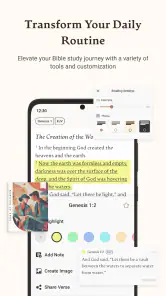




Analysis by Reviewed
I judge a Bible app less by the excitement of its first few days than by whether it gives me a reason to return after the novelty wears off. A homescreen prompt can make scripture easier to notice, but it only helps if that small nudge fits the way you already use your phone. That’s the idea I kept in mind while considering Bible Homescreen - Read Now, a free Books & Reference app from Homescreen Apps.
A small prompt can make a useful first-week routine
The appeal is straightforward: rather than relying on memory to open a separate reading app, you can bring Bible reading closer to the screen you see throughout the day. If you’re trying to build a modest habit, a daily verse can be a gentler starting point than setting yourself an ambitious reading plan. I can imagine checking it while waiting for a meeting or during a quiet moment with breakfast, then deciding whether I have time to read further.
That convenience is also a trade-off. A verse appearing in your phone routine is not the same as a focused study session, and a quick glance can stay superficial if you never pause to consider the passage around it. I’d treat the homescreen as a reminder, not as a replacement for opening the Bible and reading in context. That distinction matters especially for anyone hoping to use short prompts to learn a book or follow a sustained study.
Making the first glance count
The most useful approach, in my view, is to make a small decision before the prompt appears: what will I do if a verse catches my attention? That might mean reading the surrounding passage later, writing down a question, or simply taking a quiet minute instead of scrolling straight past. Having one low-effort response ready makes the reminder feel purposeful without turning every phone check into an obligation.
This is also where expectations matter. The homescreen format can help with remembering, but it cannot decide which parts of scripture deserve more time or explain how a passage fits its wider context. I would not judge the app by whether it transforms my routine in a few days. I’d judge it by whether it makes the first step easier and leaves me willing to take a second step when I have the time.
From novelty to a habit that lasts
From the moment you launch the Bible Homescreen - Read Now, you're greeted with a clean and inviting interface. It's not cluttered like some other apps I've tried in the past. The design is intuitive, making navigation a breeze, even if you’re not the most tech-savvy person out there. The developers have clearly put a lot of thought into making the user experience as smooth as possible.
What makes returning worthwhile
This app is packed with features that cater to both casual readers and those who are deeply invested in their spiritual journey. You can customize your homescreen with daily verses, which is a fantastic way to keep yourself motivated and inspired throughout the day. The app also allows for easy access to different versions of the Bible, so whether you prefer the King James Version or something more modern, you're covered.
More From Our News Desk

Weather by Xiaomi Review: Clear at a Glance, Less Clear Up Close

X Under Pressure: Can It Recover When Posting Goes Wrong?

Clash of Clans Is Won Between the Battles

Android Auto Makes the Case for Quieter Car Software

MobiOffice: Transforming Mobile Productivity with Seamless Integration

EA SPORTS FC™ Mobile Soccer: Redefining Mobile Sports Gaming
One practical way to get more from a verse prompt is to use it as a doorway: when a line catches your attention, look up its chapter and read the surrounding passage before settling on what it means to you. That’s a better use of a short homescreen moment than treating one sentence as a complete lesson. If you already keep notes, the app’s journaling feature can give you a place to record a question or reflection; a simple habit is to write one thought rather than trying to produce a polished entry every day.
One of the standout features for me was the quick search functionality. It’s super handy when you’re trying to find specific verses or chapters. Plus, the app doesn’t just stop at reading; it encourages reflection with its built-in journaling feature. It's like having a digital diary where you can jot down your thoughts and revelations.
Who will benefit, and who may prefer another approach
This setup seems best for readers who want scripture close at hand, enjoy brief prompts, or are trying to make reading part of an ordinary phone routine. It may also suit someone returning to the Bible after a long break, because a small daily touchpoint can feel more manageable than beginning with a demanding plan. By contrast, if your priority is a structured course, detailed study tools, or a quiet reading space without homescreen reminders, a traditional Bible app or a printed edition may fit better. I’d choose based on whether visibility helps you return or becomes another screen element to ignore.
Compared with the usual Bible-reading alternative—a standalone app you open when you remember—the homescreen approach puts the reminder closer to your daily habits. That can reduce the effort of getting started, but it doesn’t automatically create time or attention. A useful routine is to decide what you’ll do when the verse appears: read the full passage, save a question in your journal, or simply take a moment to reflect. Giving the prompt a next step makes it less likely to become decoration.
A realistic routine, not another task list
Picture a weekday morning when you are checking your phone before leaving home. A verse catches your eye, but you do not have time to read a full chapter. I would use that moment to note the reference or a question in the journal, then return to it during a lunch break or in the evening. That two-part routine is more realistic than expecting a brief glance to do the work of a longer reading session, and it gives search a practical role: finding the passage again when you are ready to follow up.
There is a trade-off in that workflow. If you prefer to keep all reading, notes, and study in one uninterrupted session, moving between a homescreen prompt and a later reading moment may feel fragmented. A dedicated Bible app opened intentionally—or a printed Bible with a bookmark—can be better when you want fewer digital interruptions. I see the homescreen format as strongest for prompting a return, not necessarily for hosting every part of a thoughtful study.
Shared reflection has its own limits
Now, if you're someone who enjoys sharing insights and learning from others, you’ll appreciate the community feature. You can connect with other users, share interpretations, and even join in-app study groups. It's a great way to broaden your understanding and see different perspectives.
Also, the app periodically hosts live sessions and discussions. It's like having a virtual bible study group that you can join from anywhere, which is perfect for those of us with busy schedules.
Community features can make reading feel less solitary, but I’d approach shared interpretations as conversation rather than a substitute for checking the passage yourself. If you mainly want private reflection, you can focus on reading and journaling instead of making participation the measure of whether the app is useful. And if you prefer studying with a particular local group or teacher, that established relationship may offer more continuity than an in-app discussion.
When community helps—and when it gets in the way
For me, the best use of discussion is to surface a question I had not considered, then take that question back to the text. If a conversation offers a different interpretation, I would compare it with the passage rather than treating a popular comment as the final word. That habit lets community widen a reading without handing over personal judgment. It also means the social side can remain optional: the app still has value for someone who mainly wants a prompt, search, and a private place to reflect.
On the other hand, anyone seeking a tightly guided curriculum should check whether the available discussion style matches what they need before relying on it as a study plan. A live conversation can be encouraging, but it is not automatically the same as a teacher-led course with a clear sequence. If accountability and a fixed learning path are what keep you engaged, a church group, study guide, or purpose-built course may give you more dependable structure.
Keeping the routine comfortable over time
The long-term test is whether the prompts continue to feel welcome. If a daily reminder starts blending into the background, changing how you respond to it can help: some days, read the verse in context; other days, use it to start a journal note or follow a question through search. The point is not to turn every glance at your phone into a study session. It’s to make the app easy to return to without adding pressure or guilt when a day gets busy.
A practical way to avoid prompt fatigue is to keep the habit deliberately small. I would not try to write a substantial journal entry, join a discussion, and study a whole chapter every time a verse appears. Pick one next step that suits the moment, and let a quick glance remain quick when that is all the day allows. The app is more likely to stay useful if it supports a routine you can actually keep rather than an ideal schedule that makes missed days feel like failure.
Maintenance also includes deciding whether the homescreen placement is still earning its space. If I notice that I have stopped reading the prompt, I would change my response before assuming I need a more demanding plan: follow a reference once, use search to revisit a verse, or write down a question for later. If none of those actions feels useful after repeated tries, removing the reminder may be a sensible choice. A tool meant to support reflection should not become visual clutter or a source of guilt.
It’s also sensible to check the app’s current version and purchase details before installing. It is free to download, with in-app purchases listed from $1.99 to $12.99 per item; the presence of purchases is worth bearing in mind if you prefer a completely no-cost experience. It is rated Everyone 10+, has a 4.4 average from around 3,600 ratings, and has been installed over 100,000 times. The current version is 1.1.89, and it requires Android 9 or later.
What to consider before settling in
The app is free to download, but the listed in-app purchases mean I would not assume every available option is included without charge. If avoiding extra spending is important to you, check the purchase choices in the app before building your routine around something you expect to use. That is a small but worthwhile step for a reference app you may want to keep for the long term, especially if you are comparing it with a basic Bible reader or a print edition.
The version and device requirement are useful practical checks too: the current release is 1.1.89 and it needs Android 9 or later. Its Everyone 10+ content rating is another point parents may want to consider when deciding whether it suits a younger reader. I would make those checks before installation rather than discovering a compatibility or purchase concern after I have begun relying on the homescreen prompt.
Final Thoughts
All in all, the Bible Homescreen - Read Now is more than just an app; it's a companion for anyone looking to deepen their spiritual journey. It’s convenient, user-friendly, and packed with features that make studying the Bible not only accessible but enjoyable. Whether you're a lifelong believer or someone who's just beginning to explore, this app is definitely worth a download.
So, why not give it a try? Dive into your spiritual journey in a way that's modern, engaging, and at your fingertips. Happy reading!
My lasting recommendation is conditional: I’d try it if a visible daily cue would genuinely help me open scripture, and I’d keep it only if that cue leads to reading or reflection rather than becoming wallpaper. Bible Homescreen’s clearest strength is bringing a small reminder into an everyday phone habit; its limitation is that the reader still has to supply the attention, context, and consistency. If that balance sounds right for you, it could earn its place on your screen.
The test after the novelty fades
What I would watch over the first month is not a streak or a perfect record, but whether the app helps me return on ordinary days. A useful sign is that a prompt occasionally leads to a passage, a saved question, or a thought worth revisiting. If I only notice the verse and immediately forget it, the homescreen placement is not doing enough for my particular routine. There is no need to force a daily ritual just because the app makes one possible.
That is why I would recommend it selectively rather than as a universal Bible-reading solution. It is a good fit for someone who benefits from seeing scripture in the flow of phone use and can supply a little follow-through. It is less suited to readers who want a quiet, uninterrupted environment, a carefully sequenced study course, or a physical book away from notifications. For those readers, a conventional reader or print Bible may create a better boundary between reflection and the rest of the phone.
Homescreen Apps’ app has a clear, specific role: making a Bible reading prompt easier to encounter, with search, journaling, and community options for people who want to go further. Its recurring value depends on how you use that opening. I would give it a fair trial, keep the parts that lead to genuine reading, and remove the habit if it becomes another ignored item on the screen. That, to me, is the honest measure of whether it deserves a lasting place.
Bible Homescreen - Read Now Frequently Asked Questions
What does the Bible Homescreen app cost, and are purchases required?
Bible Homescreen - Read Now is free to download. Optional in-app purchases range from $1.99 to $12.99 per item, so you can decide whether to buy anything as you use it. The app’s central idea is to read the Bible and find inspiration through its homescreen experience; downloading it does not require you to make a purchase.
What age group is Bible Homescreen - Read Now intended for?
The app has an Everyone 10+ content rating, which can help families decide whether it is appropriate for a particular user. It is a Books & Reference app focused on reading the Bible and finding inspiration from its words. If you are choosing apps for a child, consider the rating alongside your own preferences and the way you expect them to use it.
What is Bible Homescreen - Read Now?
Bible Homescreen - Read Now is a mobile application designed to provide users with daily Bible verses and insights directly on their phone's homescreen. The app aims to inspire and motivate users by integrating spiritual reflection into their daily routine. With customizable widgets, users can tailor their experience to suit their spiritual needs. It is developed by Homescreen Apps and is described as a Bible launcher for reading and inspiration.
How can I customize the Bible verses displayed on my homescreen?
The app offers various customization options, allowing users to select different themes, fonts, and verse types to match their preferences. Users can choose from daily, weekly, or random verse displays and even set reminders for specific reading times. The customization feature ensures that each user's spiritual journey is personalized and engaging.
Is Bible Homescreen - Read Now available for both Android and iOS devices?
Yes, Bible Homescreen - Read Now is available for download on both Android and iOS platforms. Users can easily find the app on Google Play Store for Android devices and the Apple App Store for iOS devices. The app is designed to run smoothly on a wide range of devices, ensuring accessibility for all users. For Android, it requires version 9 or later; the current version is 1.1.89.
Pros
- Easy access to daily Bible verses.
- Customizable home screen widgets.
- In-app Bible study tools.
- Offline reading available.
- User-friendly interface.
Cons
- Limited version translations.
- Ads may disrupt reading experience.
- Requires internet for updates.
- Occasional app crashes.
- Limited customer support.
- Category
- Books & Reference
- Version
- 1.1.89