ScanNow Home
- 425.00
- 4.2
- Installs
- 1.00M
- Price
- Free

Screenshots
Analysis by Reviewed
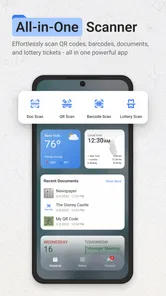
I like productivity apps that remove a small daily annoyance without asking me to rebuild my routine around them. ScanNow Home takes that approach by putting document scanning and file conversion close to the phone’s home screen. It is designed for quick jobs involving PDFs, photos, lottery materials, and QR codes, so the appeal is less about becoming a complete office suite and more about shortening the distance between seeing something and capturing it.
After using it as an everyday utility, I see the main value in its immediate access. When a paper receipt, form, ticket, or code appears in front of me, I do not necessarily want to open a large cloud-storage app, navigate through several menus, and then decide what to do with the result. A focused scanner can be more practical in that moment. The important question is whether this convenience remains useful during repeated scanning, whether the app feels dependable when the phone is busy, and whether it fits the limits of an older device.
Quick access is the central idea
Homescreen Apps has built this free productivity app around a simple starting point: scanning should be one swipe away. That positioning matters because it changes how I think about the tool. I would not choose it primarily for elaborate document management or long editing sessions. I would choose it when speed of access matters more than having every office feature in one place.
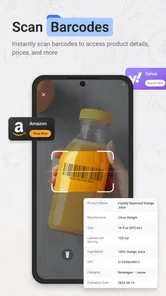
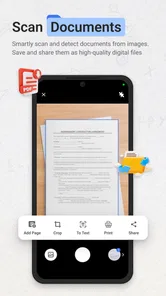
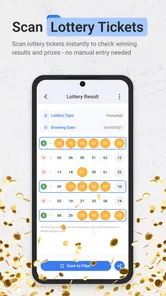
The app covers several jobs that often end up scattered across different utilities. It can be used for PDF scanning and conversion, image-based capture, lottery-related materials, and QR codes. That combination makes it more flexible than a scanner that only turns paper into a document, while still keeping the purpose fairly clear. It is a pocket tool for turning something in front of me into a usable digital item.
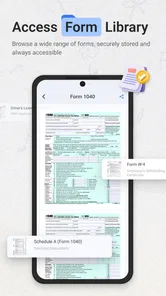
In practice, the swipe-oriented design is most helpful when the phone is already in my hand. Imagine receiving a paper form at a school, clinic, or workplace. I can capture it before folding it into a bag, then keep moving instead of promising myself that I will scan it later. The same applies to a receipt that I need to retain, a QR code printed on a poster, or a lottery slip that I want to inspect digitally.
That convenience also creates a trade-off. A home-screen shortcut can make the first step faster, but it does not automatically make the whole workflow faster. The final experience still depends on how quickly the camera recognizes the item, how easily I can correct a poor capture, and how clearly the resulting file is saved or shared. For occasional scanning, the reduced opening friction is convincing. For a large archive, I would still compare it with a dedicated document-management app.
What feels fast and what may slow the process
My expectation for ScanNow Home is quick launch and quick capture rather than instant completion of every task. A scanner has to deal with real-world problems: shadows, angled pages, glossy paper, crowded backgrounds, and codes printed too small to read comfortably. Those conditions can make any scanning tool pause for another attempt, and an app focused on convenience is not exempt from that reality.
More From Our News Desk

Weather by Xiaomi Review: Clear at a Glance, Less Clear Up Close

X Under Pressure: Can It Recover When Posting Goes Wrong?

Clash of Clans Is Won Between the Battles

Android Auto Makes the Case for Quieter Car Software

MobiOffice: Transforming Mobile Productivity with Seamless Integration

EA SPORTS FC™ Mobile Soccer: Redefining Mobile Sports Gaming
The best speed advantage comes from preparing the scene before opening the camera. I get better results when the page is flat, the phone is held steadily, and the lighting is even. That may sound basic, but it is especially important for a swipe-first tool: the less time spent retaking a page, the more meaningful the shortcut becomes. I also prefer scanning one clean page at a time when accuracy matters, rather than rushing through a messy stack.
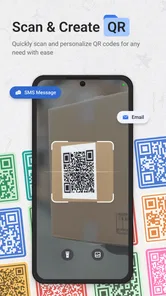
For QR codes, distance and glare are usually more important than raw app speed. Holding the phone slightly farther away can help the code fit comfortably inside the camera view, while tilting it a little can reduce reflections. With lottery materials, I would be particularly careful not to treat a quick digital reading as a substitute for checking the original paper. The app is useful for access and convenience, but important details deserve a second look.
PDF conversion is another area where expectations should stay practical. Converting a photo or scan into a PDF is valuable when I need to send a document in a familiar format, but conversion does not repair a blurry source. I would capture the page as clearly as possible first, then inspect the finished file before sharing it. This two-step check is a small habit that prevents a fast workflow from producing an unusable document.
Where heavy use changes the experience
A short scan is a very different test from processing a long set of pages. During a quick errand, the app’s focused design makes sense. During a large batch, I become more aware of every extra action: positioning the next page, confirming the capture, checking the image, converting the collection, and deciding where the result belongs.
If I had to digitize a folder of documents, I would first sort the papers by type and condition. Clean, similarly sized pages should be handled together, while receipts or folded sheets deserve their own pass. This reduces the number of times I need to change my grip or adjust the lighting. It also makes it easier to notice a missed page before the final PDF is created.
Heavy use can also expose the difference between a lightweight utility and a full document suite. A specialized office app may offer stronger tools for naming, organizing, annotating, searching, or synchronizing a large collection. ScanNow Home is more attractive when the task begins with a physical item and ends with a quick digital copy. If the task begins with an existing library of files, another category of app may be more suitable.
Resource demands are difficult to judge from the feature list alone, so I would avoid assuming that every phone will behave identically. Camera processing, image resolution, storage space, and the number of pages handled in one session all affect the workload. On a newer phone, a few scans should feel like a modest task. On an older device, I would keep the phone charged, close unnecessary apps if the camera feels sluggish, and avoid creating oversized batches without checking intermediate results.
The practical recovery strategy is simple: verify each important scan before moving on. If a page is cut off or a code is not recognized, correcting it immediately is much easier than discovering the problem after the original document has been put away. This is one of the most useful habits with any scanner, and it matters even more when the app is being used as a rapid home-screen shortcut.
Reliability depends on the capture routine
I judge a scanner’s reliability less by whether it succeeds under perfect lighting and more by how predictable it is in ordinary situations. ScanNow Home is appealing because its purpose is narrow enough to understand quickly. I know whether I am opening it to capture a page, convert an image, or read a QR code. That clarity reduces the chance of wandering through unrelated tools.
Still, reliability has two parts. The first is recognition: does the app capture the correct edges, preserve readable text, and identify the intended code? The second is recovery: what happens when the first attempt is poor? In real use, the ability to notice and redo a scan matters almost as much as the first capture. I would not rush past the preview simply because the app opened quickly.
Paper quality makes a noticeable difference. A clean sheet on a contrasting surface is an easy case. A wrinkled receipt with faint printing is not. For receipts, I would place the paper flat and capture it before the ink becomes harder to read. For forms, I would keep all corners visible and avoid covering checkboxes or signatures with my hand. For QR codes, I would make sure the entire pattern is visible instead of relying on a partial view.
These habits are not workarounds for a weak app; they are sensible controls for camera-based input. The app can only work with what the lens sees. What ScanNow Home does well conceptually is put those common tasks together, but I still recommend treating every result as a draft until I have checked it.
There is also a privacy-minded workflow worth adopting. When I scan an identity document, medical paper, financial receipt, or private form, I consider where the resulting file will remain and who might see it before sharing. The app’s usefulness does not remove the need for careful handling. I would give sensitive scans clear names, avoid sending them to the wrong conversation, and delete unnecessary copies after confirming that the important version is stored safely.
Compatibility and device limits
The app supports devices running Android 9 or newer, which gives it a reasonably broad reach across Android phones and tablets. That does not mean every supported device will offer the same camera experience. Older hardware may have a slower camera, less memory available for image processing, or a screen that makes edge checking less comfortable.
For a phone near the minimum operating-system requirement, I would keep expectations focused on short, practical sessions. A single page, a receipt, or a QR code is a more realistic test than a large, high-resolution archive. If the app is being installed on an older device, I would first try a few unimportant documents and confirm that the captures are readable before trusting it with originals that cannot easily be replaced.
Storage is another everyday constraint. Scanned images and converted PDFs can accumulate quietly, especially when I keep both the original photo and the finished document. A useful routine is to review the folder after a scanning session, rename the files I need, and remove failed attempts. This keeps the phone from becoming a pile of duplicate captures and makes later retrieval much easier.
Screen size also affects the experience. On a compact phone, checking a full page for tiny missing text takes more attention. On a larger display, reviewing the edges and reading the result is more comfortable. That is not a reason to reject the app, but it is a reason to slow down when the document contains small print, handwritten information, or numbers that must be exact.
The age rating is Everyone, so the app is positioned for broad everyday use rather than a specialized adult audience. I would still make the same distinction I make with any camera utility: broad suitability does not mean every scanned document is appropriate to share casually. The tool can be simple enough for family use, while the content captured through it may still require discretion.
How it compares with familiar alternatives
Compared with a general cloud-storage app, ScanNow Home feels more direct for the moment of capture. Cloud apps are often better when the main goal is organizing an existing collection, finding older files, or collaborating with other people. I prefer the focused scanner when I am standing in front of a physical page and want to get it into digital form without opening a larger workspace.
Compared with a phone’s built-in camera, the advantage is purpose. A normal camera can photograph a document, but it leaves me to think about framing, cropping, format, and what to do next. A scanning utility makes the document workflow more explicit. The limitation is that a camera may be more flexible for unusual subjects, while ScanNow Home is most useful when the item matches one of its intended tasks.
Compared with a full office scanner app, the choice depends on depth. A larger scanning suite may be preferable for frequent multi-page work, advanced editing, searchable archives, or detailed document controls. ScanNow Home makes a stronger case when I value immediate access and a compact set of practical actions. I would not replace a serious records-management workflow with it without testing the batch process on my own documents first.
The QR-code function adds convenience because it keeps me from switching between a document tool and a separate code reader. However, I would still inspect the destination before opening anything sensitive or unexpected. Fast recognition is useful; automatic trust is not. The same principle applies to lottery-related scans: use the app to assist with access and checking, but keep the physical item available for confirmation.
Who should use it and who should skip it
I would recommend ScanNow Home to someone who regularly needs to digitize small pieces of paper, turn quick captures into PDFs, or read QR codes without searching through a crowded app drawer. It is particularly suited to people who value a short path from the home screen to the camera and who prefer one practical utility over several separate tools.
It also makes sense for a student capturing handouts, a renter keeping copies of signed paperwork, a traveler saving tickets or receipts, or a household member digitizing instructions that are easy to misplace. In each case, the benefit comes from acting at the moment the document appears. The app is less compelling if scanning is something I do only once a year and the phone’s existing tools already cover that occasional need.
I would be cautious about choosing it as the main solution for a professional archive. Someone handling hundreds of pages, demanding text search, complex annotations, or strict file organization may be happier with a more comprehensive document platform. Likewise, users who dislike reviewing every scan should not assume that a quick shortcut eliminates the need for quality control.
One concrete workflow I found sensible is to scan a receipt immediately after a purchase, convert it when a PDF is required, give it a recognizable name, and then remove the failed images from the phone. Another is to capture a form before leaving an appointment, zoom in on the important fields, and only then put the paper away. These small steps turn the app from a novelty into a dependable habit.
Current release and overall performance impression
The app was released on January 29, 2025, and the current version is 1.5.12. Its presence on Android is already substantial, with over a million installs and a 4.2 average from around four thousand seven hundred ratings. Those figures suggest that the basic idea has found a real audience, while the rating also leaves room for the normal differences in phone hardware, scanning conditions, and personal expectations.
For me, the performance verdict is favorable when the job is short and clearly defined. The home-screen access makes the first step feel efficient, and the combination of PDF, photo, lottery, and QR-code tasks gives the app more everyday range than a single-purpose scanner. I would describe it as a quick utility rather than a full document office.
Its strongest performance habit is not trying to force speed at every stage. I get the best results by opening it quickly, positioning the item carefully, checking the capture, and cleaning up the saved files afterward. That routine keeps mistakes from multiplying during heavier use and makes the app feel more stable in practice, even when the phone or document is less cooperative.
There are clear situations where I would choose something else: a large archive, advanced editing, deep collaboration, or a workflow centered on already stored files. For everyday paper-to-phone moments, though, I find the focused approach useful. Since it is free and rated for Everyone, it is easy to try without making it a major commitment, provided the device runs Android 9 or later.
My recommendation is to use it as a fast capture companion, not as a replacement for every document tool. If your main frustration is the few seconds and menu steps between noticing a paper or QR code and saving it, ScanNow Home addresses that problem directly. If your priority is long-term document management, test a small batch first and compare the result with a full-featured alternative. That distinction is what makes the app worthwhile: it is at its best when speed of access, simple capture, and everyday convenience matter most.
ScanNow Home Frequently Asked Questions
What is ScanNow Home, and what can I use it for?
ScanNow Home is designed to help users scan, organize, and manage information from their home environment using a mobile device. Depending on the available features and permissions, it may be useful for creating digital records, identifying items, or keeping household information organized. Before downloading, check the official store description to confirm which scanning tools, supported formats, and services are included in the current version.
Is ScanNow Home free to download and use?
ScanNow Home may be available as a free download, but some functions could require in-app purchases, a subscription, or access to premium tools. The exact pricing can vary by platform, country, and promotional offer. We recommend reviewing the app’s store listing and subscription terms before starting a trial, especially if you only need basic scanning features and want to avoid automatic renewal charges.
What permissions does ScanNow Home require?
A scanning application commonly requests access to the camera so it can capture documents, labels, images, or other household information. It may also request storage or photo-library access to save and import files, while notification or internet permissions can support reminders and synchronization. Review each permission carefully and deny anything that seems unnecessary for the features you plan to use.
Does ScanNow Home work without an internet connection?
Some scanning functions may work offline because the phone can capture images locally, but features such as cloud backup, account synchronization, online recognition, sharing, or updates may require an internet connection. Offline availability can also depend on the device and app version. If you need to use ScanNow Home in areas with limited connectivity, test the essential workflow before relying on it.
Is ScanNow Home safe for storing personal or household information?
Before saving sensitive documents or private household details in ScanNow Home, review its privacy policy, data-safety information, and account settings. Check whether files are stored only on the device or uploaded to a cloud service, and whether sharing or synchronization can be disabled. Avoid scanning highly confidential material until you understand how the app handles, protects, and deletes your data.
Pros
- Quickly scans rooms and surfaces using your phone’s camera.
- Simple interface makes it easy for first-time users.
- Useful for organizing home inspection and maintenance tasks.
- Provides convenient results without requiring extra hardware.
- Can help identify areas that may need cleaning or attention.
Cons
- Scan accuracy can vary with lighting
- angles
- and camera quality.
- Some features may require a subscription or in-app purchase.
- Results should not replace professional inspections or measurements.
- Scanning larger areas may take time and drain the phone battery.
- Privacy settings should be checked before scanning personal spaces.













