Easy Homescreen
- 26.82K
- 4.0
- Installs
- 10.00M
- Price
- Free

Screenshots
Analysis by Reviewed
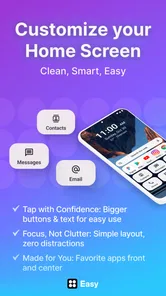
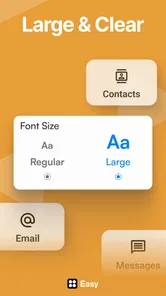
I like home-screen tools best when they make a phone easier to use, not just prettier. Easy Homescreen aims for that balance, giving you ways to adjust the look of your icons and fonts while arranging shortcuts around your routine. My overall take is that it suits people who want a friendlier, more personal layout without turning customization into a technical project.
When a personal layout is actually useful
The best reason to change a home screen is usually a small daily irritation: a useful app is buried, the screen feels busy, or the same handful of tasks take too many taps. I’d begin by noticing what I reach for in the morning, during work, and when I’m winding down. That simple inventory gives the customization a purpose and helps prevent a makeover from becoming decoration for its own sake.
For instance, someone who checks messages, a calendar, and a transport app before heading out could make those actions the visual priority, while moving rarely used tools out of the way. A person who shares their phone with a family member might favor familiar positions and clear labels over a dramatic theme. The useful distinction is between a screen that looks impressive in a screenshot and one that still makes sense when I’m in a hurry.
What a lighter home screen can do
A home screen is something I check in small bursts all day, so even modest changes can make a phone feel more personal. A calmer arrangement can put the apps I reach for most within easy reach, while a consistent visual style makes the page feel less cluttered. The useful question is not how many options an app offers, but whether a change makes the phone easier for me to scan and navigate.
For example, someone who uses a phone mainly for calls, messages, and a calendar might prefer a restrained layout with a few clear shortcuts. Someone who likes changing themes may care more about coordinating icons and fonts. I’d make one change at a time, then use the phone normally for a day before deciding whether the new arrangement is actually more comfortable.
A practical fit, with a few caveats
This is a free personalization app from Homescreen Apps, rated for Everyone. It has a 4.0 average from around 238,000 ratings, with over 10 million installs. That broad reach makes it an easy option to consider, though popularity alone doesn’t tell me whether its approach will suit every device or taste.
One trade-off with home-screen customization is that a more distinctive look can take longer to navigate if familiar icons or positions change. I’d keep the most-used apps in predictable places and avoid redesigning every page at once. If you rely on a particular arrangement for work or accessibility, test changes gradually and keep a simple layout you can return to.
More From Our News Desk

Weather by Xiaomi Review: Clear at a Glance, Less Clear Up Close

X Under Pressure: Can It Recover When Posting Goes Wrong?

Clash of Clans Is Won Between the Battles

Android Auto Makes the Case for Quieter Car Software

MobiOffice: Transforming Mobile Productivity with Seamless Integration

EA SPORTS FC™ Mobile Soccer: Redefining Mobile Sports Gaming
Compared with changing a few settings in a phone’s built-in launcher, a dedicated personalization app can feel more inviting and focused. The built-in option may still be better if you want the fewest moving parts or already have the look you want. Easy Homescreen makes more sense when you’re curious to refresh the screen and prefer a guided, approachable way to do it.
Choosing a setup you can keep using
I would treat the first version of a redesigned screen as a trial, not a commitment. Keep the old arrangement in mind, change one area, and pay attention to whether that edit reduces effort during normal use. If it creates more searching, undoing that particular choice is more informative than scrapping the whole layout and starting over.
There is also a useful trade-off between visual consistency and quick recognition. Matching icons and fonts can make a screen feel more orderly, but the strongest theme is not always the most legible one. I’d favor contrast and recognizable labels over a perfectly coordinated palette, especially for apps I need to open quickly outside the home.
Setting Up Your Perfect Home
Getting started with Easy Homescreen is a breeze. The app greets you with a user-friendly interface that even the least tech-savvy users can navigate with ease. You can choose from a variety of themes and widgets that suit your style. I was particularly impressed by the vast array of customization options that let me tweak everything from icon styles to widget sizes.
Customization Galore
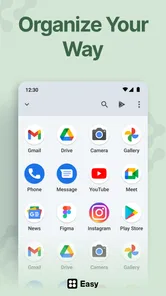
One of my favorite features is the drag-and-drop functionality. It makes organizing your apps and widgets feel like a game of Tetris, but way more fun! You can easily create folders, adjust widget sizes, and even change the entire theme of your phone with just a few taps. The app allows you to experiment without fear, as you can always revert back to a previous setup with the handy backup feature.
Widgets That Wow
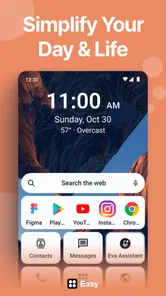
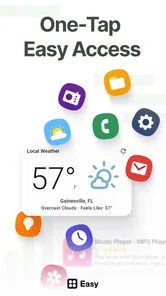
Widgets are where the app really shines. From weather updates and calendar events to music controls and quick contacts, the widgets are both visually appealing and functional. I especially enjoyed the clock widget, which you can customize to match the overall aesthetic of your home screen.
Moreover, the app provides a selection of live wallpapers that are nothing short of stunning. They bring your home screen to life without draining your battery, which is a huge plus for those of us who are always on the go.
Making widgets work for your routine
The practical question with a widget is whether it saves a step you perform often enough to justify the space it takes. I’d choose one or two that answer a quick question at a glance, such as what is next on the calendar or whether I need to open a music app, rather than filling the screen with panels I rarely use. A crowded widget arrangement can defeat the point of a simpler home page.
For a weekday morning, a compact calendar view alongside the shortcuts I use before leaving can be more useful than a large collection of themed elements. In the evening, music controls may earn their place if I reach for them regularly. The right arrangement depends on the routine, so I’d test widget size and placement before changing the whole screen to accommodate them.
Performance and Usability
Now, let’s talk about performance. I’ve used other customization apps that slow down my phone, but the app keeps things running smoothly. The app is lightweight and doesn’t hog your device’s resources, which means you can enjoy a swanky home screen without any lag.
Usability-wise, the app is intuitive. Everything is exactly where you’d expect it to be, and the learning curve is virtually non-existent. Whether you’re a customization pro or a newbie, you’ll find this app a joy to use.
Keeping the screen usable after the makeover
Personalization can introduce small bits of friction that are easy to miss while setting things up. A widget may occupy space that would be more useful for a frequently opened app, or a new icon treatment may make two apps harder to tell apart. I’d check the result in ordinary conditions—while walking between tasks, with one hand, or when I only have a moment—rather than judging it solely while browsing customization choices.
If an arrangement is useful for work or another repeated routine, consistency matters more than novelty. I’d avoid moving essential shortcuts every few days, and use theme changes for the parts of the screen that do not affect muscle memory. That approach lets the phone feel personal without making routine actions unpredictable.
Final Thoughts
In conclusion, the app offers a delightful mix of personalization, functionality, and performance. It’s perfect for anyone looking to spruce up their device without delving into complex settings. With its rich features and ease of use, it's no wonder this app is gaining popularity among smartphone users.
So, if you're ready to give your home screen a makeover, why not give it a shot? I promise, you won't be disappointed!
Small changes that pay off in daily use
A useful way to approach a makeover is to start with a real moment in your day. If I often check the calendar before leaving home, I’d place that information where it is visible without opening several apps, then keep the call and message shortcuts easy to reach. The point is to let the layout reflect actual habits rather than build a decorative screen that looks good but adds extra taps.
I’d also treat folders as a way to reduce visual noise, not as a place to hide everything. Grouping occasional-use apps can free space for daily tools, but burying frequently used ones makes the screen slower to use. After rearranging, I’d try the layout one-handed and check whether labels and icons remain easy to distinguish at a glance.
Who should try it—and who may prefer the default
The app is a good match for someone who enjoys a personal look, wants shortcuts arranged around everyday tasks, and would rather adjust a home screen visually than dig through a long set of system menus. It also suits people who like experimenting but want the option to restore a previous setup if a new arrangement doesn’t work out.
I’d skip it if you are already happy with your phone’s built-in layout, want a completely hands-off experience, or depend on a fixed arrangement that you don’t want to risk changing. If you do install it, begin with a modest edit rather than a full redesign. That makes it easier to spot which changes genuinely help and which are only novelty.
Where it sits among the alternatives
For a quick visual adjustment, the phone’s built-in home-screen settings are the simpler choice: they avoid adding another customization workflow and may be enough if all you want is a small change. Easy Homescreen is more appealing when you want a more guided way to bring icons, fonts, shortcuts, and widgets into a consistent arrangement. It is a middle ground between leaving everything as it is and taking on a more involved launcher setup.
People who enjoy tuning every detail may prefer a launcher that gives them deeper control, even if that means more decisions and setup time. On the other hand, someone who only wants to make a few everyday actions easier may not need a full redesign at all. I’d choose based on how much change I actually want, rather than assuming a dedicated app is automatically better than the phone’s defaults.
Version, cost, and a sensible expectation
The current version is 1.8.32, and it requires Android 9 or later. The app is free to download, with optional in-app purchases ranging from $0.99 to $29.99 per item. I’d start with the free experience and only consider a purchase if a specific paid option matters to the way I want to use the app; the range makes it worth checking the price of an individual item before buying.
It was released on January 26, 2023, and its 18,000 written reviews sit alongside a much larger pool of ratings. I see that level of use as a reason to give it a fair look, not as proof that every feature or visual choice will work for me. Since paid items are optional, I’d decide what I need first and avoid paying simply because a theme or layout looks appealing in the moment.
A final recommendation with a clear limit
Overall, I see this as a friendly way to make a phone feel more like your own, especially when the goal is a more considered arrangement rather than endless tweaking. Its strongest case is for someone who wants to shape a practical, recognizable home screen and is willing to spend a little time testing what works. For anyone who values an unchanged, familiar setup above personalization, the standard launcher remains a perfectly sensible choice.
My recommendation is to try it if you can name one specific frustration you want to fix—too much visual clutter, an awkward shortcut arrangement, or a desire for a more cohesive look. If you cannot name one, the default screen may already be doing its job. For me, Easy Homescreen is most convincing when each adjustment earns its space by making the phone easier to read or use, rather than simply adding another layer of decoration.
Easy Homescreen Frequently Asked Questions
Is Easy Homescreen free to download, and what should I know about its paid options?
Easy Homescreen is free to download. It also offers in-app purchases, with prices ranging from $0.99 to $29.99 per item, so some customization options may involve an additional cost. You can start with the free app and consider purchases only if you want the options they provide. Check the purchase details in the app before confirming a transaction.
What is Easy Homescreen and how does it enhance my device's interface?
Easy Homescreen is a customizable launcher app designed to enhance the user interface of your Android or iOS device. It offers a range of features, including customizable widgets, themes, and icons, allowing users to personalize their home screen to suit their preferences. The app aims to provide a more intuitive and aesthetically pleasing user experience by simplifying navigation and organizing apps efficiently.
Is Easy Homescreen compatible with all Android and iOS devices?
Easy Homescreen is compatible with a wide range of Android and iOS devices; however, there are minimum operating system requirements that must be met. For Android, the app typically requires version 5.0 (Lollipop) or higher, while iOS users need version 11.0 or later. It's recommended to check the app's compatibility in your device's app store before downloading to ensure smooth functionality.
Does Easy Homescreen offer any in-app purchases or subscriptions?
While Easy Homescreen is free to download and use, it does offer in-app purchases for additional features and themes. Users can purchase premium themes, icon packs, and other customization options. There is also a subscription model available that provides access to exclusive content and regular updates, enhancing the customization experience further.
How can I customize my home screen using Easy Homescreen?
Customizing your home screen with Easy Homescreen is straightforward. After installing the app, you can select from a wide variety of themes and widgets to apply to your home screen. The app allows you to rearrange icons, change wallpapers, and add widgets such as weather, calendar, and clock. The intuitive drag-and-drop functionality makes customization easy even for beginners.
Pros
- User-friendly interface
- Highly customizable widgets
- Seamless integration with apps
- Fast and responsive
- Low battery usage
Cons
- Limited free features
- Occasional ads in free version
- Requires modern devices
- Some widgets lack variety
- Infrequent updates













