Weather Live: Weather Forecast
- 930.00
- 4.6
- Installs
- 10.00M
- Price
- Free
Screenshots
Analysis by Reviewed
When I need to decide whether a short walk, a commute, or a day out calls for an extra layer, I want a forecast I can check quickly and then explore when the details matter. Weather Live: Weather Forecast is KUCO Apps’ free weather app, built around local and global forecasts and a radar view. It has a 4.6 average from around 78,000 ratings and more than 10 million installs, so it is clearly a familiar choice for many people. I’d treat that popularity as a reason to consider it, not as proof that every forecast will be right for every location.
How I judge a weather app before relying on it
Weather apps often ask for access to information that can make forecasts more convenient, especially location. I prefer to make that choice deliberately instead of treating a permission prompt as a routine tap-through. The important question for me is practical: do I want conditions for where I am now, or am I mainly checking a place I can enter myself? That answer can guide how I set up any weather app without making assumptions about its behind-the-scenes data practices.
I also separate the forecast itself from the way the app reaches me. A notification can be useful when I am busy and not checking my phone, but it is not automatically better just because it is available. I would consider whether alerts fit my day, then use the phone’s notification controls to adjust them if needed. That keeps the decision in my hands and avoids turning weather updates into a stream of interruptions.
For readers comparing weather apps, this is a useful distinction: a clean screen and a radar map can make information easier to use, but they do not establish that a forecast is more accurate than another provider’s. I judge the app by whether its views help me make a sensible plan, while still checking another trusted source when the consequences of getting it wrong are serious.
Checking the sky and deciding what to trust
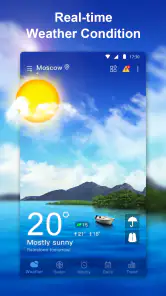
The first thing that caught my eye when I opened Weather Live: Weather Forecast was its sleek and intuitive design. It's super easy to navigate, which is a big win in my book. You get a quick glance at the current weather, and with just a swipe or two, you can dive into more detailed forecasts. The app does a great job of balancing comprehensive data with a user-friendly interface.
Forecasts are most useful when you compare views
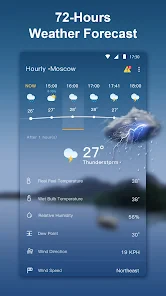
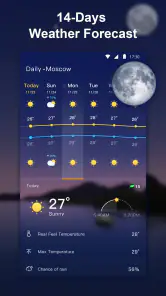
One of the standout features is the real-time weather updates. Whether it's sunny, rainy, or snowing, the app keeps you in the loop with up-to-the-minute information. I also love the detailed forecasts that cover everything from temperature and humidity to wind speed and UV index. And if you're planning a trip, the 7-day forecast is a lifesaver.
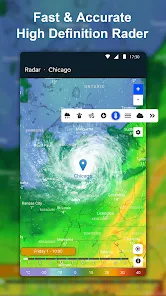
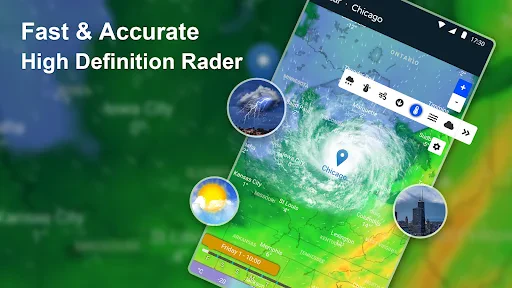
Another nifty feature is the weather radar. It's like having a mini meteorologist in your pocket. You can see weather patterns moving across the map, which is super helpful if you're trying to dodge a storm or plan a weekend getaway. Plus, the app sends you notifications for severe weather alerts, so you're always prepared, come rain or shine.
More From Our News Desk

Weather by Xiaomi Review: Clear at a Glance, Less Clear Up Close

X Under Pressure: Can It Recover When Posting Goes Wrong?

Clash of Clans Is Won Between the Battles

Android Auto Makes the Case for Quieter Car Software

MobiOffice: Transforming Mobile Productivity with Seamless Integration

EA SPORTS FC™ Mobile Soccer: Redefining Mobile Sports Gaming
For a practical check, I’d use the forecast and radar together rather than treating either as a guarantee. Before a walk or drive, the forecast gives a useful overview; the radar can help you judge whether rain appears to be approaching your area. If conditions are changing quickly, checking again closer to departure is a sensible habit. A map is helpful context, but it is not a substitute for official emergency guidance when severe weather is possible.
A small but useful habit is to check the map at the scale that matches the decision. If I am choosing whether to take a short walk, nearby movement matters more than a broad view of the region. For a drive or outdoor plan, the wider picture may help me spot a changing pattern, but I would still check the forecast again before setting out. This is a way to use radar as context, not as a promise about exactly when conditions will change at one address.
Widgets save time, but make the glance count
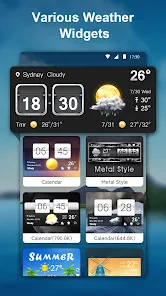
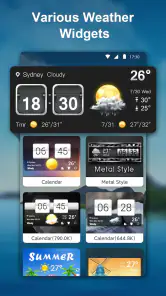
If you're like me and love having all your info at a glance, you'll appreciate the customizable widgets. You can add them to your home screen and get weather updates without even opening the app. It's those little conveniences that really make a difference in day-to-day use.
A widget is especially handy for a repeat routine: I can check before leaving home without getting pulled into a longer forecast. I’d still open the app before a longer outing, since a compact home-screen view can’t provide the same context as the forecast and radar together. That small distinction helps keep convenience from turning into overconfidence.
For the widget to be genuinely useful, I’d make sure its location is the one I want to see before relying on a quick glance. That is easy to overlook after travelling or when checking another town’s conditions. A home-screen summary is best for a familiar, recurring decision; when I am planning around a particular hour or route, I would open the full app and examine the relevant forecast and map instead.
What to consider about trust and control
Weather is location-sensitive by nature, so I’d pause at the permission prompt and decide whether I want the app to use my location or whether entering a place manually better suits my routine. I also review notification choices before enabling alerts: they can be useful for severe conditions, but an alert is only helpful if it is relevant and not easy to miss among other notifications. These are ordinary checks I make with any weather app, rather than assumptions about this one’s data practices.
If you prefer to limit what an app can access, check the controls offered by your phone’s operating system and grant only what you’re comfortable with. Before relying on a widget or alert, make sure the displayed location is the one you actually care about; this matters when you travel or check conditions for someone elsewhere. I would not assume that a forecast automatically follows me in the way I expect without looking at the location shown in the app.
There is a practical difference between checking a city once and using a current-location view as part of a daily routine. If I only need conditions for a planned destination, selecting that place directly may be a more comfortable approach than enabling location access. If I want a quick local check, location access may save steps, but I would still verify that the result is showing the right place. The choice depends on convenience, and I would revisit it if my habits change.
Likewise, I would treat privacy questions as something to answer from controls and policies I can actually inspect, rather than guessing from the app’s purpose. The fact that a weather forecast benefits from knowing a place does not tell me how every detail is handled. A cautious setup means using the least access that still supports the way I want to check weather, and keeping notification and location choices under my own control through the available settings.
Who will get the most from it
This is a good fit if you want current conditions, a longer forecast, radar, and a home-screen shortcut in one place. A weekday example: before heading out, I can glance at the widget, then open the radar if rain could affect the walk to the bus. For a weekend plan, the seven-day view helps with rough scheduling, while a closer check on the day itself is better for decisions that depend on changing weather.
It is particularly useful for someone whose plans involve short, practical choices throughout the day: whether to carry a rain layer, shift a walk, or allow extra time before leaving. I would not use the longer outlook to lock in an outdoor plan far ahead; I’d use it to decide which days look more promising, then check again as the date approaches. That makes the forecast a planning aid rather than a fixed schedule.
Compared with relying only on a phone’s built-in weather screen, this app puts radar and widgets among the reasons to take a closer look. On the other hand, if you already trust another forecast source and only need a basic temperature check, switching may add little. People who need specialist meteorological tools or must make safety-critical decisions should use authoritative local sources as well; a general weather app is not a replacement for them.
Compared with a dedicated radar tool, the appeal here is having a forecast, map, and quick home-screen check together rather than opening separate services for each task. That convenience is not the same as specialist depth. If I were tracking conditions for a demanding outdoor activity or making a decision where precise local detail matters, I would choose a more specialized source alongside it. For ordinary errands and flexible plans, a single accessible overview can be enough.
There is also a useful trade-off between alerts and quiet. Severe-weather notifications can bring important information to your attention, but frequent phone alerts may not suit everyone. I’d enable only the notifications I genuinely want, then reconsider if they interrupt more than they help. Likewise, I’d treat a global forecast as a convenient way to check another place, not assume that every location has the same level of detail or usefulness.
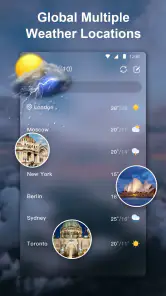
Travellers can use the global coverage to look up a destination before leaving, but I would check the location label each time rather than assume the app has switched automatically. That simple check can prevent a forecast for home from shaping what I pack for somewhere else. For a trip with several stops, I would treat each location as a separate check and avoid relying on one glance to represent the whole route.
On Android, the app requires version 7.0 or later, which makes that compatibility detail worth checking before installing it on an older device. It is free and rated for Everyone, so the basic decision to try it is straightforward for a broad range of users. I would still make the same careful choices about location and notifications that I make with any weather app, rather than assuming that an age rating answers questions about permissions or data handling.
KUCO Apps has maintained the app through its current version, 1.9.7. That tells me which release to look for when checking compatibility, but I would not treat a version number by itself as proof that the forecast suits my area. I’d judge that by using the views for the places I care about and seeing whether the information is practical for my routine.
A cautious recommendation
All in all, Weather Live: Weather Forecast is a fantastic app for anyone who wants to stay ahead of the weather. It's packed with features, easy to use, and reliable. Whether you're a casual user or a weather enthusiast, this app has something for everyone. So, if you're tired of getting caught in the rain or missing out on a sunny day, give this app a try. It's like having a weather guru in your pocket, and trust me, your future self will thank you.
In a world where the weather can be unpredictable, having a reliable app like this is a game-changer. So, next time you're wondering whether to bring that umbrella, just check your phone and let Weather Live: Weather Forecast be your guide.
For a free app rated for Everyone, it is an approachable option to try; it was released on June 3, 2020, and its current version is 1.9.7, with Android 7.0 or later required. My recommendation is measured: use the quick view for routine choices, check the radar when timing matters, and keep another trusted source in mind for serious weather decisions. That combination makes its everyday strengths more useful without asking any single forecast to be perfect.
Weather Live: Weather Forecast Frequently Asked Questions
Can I check weather for places other than my current location?
Yes. Weather Live: Weather Forecast offers local and global weather forecasts, so you can use it to check conditions in places beyond where you are. This can be helpful when comparing weather at home with a destination before traveling or making plans. The app combines those forecasts with radar, giving you more than one way to review conditions.
Is Weather Live: Weather Forecast suitable for everyday use?
Weather Live: Weather Forecast is a weather app designed for checking local and global conditions. Its forecasts and radar can be useful for everyday decisions, such as choosing what to wear or deciding whether to plan an outdoor activity. The app is rated for Everyone, making its intended audience broad, while the usefulness of any forecast will depend on the places and information you want to follow.
What does the app’s weather radar show?
Weather Live: Weather Forecast includes weather radar alongside local and global forecast information. The radar can help you check weather patterns visually, while forecasts provide another way to understand conditions in the places you care about. If you regularly plan trips or outdoor activities, having these tools together can make the app useful for a quick weather check before you head out.
Will Weather Live: Weather Forecast work on my device?
The app is available for Android devices running version 7.0 or later, and it is also offered for iOS. It is a weather app developed by KUCO Apps, with a general-audience content rating. Checking your device’s operating system before downloading is a sensible first step, especially if you have an older phone or tablet.
What features does Weather Live: Weather Forecast offer?
Weather Live: Weather Forecast provides a comprehensive suite of features including real-time weather updates, detailed forecasts for the week ahead, interactive weather maps, and alerts for severe weather conditions. The app also offers sunrise and sunset times, wind speed and direction, and humidity levels, ensuring users have all the weather information they need at their fingertips.
Pros
- Highly accurate weather updates.
- Customizable widget options.
- Detailed radar and satellite maps.
- Real-time severe weather alerts.
- User-friendly interface.
Cons
- Ads can be intrusive at times.
- Premium features are behind a paywall.
- High battery consumption.
- Occasional loading delays.
- Limited offline functionality.
- Category
- Weather
- Version
- 1.9.7











