Weather Forecast
- 4.37K
- 4.7
- Installs
- 10.00M
- Price
- Free
Screenshots
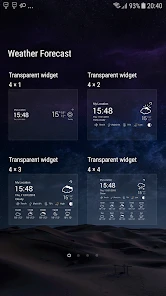
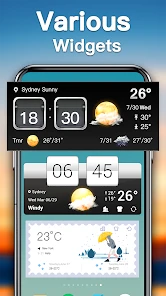
Analysis by Reviewed
I judge a weather app less by how much information it can show than by how quickly it helps me make a sensible plan. Weather Forecast is built for that everyday check: deciding whether to take a jacket, choosing when to head out, or getting a broad sense of the week ahead. It is a free weather app from TOH Talent Team, and its focus on forecasts and radar makes it most useful when I want both a quick overview and a way to follow changing conditions.
Where a quick check can get stuck
Weather apps are only useful when the forecast is easy to find and the location is right. If the conditions look surprising, I first check that I am viewing the intended place rather than assuming the forecast itself is wrong. A nearby town can have different conditions, especially when rain is moving through, so the location on screen matters as much as the forecast.
I also avoid treating a seven-day outlook as a firm appointment calendar. It is handy for spotting broad patterns when I am planning ahead, but I rely more on the near-term view for decisions that depend on exact timing. That distinction helps me use the app without expecting a forecast several days away to settle every detail.
Getting to Know Weather Forecast
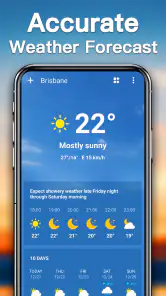
First off, let's dive into how Weather Forecast works. The app is designed to provide you with real-time weather updates that are accurate and easy to understand. When you first open it, you’re greeted with a sleek interface that’s not just easy on the eyes but also incredibly intuitive. No more fumbling around trying to find the information you need—everything is laid out in a way that makes sense.
Setup checks that make forecasts more useful
When I start using a weather app, I check the displayed location and make sure the phone can get online. Those simple checks often explain a blank, stale-looking, or unexpected forecast without turning setup into a project. If the location is wrong, I correct the place I want to follow; if the information has not refreshed, I try again once the connection is available.
Weather Forecast is rated for Everyone, costs nothing to try, and runs on Android 6.0 or later. Its 14.0 version is a mature release, while its 4.7 average from around 180,000 ratings and more than 10 million installs suggest it has found a broad audience. I would still judge it by whether its layout and local forecast suit my routine: popularity cannot tell me how useful the information will be for my particular neighborhood.
Features That Stand Out
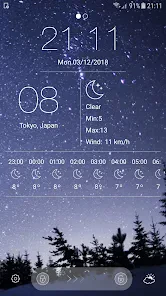
One of the stand-out features of this app is its hourly weather updates. This is a game-changer for anyone who needs to plan their day down to the hour. Whether you’re trying to figure out the best time to go for a run or when to schedule that outdoor meeting, Weather Forecast has your back. The app also offers a 7-day forecast, so you can plan your week without any unexpected surprises.
More From Our News Desk

Weather by Xiaomi Review: Clear at a Glance, Less Clear Up Close

X Under Pressure: Can It Recover When Posting Goes Wrong?

Clash of Clans Is Won Between the Battles

Android Auto Makes the Case for Quieter Car Software

MobiOffice: Transforming Mobile Productivity with Seamless Integration

EA SPORTS FC™ Mobile Soccer: Redefining Mobile Sports Gaming
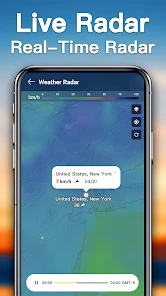
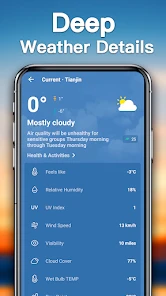
But wait, there’s more! For those who love a bit of detail, the app provides comprehensive information including humidity levels, wind speed, and even UV index. It’s like having a weather station right in your hand. And for the visually inclined, the app includes radar maps that let you track weather patterns in real-time. Trust me, watching a storm roll in on the map is oddly satisfying.
Choosing what to check before heading out
For a school run, dog walk, or commute, I find it useful to start with the hourly view rather than scanning the whole week. I look for whether conditions change around the time I will actually be outside, then use the broader outlook only if I am deciding which day to schedule an errand. This small order of operations keeps a quick check quick: the week view helps narrow down a day, while the hourly details help with timing.
There is also a practical way to use the extra conditions without turning every forecast into a research session. Wind matters more than a temperature number when I am cycling or carrying an umbrella; UV is more relevant when I will spend a long stretch outdoors; humidity can help explain why a seemingly mild day feels uncomfortable. I would check the detail that affects the plan and ignore the rest. The benefit is not collecting every metric, but matching the information to the decision.
Using the forecast for real plans
For a practical example, imagine I have a walk to work and an outdoor errand later in the day. I can use the hourly view to compare the likely conditions around those parts of the day, then look at radar when rain seems relevant. The useful habit is to check both rather than letting a single icon decide: the forecast gives me a time-based overview, while the map helps me see whether a weather system appears to be approaching or passing.
That combination also clarifies the app’s trade-off. Radar is more visual than a row of forecast values, but it takes a moment to interpret and should not be mistaken for a guarantee about exactly when rain will reach my street. For a quick decision, the hourly forecast is simpler; when the sky looks unsettled, the map adds context. I would use the longer outlook for broad planning, then check again closer to leaving.
Reading radar without overreacting
A useful radar check is a comparison, not a promise. If I see rain near my area, I first orient myself on the map and look at the direction and general movement rather than assuming the strongest-looking patch is headed directly toward me. I then compare that impression with the hourly forecast. When the two views do not line up neatly, I avoid making a precise arrival-time prediction from the map alone.
This is especially helpful when deciding whether to leave immediately or wait a little before an outdoor task. Radar can show why conditions may be changing, but it does not remove uncertainty at street level. If the outing is flexible, I treat the map as a reason to check again before leaving; if it is not flexible, I make a robust plan, such as bringing rain protection rather than trying to outguess the timing.
Usability and Design
The usability of the app is top-notch. Everything is just a tap away, and the design is both functional and aesthetically pleasing. The developers clearly put a lot of thought into making sure the app is user-friendly. You don’t need to be a tech wizard to navigate through the different sections, which is always a bonus in my book.
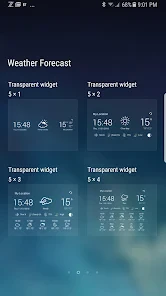
One little nifty feature that I personally love is the app's ability to send weather alerts straight to your home screen. This means you’ll never be caught off guard by sudden changes in weather, which is particularly useful if you live in an area where the weather can be unpredictable.
A routine that keeps checks useful
I would make the app part of a small routine rather than keeping it open all day: check the location and the hourly outlook when planning to leave, glance at radar if rain could disrupt the plan, and check again closer to the time if conditions look unsettled. That approach makes the information easier to act on and avoids treating every forecast change as a reason to revise the whole day.
If I am planning something several days away, I use the longer view to compare possibilities, not to lock in details that depend on exact weather. For a picnic or outdoor appointment, I would keep a backup option in mind and make the final call nearer the day. The app is most useful when it supports that kind of flexible planning, not when I expect it to remove uncertainty.
Recovering when something looks off
If a forecast seems stuck or a location is not what I expected, I work through the basics in order: check the displayed place, check whether the phone has a connection, then reopen the app and look again. If radar and the written forecast appear different, I treat them as different views to compare, not as proof that one must be broken. A map can make a passing band easier to notice, while the forecast is the better place to check the stated outlook.
Alerts are helpful as a prompt, not a replacement for checking conditions before a plan that depends on them. I would not assume every change will arrive as a notification or make a safety-critical decision from one glance. For outdoor work, travel, or severe weather concerns, I compare the forecast with current local guidance and use caution rather than relying on a single app.
When the phone or connection is the real obstacle
When information does not seem current, I try to separate an app problem from a basic phone issue. I check whether other online services are working, confirm that I have selected the right place, and give the forecast another chance to load after reconnecting. If the phone has been offline, a screen that has not changed may simply be showing information from before the connection returned. These checks are more useful than repeatedly switching between forecast and radar without knowing whether either has refreshed.
For a trip or a day with limited connectivity, I would not assume that a live radar view will remain useful without a connection. I check conditions while online and make a practical plan before heading out. That is a sensible habit for any weather tool: a convenient display is not a substitute for having a backup plan when access to current information is uncertain.
When another weather option fits better
Compared with a phone’s built-in weather screen, this app makes sense if I want a dedicated place to look at radar alongside the forecast. A simpler built-in option may be better if I only need the temperature at a glance and prefer not to open another app. On the other hand, someone who needs specialist mapping or highly detailed professional data should look for a service designed around those tools rather than assuming this general-purpose app will cover every advanced need.
I find Weather Forecast best for people who make ordinary day-to-day plans and appreciate having hourly and week-ahead views in one place. It is less compelling for someone who rarely checks weather, dislikes navigating between forecast and map, or needs highly specialized information. Its 4.4K reviews offer another source of user feedback, but my practical test would be whether the local forecast and radar are clear enough for the decisions I actually make.
Who will get the most from it
This is a sensible fit for someone who checks weather before commuting, walking, exercising outdoors, or arranging a casual plan, and who wants a radar view available without moving to a separate specialist tool. The mix of a near-term forecast and a wider outlook suits people who make everyday decisions in stages: first choosing a day, then choosing a time. It is also approachable if you do not want to learn a complicated mapping interface just to check whether rain may affect your plans.
I would skip it if I want only a glanceable temperature and already find the built-in weather screen adequate. I would also choose a more specialized service if my decisions depend on detailed professional maps or a level of local analysis beyond general forecasting. That is not a knock on this app; it is a question of matching the tool to the stakes and complexity of the job.
Final Thoughts
All in all, Weather Forecast is a solid app that delivers exactly what you need without any unnecessary fluff. It’s reliable, easy to use, and packed with features that cater to both casual users and weather enthusiasts. If you’re on the hunt for a dependable weather app, this one should definitely be on your radar.
Whether you’re a sun worshipper or someone who loves a good rainstorm, Weather Forecast makes sure you’re always in the know. So go ahead, download it, and never let the weather catch you by surprise again!
Weather Forecast Frequently Asked Questions
Is Weather Forecast suitable for children and family use?
Weather Forecast is rated Everyone, making it suitable for a broad audience, including families looking for a straightforward way to check the weather. Its focus is on forecasts and weather radar, which can help with everyday plans such as deciding what to wear or whether to adjust an outing. As with any app, parents can review its settings and how it is used on a child’s device.
What does Weather Forecast show for upcoming days?
The app’s weather information covers today, tomorrow, and the next seven days, giving users a view of current and upcoming conditions. It also features weather radar, which offers a visual way to follow weather patterns. This combination may be useful when planning day-to-day activities as well as looking a little further ahead, though forecasts should be treated as guidance rather than a guarantee.
What is Weather Forecast, and who is it for?
Weather Forecast is a weather app for people who want a convenient way to check conditions and plan ahead. Its age rating is Everyone, so it is suitable for a broad audience. The app’s store summary highlights forecasts and weather radar for today, tomorrow, and the next seven days, making it useful for everyday planning.
Which devices can run Weather Forecast?
Weather Forecast is available for Android devices running Android 6.0 or later. Before downloading, check the operating system version on your device to make sure it meets that requirement. The app is currently at version 14.0, and confirming compatibility before installation can help avoid problems when trying to download or open it.
What features does the Weather Forecast app offer?
The Weather Forecast app provides a comprehensive suite of features including real-time weather updates, hourly and weekly forecasts, severe weather alerts, and radar maps. Additionally, it offers customizable notifications to keep users informed about significant weather changes and supports multiple locations, allowing users to monitor weather conditions in different areas at once.
Pros
- Accurate weather predictions daily.
- Simple and user-friendly interface.
- Customizable weather alerts.
- Wide range of weather information.
- Fast and responsive performance.
Cons
- Ads can be intrusive at times.
- Requires internet for full features.
- Limited offline functionality.
- Some features behind paywall.
- Battery consumption could be high.
- Category
- Weather
- Version
- 14.0











