Weather Forecast - Live Alerts
- 94.00
- 4.7
- Installs
- 1.00M
- Price
- Free
Screenshots
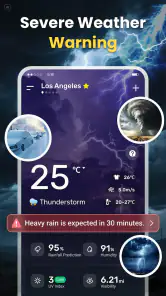
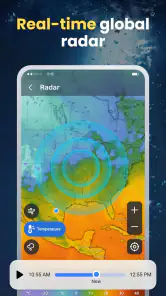
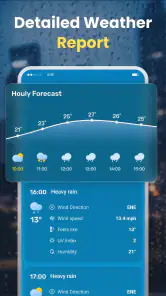
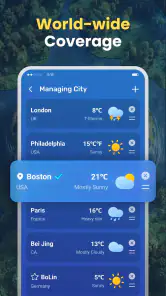
Analysis by Reviewed
I judge a weather app by a simple test: can I make a better decision with it without having to guess what it is doing? Weather Forecast - Live Alerts is a free weather app from RODRIGUEZCASTILLO FABIOLA. Its name sets an expectation of timely forecasts and alerts, but I’d treat it as a practical source to consult rather than assume that any forecast or warning is guaranteed. That distinction matters most when a change in the weather could affect a commute, outdoor plans, or a longer trip.
What earns trust in a weather app
The app’s description is brief, so I wouldn’t read more into its promises than the words support. For me, trust comes from being able to see what the app offers, make deliberate choices, and check important information against another source when the consequences are high. A weather forecast is useful guidance, not certainty: local conditions can change, and an alert is only helpful if it reaches you in time and applies to your location.
The app has a 4.7 average from around 4,100 ratings, and it has passed one million installs. Those figures suggest that many people have chosen to try it, but they do not tell me whether its forecasts match the needs of my location or routine. I’d use popularity as context, not as proof that every alert is complete or that every user will find the experience suitable.
It is listed for everyone, which makes it broadly approachable as a weather utility. The current version is 1.0.38, and it was released on December 17, 2025. That relatively recent release context makes me especially careful about treating the app as my only source for decisions where an outdated or missed update could matter. I’d first see how it behaves in ordinary conditions before relying on it for anything time-sensitive.
Check the choices before you depend on alerts
Alerts are the part of a weather app that can affect how much attention it asks from you. Before making them part of my routine, I would look at the choices presented in the app and on the device: what notifications I can enable or silence, whether location access is requested, and whether I can use a manually selected location instead. These are sensible checks for any weather tool; I would not assume a particular permission or control exists here without seeing it on my own device.
That distinction is important. A request for location access, if presented, should be considered in light of how I plan to use the app. If I mainly check weather for one town, a location choice that does not require continuous access would be preferable to granting broader access—if that choice is offered. If I need conditions for changing locations, more direct location access could be convenient, but I would still review the operating system’s permission options rather than accept a prompt automatically.
I would also inspect notification settings instead of switching every alert on by default. A warning that arrives at a useful moment can help; frequent notifications that I cannot tune may simply become noise. If the available controls are not clear, I would keep the app as a manual check and rely on a separate, trusted warning channel for severe-weather decisions.
You May Like

Clash of Clans Is Won Between the Battles

Android Auto Makes the Case for Quieter Car Software

MobiOffice: Transforming Mobile Productivity with Seamless Integration

EA SPORTS FC™ Mobile Soccer: Redefining Mobile Sports Gaming

How Microsoft OneDrive Became a Mobile Productivity Giant

How Google Translate Breaks Language Barriers Effortlessly
Location and personal-data moments deserve attention
Weather is inherently location-sensitive. A forecast for the wrong town can be misleading even if the information itself is current, so the first practical question is whether the displayed location is the one I care about. When I travel, I would verify that the app has switched to the intended place rather than assume that a forecast follows me correctly. For a planned drive, I would check both the departure point and destination instead of using conditions at home as a proxy for the whole route.
Location information can also reveal routines, which is why I prefer to grant only what a service genuinely needs for my chosen use. The app’s name and category do not establish how it handles location or other data, so I would read the privacy information and permission prompts shown on the device before deciding. If I am uncomfortable with the requested access, I would deny it where possible and see whether manual location selection remains practical. If it does not, another weather source may suit me better.
I’d apply the same caution to account controls. I would not assume that an account is necessary, that one can be created, or that a particular deletion option exists. If the app offers sign-in or asks for personal details, I would pause and consider whether those details are needed for a basic forecast. If it can be used without sharing more than I’m comfortable with, that is a better fit for a quick daily check; if not, I would compare it with a provider whose account and privacy choices are clearer to me.
A useful routine without giving the forecast too much authority
One realistic use is a morning check before leaving for work. I would look at the forecast for the places I’ll actually be, then decide whether I need a coat, an umbrella, or extra travel time. If an alert appears, I would treat it as a prompt to investigate rather than as a complete explanation of what is happening. For an important outdoor commitment, I would check again closer to departure, because a morning glance cannot settle every later decision.
There is a less obvious advantage to this habit: it separates two questions that are easy to muddle. First, what weather is expected where I am going? Second, how confident should I be before changing my plans? A weather app can help with the first, while the second depends on the stakes, the timing, and whether another source agrees. For a casual walk, one forecast may be enough. For a long drive or an event that cannot easily be moved, I would cross-check.
I would also keep notifications proportionate to the places I care about. If the app presents controls for locations or alert types, I would focus them on the places that affect my day rather than turn every option on. That keeps a weather alert meaningful instead of making it one more notification I ignore. This is a workflow suggestion, not a claim that the app offers any specific alert filters.
Where it fits among familiar weather options
Compared with a built-in phone weather app, a separate app is worth keeping only if its presentation, location handling, or alerts work better for me. The built-in option is often the easiest starting point because it is already on the device; switching makes sense when the alternative gives me a clearer view of the places I check or a more useful routine. I would compare the actual screens and controls on my phone rather than assume that a separate app is automatically more detailed.
Compared with a national weather service or an established local forecast source, this app is best treated as a convenient everyday companion until I have tested it in my area. Official warning services may be the better choice when I need authoritative hazard information, while a general weather app can be quicker for a routine glance. I would not make the app’s “Live Alerts” wording a substitute for checking a recognized emergency source when safety is involved.
It is also not the right tool for every kind of planning. If I need specialist information for aviation, marine activity, mountain conditions, or another high-risk setting, I would choose a service designed for that purpose. For ordinary decisions—whether to take an umbrella or reconsider an outdoor errand—a simple forecast app can be enough, provided I remain aware that conditions and predictions are not interchangeable.
Who may appreciate it, and who should look elsewhere
I can see this app suiting someone who wants a straightforward weather check and is willing to review its permissions and notification choices before relying on it. It costs nothing to download, which makes trying it an easy decision for a casual user. The minimum operating system is version 7.0, so compatibility is broad for devices that meet that requirement, though the experience still depends on the device and the choices made during setup.
I would hesitate to recommend it as a sole source to someone who needs highly specialized forecasts, firm guarantees about alert delivery, or detailed privacy assurances before installing. Those needs call for clearer, verified information and often a dedicated service. I’d also skip it if its location prompts, account requests, or alert controls—whatever appears during setup—do not match my comfort level. A free app is not automatically the right trade-off if its choices feel unclear.
My practical approach would be to install it, check the forecast for a familiar location, and inspect the permission and notification options before turning the app into part of my daily routine. I would compare its forecast with a source I already trust for a few ordinary days, then decide whether the presentation and alerts are useful enough to keep. That small trial answers the questions that a rating alone cannot: whether it shows the places I need, whether its notifications help rather than distract, and whether I feel comfortable with the access it requests.
A cautious recommendation
Weather Forecast - Live Alerts is worth considering as a free, everyday weather app, especially if you want a convenient way to check conditions and are prepared to make your own choices about location and notifications. I like the sensible role it can play: a quick prompt for the day, not a promise that the weather will unfold exactly as predicted. The strongest recommendation I can make is conditional—try it, review the controls visible on your device, and judge its usefulness in your own area.
For low-stakes planning, that may be all you need. For severe weather, sensitive location concerns, or specialized outdoor activity, I would pair it with a more authoritative or purpose-built source. That balance lets the app be convenient without asking it to carry more trust than a general weather forecast should.
Making the first few checks count
When I test a new forecast app, I try not to judge it from a single glance. I would check the same familiar location at different points in the day and note whether the information helps with a decision I actually make, such as choosing when to run an errand. This is more useful than opening it repeatedly without a purpose, and it gives me a fairer sense of whether its everyday presentation suits me.
A small but worthwhile habit is to confirm the location label before acting on a forecast, especially after travelling or switching between places. Then I would compare the expected conditions with what I can observe outside and with a source I already trust if plans are important. That routine cannot make forecasts certain, but it can catch a wrong-place assumption before it turns into a bad packing or travel decision.
When convenience is not enough
For a flexible weekend walk, a quick forecast is usually a reasonable starting point; for a fixed outdoor appointment, I would check again near the time and have a backup plan. Someone coordinating a group might also share the location and timing they are checking, rather than send a vague message that simply says the weather looks poor. These are practical ways to use a general weather app without expecting it to make the decision on everyone’s behalf.
My final choice would come down to whether the app earns a place alongside the tools I already use. If I can quickly check the right place, understand the forecast, and keep notifications at a comfortable level, it may be a useful addition. If I spend more time managing permissions or second-guessing the location than getting a clear answer, the phone’s built-in forecast or a local weather service is the more sensible option for me.
Weather Forecast - Live Alerts Frequently Asked Questions
What can I do with Weather Forecast - Live Alerts?
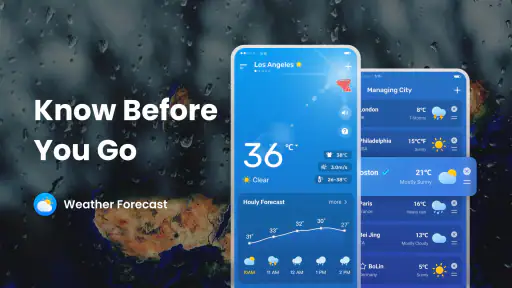
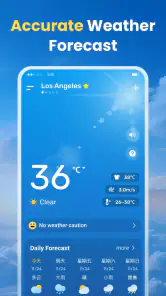
Weather Forecast - Live Alerts is designed to help you check current conditions and see what the weather may be like in the hours or days ahead. Depending on the version and your location, its features may include temperature, precipitation, wind, and severe-weather notifications. Check the app’s feature list and screenshots on the download page, since available forecasts and tools can vary by region and app version.
Are the forecasts and live alerts accurate?
Forecasts and alerts are useful for planning, but they are not guarantees. Accuracy can vary with location, forecast provider, changing conditions, and how far ahead you are looking. For important decisions—especially during severe weather—compare the app’s information with official local weather advisories. Keep the app updated and allow location access if you want forecasts tailored to where you are.
Does Weather Forecast - Live Alerts need my location?
Location access can help the app show local conditions and send alerts relevant to your area. You may be able to enter a city manually instead, though the exact options depend on the app version. Review the permission prompt and the app’s privacy information before choosing. If you grant location access, check your device settings to see whether it can use location only while the app is in use.
Can I receive severe-weather notifications?
The app’s name indicates that live alerts are a central feature, but the types of notifications available may depend on your location, device settings, and the app’s alert coverage. Check that notifications are enabled both in the app and in your phone’s settings, and review any alert categories you can choose. Do not rely on a third-party app as your only source for emergency warnings.
Is Weather Forecast - Live Alerts free, and does it contain ads or in-app purchases?
Pricing and monetization can differ between the Android and iOS versions and may change over time. Before downloading, check the store listing for the price, advertisements, and any in-app purchases or subscriptions. If you are considering a paid option, review its renewal terms and cancellation instructions first. Also check recent user reviews to learn whether the current version’s costs and features match your expectations.
Pros
- Quick access to current conditions and upcoming forecasts.
- Severe weather alerts can help you prepare before conditions change.
- Useful for planning outdoor activities and daily travel.
- Live radar makes precipitation patterns easier to follow.
- A straightforward layout helps you find key weather details quickly.
Cons
- Forecast accuracy can vary by location and how far ahead you look.
- Some locations may have limited or less detailed weather data.
- Frequent alerts may become distracting if notifications are enabled.
- Radar and forecast information require an internet connection to update.
- Ads or premium features may affect the experience
- depending on the version.
- Category
- Weather
- Version
- 1.0.38