Ventusky: Weather & Live Radar
- 554.00
- 3.9
- Installs
- 1.00M
- Price
- Free

Screenshots
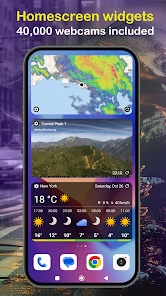
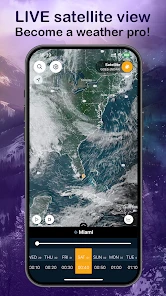
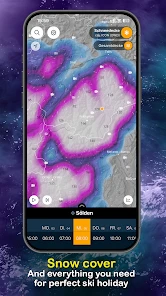
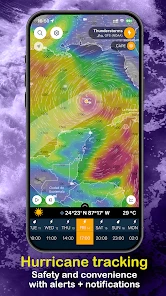
Analysis by Reviewed
When I’m deciding whether to change a plan because of the weather, a single icon can leave out the part I care about most: what is happening nearby and where it is headed. Ventusky: Weather & Live Radar is built around that bigger picture. Its map-led approach makes weather feel less like a list of numbers and more like something unfolding across a place, which I find especially useful when conditions might affect a walk, a trip, or time outdoors.
Useful context before the day gets busy
The app is at its best when I have a question that needs more than a quick temperature reading. Is rain approaching from the west? Does the wind look different along the coast than inland? Is it worth shifting an outdoor plan by a few hours? Looking at the map helps me frame those questions spatially. I still check the forecast for the specific place I care about, but the surrounding pattern gives that local outlook more meaning.
That makes it a good fit for people who like to plan with context: walkers choosing a start time, travelers checking conditions across a route before leaving, or anyone curious about how a passing weather system might affect their area. It is less compelling if I only want a compact answer while rushing out the door. In that situation, a basic forecast card is easier to scan, and I would not open a detailed map just to confirm something I already know.
Readability, navigation, and a calmer way to explore
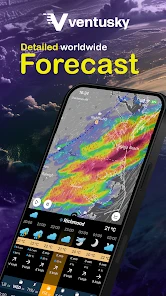
One of the first things that caught my eye with Ventusky is its stunningly visual interface. Unlike the typical weather apps that bombard you with numbers and stats, Ventusky offers a beautiful and interactive map that lets you explore different weather patterns globally. From wind currents to temperature changes, you can see it all in real-time. I mean, who knew checking the weather could be this fun?
Reading the map at your own pace
That map-first approach is a real strength if I want to understand where a weather system is moving, rather than scan a row of icons for a single city. It also asks more of me: colors and moving patterns can be harder to interpret quickly than a plain temperature and rain summary. I find the clearest workflow is to start with the map for context, then check the forecast details for the place I actually plan to visit. If I only need to know whether to carry a coat, a simpler forecast screen may be quicker.
Ventusky is a free weather app from developer Ventusky, with optional in-app purchases priced from $2.99 to $19.99 per item. It has a 3.9 average from around 15,000 ratings, and more than a million installs. It is rated for Everyone and has been available since December 19, 2017. Those details make it easy to place the app, but the useful question is whether its layered map suits the way I make decisions about weather.
Weather layers for decisions, not just browsing
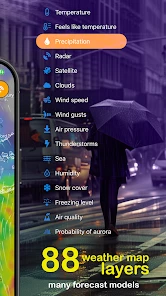
But don’t let the pretty visuals fool you; this app is packed with serious weather data. You can dive deep into specifics like air pressure, snow cover, or even wave heights for those planning some sea adventures. It's like having a mini meteorologist in your pocket. Whether you're planning a hike or just curious about the storm brewing across the ocean, Ventusky has got you covered.
More From Our News Desk

Weather by Xiaomi Review: Clear at a Glance, Less Clear Up Close

X Under Pressure: Can It Recover When Posting Goes Wrong?

Clash of Clans Is Won Between the Battles

Android Auto Makes the Case for Quieter Car Software

MobiOffice: Transforming Mobile Productivity with Seamless Integration

EA SPORTS FC™ Mobile Soccer: Redefining Mobile Sports Gaming
Those layers can help me ask better questions than “Will it rain?” For a hike, I might compare wind and temperature across the route before deciding which part of the day feels sensible. Near the coast, wave information can add context that a basic town forecast misses. A useful trade-off is that more data does not automatically mean a more certain decision: I still treat a map as a planning aid, not a substitute for local warnings or judgment. If I am unfamiliar with a layer, I would rather check what it represents than infer too much from its colors.
Following changing conditions without rushing
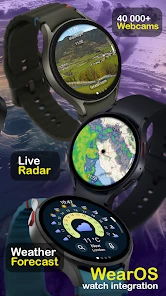
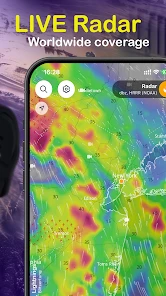
What makes Ventusky stand out is its live radar feature. It’s incredibly detailed and allows you to track storms and rainfall in real-time. This is particularly handy for those spontaneous outdoor plans. Plus, the app provides timely alerts for severe weather conditions, ensuring you’re always prepared, come rain or shine.
In an ordinary day, I can picture checking the rain around home before leaving, then reopening the map during a walk when the sky starts to darken. Seeing nearby movement can help me choose whether to head back or wait somewhere sheltered. For a longer drive, I would check the route before setting off rather than trying to study a detailed map while moving; the visual detail is best used when I can give it my attention. Radar and alerts are useful companions, but I would not rely on any one app as my only source during dangerous conditions.
Motor and sensory considerations
The map invites exploration, which is enjoyable when I have time, but it can be less convenient if precise gestures or repeated screen interaction are difficult. A quick glance at a straightforward forecast may be easier in that moment. Likewise, a moving, colorful display can be busy for someone who prefers still, text-led information. I would use the map selectively—choosing the layer that answers one question, then returning to a simpler view—rather than leaving every visual detail competing for attention.
A practical workflow for a real forecast check
For a weekend outing, I would begin with the destination and the likely period I’ll be outside, then look at the map for the weather pattern rather than immediately switching through every available layer. If rain is the concern, I’d focus on precipitation and radar; if the route is exposed, wind may be the more useful comparison. I’d then check the place-specific forecast and decide whether the plan needs changing. This keeps the app from becoming a tour of interesting maps with no clear decision at the end.
There is also a useful distinction between planning and monitoring. Before leaving, I can take time to compare conditions across a wider area. Once I am outdoors, I want a simple answer and a safe place to act on it, not an extended session of zooming and layer switching. I’d check the map while stopped, and treat alerts as a prompt to pay attention rather than proof that conditions are harmless until one appears.
Another cool feature is the ability to customize the weather layers. Whether you’re a hardcore weather enthusiast or just a casual user, you can adjust what you see on the map. It’s like having a weather station at your fingertips!
That customization is most helpful when I use it with a purpose. Before a trip, I can focus on the conditions relevant to the activity instead of treating every available map as equally important. Comparing a couple of layers can reveal useful context, but switching among many options can also slow down a quick check. I would start with the one concern that could change my plan—rain, wind, or temperature—and add another layer only if it answers a real question.
Usability and Accessibility
Navigating through the app is a breeze. The intuitive design means you don’t need to be a tech wizard to figure it out. Plus, it’s available on both Android and iOS, so no one’s left out in the cold! Simply download, set up your location, and you’re good to go.
For someone who relies on a fast, low-effort glance, the map may take more attention than a conventional forecast card. I would not choose it as my only weather tool if I need large, plain-text information at a glance or find layered graphics tiring; a simpler weather app can be a better fit for that routine. Ventusky makes more sense for people who like spatial context, want to explore conditions beyond their immediate neighborhood, or are comfortable taking a moment to orient themselves on a map.
When the map is not the easiest option
Weather information has to work in the moment it is needed, and a detailed visual display can be a poor match for some situations. If I’m already outside in bright conditions, carrying things, or trying to check the forecast while moving, I would rather stop and use a more direct view than rely on a quick interpretation of multiple colors. Anyone who finds animation distracting may also prefer a static summary for routine checks. That is not a flaw unique to this app so much as a real trade-off in choosing a map as the main way to explore weather.
For people who use assistive technologies or need particular text, contrast, or motion settings, I would test the interface against their own needs before depending on it. A map can communicate patterns efficiently for one person and create extra work for another. The practical question is whether the essential information—where conditions are, how they may change, and what action to take—is comfortable to locate and understand on the device being used. If it is not, a simpler text-forward forecast is a sensible alternative, even if it offers less geographic detail.
One question people often have is whether the app is only for weather hobbyists. I don’t think so: a casual user can open it for a rain check, while someone who enjoys meteorology can spend longer comparing conditions. Another practical question is whether the free app is enough. It is free to use, while optional purchases are available; I would begin with the free experience and decide whether any paid option matters to my own routine before spending. Its broad set of maps is a reason to try it, not a reason to assume every layer is necessary.
How it compares with a conventional forecast
Compared with the usual weather apps that lead with a daily summary, Ventusky puts the map and geographic picture closer to the center. That makes it more informative when I care about how conditions vary across an area, but less direct when I just want a single number or a quick yes-or-no answer. I would keep a simpler forecast option in mind for very fast checks, and choose Ventusky when the movement and distribution of weather are what I need to understand.
That difference matters most when I am deciding between two places or timings, rather than asking for a single local reading. A conventional app is often better at putting today’s essentials right up front; Ventusky is better suited to exploring the pattern behind them. I wouldn’t replace a straightforward forecast with it for every household check. I’d use each style for what it does well, and keep the map app for the moments when geography changes the decision.
A measured recommendation for different needs
Overall, Ventusky: Weather & Live Radar is more than just a weather app; it’s an experience. It combines functionality with stunning visuals, making weather checking a part of my daily routine that I actually look forward to. Whether you're planning your day or just curious about the world’s weather patterns, this app is a must-have. So, go ahead, give it a whirl, and see the weather in a whole new light!
Who will get the most from it
I would recommend it to curious users, outdoor planners, and anyone who wants to see weather as a changing pattern across a map rather than a set of isolated readings. I would skip it—or pair it with a simpler forecast—if my priority were the fastest possible glance, if map-heavy screens were difficult to use, or if I rarely need more than a basic local outlook. For me, its best role is a visual planning tool: engaging and informative when I have a specific question, but not automatically the easiest answer for every weather check.
My inclusive verdict
My recommendation is conditional in a useful way: choose Ventusky if map-based context helps you make better plans, and give yourself time to learn which layers actually matter to you. Keep a simpler forecast within reach if you need information with minimal interaction, or if animated visuals and gestures are tiring or difficult. The app’s visual depth is its defining advantage, but a weather tool should make decisions easier, not add another barrier. Tried at your own pace and used for the right questions, it can be a thoughtful companion for understanding changing conditions.
Ventusky: Weather & Live Radar Frequently Asked Questions
Can I use Ventusky to compare weather conditions in different places?
Yes. Ventusky’s map-based approach makes it easy to move between locations and get a visual sense of how conditions differ. This can be handy when choosing between destinations, checking weather near family or friends, or comparing a local forecast with conditions elsewhere. Rather than relying only on a brief summary, you can explore weather patterns on the map and see the broader picture.
What kinds of weather can I view on Ventusky’s maps?
Ventusky offers more than 80 weather maps, along with live radar and tools for following storms and hurricanes. The maps provide a visual way to explore weather conditions and patterns, which can be useful if you like seeing more than a standard forecast summary. The range of layers makes the app especially appealing to people who want to inspect weather information in a more detailed, map-focused format.
Does Ventusky show weather conditions for locations around the world?
Ventusky is built around visual weather maps, making it useful for checking conditions beyond your immediate area as well as looking at weather where you plan to travel. Its global weather data and forecast maps help you explore patterns across different places. For day-to-day decisions, you can focus on a location; for broader context, the map view gives you a way to see how weather systems are moving.
Can Ventusky help me track storms and hurricanes?
Yes. Storm and hurricane tracking is part of Ventusky’s weather-focused feature set, alongside live radar and a wide selection of weather maps. The visual presentation can help you follow developing conditions and see how they relate to surrounding areas. It is a useful way to monitor weather patterns, though forecasts are best treated as guidance and checked again as conditions change.
Is Ventusky useful for planning outdoor activities and trips?
Ventusky can be useful when deciding what to wear, when to travel, or whether changing weather might affect an outdoor plan. Its forecasts and interactive maps let you look beyond a simple summary and explore conditions visually. For a trip, checking the destination as well as the route can provide helpful context; for plans affected by severe weather, keep an eye on updated forecasts.
Pros
- Real-time weather updates
- Detailed radar imagery
- User-friendly interface
- Accurate forecasts
- Global coverage
Cons
- Limited free features
- Ads in free version
- Requires internet for updates
- Occasional loading delays
- Subscription for advanced features
- Category
- Weather
- Version
- Varies with device











