Uber - Request a ride
- 428.26K
- 4.7
- Installs
- 1.00B
- Price
- Free

Screenshots



Analysis by Reviewed
When I need a ride without arranging a car in advance, I want the request to be quick, the pickup point clear, and the handoff to the driver uncomplicated. Uber - Request a ride is built around that familiar moment: open a maps and navigation app, enter where you’re going, and arrange a trip through your phone. It can be useful for ordinary errands as well as airport journeys, but the experience still depends on local ride availability, traffic, and whether you can meet the driver at a sensible pickup spot.
Deciding when a ride makes sense
I find Uber most useful when public transport would involve awkward transfers, when I’m carrying bags, or when I need to leave at a particular time. For a short trip along a direct bus or train route, public transit is often the better choice: it can be cheaper, and it avoids coordinating a vehicle pickup. Walking or cycling can make more sense for nearby destinations. Uber’s advantage is flexibility, not that it is automatically the best option for every journey.
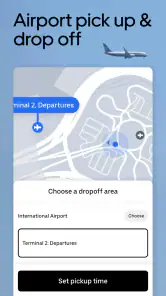
A practical example is getting to the airport with luggage. I can request a car from a suitable pickup point rather than trying to manage a bag through several transit connections. Before confirming, I’d check the destination and pickup location carefully, then leave room for traffic and the time it takes to meet the driver. That small pause matters: a correct address can still be an awkward pickup if it sits on a busy road or the wrong side of a large venue.
The Latest on Uber - Request a ride
Getting Started with Uber
First off, let me tell you how easy it is to get started with Uber. Downloading and installing the app is a breeze. I was up and running in no time. You just need to sign up, enter your payment details, and voilà, you're ready to request a ride. The user interface is pretty slick too. Everything's laid out intuitively, so even if you're not tech-savvy, you'll find it user-friendly.
From destination entry to pickup
The most useful habit I’ve developed is to treat the pickup pin as carefully as the destination. A pin placed at the nearest entrance, rather than somewhere across a plaza or behind a building, can prevent a round of calls and messages. If I’m leaving a crowded station, I look for a pickup place I can actually reach on foot and describe clearly. This is especially helpful when several streets or entrances share a similar address.
After requesting, I use the driver and vehicle details shown in the app to make sure I’m meeting the right car. Tracking helps me judge when to head outside, but I don’t treat an estimated arrival as a promise: traffic and road access can change the timing. At busy venues, I stay somewhere safe and accessible instead of stepping into traffic to meet the car. The handoff is smoother when both sides can identify the same pickup point.
The Ride Experience
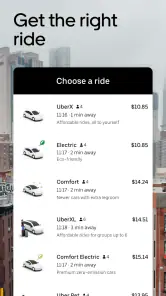
Now, let's talk about the ride experience. The app lets you choose from a variety of ride options. Whether you want to go solo or share a ride, Uber has got you covered. I personally enjoy the UberX option for its balance between cost and comfort. And hey, if you're feeling fancy, you can always opt for UberBlack. The drivers are generally courteous and professional, and I find the cars to be clean and well-maintained.
More From Our News Desk

Weather by Xiaomi Review: Clear at a Glance, Less Clear Up Close

X Under Pressure: Can It Recover When Posting Goes Wrong?

Clash of Clans Is Won Between the Battles

Android Auto Makes the Case for Quieter Car Software

MobiOffice: Transforming Mobile Productivity with Seamless Integration

EA SPORTS FC™ Mobile Soccer: Redefining Mobile Sports Gaming
One of the features I love is the real-time tracking. I can see exactly where my driver is and how long it'll take for them to get to me. No more standing on the curb, wondering when your ride will show up. It's the little things like this that make Uber - Request a ride stand out.
What changes from trip to trip
Options and availability can vary by location, so I wouldn’t plan around a particular ride type being offered everywhere. If you’re travelling with other people or have bulky luggage, consider whether the option you select is a practical fit before you request. For a solo trip, a standard ride may be enough; for a group, public transport or another arrangement could be less stressful if the available car choices don’t suit your needs.
Compared with a traditional taxi, the app puts requesting and following the pickup in one place, which I find convenient when I’m unfamiliar with an area. A taxi from a rank can be simpler when one is already waiting, and buses or trains are often preferable for predictable routes. I use Uber as one choice in that mix, rather than assuming it will always be faster, cheaper, or more available.
Making the trip work for your day
For an everyday errand, I’d think about the whole journey rather than only the drive. If I’m carrying groceries, I’ll choose a pickup spot where I can wait without blocking a doorway and check that the destination pin lands near the entrance I need. For a dinner or event, I’d also consider where I’ll be dropped off: a nearby legal stopping point may be more practical than the exact front door of a crowded venue.
These small choices are useful because a ride request is a handoff, not just a route on a map. I enter the destination, choose an option available for that trip, then make myself easy to find. If the address is ambiguous, I’d use a recognizable nearby entrance or landmark and communicate the meeting point clearly. That is often more effective than repeatedly adjusting a pin while the driver is already approaching.
Uber is particularly convenient for visitors who do not know local taxi customs or which transit line serves a destination. The app-based flow gives me one place to request and follow a ride, while a taxi rank can be the better option when cars are already waiting and I want to leave immediately. In a city with dependable transit, I’d compare the direct route first; the extra door-to-door convenience may not justify a car for every trip.
Safety Measures
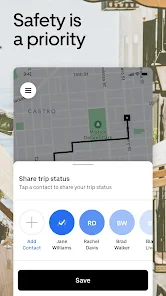
In today’s world, safety is paramount, and Uber seems to get it. The app provides features like driver profiles, which include ratings and reviews, so you know who you’re getting into a car with. Plus, there’s the option to share your trip with a friend or family member. It’s reassuring to know my loved ones can keep an eye on my journey.
Uber has also integrated some COVID-19 safety measures, like mask requirements and the option to sit in the back seat to maintain social distancing. It's nice to see a company adapting to the times and prioritizing health and safety.
When the plan needs adjusting
The flow can become less convenient when the pickup area is congested, a driver cannot reach the pin easily, or road conditions slow the trip. I’d move to a clearer nearby meeting point when that’s safe and practical, rather than repeatedly waiting at a confusing entrance. If timing is critical, I compare the available ride with transit or a taxi before depending on it, and I keep enough flexibility for the unexpected.
Uber is a poor fit if you need a guaranteed vehicle at a precise minute, want to avoid app-based coordination, or have a route served well by a straightforward transit option. It also isn’t a substitute for checking accessibility and luggage needs before you travel. I’d use it when door-to-door convenience is worth the trade-offs, not simply because it is the most familiar name.
Another point worth considering is payment and preparation. The app is free to download, but that does not make the ride itself free; I’d review the trip details shown before requesting and make sure the payment setup is ready. If I’m travelling with someone who needs help arranging the ride, I’d agree on the pickup location and destination together before placing the request, rather than trying to solve both while standing in a busy area.
For an airport run, I would not treat the app’s arrival estimate as a complete departure plan. I’d allow time for the driver to reach the pickup, for us to find each other, and for traffic on the way. If the airport has a designated pickup area, following its directions matters more than choosing the closest-looking point on the map. A taxi booked through another method or public transport may be preferable when it better matches the airport’s pickup arrangements or my need for certainty.
Who may find it worthwhile
Uber Technologies, Inc. develops this free app for everyone, and its scale is hard to miss: it has over a billion installs, around 19 million ratings, and a 4.7 average. Those figures suggest a widely used service, though they don’t guarantee the same experience in every city. I’d recommend it to people who want a flexible way to request a ride and are comfortable checking details on a phone; someone who prefers fixed public routes or a street-hail taxi may be happier with those alternatives.
If you’re wondering whether it is useful only for airport trips, I’d say no: everyday errands and evenings out can suit it too. The key question is whether a car pickup actually improves your journey. I also wouldn’t assume that every vehicle option, safety arrangement, or local practice is identical from place to place; check what the app presents for the trip you are making.
The app is rated for everyone, but the practical decision to use it still depends on the traveller and the journey. I’d be cautious about relying on a ride option without first checking that it suits the passenger, luggage, and pickup location. For people who value a predictable route and fixed stops, a transit app alongside a local bus or train may be more useful. For those who would rather avoid waiting at a curb, requesting a car can be a worthwhile alternative.
Planning for less familiar trips
When I’m visiting somewhere new, I use the app as a way to make the pickup and destination explicit, not as a replacement for understanding the area. Before leaving a hotel or venue, I check whether the suggested pickup point is on the side of the building I can reach and whether the destination is the entrance I actually need. A large venue may have several gates or drop-off areas, and a little map-checking can avoid being left at the opposite end.
For a late evening journey, I’d decide on the meeting point before requesting and share the trip with someone I trust when that option is available. I still pay attention to the car and driver details rather than assuming that seeing a vehicle approach is enough to identify it. These checks take only a moment, but they make the app’s tracking more useful as part of a deliberate handoff.
Questions I consider before requesting
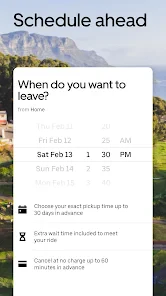
A common practical question is whether I can rely on Uber when plans are tight. I treat it as a convenient option, not a guaranteed reservation at an exact minute. If a missed connection or appointment would cause a real problem, I’d build in a buffer and compare other ways to travel before committing to the ride.
Another is whether it makes sense for a group or a passenger with particular needs. I check the ride options actually shown for the trip and think through passenger count, luggage, and the ability to enter and exit comfortably. If the displayed choices do not fit, I would not force the plan; a taxi, transit, or a separately arranged vehicle may be a better match.
People also ask whether the app can replace a navigation or transit tool. For requesting and following a car, it is useful to have the trip in one place. For planning a route around scheduled trains, bus connections, walking, or cycling, a dedicated transit or maps app can answer a different question more clearly. I would keep the tools separate when I need detailed options beyond a car ride.
Final Thoughts
In conclusion, if you're looking for a reliable, convenient, and versatile ride-hailing app, Uber hits the mark. It’s not just about getting from point A to point B; it’s about the overall experience. With its user-friendly interface, variety of ride options, and commitment to safety, Uber has cemented its place in the modern travel landscape. So, the next time you need a ride, why not give Uber a try? You might just find it becomes your go-to app for all your transport needs.
Uber - Request a ride Frequently Asked Questions
Can I use Uber without choosing a ride immediately?
You can open Uber and explore the ride-request flow before deciding whether to book. Enter a destination to see the options shown for that journey, then review the details before confirming anything. Availability depends on the location, so browsing in advance can help you decide whether the app is useful for the places and trips you have in mind.
What kinds of trips is Uber intended for?
Uber is intended for rideshare journeys, taxi cab trips, airport travel, and everyday transportation. You can enter a destination and review the choices shown for that particular trip. It can be useful for planning a ride across town or getting to an airport, but the available services depend on where you are and may differ between locations.
Do I need an internet connection and location access to request a ride?
Uber is a mobile app for requesting rides and uses maps and navigation as part of the trip experience. You will need to use your phone to enter a destination and manage the request, and location access can help establish where a pickup is needed. Check your device settings and connection before relying on the app to arrange a journey.
Can I request a ride for someone else?
Uber’s ride-request process is centered on entering a destination and arranging a trip through the app. If you are setting up or using an account for another person, make sure the pickup and destination details are clear and that the passenger knows which ride has been requested. Check the options shown for the trip before confirming, particularly when travel plans involve an airport.
Does Uber work in every city, and will the same ride choices be available everywhere?
Uber can be used for rideshare trips, taxi cabs, airport travel, and everyday journeys, but what appears in the app depends on the location. Before relying on it for a particular trip, enter the destination and check which options are available. The choices shown for one city or journey may differ from those offered elsewhere.
Pros
- Wide availability across cities worldwide.
- User-friendly interface for quick bookings.
- Various vehicle options to suit needs.
- Real-time tracking of rides for safety.
- Multiple payment options including cash.
Cons
- Surge pricing can make rides expensive.
- Driver availability varies by location.
- Some users report app crashes.
- Customer support can be slow to respond.
- Limited service in rural areas.
- Category
- Maps & Navigation
- Version
- Varies with device