Uber Lite
- 168.00
- 4.2
- Installs
- 10.00M
- Price
- Free

Screenshots
Analysis by Reviewed
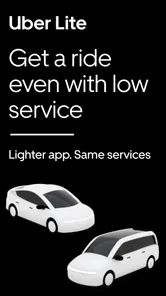
Ever found yourself in a situation where you desperately need a ride, but your phone is just not cooperating? That's where Uber Lite comes to the rescue! This stripped-down version of the popular Uber app is designed to work seamlessly even on older devices or in areas with patchy network coverage. Let me take you through my experience with this app and share why it might just become your new travel buddy.
Quick and Easy Setup
The first thing you'll notice about Uber Lite is how swiftly it sets up. We're talking about a 5MB download, which is a breeze compared to its full-fledged sibling. This is particularly handy if you're running low on storage or using a device that isn’t exactly the latest model. I was up and ready to book a ride in under a minute, and that’s saying something for those of us who don’t have the patience to wait around.
Intuitive Interface
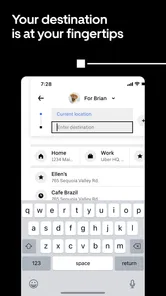
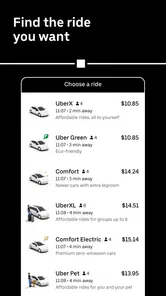
Despite its light footprint, the app doesn’t skimp on user experience. The interface is clean and straightforward. There’s no clutter, and everything you need is right there at your fingertips. Booking a ride requires just a couple of taps, and I found that the app was surprisingly responsive even when my internet connection dipped into single bar territory. It’s as if Uber Lite was made for those "why now?!" moments when your internet decides to go on a coffee break.
Performance on the Go
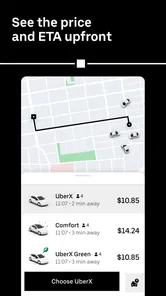
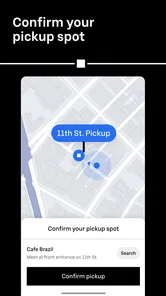
I took Uber Lite for a spin around town, literally, and it held its own against the full version in terms of functionality. You still get access to all the essential features—ride history, driver profiles, and multiple payment options. The app uses a simplified map which loads faster and consumes less data, which is a blessing if you're running on a limited data plan or in areas with slow internet speeds.
Safety and Reliability
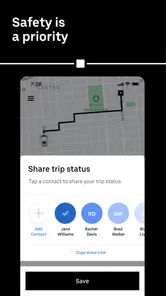
Safety is always a top priority when it comes to rideshare services, and Uber Lite doesn’t compromise on this front. You can still share your trip details with family or friends, and the app provides real-time updates about your ride status. Plus, the driver verification process remains as thorough as ever, ensuring you’re in safe hands.
In conclusion, Uber Lite is a fantastic alternative for those who need reliable transportation without the need for flashy features that consume data and battery life. Whether you're traveling in a region with limited connectivity or simply prefer a no-fuss, efficient ride-booking experience, this app has you covered. It’s like having a fast lane pass in the world of ridesharing—quick, efficient, and always getting you where you need to be.
More From Our News Desk

Weather by Xiaomi Review: Clear at a Glance, Less Clear Up Close

X Under Pressure: Can It Recover When Posting Goes Wrong?

Clash of Clans Is Won Between the Battles

Android Auto Makes the Case for Quieter Car Software

MobiOffice: Transforming Mobile Productivity with Seamless Integration

EA SPORTS FC™ Mobile Soccer: Redefining Mobile Sports Gaming
Uber Lite Frequently Asked Questions
What is Uber Lite and how does it differ from the regular Uber app?
Uber Lite is a simplified version of the Uber app designed to work efficiently on low-end devices and slower network connections. It offers the essential features needed to book a ride, but with a smaller app size and reduced data usage. Unlike the regular Uber app, it focuses on speed and reliability for users who need a no-frills experience.
Can I use Uber Lite in any country where Uber operates?
Uber Lite is available in select countries where Uber operates, primarily targeting regions with limited internet connectivity or where low-end smartphones are more common. It’s always a good idea to check the app store or Uber’s website to confirm if Uber Lite is available in your country or region before downloading.
Does Uber Lite support multiple payment methods?
Yes, Uber Lite supports multiple payment methods, including cash, credit cards, and digital wallets, similar to the standard Uber app. However, the availability of certain payment options might vary depending on the country you are in. Always check the app’s payment settings to see which methods are available in your area.
How does Uber Lite ensure user safety and security?
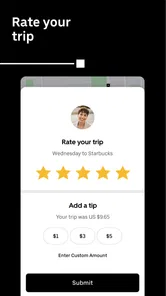
Uber Lite incorporates several safety features to ensure user security, such as in-app emergency assistance, trusted contacts for trip sharing, and driver background checks. Although it is a lighter version, Uber Lite maintains Uber’s commitment to user safety by offering features like real-time GPS tracking and a rating system for both drivers and passengers.
What are the minimum device requirements to run Uber Lite?
Uber Lite is designed to run on Android devices with limited processing power and storage. It requires Android 4.4 or higher and minimal app permissions, making it suitable for older smartphones with constrained resources. Its small app size and efficient data usage make it an ideal choice for users with budget devices.
Pros
- Lightweight and fast installation.
- User-friendly interface.
- Low data consumption.
- Works on low-end devices.
- Quick booking process.
Cons
- Limited features compared to the full version.
- No scheduled rides.
- Fewer payment options.
- Basic map interface.
- Limited customer support.













