Translateasy Lingual Assistant
- 67.00
- 4.5
- Installs
- 5.00M
- Price
- Free

Screenshots
Analysis by Reviewed
For a first-time user, the most reassuring thing about a translation app is getting one useful result without a long setup ritual. Translateasy Lingual Assistant is a free Books & Reference app from Mortys Games, and its mix of text, voice, camera, and offline tools aims to cover common moments when a language gets in the way. I’d treat it as a handy companion for everyday communication, rather than a substitute for a human interpreter when the wording really matters.
What to expect from the app
The app has an average rating of 4.5 from around 5.8K ratings, and it has been installed over 5 million times. It is rated for Everyone, with a current version of 3.1.0 and support for Android 6.0 and up. Those details make it approachable for a wide range of users, though a large audience does not guarantee that every translation will suit every context.
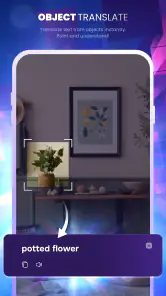
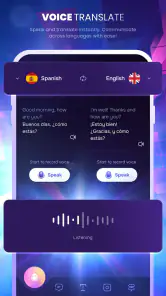
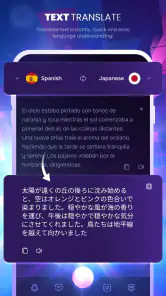
My first impression is that Translateasy is built around getting to a translation quickly. You can type or paste text, speak a phrase, look at printed words with the camera, or use downloaded languages offline. That range is useful because the best method changes with the situation: typing works for a message you can review, while voice is more natural when you’re trying to keep a conversation moving.
Getting started without overthinking it
I’d begin with a short, low-stakes phrase rather than a full paragraph. Choose the languages you need, enter a simple sentence, and check whether the result conveys your meaning. Then try the same idea with voice if you expect to use spoken translation. A quick test at home helps you learn where the controls are before you’re standing at a station or trying to order food.
If you expect to be away from reliable internet, prepare before leaving by downloading the language options you need for offline use. Don’t assume that every tool behaves identically offline: the practical question is whether the specific language and task you need are available without a connection. I’d test that in advance, rather than discovering a limitation when you’re already out.
Breaking Down Language Barriers
So, I decided to give the Translateasy Lingual Assistant a whirl, and let me tell you, it’s like having a multilingual buddy in my pocket. Right off the bat, the app greets you with an intuitive interface. I didn’t have to fumble around to find my way, which is always a huge plus in my book.
Sleek Interface and Easy Navigation
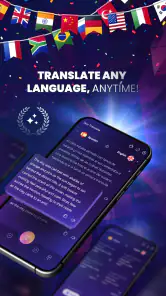
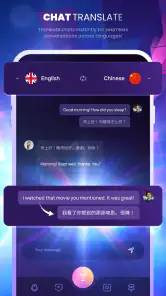
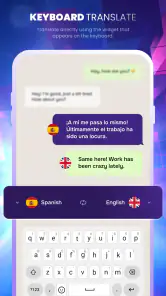
The home screen is clean, and everything is just a tap away. Need to translate a text? Just type or paste it into the box and voilà, you’ve got your translation. What really caught my attention was the voice translation feature. I mean, you just speak into your phone, and it translates your words in real-time. It’s like magic!
More From Our News Desk

Weather by Xiaomi Review: Clear at a Glance, Less Clear Up Close

X Under Pressure: Can It Recover When Posting Goes Wrong?

Clash of Clans Is Won Between the Battles

Android Auto Makes the Case for Quieter Car Software

MobiOffice: Transforming Mobile Productivity with Seamless Integration

EA SPORTS FC™ Mobile Soccer: Redefining Mobile Sports Gaming
Features That Impress
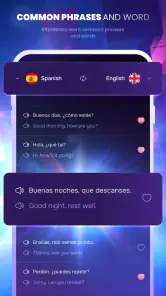
Among the standout features, the app offers an offline mode. Yes, you read that right! You can download languages and use them without an internet connection. This feature is a lifesaver, especially when you’re in places with spotty Wi-Fi. Plus, there’s a handy dictionary feature that gives you the meaning and usage of words, which is perfect for language learners.
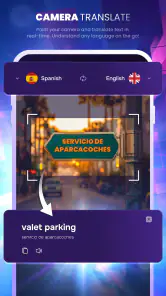
There’s also this cool camera translation feature where you just point your camera at text, and it translates it for you. I tried it on a menu, and it worked like a charm. It’s small features like these that make the app a joy to use.
Real-Life Applications
Whether you’re a globetrotter, a student, or just someone looking to learn a new language, this app has something for you. During my test run, I found it incredibly helpful for translating signs and basic conversations. It’s like having a personal translator ready to assist you at any moment.
For the language learners out there, the app isn’t just about translations. It also helps you understand the context, which is crucial in mastering any language. The app turns learning into an interactive experience, which is way more engaging than staring at a textbook.
Using it in everyday situations
Imagine arriving at a small café abroad with a menu you can’t read. The camera can give you a first pass, but I’d still check the translated dish against nearby words and ask a follow-up question if an ingredient could affect an allergy. For a simple request, voice translation can help you get started; for a complicated explanation, typing gives you a moment to edit before showing or reading the sentence aloud.
That distinction is one of my most useful tips: treat a fast translation as a draft when precision matters. Short, direct sentences are easier to interpret than jokes, slang, or a string of questions packed together. If the other person looks uncertain, try a simpler version rather than repeating the same long sentence louder.
Where it fits among other translation choices
Compared with carrying a phrasebook, Translateasy is more flexible when you need a sentence that is not printed on a page, and the dictionary can be more helpful for checking a word’s meaning. Compared with a general-purpose online translator, its offline option is the practical advantage when you prepare ahead. A phrasebook or a human speaker is still the better choice for fixed, high-stakes wording, regional nuance, or a conversation where a small misunderstanding could have serious consequences.
It is also worth remembering that camera translation depends on having text that is clear enough to read. A tilted sign, decorative lettering, or a cluttered menu can make the result harder to trust. I’d move closer, frame only the relevant line, and compare the output with the surrounding context instead of treating a single translated word as the whole story.
Who will get the most from it
I can see Translateasy working especially well for travelers handling routine questions, students checking unfamiliar vocabulary, and curious readers trying to understand a recipe or sign. It is less suitable as the only tool for legal, medical, or other sensitive conversations. In those cases, I’d look for qualified human help rather than rely on an app’s wording, however convenient it feels.
The app is free to download, with in-app purchases ranging from $4.99 to $29.99 per item. I’d start with the free experience and decide whether any paid option is worthwhile only after identifying a feature I genuinely need. That keeps the choice practical: you can first see whether the translation methods suit your routine instead of paying on the assumption that more tools automatically mean better results.
Choosing a translation method that fits the moment
A useful way to get more from the app is to match the input method to the kind of answer you need. For a short question at a ticket counter, voice can keep things moving, but I’d speak one thought at a time and pause long enough for the other person to respond. If I need to explain a preference or ask about a specific detail, I’d type it first so I can remove extra wording before sharing it.
The dictionary is most useful when I want to understand a single unfamiliar word rather than turn an entire passage into another language. I’d use it to check a word in a sign or a lesson, then look at the full sentence to see how that meaning fits. That small habit helps prevent a common learner’s mistake: memorizing a translation without noticing that a word can change meaning with context.
A realistic day away from home
Picture a first afternoon in a city where I don’t read the local language. Before leaving my accommodation, I’d check that the offline language I plan to use is downloaded. At a transit stop, I could point the camera at a clear sign for a quick orientation, then type a short question if the route still isn’t clear. At lunch, I’d use the camera for the menu and voice for a basic request, while keeping allergy questions simple and seeking a person’s help if the answer needs to be exact.
The point is not to make the app handle every interaction. It gives me a way to start, understand a little more, and ask a better follow-up. Keeping that modest goal in mind makes the tools less stressful: I’m not expecting a perfect conversation from a phone, just enough help to bridge an ordinary gap.
What can feel less straightforward
Translation quality is not a single yes-or-no result. A short, plain sentence may be easy to check, while idioms, humor, or a sentence with several clauses leave more room for a mismatch. I’d avoid feeding it a long paragraph and assuming the whole result is reliable; breaking the message into smaller parts makes it easier to spot when a phrase has come out oddly.
There is also a practical difference between having an offline option and having every situation covered without internet. Downloading the language ahead is a sensible step, but I would still test the actual task I expect to use, especially if I’m relying on camera or voice tools. If a connection is available, it’s worth keeping that as a backup rather than treating offline use as a guarantee that every feature will behave the same way.
Who should choose something else
If you need polished, dependable wording for a contract, a health concern, or another consequential exchange, I would not make this app the final authority. A qualified interpreter is the safer choice because context and responsibility matter as much as the literal words. Likewise, someone who wants a structured language course with a planned curriculum may be better served by a dedicated learning app; Translateasy’s dictionary and translation tools can support study, but they are not a replacement for lessons and practice.
It may also be the wrong fit if you rarely need translation and already carry a reliable phrasebook for a fixed trip. The app’s flexibility is most valuable when the wording changes from one moment to the next. If your needs are limited to a few predictable phrases, a compact list you have checked in advance may be simpler and easier to trust.
Final Thoughts
In a world that’s more connected than ever, breaking down language barriers is essential. The app does just that with finesse. It’s user-friendly, packed with features, and it’s got that cool factor with its real-time translations. Whether you’re asking for directions in Paris or trying to impress your friends with your new language skills, this app is a fantastic tool to have in your arsenal. So go ahead, give it a try, and embrace the world of languages with open arms!
A sensible next step
My recommendation is to install it, try one typed phrase and one spoken phrase, then prepare offline languages if a trip is coming up. That small rehearsal answers the questions that matter most: whether the interface feels clear to you, whether the result communicates your intent, and whether the offline option is ready for your plans. With that check done, Translateasy can be a useful everyday backup—provided you keep a human conversation, not the screen, at the center of communication.
Translateasy Lingual Assistant Frequently Asked Questions
Is Translateasy Lingual Assistant free to download, and are there optional purchases?
Translateasy Lingual Assistant is free to download, so you can try the app without paying upfront. It also offers in-app purchases, with items priced from $4.99 to $29.99 each. If you prefer to avoid spending, check the purchase prompts carefully and review your app-store purchase settings before using any paid options.
What is Translateasy Lingual Assistant and what does it offer?
Translateasy Lingual Assistant is a versatile language translation app designed to help users easily translate text, speech, and even images across multiple languages. It offers real-time translation capabilities, making it an ideal tool for travelers, language learners, and international business professionals. The app supports various languages and dialects, providing an inclusive and comprehensive translation experience. Additionally, it features voice recognition, text-to-speech, and offline translation options, ensuring users can communicate effectively even without an internet connection.
How user-friendly is the interface of Translateasy Lingual Assistant?
The interface of Translateasy Lingual Assistant is designed with simplicity and ease of use in mind, making it accessible to users of all ages and technical abilities. It features a clean layout with intuitive navigation, allowing users to quickly access translation services with minimal effort. The app's design ensures that users can find and use its features without needing a steep learning curve, which is especially beneficial for those who are not tech-savvy. Additionally, the app offers customizable settings to cater to individual user preferences.
Does Translateasy Lingual Assistant require an internet connection to function?
Translateasy Lingual Assistant offers both online and offline functionalities. While an internet connection enhances its capabilities, especially for real-time translations and accessing the latest language data, the app also provides offline translation features. Users can download specific language packs to their devices, allowing them to use the translation services without an internet connection. This feature is particularly useful for travelers visiting areas with limited connectivity.
Is Translateasy Lingual Assistant secure and does it protect user data?
Security and data privacy are paramount concerns for Translateasy Lingual Assistant. The app is designed to protect user data with robust encryption methods, ensuring that any information processed or stored remains confidential. It complies with international data protection regulations, providing users with the assurance that their personal information is secure. Additionally, the app does not retain translated content, minimizing the risk of data exposure. Users can confidently use the app without worrying about privacy breaches.
Pros
- User-friendly interface for easy navigation.
- Supports multiple languages for translation.
- Offers voice recognition for hands-free use.
- Provides offline translation capability.
- Regular updates with new features and languages.
Cons
- Limited customization options for user settings.
- Occasional inaccuracies in translation.
- Requires internet for voice recognition.
- Ads can be intrusive in free version.
- Limited support for regional dialects.
- Category
- Books & Reference
- Version
- 3.1.0