Photo Editor
- 50.00
- 3.7
- Installs
- 1.00M
- Price
- Free

Screenshots
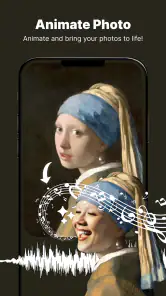
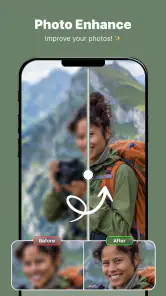
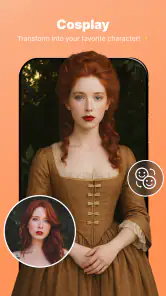
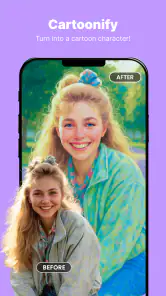
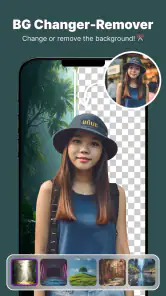
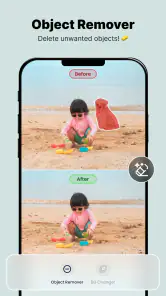
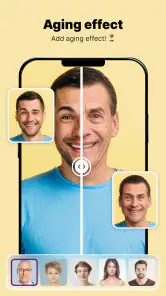
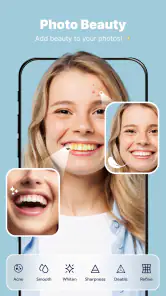
Analysis by Reviewed
I judge a photo editor by whether it helps me finish a picture without turning a quick tweak into a long session. Photo Editor has a broad set of creative tools, but its appeal depends on what you want to do: it is most useful when you want to reshape a portrait or change a distracting part of a scene, rather than simply apply a preset and move on. That mix makes it worth considering, though I would not call it the right choice for every photographer.
Where its editing tools earn their place
The practical draw is the combination of body shaping, background changing and object removal. Those options suit everyday fixes: adjusting a portrait for a profile picture, replacing a busy backdrop, or cleaning a small distraction out of a travel shot. They can save a trip between separate apps, but they also ask for a little care. A background edit tends to look more convincing when the subject has a clear outline, while reshaping is best kept subtle so the result still looks like the person in the original photo.
For a realistic workflow, I would start with the image that needs the least repair, crop it before making detailed changes, then zoom in to inspect edges around hair, clothing and hands. With object removal, small items against a simple surface are generally easier to clean up than large objects overlapping a patterned background. These are useful trade-offs to keep in mind: the tools can make a photo more presentable, but they cannot make every difficult selection look natural.
In the wider photography category, many editors are strongest at filters, color adjustments or carefully layered work. This app’s stated focus is more hands-on image alteration, which is handy when the job is removing a visual distraction or changing the setting behind a person. If I wanted detailed color grading or a workflow built around precise controls, I would compare it with an editor focused on those tasks. If I only needed a quick crop or a standard filter, my phone’s built-in editor might be faster.
Who is likely to enjoy it
I can see it working well for someone who edits portraits and social pictures now and then, especially if they prefer a single mobile app for several common retouching jobs. Imagine taking a family photo in a cluttered room: a gentle background change and a small cleanup could make the image easier to share without requiring desktop software. It is also approachable for casual users who would rather experiment on a copy than learn a complex editing suite.
I would be more cautious if you need reliable, repeatable results for client work, product listings or images where accurate details matter. Body-shaping tools can distort clothing or nearby lines if pushed too far, and removing an object may leave an obvious patch when the background is complicated. For those situations, I would choose a workflow that gives more control over selections and lets me inspect the result carefully before exporting.
What to consider before installing
Mortys Games makes this free photography app, and it has an average rating of 3.7 from around 3,200 ratings, with over 1 million installs. It is rated for everyone, runs on Android 7.0 or later, and version 2.2.0 is the current release. The app includes in-app purchases priced from $2.99 to $29.99 per item, so I would check what is available in the app before settling into an editing routine or assuming every tool is included at no cost.
More From Our News Desk

Weather by Xiaomi Review: Clear at a Glance, Less Clear Up Close

X Under Pressure: Can It Recover When Posting Goes Wrong?

Clash of Clans Is Won Between the Battles

Android Auto Makes the Case for Quieter Car Software

MobiOffice: Transforming Mobile Productivity with Seamless Integration

EA SPORTS FC™ Mobile Soccer: Redefining Mobile Sports Gaming
A helpful habit with any retouching app is to keep the untouched original and compare it with the edited image before sharing. That quick side-by-side check catches over-smoothed portraits and background edges that looked fine while zoomed in. I would also make one change at a time: it is easier to undo a heavy reshape or a rough removal when it has not been buried under several other edits. Photo Editor is free to install, but the purchase range means the value depends partly on whether the tools you want are available without an extra payment.
In the vast ocean of mobile apps, finding the perfect photo editing tool can feel like searching for a needle in a digital haystack. But lo and behold, I stumbled upon Photo Editor, a gem that promises to transform your ordinary snapshots into works of art. Let me take you on a journey through my experience with this nifty app.
A User-Friendly Design
First things first, the interface of Photo Editor is like a breath of fresh air. Navigating through its features is as smooth as butter, making it a breeze even for rookies. You know that feeling when you open an app and instantly feel overwhelmed? Thankfully, that’s not the case here. Everything is neatly organized, so you can dive right into editing without a hitch.
Editing Features Galore
Now, let's talk about what really matters: the editing tools. Whether you want to tweak the brightness, contrast, or saturation, Photo Editor has got you covered. Plus, there are tons of filters that can give your photos that extra oomph. From vintage vibes to modern glam, there’s something for everyone. And for those who love to get creative, the app offers a myriad of effects that can transform your images in unexpected ways.
Advanced Tools for the Enthusiasts
If you’re a bit more on the tech-savvy side, you’ll appreciate the advanced editing options. The app supports layers, which is a feature usually reserved for desktop software. This means you can really delve into complex edits and create something truly unique. Plus, the blemish and red-eye correction tools work like a charm, giving your portraits a polished finish.
One of my personal favorites is the double exposure feature. It’s like having a mini Photoshop in your pocket, allowing you to blend two images seamlessly. Seriously, the possibilities are endless.
Convenience at Your Fingertips
Another thing that makes Photo Editor stand out is its convenience. Once you’re done editing, sharing your masterpiece is just a tap away. Whether you want to flaunt it on Instagram or send it to your friends, the app makes it super easy. And if you’re worried about storage space, fear not! The app saves your edits in a compressed format, ensuring your phone doesn’t run out of juice.
Moreover, the app doesn’t bombard you with ads every two seconds, which is a massive relief. It’s like the developers actually understand the importance of a seamless user experience. Kudos to them!
Final Thoughts
In conclusion, Photo Editor is a fantastic tool for anyone looking to spruce up their photos without breaking a sweat. Whether you’re a newbie or a seasoned pro, there’s something here for everyone. The app combines simplicity with powerful features, making it a must-have in your smartphone arsenal. So, if you haven’t already, give it a whirl. You might just find it’s the perfect fit for your editing needs.
A sensible way to decide
I would try it first on a photo that is easy to replace, rather than making my only copy of an important image the test case. Start with a clear portrait or a scene where the object you want to remove sits against a plain area; those give you a fair sense of whether the controls suit your patience and expectations. If the result is convincing at normal viewing size but looks rough when enlarged, it may still work for a casual post, while a print or professional use deserves a more careful editor.
That distinction is the key to my recommendation. Photo Editor brings several kinds of edits into one place and can be a practical option for casual portrait touch-ups, creative experiments and quick social sharing. I would skip it if subtle, highly accurate retouching is essential, or if you want a specialist tool for color work rather than image cleanup and reshaping. For everyone else, I’d treat it as a flexible mobile option, keep edits restrained, and decide whether its paid extras are worthwhile only after trying the tasks I actually need.
A small, repeatable portrait workflow
For a profile photo, I would choose a frame with a clear separation between the person and the background, then make the crop before any retouching. That keeps the subject’s proportions in view and avoids spending time repairing areas that will later be cut away. I would change only one thing at a time, checking the whole image after each adjustment rather than judging a face or outline in isolation. A portrait can look tidy when enlarged but oddly shaped at thumbnail size, which is how most people will first see a social profile picture.
If a background replacement is the main goal, the original setting still matters. A busy room with hair crossing bright patterns is a tougher starting point than a subject photographed against an uncluttered wall. I would not try to compensate for a difficult source image by piling on more edits; that usually creates more edges to inspect. When the cutout is not convincing, a restrained cleanup of the existing background may look more natural than a dramatic replacement.
Making object removal look less obvious
Object removal is most useful when I can explain what should fill the space after the distraction is gone. A small mark on a plain wall or a modest item on a broad surface gives the edit a simple visual context. By contrast, removing something that crosses a railing, a face, or a repeating pattern asks the app to reconstruct details that are easy to notice when they are wrong. I would use the tool for minor clutter in a casual image, not assume it can erase a major object without a visible trace.
There is also a practical reason to avoid removing every imperfection: a scene can start to feel artificial when its familiar details disappear. For a travel photo, I would clean up a stray distraction only if it pulls attention away from the subject. Keeping a little of the original environment often preserves the sense of place, and it saves time that would be better spent choosing a stronger crop or a different frame.
When a simpler editor is the better fit
Compared with the editor already on a phone, Photo Editor makes more sense when I need a targeted change such as reshaping, replacing a backdrop or removing an object. If I only want to brighten a dim picture, straighten a horizon or apply a familiar look, switching apps may add steps without improving the result. A built-in editor is often the sensible choice for quick corrections that do not require a selection or reconstruction.
At the other end, a specialist editor is a better match when I need careful color work, repeatable adjustments across a set of images, or fine control over complex edges. Photo Editor’s appeal is its collection of approachable alteration tools, not a promise that every kind of photo work will be equally efficient. I would choose according to the job in front of me rather than expecting one mobile app to replace both a simple gallery editor and a more detailed editing workflow.
What I would check during a first session
Before relying on an edit, I would find out which tools I can use without paying and whether the features I care about sit behind an in-app purchase. The listed purchase range runs from $2.99 to $29.99 per item, so it is worth treating “free” as the cost to install, not a guarantee that every option is included. I would test the actual task I expect to repeat before spending money, rather than buying a tool because its name sounds useful.
I would also check the finished image at both a normal display size and a closer view. The first tells me whether the edit works for its intended use; the second can reveal rough selection boundaries or repeated texture that is easy to miss while editing. If I am sharing a small image, a minor imperfection may not matter. If I plan to print it or use it where details will be scrutinized, I would be stricter and consider a more controlled editor.
Who should pass
I would steer away from this app if my main priority were natural-looking, high-precision portrait retouching on every image, or if I needed a dependable process for commercial photos. The same goes for anyone who mainly wants a quick filter and rarely edits beyond basic exposure or cropping: the phone’s existing tools may be enough. People who enjoy experimenting, can tolerate a little trial and error, and want portrait and scene-alteration tools together are more likely to find a useful role for it.
My overall view is that Photo Editor is best treated as a convenient toolbox for specific fixes, not as an all-purpose replacement for every editor. Its strengths are most apparent when the source photo is suitable and the adjustment is modest; its weak spots show when a complicated edge or background demands precise reconstruction. If that balance matches the way you take and share pictures, it is worth trying carefully. If accuracy, consistency or advanced color control comes first, I would look elsewhere.
Photo Editor Frequently Asked Questions
Does Photo Editor work on both Android and iOS?
Photo Editor is a photography app, and its current version is 2.2.0. On Android, it requires version 7.0 or later, so checking your device’s operating system before downloading is a sensible first step. The app is free to download, with in-app purchases available for users who want to access paid options.
What can I use Photo Editor for?
Photo Editor is aimed at people who want to refine pictures, with a focus on body shaping, changing backgrounds, and removing unwanted objects. These tools make it useful for quick touch-ups as well as more noticeable edits before sharing an image. Its short store description is simply “Photo Editor,” so the practical appeal is in the editing tasks highlighted by the app.
What features does the Photo Editor app offer?
The Photo Editor app provides a comprehensive suite of features including basic editing tools like cropping, resizing, and rotating, as well as advanced filters, effects, and color adjustments. It also supports layer editing, text overlay, and even drawing features, allowing users to create professional-quality images with ease. Additionally, it offers direct sharing options to various social media platforms.
Is the Photo Editor app free to use?
The Photo Editor app is free to download and use, with in-app purchases ranging from $2.99 to $29.99 per item. This means you can try the app without paying upfront, while some optional purchases may cost extra. Consider whether you need paid items before buying, especially if you plan to use the editor only for occasional photo touch-ups.
Can I use the Photo Editor app without an internet connection?
Yes, most of the core functionalities of the Photo Editor app can be used offline, which is perfect for users who edit photos on the go. However, to access some features like cloud storage, online templates, and updates, an internet connection is necessary. Users can rest assured that their offline editing will not be interrupted.
Pros
- User-friendly interface
- Wide range of editing tools
- High-quality filters
- Supports RAW image files
- Quick sharing options
Cons
- Contains ads
- In-app purchases required
- Large app size
- Occasional crashes
- Limited free features
- Category
- Photography
- Version
- 2.2.0












